00190802-02.pdf - 第438页
14 Control / Control Modules User’s Manual Line Computer UNIX 14.4 Station Controll ers Software Version 402.xx Edition 06/96 14 - 36 14.4.4. 1 Display Area The indiv idual se ction s of this ar ea contai n the fo llowin…
User’s Manual Line Computer UNIX 14 Control / Control Modules
Software Version 402.xx Edition 06/96 14.4 Station Controllers
14 - 35
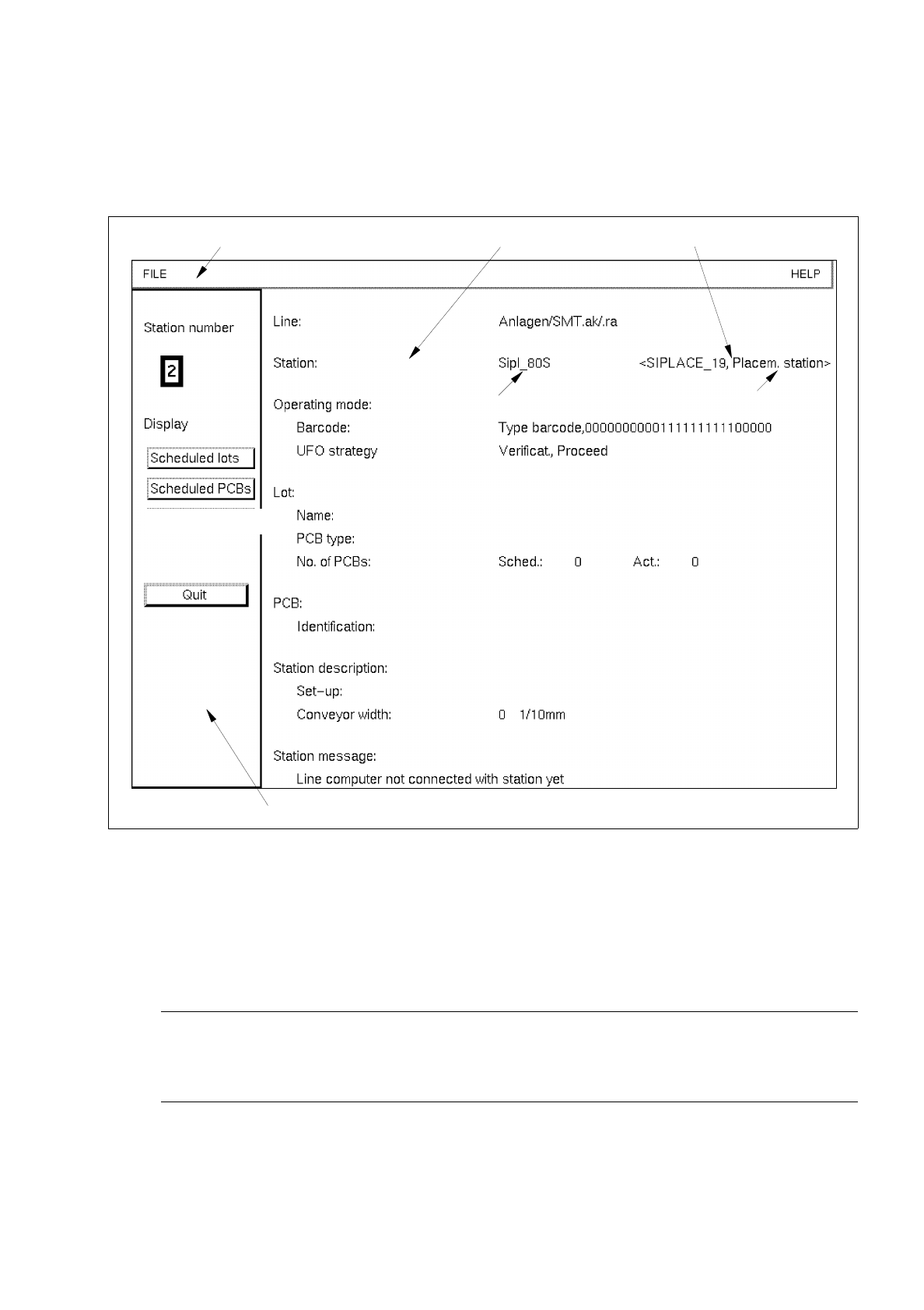
14.4.4 Main Display Window of the Station controller
The various elements of the main display window and their tasks are described in the following.
Fig. 14.4.1 Main Window "Station Controller"
The main display window is subdivided as follows:
-
Menu bar
The menu bar contains the menus "FILE" and "HELP".
☞
NOTE
Since the functions and operation of the menus "FILE" and "HELP" are similar to those in other
application programs of the line computer, they described in detail in chapter 2.
-
Display Area
-
Command Area
menu bar
display area
command area
IEC bus address
logic name
type of station

14 Control / Control Modules User’s Manual Line Computer UNIX
14.4 Station Controllers Software Version 402.xx Edition 06/96
14 - 36
14.4.4.1 Display Area
The individual sections of this area contain the following information:
-
Station number number of the station assigned to the station controller (e.g. 2)
(in the left section of the window)
-
Line: name of the Line (e.g. SMT.AK)
-
Station: logic name of the station, IEC bus address and type of station
e.g. Siplace_S <Siplace_19 placing station>
-
Operating Mode:
Barcode: type of barcode strategy (type and filter)
UFO strategy: type of UFO strategy (e.g. Verificat., Proceed)
-
Lot:
Name: lot name (e.g. clock radio)
PCB type: name of PCB type (e.g. radio.la)
No. of PCBs: scheduled and actual number (e.g. Sched.: 100, Act.: 96)
-
PCB:
Identification: identification number of the PCB
(no. is only displayed for barcode strat. "with barcode";
if "without barcode" is selected, field remains blank)
-
Station description:
Set-up: set-up name (e.g. radio1.ar)
Conveyor width: conveyor width setting in 1/10 mm
-
Station message: status of station (e.g. "Line computer not connected with
station yet")
User’s Manual Line Computer UNIX 14 Control / Control Modules
Software Version 402.xx Edition 06/96 14.4 Station Controllers
14 - 37
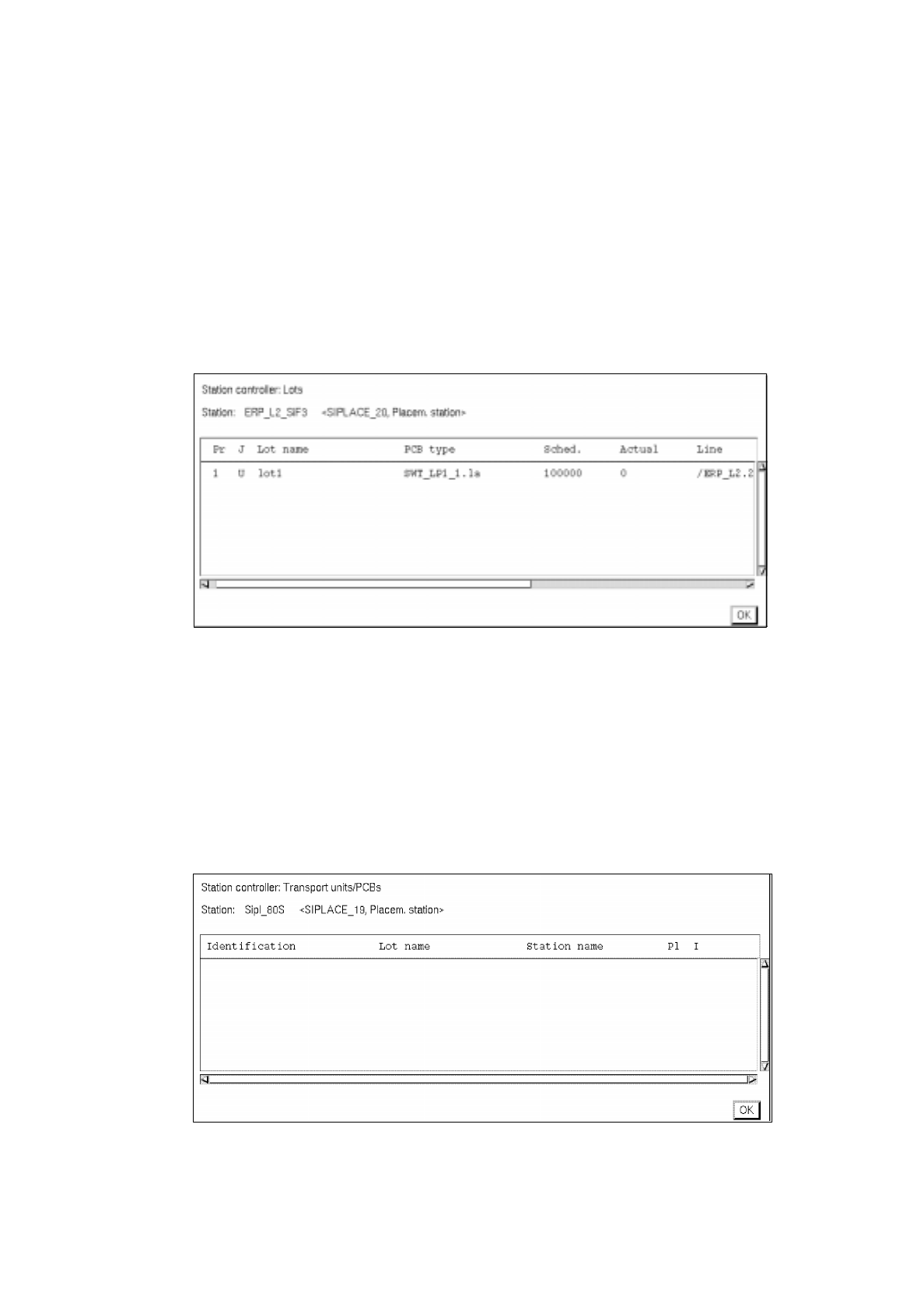
14.4.4.2 Command Area
Here, a listing of the scheduled lots and a listing of the scheduled PCBs with details on the current status of
the station can be called up, as required. The listings are shown in separate windows. The contents of the
windows are automatically and constantly updated as long as one of these windows is open.
-
Viewing Lot list
●
Click on Scheduled lots listed under "Display".
The window containing a listing of the scheduled lots is opened.
The job currently being processed is identified by an "a" in the first column.
-
Closing the window (lot list)
●
Click on Quit.
The window is closed.
-
Viewing PCB list
●
Click on Scheduled PCBs listed under "Display".
The window containing a listing of the currently processed (scheduled) PCBs is opened.
-
Closing the window (PCB list)
●
Click on Quit.
The window is closed.