slau358q.pdf - 第26页
Programming MSP Flash Devices Using the MSP Gang Programmer www.ti.com 26 SLAU358Q – September 2011 – Revised October 2019 Submit Documentation Feedback Copyright © 2011–2019, Texas Instruments Incorporated Operation 2.1…
www.ti.com
Programming MSP Flash Devices Using the MSP Gang Programmer
25
SLAU358Q–September 2011–Revised October 2019
Submit Documentation Feedback
Copyright © 2011–2019, Texas Instruments Incorporated
Operation
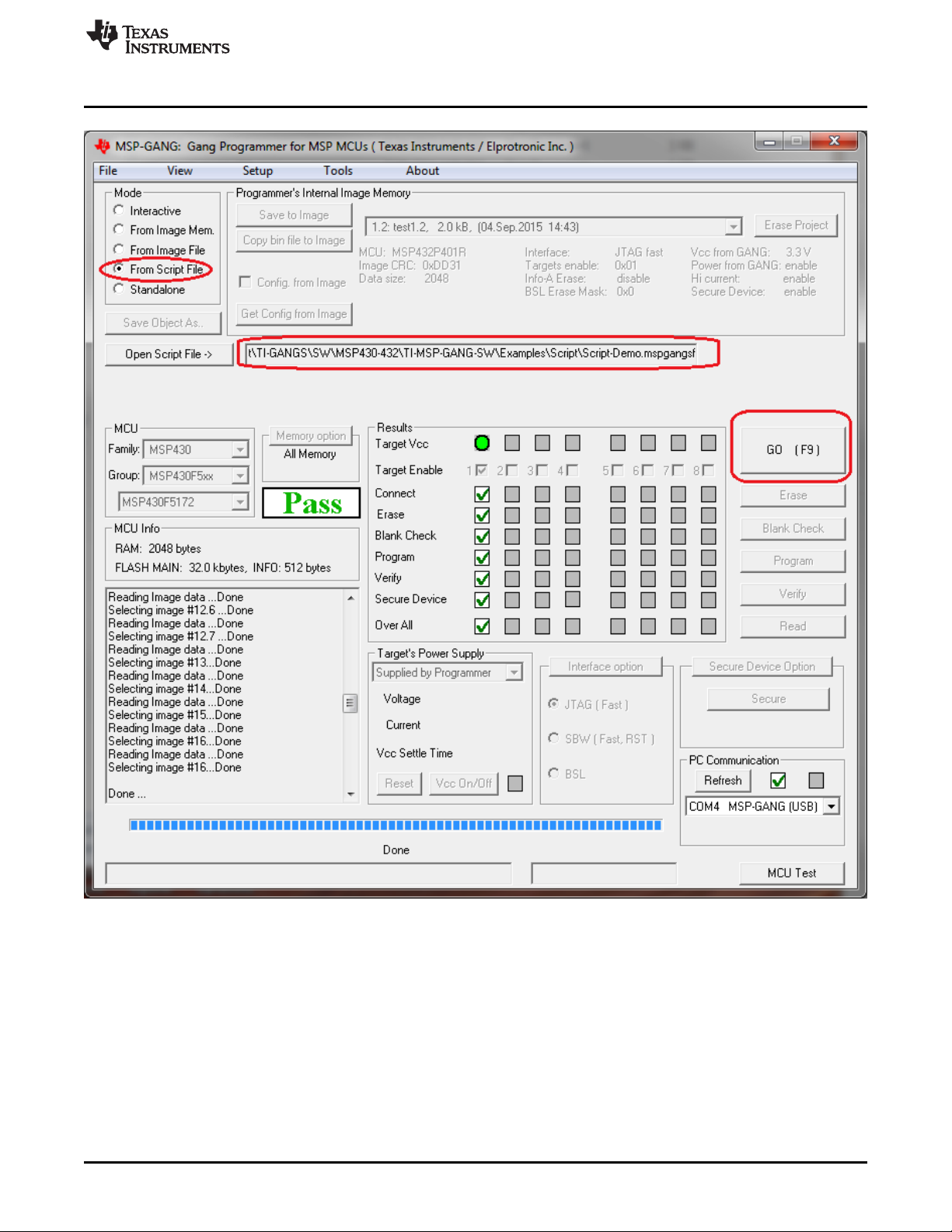
NOTE: This figure shows the From Script mode (see the Mode section near the top left corner). A script file is
selected using the Open Script File button and it specifies all configuration options, and the code files to be
used for programming. In addition, the script can call individual functions, such as Program or Verify, in the
order specified by the programmer.
Figure 2-8. Main MSP Gang Programmer Dialog GUI, From Script
2.1.3.1 Script Limitations
• Up to a total of 1000 command lines can be used. Empty lines and comments are ignored.
• The stack supports a call depth of up to 50 CALLs (CALL inside CALL inside CALL, and so on).

Programming MSP Flash Devices Using the MSP Gang Programmer
www.ti.com
26
SLAU358Q–September 2011–Revised October 2019
Submit Documentation Feedback
Copyright © 2011–2019, Texas Instruments Incorporated
Operation
2.1.3.2 Command Syntax
• White spaces before instructions, labels, and comments are ignored.
• ; – Start of a comment. All characters in the same line after the start of a comment are ignored.
NOTE: A comment cannot be placed after a filename.
For example, when specifying a config file to be loaded, a path to a file must be given. This
filename cannot be followed by a comment.
• > – Start of a label. Place the label name after the character with no spaces in between.
NOTE: A line with a label cannot also contain a command or another label.
For example, this would be illegal:
>START VCCOFF
2.1.3.3 Instructions
MESSAGE – Message declaration. Contents must be placed between quotes below a message
declaration. Maximum of 50 content lines. Example:
MESSAGE "Hello." "This is my script."
GUIMSGBOX setting – Enable or disable pop-up message boxes in the GUI (warning and errors). Setting
can be either ENABLE or DISABLE.
IFGUIMSGBOXPRESS option – Apply the option when a message box created by GUI is generated.
Option can be OK or CANCEL.
MESSAGEBOX type – Create a pop-up message box with buttons. Contents must be placed between
quotes below message declaration. Maximum of 50 content lines. Message box types are:
• OK – One button: OK.
• OKCANCEL – Two buttons: OK and CANCEL
• YESNO – Two buttons: YES and NO
• YESNOCANCEL – Three buttons: YES, NO, and CANCEL
Example:
MESSAGE YESNOCANCEL
"You have three choices:"
"Press yes, no, or cancel."
GOTO label – Jump to instruction immediately following the label.
SLEEP number – Pause a number of milliseconds, between 1 and 100000.
F_LOADPASSWORDFILE filename – Load JTAG password file. Provide a full path and filename.
F_FROMIMAGEMODE – Switch to Image mode.
CALL label – Call procedure starting at the instruction immediately following the label. Stack saves return
address.
RETURN – Return from CALL.

www.ti.com
Programming MSP Flash Devices Using the MSP Gang Programmer
27
SLAU358Q–September 2011–Revised October 2019
Submit Documentation Feedback
Copyright © 2011–2019, Texas Instruments Incorporated
Operation
IF condition operation – Test condition and if true then perform operation. The condition can be one of
the following:
• BUTTONOK – OK button is pressed in the message box.
• BUTTONYES – YES button is pressed in the message box.
• BUTTONNO – NO button is pressed in the message box.
• BUTTONCANCEL – CANCEL button is pressed in the message box.
• DONE – Previous process (for example, GO or Read File) finished successfully.
• FAILED – Previous process (for example, GO or Read File) failed.
The operation can be one of the following:
• GOTO label
• CALL label SLEEP number – Pause a number of milliseconds, between 1 and 100000.
F_LOADCFGFILE filename – Load configuration file. Provide a full path and filename.
F_LOADCODEFILE filename – Load code file. Provide a full path and filename.
F_APPENDCODEFILE filename – Append code file. Provide a full path and file name.
F_VCCOFF – Turn V
CC
OFF from programming adapter to target device.
F_VCCON – Turn V
CC
ON from programming adapter to target device.
NOTE: V
CC
from FPA must be enabled first using configuration file.
F_VCCINMV – Set V
CC
in mV, between 1800 to 3600 in steps of 100 mV.
F_RESET – Perform RESET function from main dialog screen.
F_GO – Perform GO function from main dialog screen.
F_ERASEFLASH – Perform ERASE FLASH function from main dialog screen.
F_BLANKCHECK – Perform BLANK CHECK function from main dialog screen.
F_WRITEFLASH – Perform WRITE FLASH function from main dialog screen.
F_VERIFYFLASH – Perform VERIFY FLASH function from main dialog screen.
F_BLOWFUSE – Perform BLOW FUSE function from main dialog screen.
NOTE: Blows fuse regardless of enable option.
If the BLOW FUSE command is used, then the security fuse is blown even if the Blow
Security Fuse enable option is disabled.
F_SETIMAGENUMBER number – Choose image number between 1 and 96 from MSP Gang
Programmer internal memory.
F_INTERACTIVEMODE – Switch to Interactive mode.
NOTE: The execution result can be saved in the result file. Contents of the file can be used by the
application software if required. The result can be saved in the new file or append to the
existing file. Following script line commands can be used for specifying the result file:
F_NEWRESULTFILENAME – Provide a full path and name of the result file.
F_APPENDRESULTFILENAME – Provide a full path and name of the file where the result should be
appended.
F_COMMENTTOFILE – Add a comment at the beginning of the result stream.