slau358q.pdf - 第41页
www.ti.com Programming MSP Flash Devices Using the MSP Gang Programmer 41 SLAU358Q – September 2011 – Revised October 2019 Submit Documentation Feedback Copyright © 2011–2019, Texas Instruments Incorporated Operation NOT…

Programming MSP Flash Devices Using the MSP Gang Programmer
www.ti.com
40
SLAU358Q–September 2011–Revised October 2019
Submit Documentation Feedback
Copyright © 2011–2019, Texas Instruments Incorporated
Operation
The preceding example lists numbers that would be programmed to 8 target devices using a size of 8
bytes each. These hex numbers can represent integer values or ASCII text, depending on the application.
In the case of ASCII, the text must be converted to hex in the file.
After a set of 8 targets is programmed, the user must update the file (the same file name) with new
values. The following example lists a new set of 8 values:
01 0A A3 B4 32 35 65 2B
01 0A A3 B4 32 35 65 2C
01 0A A3 B4 32 35 65 2D
01 0A A3 B4 32 35 65 2E
01 0A A3 B4 32 35 65 2F
01 0A A3 B4 32 35 65 30
01 0A A3 B4 32 35 65 31
01 0A A3 B4 32 35 65 32
The programmer writes the numbers as provided to the specified flash or FRAM location. The provided
numbers must be the same size (in bytes) as specified in the Used size in bytes option (see Figure 2-17).
The SN or MAC number can be also saved to a dedicated register, if available on the target MCU; for
example, in the MSP432E4xx MCUs. In this case, select the MAC in Fixed location option. The address
for the MAC number is hardcoded and displayed (read only and grayed out) for user review in the Start
Address in Memory field (see Figure 2-17).
If the SN or MAC number is saved to flash or FRAM, the same address cannot be used by the program
code (specified in the code file). The programmer will display a warning if it detects a conflict between
address of the SN or MAC number and code. If the linker requires that the code file fill the SN or MAC
number location with a dummy value, select the Remove code contents in the location where the Unique
Number is defined option to overwrite this location with the correct SN or MAC number.
If location specified for the SN or MAC number is not empty (all 0xFF), the SN or MAC number is not
written to the target. If the programmer detects any value other that 0xFF, the existing value is restored
and the new SN or MAC number is ignored. This process keeps an existing SN or MAC number in the
target if the number was already programmed. To overwrite an existing value, erase the device memory
before programming.
NOTE: The MSP-GANG does not erase the existing SN or MAC number if the erase all memory
option is used. The old SN or MAC number is restored after the erase, the same way that
the defined retained bytes are restored.
The SN or MAC number can be erased; for example, if serialization is disabled. After erasing, the SN or
MAC number location can be used as regular memory.
2.1.9 Creating and Using Images
An image contains the code files and the configuration options necessary for programming of a target
device. Images can be stored as a binary file (".mspgangbin") in internal MSP Gang Programmer memory
(or SD card), or as an image file (".mspgangimage") on disk for redistribution. Image files intended for
redistribution can be encrypted with additional security features described later in this section.
Creating an image is done in Interactive Mode by following the same steps described in Section 2.1.4,
followed by pressing the "Save Image File As…" or "Save to Image" buttons. The first button saves the
code files and configuration options as a binary file and image file locally on disk, and the second button
saves this information directly to the MSP Gang Programmer internal memory. Note that to use the MSP
Gang Programmer in Standalone mode, you need to program at least one image to internal memory or
read a binary file from an SD card (using the SD card connector on the MSP Gang Programmer). If you
intend to modify the contents of an image at a later date, it is advisable to save the configuration options
as a project. Because an image is read-only, reading a project file is the only way to recreate images
easily without reentering the configuration options from scratch. After the project is loaded, a change can
be made and a new image with the same name can be created to overwrite the previous one.

www.ti.com
Programming MSP Flash Devices Using the MSP Gang Programmer
41
SLAU358Q–September 2011–Revised October 2019
Submit Documentation Feedback
Copyright © 2011–2019, Texas Instruments Incorporated
Operation
NOTE: Do not overwrite images unnecessarily during production
The image flash memory has a specified 10000 endurance cycles. Therefore, over the
lifetime of the product, each image can be reliably reprogrammed 10000 times.
Reprogramming images should be done once per production setup, rather than per
programming run. Reprogramming the image per programming run will quickly exhaust flash
endurance cycles and result in errant behavior.
In total, 96 different images can be saved internally in the MSP Gang Programmer or one image can be
saved on an SD card. Each image can be selected at any time to program the target devices. The MSP
Gang Programmer also allows the image to be saved in a file, either to be saved on an SD card or to be
sent to a customer. In order for the image file to be usable from the SD card, copy only the binary file
(".spgangbin") to the SD card and preserve the proper extension (Note that binary files are not encrypted).
For redistribution to a customer, the image file can be sent and encrypted with additional security features.
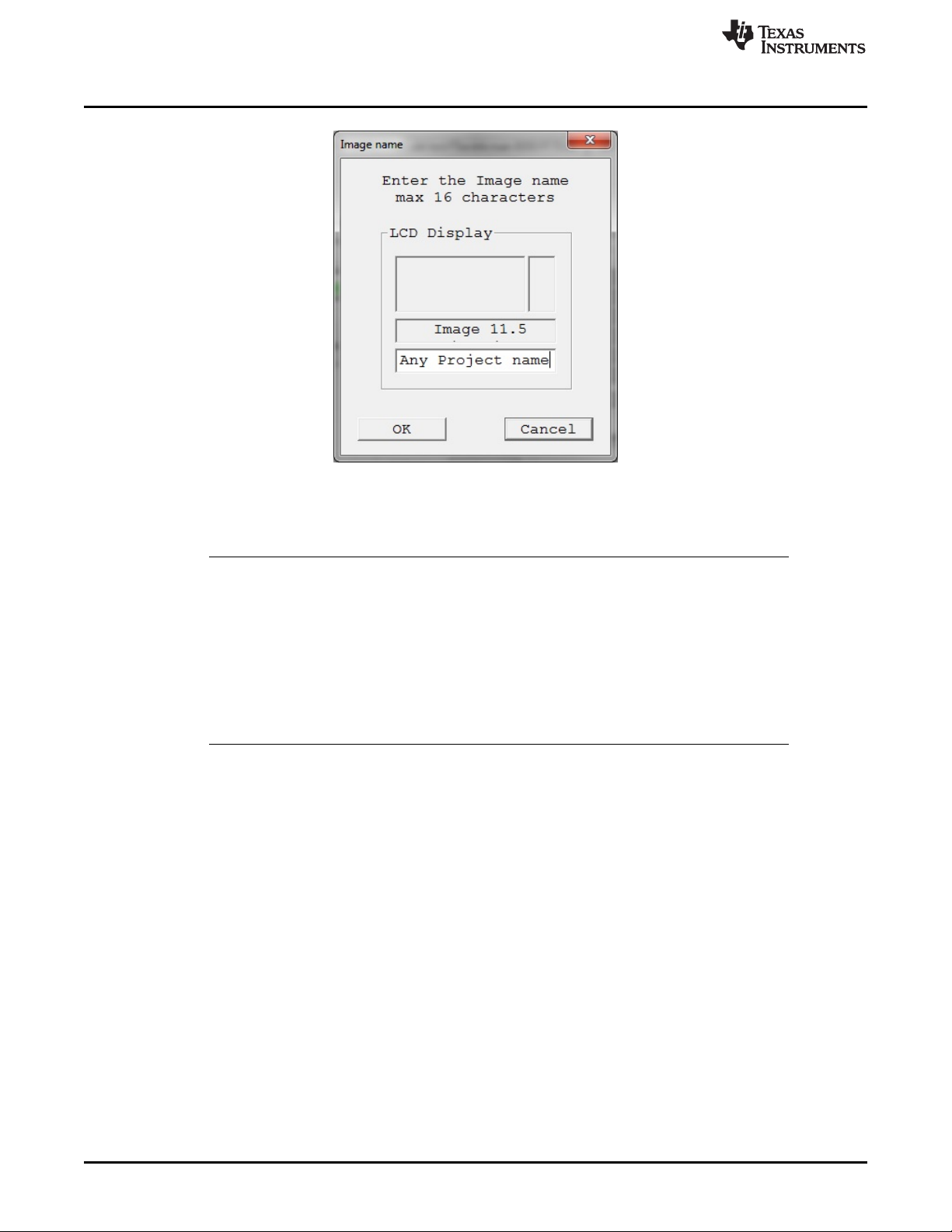
When a new image is saved to a file or to a MSP Gang Programmer internal memory, an image
configuration screen appears (see Figure 2-18). Enter any name up to 16 characters. This name is
displayed in the GUI image selector (see Figure 2-1) on the bottom line of the MSP Gang Programmer
LCD screen when the corresponding image is selected. Press OK when the name is entered.
Once you have created a programming setup using the steps mentioned above, it is useful to store it in
the form of an image. The advantage of an image is that it contains both the configuration options
necessary for programming as well as the code files that are flashed to target devices. Moreover, only
images can be saved to internal MSP Gang Programmer memory and used in Standalone mode, where
the programmer can operate without being connected to a PC.
Before the user proceeds to making images; however, it is advisable to save the MSP Gang Programmer
setup as a project first. This is recommended because images cannot be modified once created, only
overwritten. Therefore, if the user wants to change an image that has already been created without
recreating the whole configuration from scratch then it is necessary to load the corresponding project file.
Once the project is loaded, a change can be made and a new image with the same name can be created
to overwrite the old one.
Images can be saved to the programmer's internal memory, or on an external SD-Card. A total of 96
different images can be saved internally, or one image can be saved on an SD-Card. Each image can be
selected at any time to program the target devices. The MSP Gang Programmer also allows the image to
be saved in a file, either to be saved on an SD-Card or to be sent to a customer. When the code file and
configuration are ready to be saved, press the Save Image button to save to MSP Gang Programmer
internal memory, or the Save Image to file button to save to a file.
Whether the new image being created is saved to a file or to MSP Gang Programmer internal memory, an
image configuration screen appears (see Figure 2-18). Enter any name up to 16 characters. This name is
displayed in the GUI image selector (see Figure 2-1) and it is displayed on the bottom line of the MSP
Gang Programmer LCD screen when the corresponding image is selected. Press OK when the name is
entered.
Programming MSP Flash Devices Using the MSP Gang Programmer
www.ti.com
42
SLAU358Q–September 2011–Revised October 2019
Submit Documentation Feedback
Copyright © 2011–2019, Texas Instruments Incorporated
Operation
NOTE: The image name is limited to 16 characters. This name is shown on the LCD display of the MSP Gang
Programmer , and Image pulldown menu in the GUI.
Figure 2-18. Image Name Configuration Screen
NOTE: Since version 1.2.1.0, the number of images has increased from 16 (512KB each) to 96
(64KB each). Total image memory has decreased from 8MB to 6MB. For compatibility
purposes with older images, the numbering scheme for the new images uses an index and
subindex format (for example, 1.0, 1.1, 1.2... 1.7, 2.0, 2.1, 2.2... 12.7). The first index selects
the 512KB image memory block, and the subindex selects which 64KB portion of the 512KB
block is used. Old images that occupy 512KB always have the subindex as 0 (for example,
old Image 1 is now Image 1.0). Newly created images can occupy one 64KB block or more
(for example, a 128KB image stored in image number 2.1, will be saved to occupy blocks 2.1
and 2.2). Images 13 to 16 will be removed in future versions; however, during the transition
period, they can only be read or erased (that is, they are marked as read-only in the GUI).
The screen shown in Figure 2-19 allows the user configure what type of security is used to protect the
image file. Three options are available; however, for all three options the contents of the code file are
always encrypted and cannot be read.