00195044-16_UM_VisionTeachStation_DE_EN.pdf - 第143页
Vision Teach Station User Manual 7 Software 05/2016 Edition 7.2 Software upgrade 143 7.2.1 Software required Y ou will need the Installation Package Vision T each Station for SIPLACE Pro 13.x (item no: 001 17256-xx) for …
7 Software Vision Teach Station User Manual
7.2 Software upgrade 05/2016 Edition
142
7.2 Software upgrade
NOTE
From version VTS 3.51 / SIPLACE Pro 5.0 SP1 onwards it is possible to run the VTS on the
SIPLACE LAN, and thus access other SIPLACE Pro databases (version 5.0 SP1). If you want
to use this feature, you will have to reinstall the computer to ensure that the host name and IP
address are unique (see section 7.3, page 149). 7
Please also read sections 9.3 and 9.4 from page 165.
CAUTION: 7
Following items are important for the older software packages 00376902, 00385200 and
00387300:
When you install the software, make sure that the version of SIPLACE Pro matches the vision
teach station software (as shown in table 7.1 - 1 on page 141). The install routine does not check
the versions.
You should therefore check which versions of the software packages are installed before star-
ting the installation.
Carry out the installation in the order described below.
NOTE 7
As of Vision Teach Station version 4.1.1 you can update the Vision Teach Software independently
of the SIPLACE Pro version, if at least SIPLACE Pro V5.05SP1 is installed.
Please note that some of the new features (see section 7.5 on page 153) are only available with
SIPLACE Pro V7.0 or higher.
For this, simply deinstall the Vision Teach Station software as described in the last item in
section 7.2.3 on page 143.
Then install the new Vision Teach Station version as described in section 7.2.4.4 on page 148.
NOTE 7
To install or remove the software you will need access with administrator rights
You will find the latest information on the setup CD and in the "ReadMe.txt" file.

Vision Teach Station User Manual 7 Software
05/2016 Edition 7.2 Software upgrade
143
7.2.1 Software required
You will need the Installation Package Vision Teach Station for SIPLACE Pro 13.x
(item no: 00117256-xx) for the upgrade to Vision Teach Station version 5.3.2.
The upgrade package contains the following CDs:
Designation
Item no. Requires
SIPLACE NET Support Media V2.3
00393231-xx X
SIPLACE Pro Application V13.1
00117818-xx X
Vision teach station CD V5.3.2
00388782-xx X
Tab. 7.2 - 2 Installation Package Vision Teach Station for SIPLACE Pro 13.x
7.2.2 License for the local SIPLACE Pro server as of V7.0
In order to operate Vision Teach Station offline, you will need a valid license for the SIPLACE Pro
server on the VTS computer.
The license management for line software products has been overworked in the SIPLACE Pro 7.0
version. The VTS computer is configured as license manager server and is delivered with a test
license. If this license expires, you will have to generate a host bound license key with your factory
license via the SIPLACE Licence web portal. Instructions can be found in the
"Installation_Manual_SIPLACE_OIB_License_Manager.pdf" document. This document is avail-
able on the SIPLACE Net Support Media DVD in the <<Siplace Installation\SIPLACE
License Manager\V2.x>> directory. If you do not have any factory license for the current SIPLACE
Pro version by this time, you can create a test license that is valid for three months via this portal
as well.
If the Vision Teach Station is operated in SIPLACE LAN and you work with databases on other
SIPLACE Pro computers, you will need no license for the local SIPLACE Pro server.
7.2.3 Removing the old version
Uninstall SIPLACE Pro in the Control Panel under "Add & Remove Programs" (see the
"SiplaceProInstall_eng.pdf" document on the "SIPLACE Pro Application" setup CD in the
"Documentation" directory).
7
7 Software Vision Teach Station User Manual
7.2 Software upgrade 05/2016 Edition
144
7
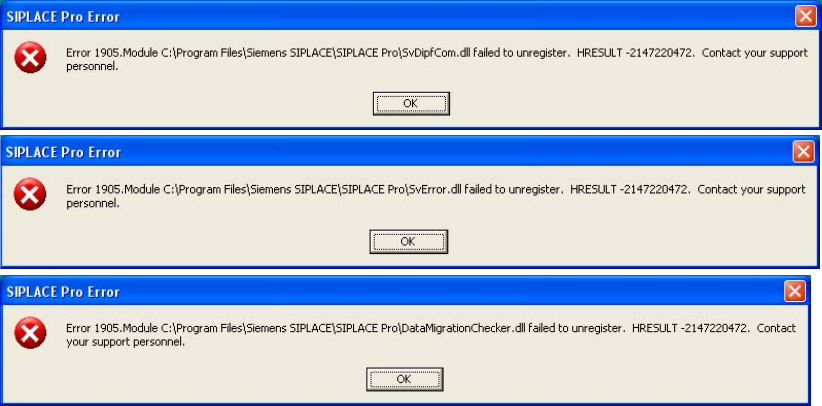
Fig. 7.2 - 1 Error messages when uninstalling SIPLACE Pro
Ignore the three error messages that appear while you are uninstalling SIPLACE Pro. These
relate to files that SIPLACE Pro and the SIPLACE vision teach station software use together.
Click on OK for each message.
Uninstall the vision teach station software by running the "UninstallAll.bat" file in
"C:\ Program Files\Siemens AG\Teach Station".
From Vision Teach Station version 3.51 onwards, you can also uninstall from the
Start menu > Programs > Teach Station > Teach Station "Uninstall All". 7