OperationInstruction_Vsision XP - 第142页
Page 134 V ISION XP+ V AC 5 Software 5.5 The Masks Menu Operating Instructions V ersion 1.5 K) Fine venting limi t After the vacuum is drawn, the chamber is initi ally finely vented; if the pre- set limit is reac hed, th…
VISION XP+ VAC Page 133
5 Software
5.5 The Masks Menu
Operating Instructions
Version 1.5
5.5.17 Vacuum
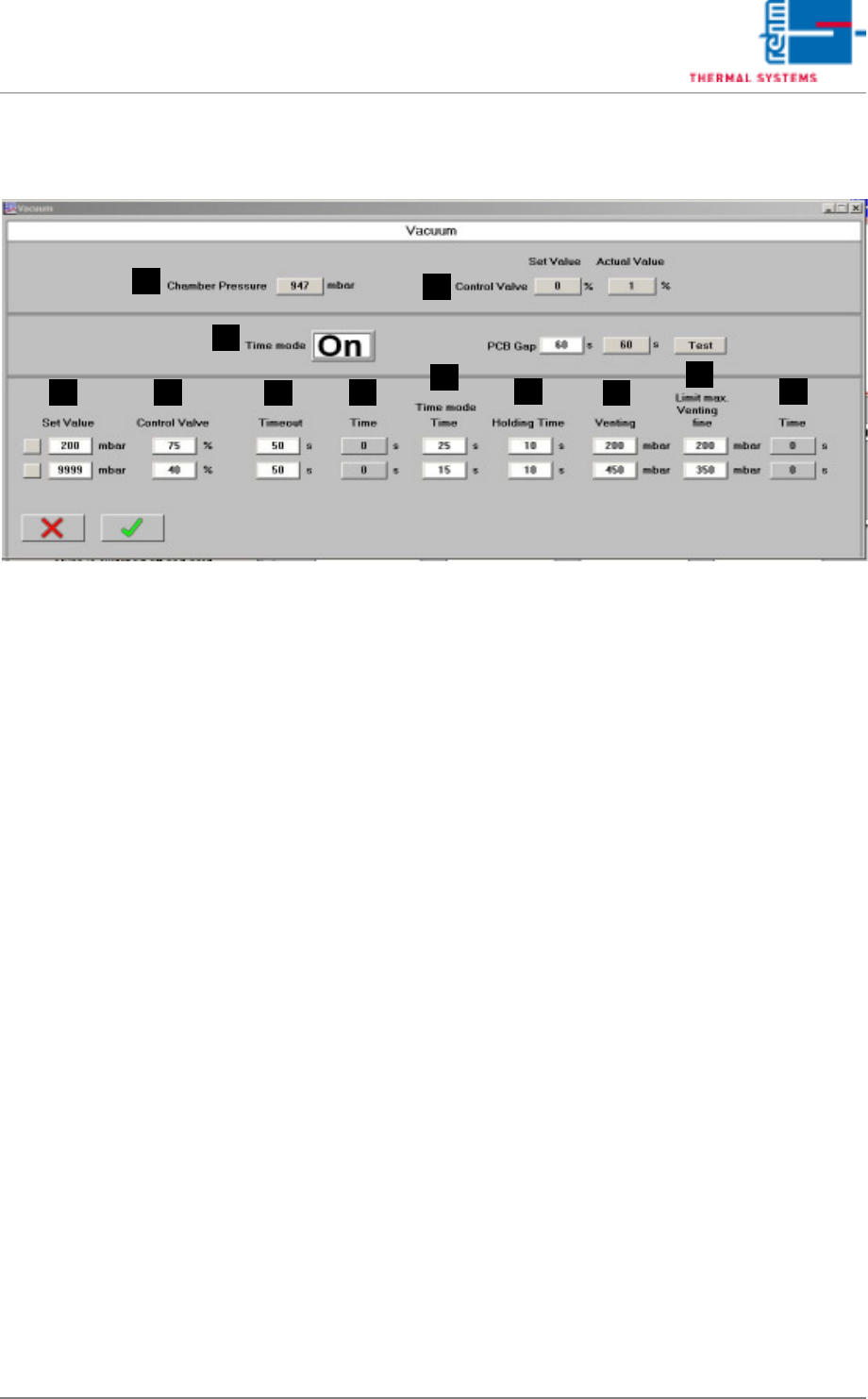
Abb. 5-60 Vacuum
Vacuum
This screen displays the operating modes of the vacuum chamber.
A) Chamber pressure
Chamber pressure display in mbar.
B) Regulating valve
Target: Current value set in %.
Actual: Feedback of the actual position in %.
C) Time mode
ON: The vacuum is drawn for a predefined time.
OFF: Predefined value in mbar to draw the vacuum.
Time mode: Time to block the vacuum process.
D) Target value
In time mode off: Target value to be reached during the vacuum process.
E) Regulating valve
Setting the valve in % as to how fast the vacuum is to be drawn
F) Timeout
If the specified time is exceeded, the vacuum process is aborted and an
alarm is also triggered in Visu.
G) Time
Specified time in sec. for drawing the vacuum.
H) Time mode time
Time in sec in which the vacuum is drawn.
I) Holding time
Predefined holding time after drawing the vacuum.
J) Venting
If the vacuum is drawn in one step, the mbar information is irrelevant.
If, however, a vacuum is drawn in several stages, the individual preset
values are processed in mbar.
A
D
C
B
H
I
J
K
E
F G
L

Page 134 VISION XP+ VAC
5 Software
5.5 The Masks Menu
Operating Instructions
Version 1.5
K) Fine venting limit
After the vacuum is drawn, the chamber is initially finely vented; if the pre-
set limit is reached, the setting is then changed to rough venting.
L) Time
Set cycle time in sec. For drawing the vacuum.
VISION XP+ VAC Page 135
5 Software
5.6 The Protocol Menu
Operating Instructions
Version 1.5
5.6 The Protocol Menu
All changes of status with regard to digital inputs and outputs, setpoints,
actual values, alarm values and defined program changes are documented
in the protocol.
A protocol is always generated when the switching status of a digital input or
output is changed. For example, this is the case when a button is clicked, or
when an error occurs which triggers an alarm.