OperationInstruction_Vsision XP - 第95页
V ISION XP+ V AC Page 87 5 Software 5.2 Main Window Operating Instructions V ersion 1.5 Fig. 5-1 2 Main Windo w Z) PCB's placing With this input field the display T otal P CBs may be set at a value from which counti…

Page 86 VISION XP+ VAC
5 Software
5.2 Main Window
Operating Instructions
Version 1.5
port is released again only after the process chamber is opened and
closed.
V) Vacuum active/inactive
If the button is active, the vacuum mode is switched on.
If the button is inactive, the vacuum mode is switched off.
W) Stopper up/down
Down: The outlet stoppers have been advanced to the bottom position.
PCBs can be discharged from the system in an unobstructed fashion.
Up: The outlet stoppers are controlled by the outlet interface. The PCBs
are stopped as long as no enabling signal is received from the down-
stream module, and cannot be discharged from the system.
X) Open/Close Process Chamber
These buttons are only enabled when the operating mode switch has
been set to service. The process chamber is opened with the left-hand
button, and closed with the right-hand button. An acoustic signal is gen-
erated by the horn while the process chamber is being closed.
Y) Display for Number of PCBs
PCB´s in Oven: indicates the number of assemblies in the system. The
indication is grey as long as the system is unloaded and operated without
load. It is green when the system is loaded. The indication is yellow, when
the system is unloaded and not operated yet without load.
The system is operated without load, when the last board is transported
out of the system and afterwards the pulse duration is expired under „Buf-
fer Conveyor empty“ in the mask Interface (see chapter 5.5.7, page 116).
The conveyor can only be trammed, when the indication is grey.
Total PCBs: displays the number of PCBs which have been produced
since the current program was loaded. The counter is reset when system
software is exited, or when a new program is loaded.
One PCB can be subtracted from the displayed number of PCBs in the
oven by pressing the Reset key. If this button is pressed and held for
more than 5 seconds, the counter is reset to 0. This function is only en-
abled when the operating mode switch has been set to service.
VISION XP+ VAC Page 87
5 Software
5.2 Main Window
Operating Instructions
Version 1.5
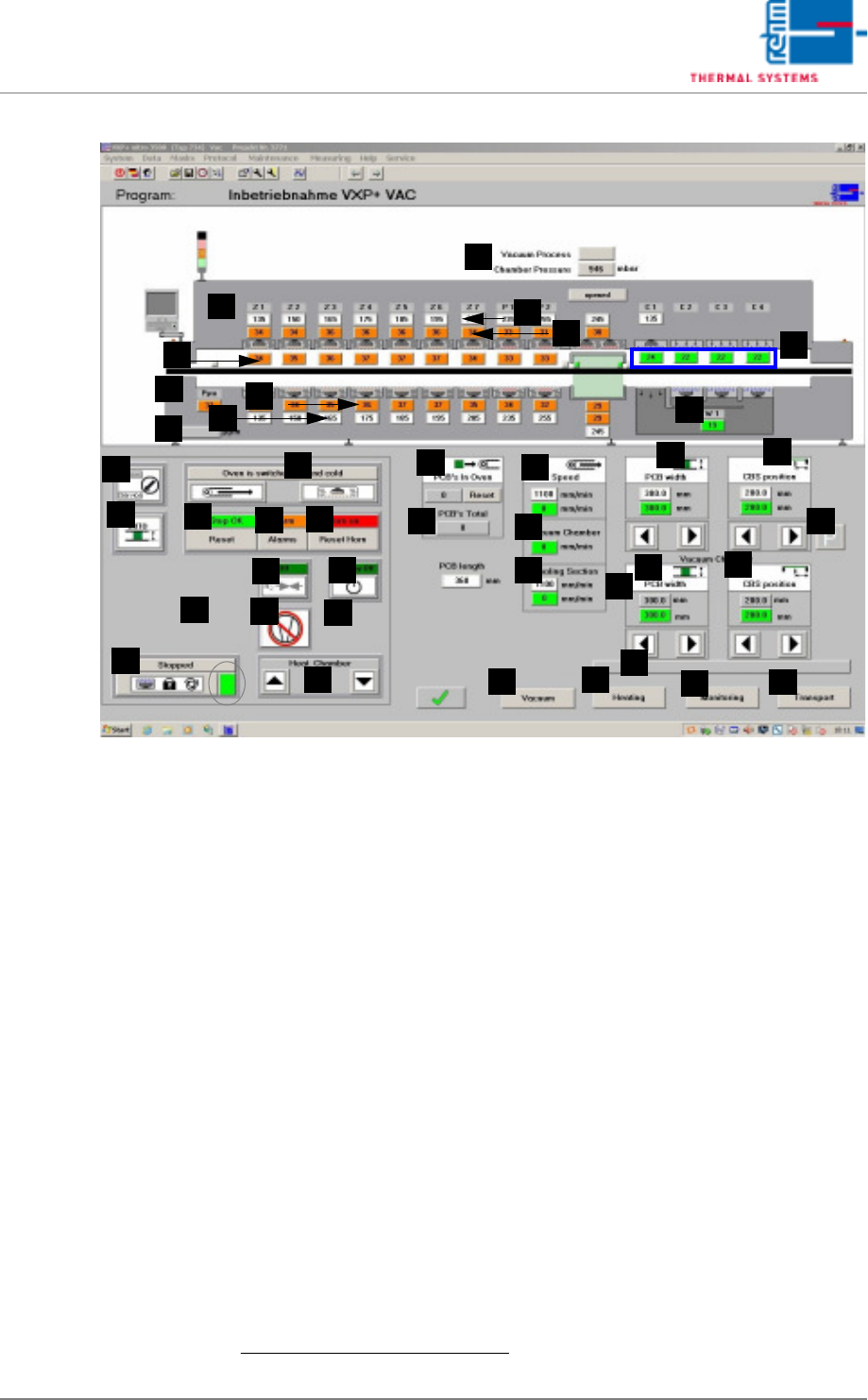
Fig. 5-12 Main Window
Z) PCB's placing
With this input field the display Total PCBs may be set at a value from
which counting starts to continue.
Procedure:
– Put in desired value and as soon as the display Total PCBs states
the set value, enter „0“.
– When entering „1“ or „load program“ the display will be set back to
„0“.
AA)Transport speed of the vacuum chamber
Entering a new target value (white box) changes the transport speed.
The actual value is displayed in the box below.
1
AB)Vacuum chamber
Speed display in vacuum mode; this can be adjusted separately.
AC)Cooling section for vacuum mode
The speed in vacuum mode can be adjusted separately. Entering a new
target value (white box) changes the speed in the cooling section. The
actual value is displayed in the box below.
AD)Conveyor Width Adjustment
Conveyor width is changed by entering a new setpoint (white field).
1
As
a prerequisite, the conveyor adjustment switch must be set to “Auto”, the
heaters must display values of at least 90° C (adjustable) and there may
F
E
G
H
B
A
C
D
I
J
Q
AA
Z
Y
X
W
V
U
T
S
R
P
O
N
M
L
K
AL
AH
AB
AF
AG
AJ
AI
AC
AD
AE
AM
AP
AK
1. Siehe hierzu auch page 80, “Use of Color” bzw. „Werte eintragen“.

Page 88 VISION XP+ VAC
5 Software
5.2 Main Window
Operating Instructions
Version 1.5
not be any PCBs in the system.
The scroll keys are active when conveyor adjustment is set to Manual
and the operating mode is set to Service. Safety limit switches prevent
violation of minimum and maximum position values.
AE)Center Support Position
The position of the center support is changed by entering a new setpoint
(white field).
1
As a prerequisite, the conveyor adjustment switch must be
set to “Auto”, the heaters must display values of at least 90° C (adjust-
able) and there may not be any PCBs in the system.
The scroll keys are active when conveyor adjustment is set to Manual
and the operating mode is set to Service. Safety limit switches prevent
violation of minimum and maximum position values.
AF)Control switch of stand-by Position (optional)
By pressing this button, the Center Board Support moves to stand-by po-
sition.
AG) Vacuum chamber PCB width
In automatic mode, the PCB width is set to the same as the transporting
width adjustment of the oven.
In manual mode, the transport system can be moved individually.
AH)Vacuum chamber central support position
In automatic mode, the central support position is set to the same as the
central support position of the oven.
In manual mode, the central support position can be set individually.
AI)Status display appears with program change. After the Pin-in-Paste
sheets are checked, the display is deactivated again by opening and
closing of the process chamber.
AJ)Vacuum button
This button opens the vacuum window (see page 133).
AK)Heating Button
The Heating window appears when this button is clicked (see page 106).
AL)Watchdog Button
The Watchdog window appears when this button is clicked (see page
108).
AM)Transport Button
The Conveyor window appears when this button is clicked (see page
112).