SIPLACE S-23 HM - 第158页
5 Single Functions User Manual SIPLACE S -23 HM 5.2 Single functions, Gantry Software Version SR.406.xx 02/00 US E dition 158 Actuate DP-axis 5 When this function is acti vated, the nozz le in the d p1 ax is is rotated b…
User Manual SIPLACE S-23 HM 5 Single Functions
Software Version SR.406.xx 02/00 US Edition 5.2 Single functions, Gantry
157
Reject circuit - Forced air on/off 5
When this function is activated, the forced air at the nozzle in the reject position is switched on or
off.
Å Click the Forced air on/off button in the "Reject circuit" area.
The forced air is switched on or off.
Reject circuit - Vacuum on/off 5
When this function is activated, the vacuum to the nozzle in the reject position is switched on or
off.
Å Click the Vacuum on/off button in the "Reject circuit" area.
The vacuum is switched on or off.
Head reference run 5
This function is used to start a head reference run of all the head axes, or in other words, all head
axes travel to their origin. The gantry axes travel over the reject container and discard compo-
nents in a defined manner.
Å Click the Head reference run button.
The head axes execute a head reference run.
Holding circuit - Measure vacuum 5
When this function is activated, the vacuum at the nozzle in the holding circuit is measured.
Å Click the Measure vacuum button in the "Holding circuit" area.
The vacuum is measured and the result displayed in [mbar] above the button.
Star in position 1 5
This function is used to bring the revolver head into a defined starting position.
Å Click the Star in position 1 button.
The revolver head is moved round so that segment 1 is in the pick up and placement position
(lowest position). In addition the revolver head and the z-axis perform a reference run.
RV head indexing 5
This function is used to move the revolver head. Each time you click the button the revolver head
is moved round by one segment.
Å Click the RV head indexing button.
The revolver head is moved by one segment.
The current positions of the segments is displayed in the graphic.
5 Single Functions User Manual SIPLACE S-23 HM
5.2 Single functions, Gantry Software Version SR.406.xx 02/00 US Edition
158
Actuate DP-axis 5
When this function is activated, the nozzle in the dp1 axis is rotated by 90
0
.
Å Click the Actuate DP-axis button.
The nozzle in the dp1 axis is rotated by 90
0
once.
5
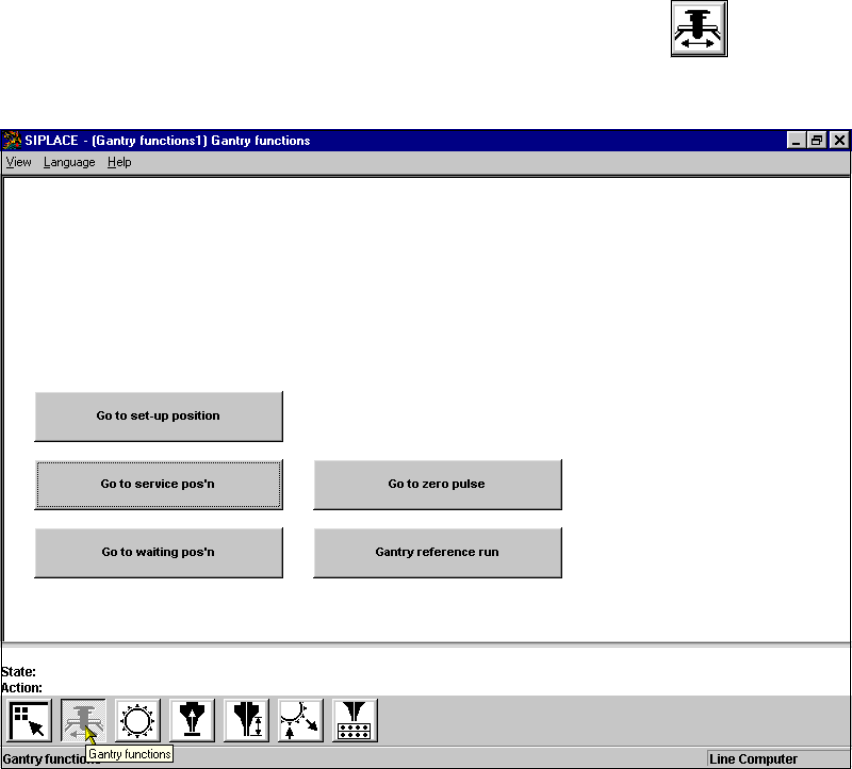
5.2.2 "Gantry functions" screen
Å In the current screen for the single functions for Gantry x, click the symbol .
The user interface is switched to the "Gantry functions" screen (see Fig. 5.2 - 2).
5
Fig. 5.2 - 2 "Gantry functions" screen

User Manual SIPLACE S-23 HM 5 Single Functions
Software Version SR.406.xx 02/00 US Edition 5.2 Single functions, Gantry
159
NOTE
All travel functions of the main axes (x and y) must be started using the start button.
A message appears in the status field on the screen which asks you to "Please press the start
button".
If the machine covers are not closed, the message "Close cover" will appear in the status field. 5
5
5.2.2.1 Functions
In the "Gantry functions" screen the following functions are available to test the currently selected
gantry. The required function is triggered by clicking on the corresponding button. 5
Go to set-up position 5
This function is used to check the set-up position of the gantry.
When the gantry is in the set-up position, it is possible to unload and retool the feeders.
Å Click the Go to set-up position button and press the start button as often as you are asked to.
The gantry moves (from the feeder area) into the set-up position.
Go to service position 5
This function is used to check the service position of the gantry.
When the gantry is in the service position, it is possible to carry out work on the placement head
and on other parts of the gantry.
Å Click the Go to service pos’n button and press the start button as often as you are asked to.
The gantry moves into the service position.
Go to waiting position 5
This function is used to check the waiting position of the gantry.
When the gantry is not required for placement, it moves to the waiting position.
Å Click the Go to waiting pos’n button and press the start button as often as you are asked to.
The gantry moves into the waiting position.