SIPLACE S-23 HM - 第174页
5 Single Functions User Manual SIPLACE S -23 HM 5.3 Single functions, Transport Software Version SR.406.xx 02/00 US Edition 174 5.3.1.1 F unctions Ceramic substrate centering 5 NOTE The cer amic sub strat e cen terin g f…
User Manual SIPLACE S-23 HM 5 Single Functions
Software Version SR.406.xx 02/00 US Edition 5.3 Single functions, Transport
173
5.3.1 "Transport functions" screen
The transport functions are used for checking and adjusting the functional modules of the board
conveying systems. 5
5
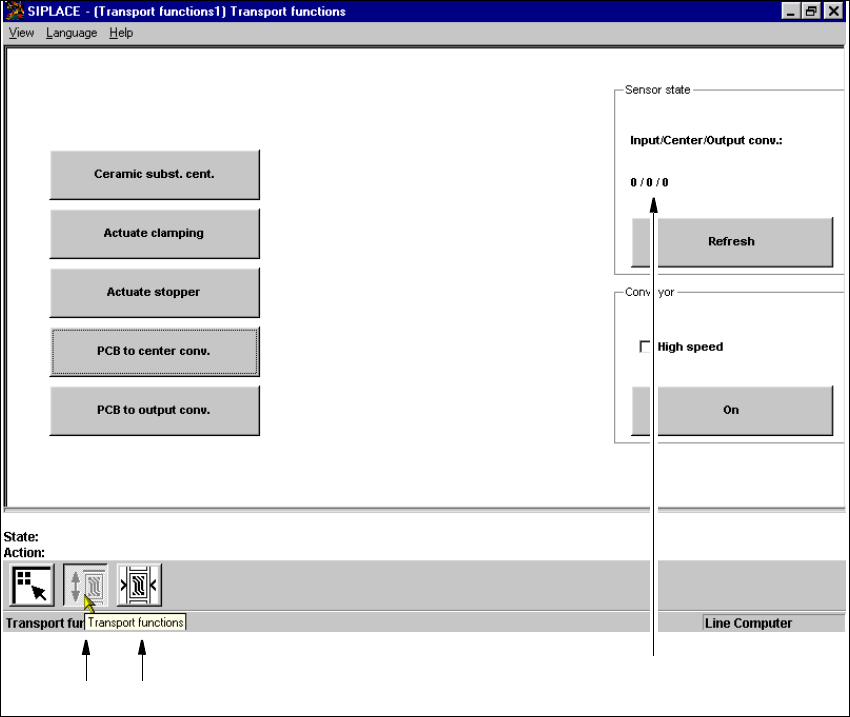
Fig. 5.3 - 1 "Transport functions" screen
Key to Fig. 5.3 - 1
(1) Functions for the board conveying systems
(2) Functions for adjusting the transport conveyor width
(3) Functions to display state of the ultrasonic sensors
5
5
12
3

5 Single Functions User Manual SIPLACE S-23 HM
5.3 Single functions, Transport Software Version SR.406.xx 02/00 US Edition
174
5.3.1.1 Functions
Ceramic substrate centering 5
NOTE
The ceramic substrate centering function can only be activated if the "Ceramic substrate centering"
option is installed and entered in the machine options. 5
This function is used to check the centering (clamping) of ceramic substrates in the center con-
veyor.
Å Click the PCB to center conv. button.
The ceramic substrate is moved to the center conveyor.
Å Click the Ceramic subst. cent. button.
The ceramic substrate is centered (clamped).
Å Click the Ceramic subst. cent. button again.
The centering is released again.
Actuate clamping 5
This function can be used to check board clamping for the center conveyor. 5
Å Use the PCB to center conv. function to move the board to the center conveyor.
Å Click the Actuate clamping button.
The board is clamped to the center conveyor.
Å Click the Actuate clamping button again.
The clamping is released again.
Actuate stopper 5
This function can be used to check the operation of each stopper as it is extended and then
retracted. The function can be executed either with or without a board.
Å Click the Actuate stopper button in the center conveyor.
The stopper for the center conveyor is extended and then returned to its original position.
PCB to center conv. 5
This function can be used to move a board which is on the input conveyor to the center conveyor,
stop it there and clamp it. 5
Å Click the PCB to center conv. button.
The board currently located on the input conveyor is moved to the center conveyor.

User Manual SIPLACE S-23 HM 5 Single Functions
Software Version SR.406.xx 02/00 US Edition 5.3 Single functions, Transport
175
PCB to output conv. 5
This function is used to move a board currently in the center conveyor to the output conveyor. 5
Å Click the PCB to output conv. button.
The board currently located on the center conveyor is moved to the output conveyor.
Refresh 5
The "Refresh" function is used to check whether the ultrasonic sensors for the whole of the trans-
port conveyor are adjusted correctly. To do this, position a board over one of the sensors. 5
The most recent states of the light barriers for the input conveyor (input), center conveyor (center),
and output conveyor (output) are displayed above the "Refresh" button. When you execute the
"Refresh" function the current states are queried and the results displayed (see Fig. 5.3 - 1). 5
Å Position a board over the sensor for the required conveyor.
Å Click the Refresh button in the "Sensor state" area.
The sensors are updated and the result is displayed over the button.
There are two possible states for each sensor: 5
1 = The sensor has responded.
There is a board on this conveyor. 5
0 = The sensor has not responded.
There is no board on this conveyor. 5
Å Repeat the process for each of the transport conveyors, if necessary.
On 5
This function can be used to check the conveyors at both slow and high speed. The input conveyor
only travels at high speed. 5
NOTE
The conveyor must be empty before carrying out this function. 5
Å Click the PCB to output conv. button to empty the conveyor.
Å Activate the "High speed" check box in the "Conveyor" area if the conveyor is to travel at high
speed.
Å Deactivate the check box if the conveyor is to travel at the slower speed.
NOTE
The input conveyor only travels at high speed. 5