SIPLACE S-23 HM - 第21页
User Manual SIPLAC E S-23 HM 1 Introduction, technical dat a Software Version S R.406.xx 02/00 US E dition 1.2 Structure of the User Manual 21 1.2 Structure of the User Manual This User M anual is made u p of the followi…
1 Introduction, technical data User Manual SIPLACE S-23 HM
1.1 General Software Version SR.406.xx 02/00 US Edition
20
1
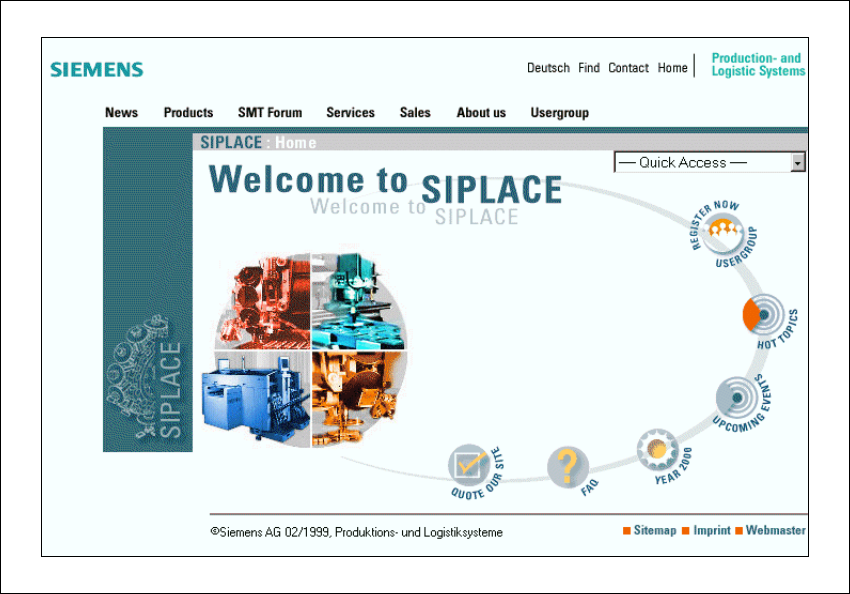
Fig. 1.1 - 1 The SIPLACE home page
The various headings contain information on 1
– our products
– services
– contacts, etc.
Registered customers can also access the SIPLACE User Group, where you can call up special
information on our placement machines, such as 1
– technical documentation
– Technical Infos
– spare parts lists, etc.
Registering for access to the User Group is sheer child’s play: 1
Å Click on the ‘Register Now user group’ button
Å Complete the registration form and just send it off.
You will then quickly receive access authorization with USER ID and a password. 1
1
User Manual SIPLACE S-23 HM 1 Introduction, technical data
Software Version SR.406.xx 02/00 US Edition 1.2 Structure of the User Manual
21
1.2 Structure of the User Manual
This User Manual is made up of the following chapters: 1
Introduction 1
The introduction contains an overview of the structure of this User Manual and the technical data
for the automatic placement system. It also contains notes on setting up the placement system,
an overview of the different modules and a description the functions of individual modules. 1
Operational safety 1
This chapter covers all safety-related matters. It includes, for example, conventions for the use of
safety instructions in this manual and rules to ensure safe operation of the placement system. The
safety equipment and safety circuits are described in detail. The chapter also contains important
information on the placement system’s energy state, which is needed for servicing and mainte-
nance work. 1
Introductory notes and basic terms 1
The automatic placement system’s controls and user interface are described in this chapter. Illus-
trations and flow charts are used to explain the structure of the user interface. 1
Placement functions 1
This chapter provides information on setting up the placement system. One section classifies the
various errors that can occur and describes the individual menus. In the "feeder modules" section
you will learn how to prepare the components and set up and check feeder modules. 1
Single functions 1
This chapter explains the individual gantry, placement head and PCB conveyor functions. After
reading this chapter, you will be able to test the operating statuses of these modules and analyze
errors that occur. 1
Vision functions 1
The functions and technical data of the PCB and component vision systems are described in this
chapter, which also contains a comprehensive description of the menus for optical PCB and com-
ponent centering and the vision parameters. 1
What to do when ... 1
Pass this chapter on to your machine operators. It contains valuable tips and tricks gained from
experience. For example, you will learn how to minimize downtimes by taking preventive action.1
1 Introduction, technical data User Manual SIPLACE S-23 HM
1.3 User classification Software Version SR.406.xx 02/00 US Edition
22
Error information and diagnostics 1
This chapter contains basic instructions on how to use the information provided by the error diag-
nosis system, which also enables you to enter and save your own notes on errors that have oc-
curred. The menu-driven diagnosis system is a valuable aid to trouble-shooting and error
analysis. 1
On-line help 1
This chapter explains how to use the on-line help system. 1
Component handling 1
In this chapter you will find information concerning the feeder modules and the components they
can be used to insert. 1
Station extensions hardware/software 1
Overviews of the nozzle changers, PCB barcode readers, Remote Service, etc. 1
Software installation 1
This chapter tells you how to install the software. 1
1.3 User classification
The operating software is structured so that certain functions or menus can only by used or called
by appropriately trained personnel. There are three different classes of user: 1
– operators,
– line engineers and
– service engineers.
Access to each class may be password-protected. Chapters containing information for user
classes higher than "operator" contain a reference to the user class concerned in the footer. 1
Operators 1
The operator class consists of any person who has been trained in operation of the machine.
These people are authorized to use any functions associated with operating the machine and may
call up any menus needed to use the machine. 1