SIPLACE S-23 HM - 第347页
User Manual SIPLAC E S-23 HM 8 Error Information Software Version SR.406.xx 02/00 US Edition 8.1 General 347 8 Error Information 8.1 Gen eral If errors occur dur ing oper ations a t the plac ement station, you c an all u…
7 What should you do ... User Manual SIPLACE S-23 HM
7.13 Line engineer profile Software Version SR.406.xx 02/00 US Edition
346
User Manual SIPLACE S-23 HM 8 Error Information
Software Version SR.406.xx 02/00 US Edition 8.1 General
347
8 Error Information
8.1 General
If errors occur during operations at the placement station, you can all up information concerning
the possible causes and ways of eliminating the error in question. To do this, you start the help
system for the station computer (see Chapter 9).
– You call error information on the currently displayed error by clicking the "Error information"
button in the main view (see section 8.2.1).
– You can call up information on an observed error of a specific type by clicking the "Error infor-
mation" button in the corresponding error display (see section 8.2.2).
8 Error Information User Manual SIPLACE S-23 HM
8.2 Calling error information Software Version SR.406.xx 02/00 US Edition
348
8.2 Calling error information
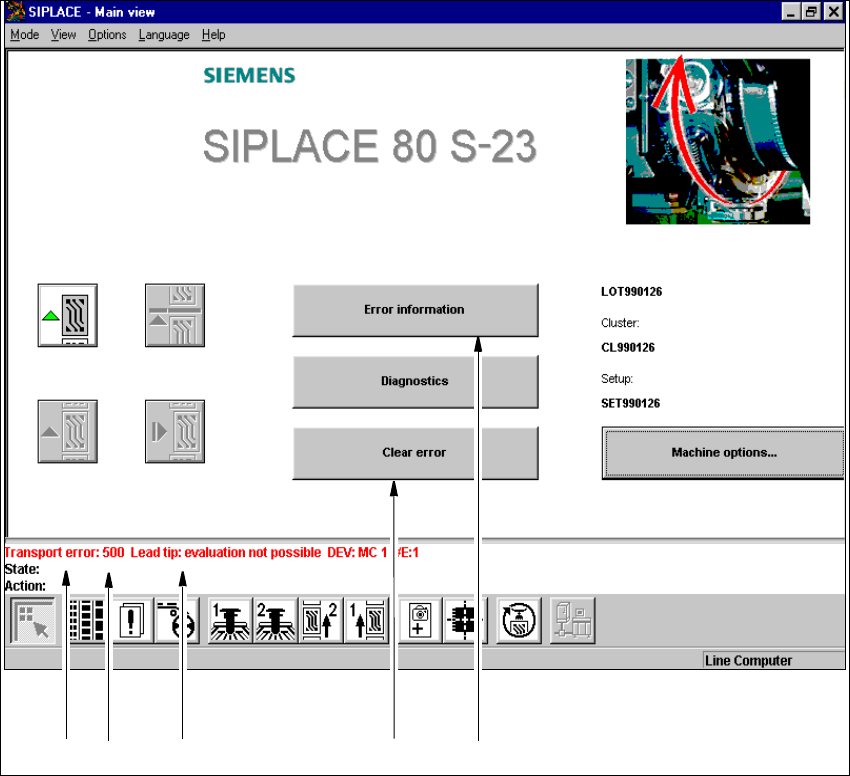
If an error occurs during operation, a corresponding error message is displayed in the status bar
in the user interface. In main view, the Error information and Clear error buttons are active
(see Fig. 8.2 - 1).
8
Fig. 8.2 - 1 Main view with error message
Key to Fig. 8.2 - 1
(1) Type of error (track, machine, transport or general error)
(2) Error number (the error number assigned to the error)
(3) Error message (summary information on error)
(4) "Clear error" button (to acknowledge the error after error elimination)
(5) "Error information" button (to call up help on the current error)
12 3 4 5