SIPLACE S-23 HM - 第425页
User Manual SIPLACE S-23 HM 12 Station Extensions / Software Software Version SR.406.xx 02/00 US Edition 12.2 GEM Interface 425 SIPLACE Pro 12 When a c luster is specifi ed at th e station, all the data requ ired for thi…
12 Station Extensions / Software User Manual SIPLACE S-23 HM
12.2 GEM Interface Software Version SR.406.xx 02/00 US Edition
424
12.2.2 Operation
12.2.2.1 Setting the Control Mode
The control mode specifies how the station is supplied with the necessary placement data. 12
Å In the main view, select the Options menu and then choose the Control mode... option.
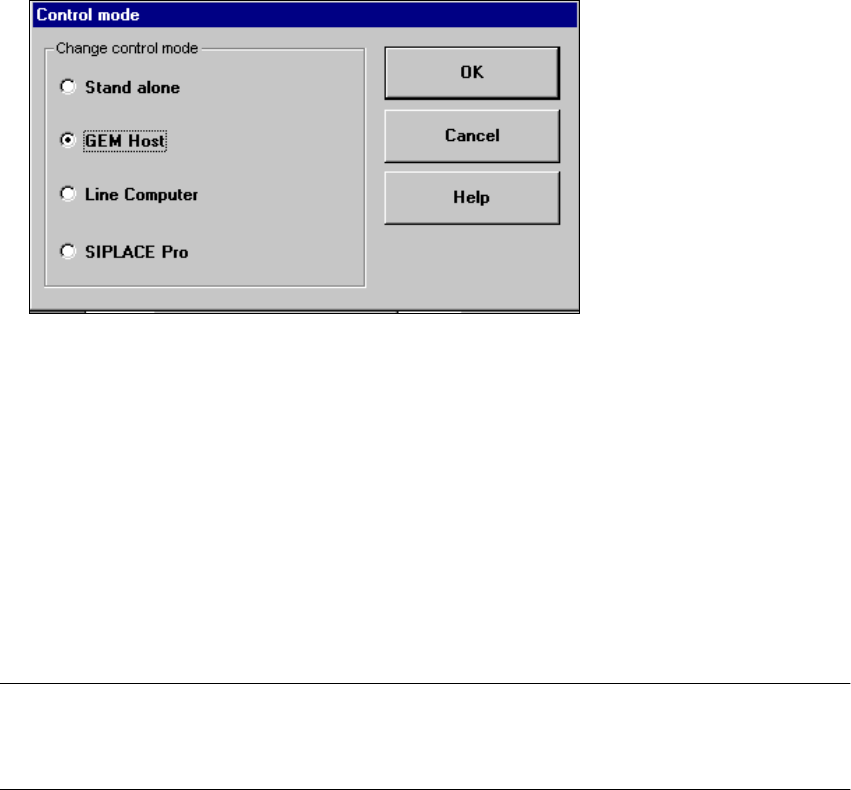
Å The following selection box appears.
Possible Settings: 12
Stand alone 12
(This control mode is used for test purposes only)
If a cluster is specified at the station, all necessary data will be loaded from the hard disk of the
station computer.
The data must be located on the station computer’s hard disk. 12
GEM Host 12
In this control mode only the host computer can specify the placement programs.
The data must be located on the host computer’s hard disk. 12
NOTE
This setting must be activated if you wish to download placement programs from the GEM
computer to the station computer. See also section 12.2.2.6. 12
Line Computer 12
If a cluster is specified at the station, all necessary data will be loaded from the line computer. The
data must be located on the line computer’s hard disk. 12
User Manual SIPLACE S-23 HM 12 Station Extensions / Software
Software Version SR.406.xx 02/00 US Edition 12.2 GEM Interface
425
SIPLACE Pro 12
When a cluster is specified at the station, all the data required for this are loaded from the com-
puter specified in the configuration of the SIPLACE Pro connection. The data must be located on
the hard disk of this computer. 12
12
Å Select the button for the required control mode.
Å Click OK to confirm and activate this setting.
12.2.2.2 Defining the GEM default Settings
You use the "GEM default settings..." menu option to make various settings which will be used at
power-up as default parameters for the station. 12
Å In the main view select the Options menu and then select the option GEM default settings....
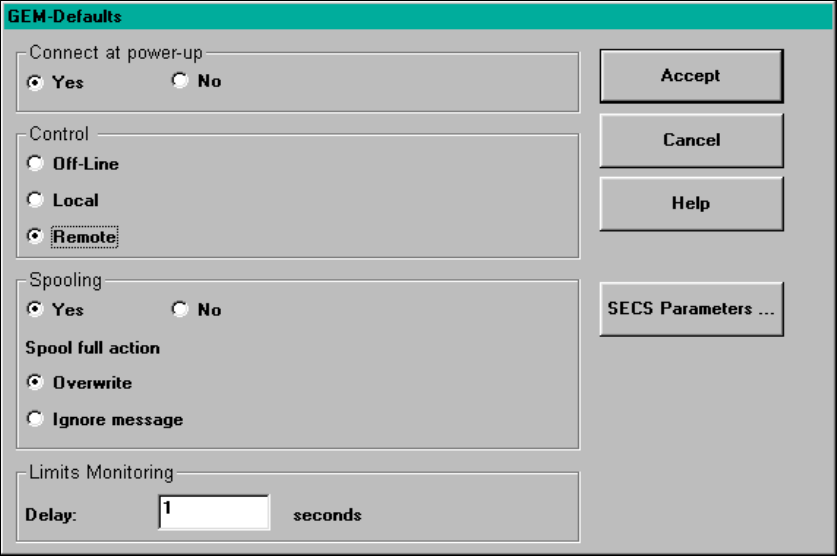
The following window is displayed.
12
Fig. 12.2 - 2 "GEM-Defaults" window
12 Station Extensions / Software User Manual SIPLACE S-23 HM
12.2 GEM Interface Software Version SR.406.xx 02/00 US Edition
426
Possible settings: 12
Connect at power-up 12
(See also section 12.2.2.5) 12
– Yes
When the station is switched on, the station computer attempts to connect to the host com-
puter.
– No
When the station is switched on, no connection to the host computer is made. However, the
operator can establish the connection manually in the "State view" (see also section 12.2.2.5).
Control 12
(See also section 12.2.2.5) 12
– Off-line
It is not possible to send or receive messages.
– Local
In the "Placement Program" view, the user can "upload" placement programs from the station
computer to the host computer (See also section 12.2.2.6).
No placement programs can be downloaded from the host computer to the station computer.
– Remote
In the "Placement Program" view, the user can upload placement programs from the station
computer to the host computer and "download" from the host computer to the station computer.
Spooling 12
(See also section 12.2.2.5) 12
– Yes
If the connection to the host computer is lost, the station will collect in a spooling file all mes-
sages intended for the host computer. Once the connection is re-established, the host can pick
up these messages from the station. The quantity of messages which can be stored is limited
by the size of the spooling file (20 MB).
– No
If the connection to the host computer is lost, all messages intended for the host computer will
be lost.