Nordson_EFD_GV_Series_Operating_Manual - 第100页
GV Series Automated Dispensing Systems 100 www.nordsonefd.com info@nordsonefd.com +1-401-431-7000 Sales and service of Nordson EFD dispensing systems are available worldwide. Appendix A, Command Function Refer ence (cont…
GV Series Automated Dispensing Systems
99www.nordsonefd.com info@nordsonefd.com +1-401-431-7000 Sales and service of Nordson EFD dispensing systems are available worldwide.
Appendix A, Command Function Reference
(continued)
Backtrack Setup (continued)
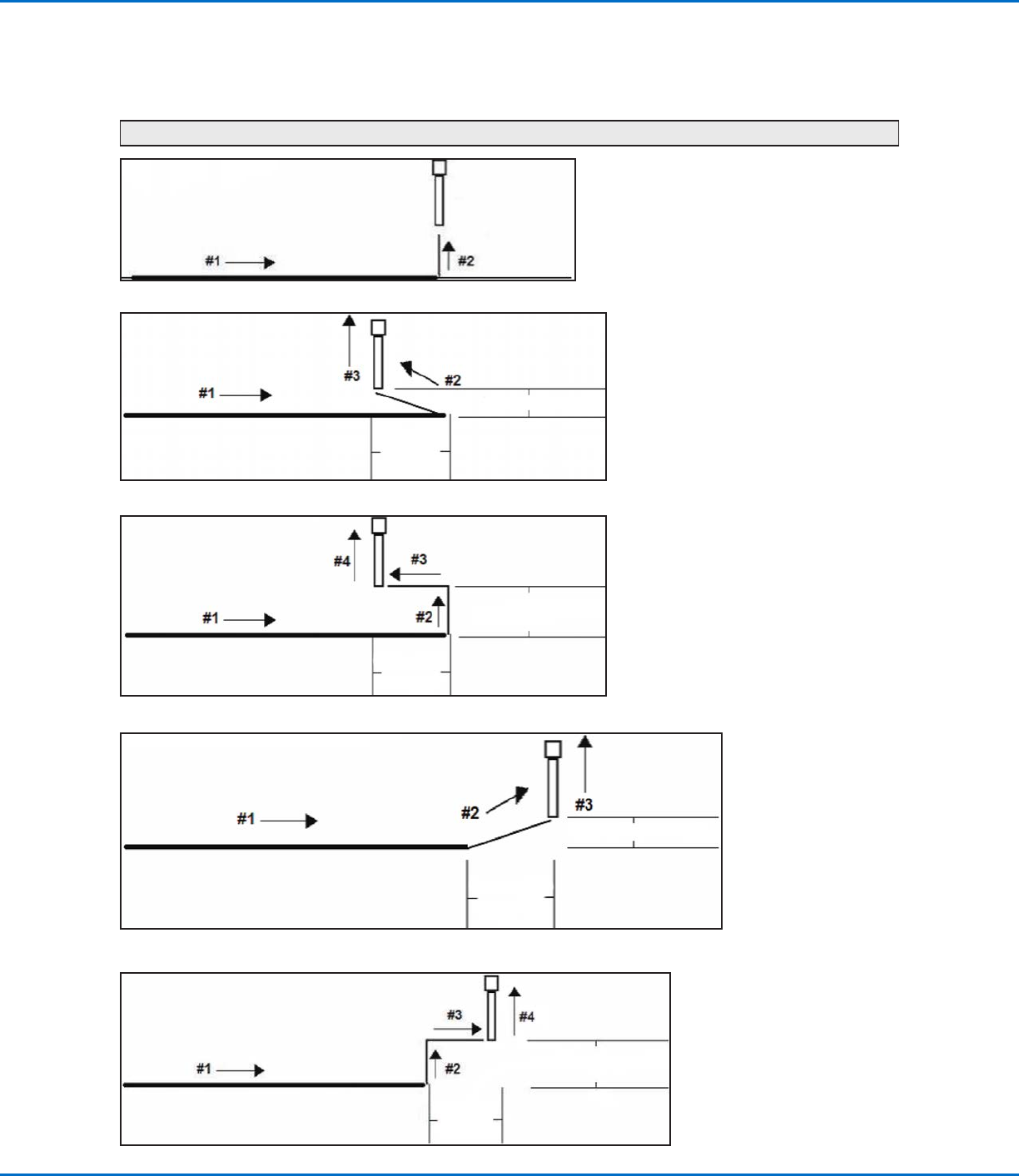
Example illustrations of Backtrack Setup
0 or blank (Normal)
Backtrack Gap
1 (Back)
Backtrack Gap
Backtrack
Length
2 (Square Back)
Backtrack Gap
Backtrack
Length
3 (Forward)
Backtrack Gap
Backtrack
Length
4 (Square Forward)
Backtrack Gap
Backtrack
Length
GV Series Automated Dispensing Systems
100 www.nordsonefd.com info@nordsonefd.com +1-401-431-7000 Sales and service of Nordson EFD dispensing systems are available worldwide.
Appendix A, Command Function Reference
(continued)
Block Initialize
Click Function
Double-click
address and
select from drop-
down menu
When two Step & Repeat Block commands are present in a program, use Block Initialize to specify only the
points that are selected in the Run Block Select window. Refer to “How to Disable Dispensing for Specific
Workpieces in an Array” on page69 for details.
Call Pattern
Click Function
Double-click
address and
select from
drop-down
menu
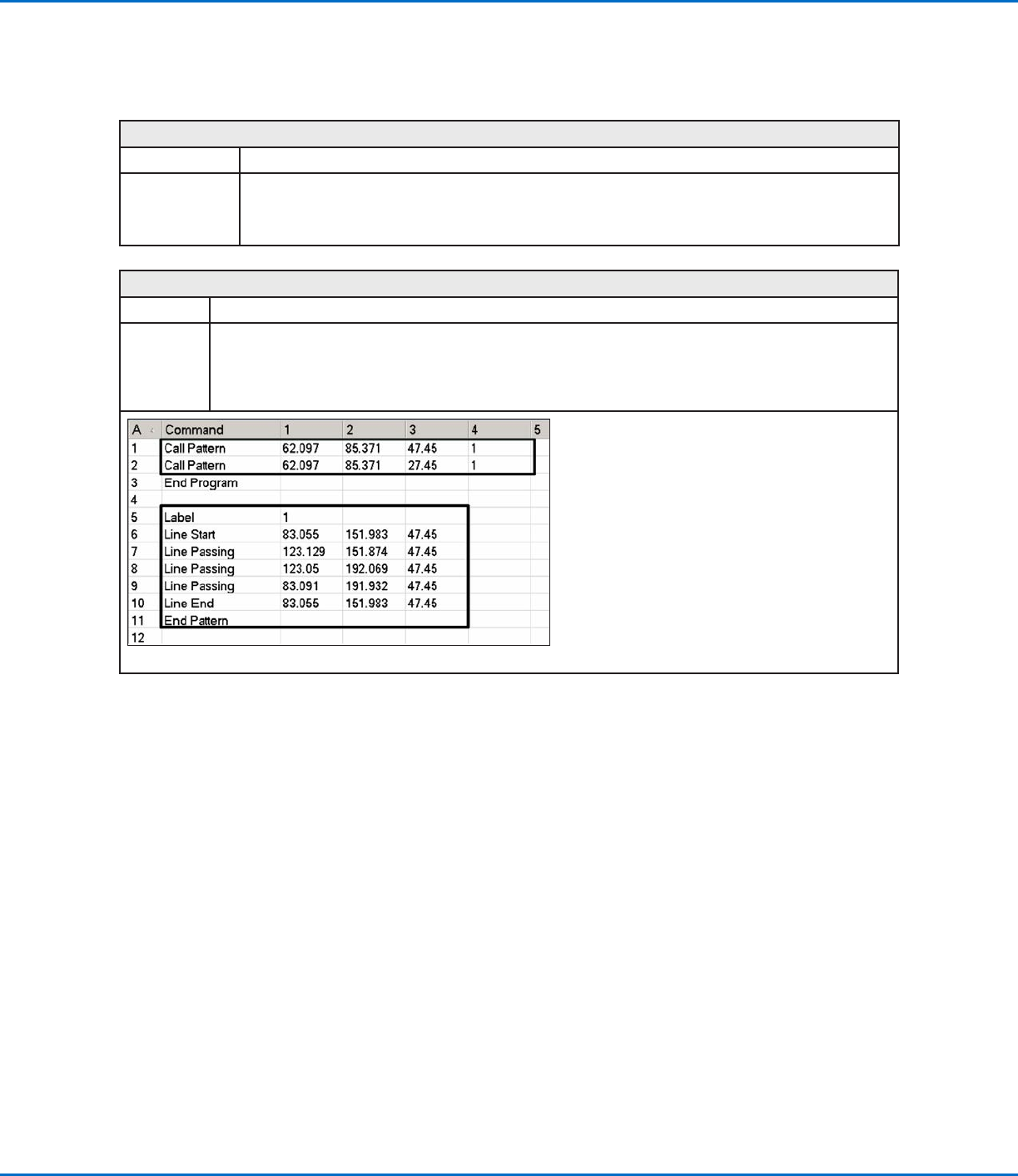
Causes the system to dispense in a pattern that is like another pattern in the program, but at the location in
the program where the Call Pattern command occurs. The called pattern must have a Label assigned to it. The
system stops dispensing the called pattern when it reaches an End Pattern command.
Example of a program that includes a Call Pattern command
GV Series Automated Dispensing Systems
101www.nordsonefd.com info@nordsonefd.com +1-401-431-7000 Sales and service of Nordson EFD dispensing systems are available worldwide.
Appendix A, Command Function Reference
(continued)
Call Subroutine
Click Function
Double-click
address and
select from drop-
down menu
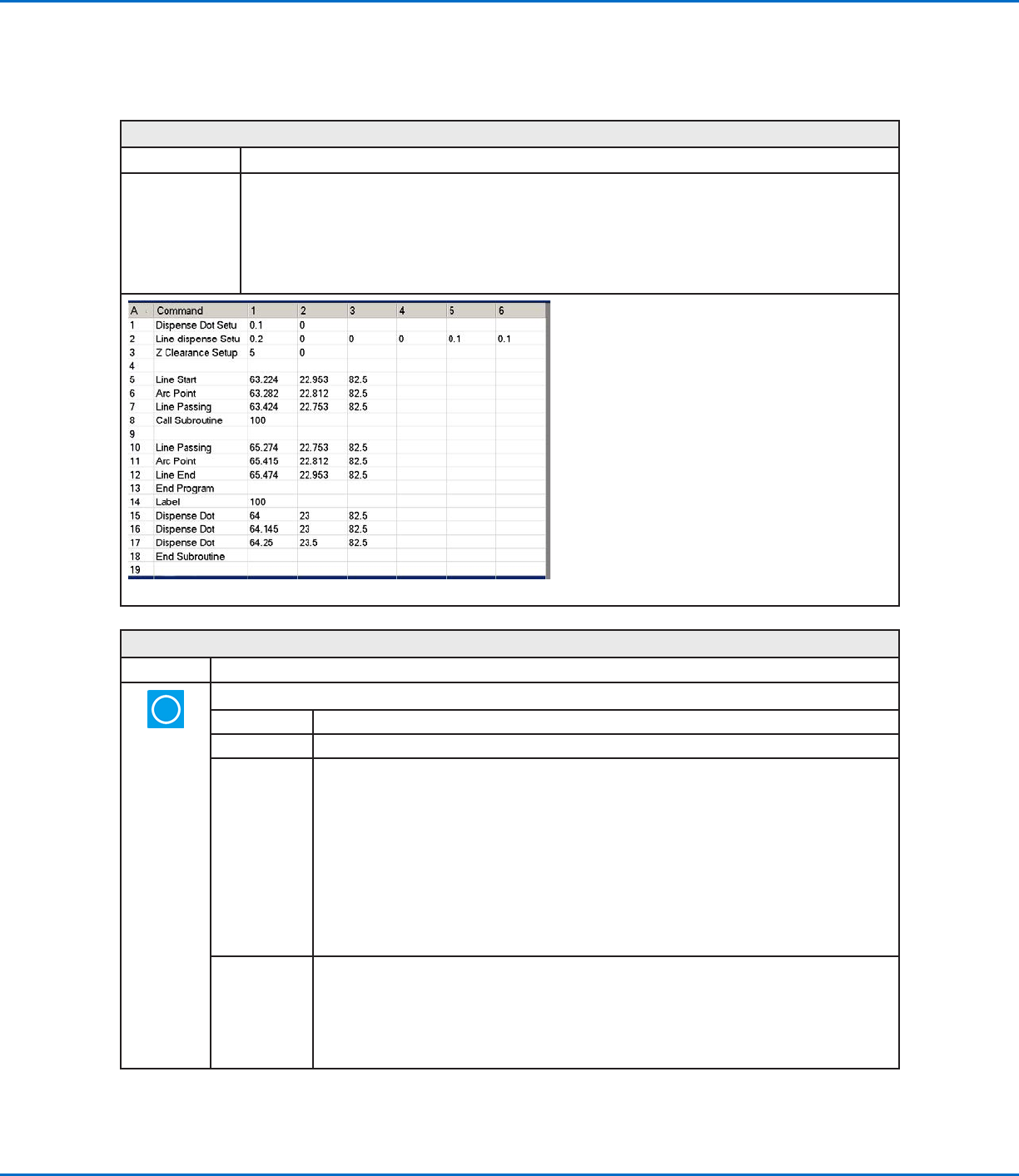
A subroutine is a set of commands that is located after the end of the program. Call Subroutine causes
the program to jump to the subroutine at a specified address and then to execute the commands at that
address. When the End Subroutine command (which is inside the subroutine) is reached, the program
continues at the address that immediately follows the Call Subroutine command. Call Subroutine is
most useful for repeating a pattern anywhere on the same workpiece (as opposed to the Step & Repeat
command, in which a pattern is repeated on separate workpieces that are arranged in straight lines and at
fixed distances from each other).
Example of a program that includes a Call Subroutine command
Circle
Click Function
Registers a circle with the circle’s center at the current XYZ location
Parameter Description
Diameter The diameter of the circle (in mm)
Start Angle The angle (in degrees) from the center of the circle where the start of the circle begins. The
default of 0 degrees equates to the 3:00 position.
Default: 0 (degrees)
Range: 0 to 360
NOTES:
• You can enter a negative value. For example, if you enter -90, the circle start point will be the
12:00 position.
• You can also enter a value greater than 360, but if you do so, the robot compensates for the
larger value. For example, if you enter 400, the circle start point will begin at the 40 degree
mark.
Total Degree The angle (in degrees) after the Start Angle value at which dispensing stops.
Default: 0 (degrees)
To dispense in a counterclockwise direction, enter a negative value.
NOTE: You can enter a value greater than 360. For example, if you enter 720, the Z axis head
will loop twice.