Nordson_EFD_GV_Series_Operating_Manual - 第121页
GV Series Automated Dispensing Systems 121 www.nordsonefd.com info@nordsonefd.com +1-401-431-7000 Sales and service of Nordson EFD dispensing systems are available worldwide. Appendix A, Command Function Refer ence (cont…
GV Series Automated Dispensing Systems
120 www.nordsonefd.com info@nordsonefd.com +1-401-431-7000 Sales and service of Nordson EFD dispensing systems are available worldwide.
Appendix A, Command Function Reference
(continued)
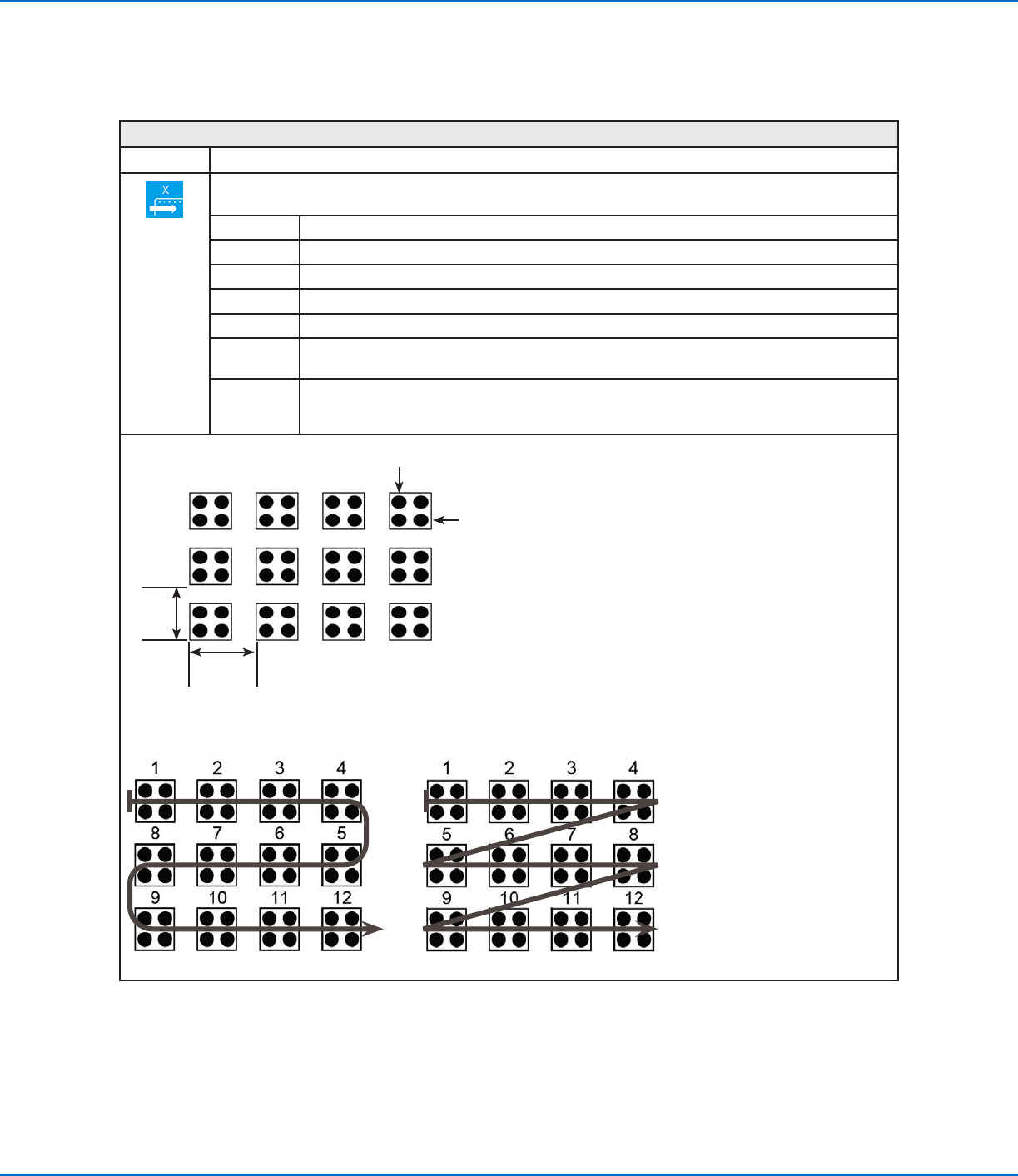
Step & Repeat X
Click Function
Enables the repeat of the dispensing pattern onto many identical workpieces that are mounted on a fixture plate
and aligned in rows and columns.
Parameter Description (see illustrations below)
X Offset The distance (in mm) between each workpiece in the X direction.
Y Offset The distance (in mm) between each workpiece in the Y direction.
Columns (X) The number of columns in the X direction.
Rows (Y) The number of rows in the Y direction.
1.S Path or
2.N Path
The path of pattern travel. Select “1.S Path” for an S-shaped pattern or “2.N Path” for an
N-shaped pattern.
Label
(default) or
Address
The label or address where the Step & Repeat X command begins.
X Offset
(in mm)
Y Offset
(in mm)
Row (Y)
Column (X)
Example of X and Y offsets in a Step & Repeat command
Step & Repeat X, S Path Step & Repeat X, N Path
Difference between the “1.S Path” and “2.N Path” selections
GV Series Automated Dispensing Systems
121www.nordsonefd.com info@nordsonefd.com +1-401-431-7000 Sales and service of Nordson EFD dispensing systems are available worldwide.
Appendix A, Command Function Reference
(continued)
Step & Repeat Y
Click Function
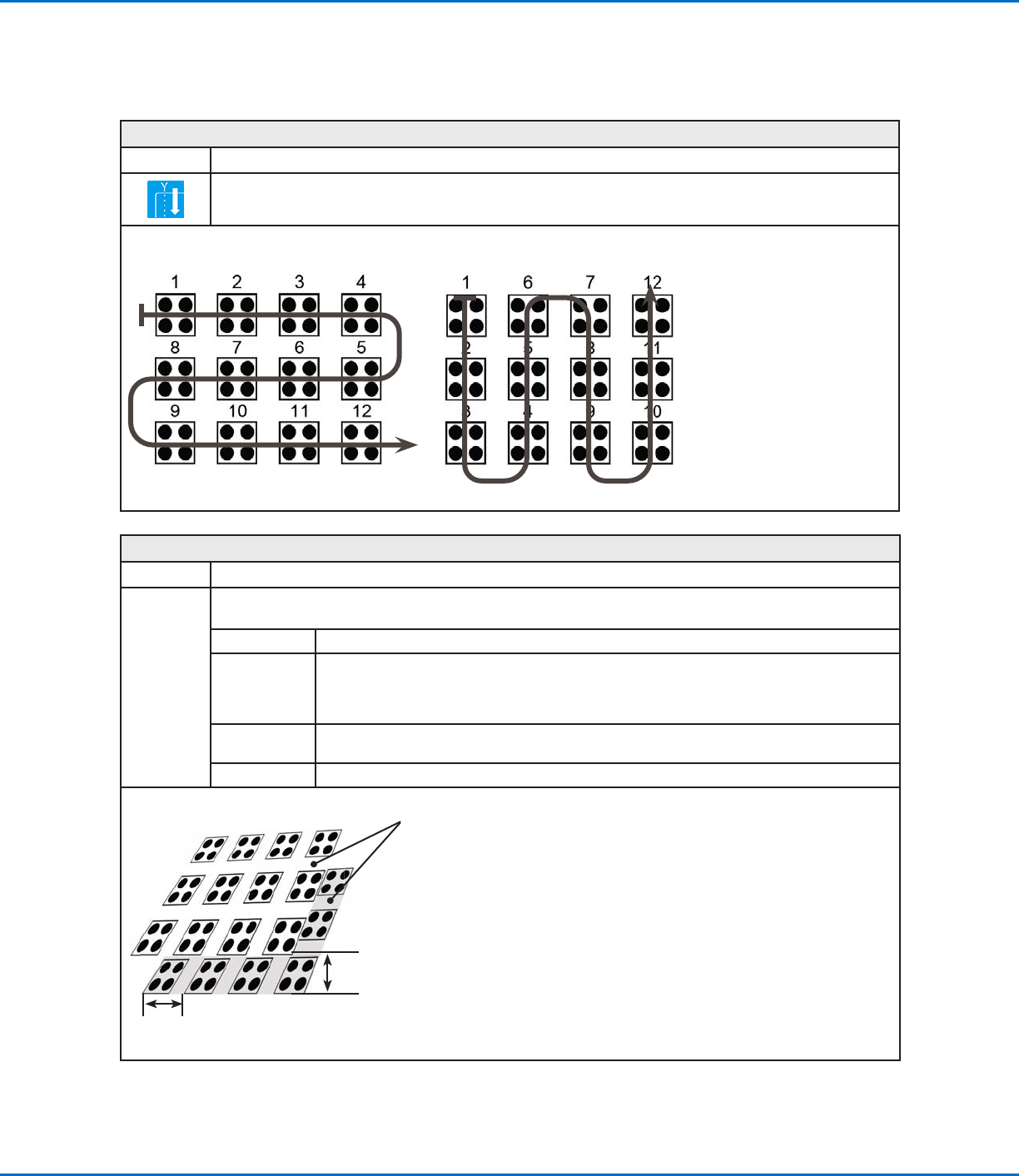
Works exactly like Step & Repeat X except that priority is given to the Y axis instead of to the X axis, as shown
below.
Step & Repeat, X Axis Direction Step & Repeat, Y Axis Direction
Difference between Step & Repeat X and Step & Repeat Y
Step & Repeat Z
Click Function
Double-click
address and
select from
drop-down
menu
Enables the repeat of the dispensing pattern onto many identical workpieces that are mounted on a fixture plate
and aligned in rows and columns.
Parameter Description
Z Offset
The distance (inmm) between each workpiece tier in the Z direction.
• A positive Z Offset value moves the tip away from the work surface.
• A negative Z Offset value moves the tip towards the work surface.
Range: 0.1–100 (mm)
Tier
The number of tiers (or levels) in the Z direction.
Range: 1–9999
Label The address where the Step & Repeat Z command begins.
Y Offset (inmm)
Tier
Z Offset
(inmm)
Diagram of the Z Offset and Tier Parameters
GV Series Automated Dispensing Systems
122 www.nordsonefd.com info@nordsonefd.com +1-401-431-7000 Sales and service of Nordson EFD dispensing systems are available worldwide.
Appendix A, Command Function Reference
(continued)
Stop Point
Click Function
Registers a Stop Point at the current XYZ location. When this command occurs, the dispensing tip moves to the
registered location and waits until the START or CONTINUE button is pressed.
Trig Mark
Click Function
Double-click
address and
select from
drop-down
menu
This command is not used on GV Series systems.
Var
Click Function
Double-click
address and
select from drop-
down menu
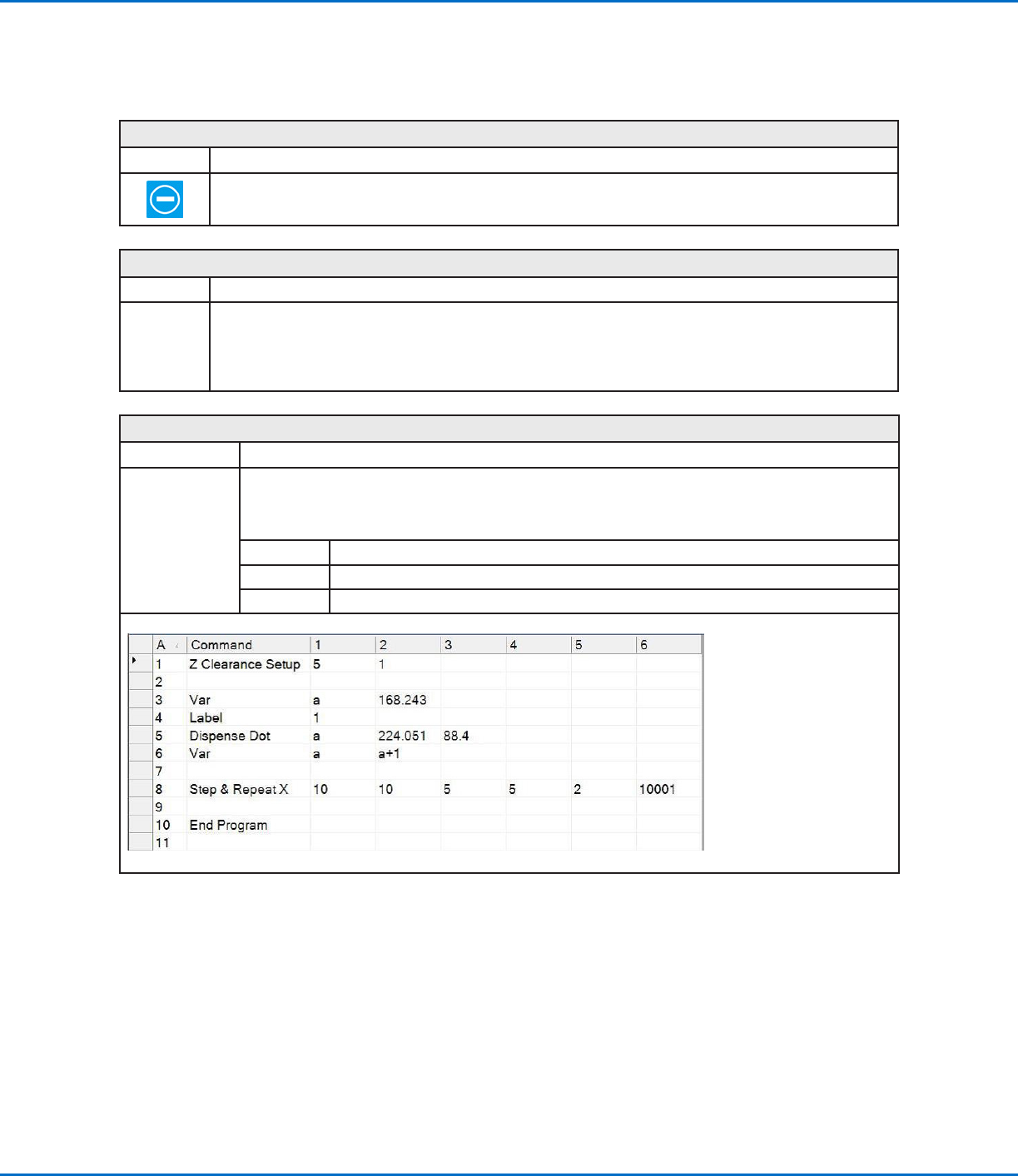
Allows a numeric value to be assigned to a symbol or character; once assigned, the symbol or character
can be used in a program in place of the numeric value. A set command can also be used to cause the
system to increase or decrease a coordinate by the assigned numeric value. Var can be used with the Find
Mark and Fiducial Mark commands.
Parameter Description
Symbol Enter the symbol or character that will represent the assigned Value
Value Enter the numeric value that the symbol or character represents
Example of a program that includes a Var command