Nordson_EFD_GV_Series_Operating_Manual - 第144页
GV Series Automated Dispensing Systems 144 www.nordsonefd.com info@nordsonefd.com +1-401-431-7000 Sales and service of Nordson EFD dispensing systems are available worldwide. # Click Step Reference Image 9 • Click TOGGLE…
GV Series Automated Dispensing Systems
143www.nordsonefd.com info@nordsonefd.com +1-401-431-7000 Sales and service of Nordson EFD dispensing systems are available worldwide.
# Click Step Reference Image
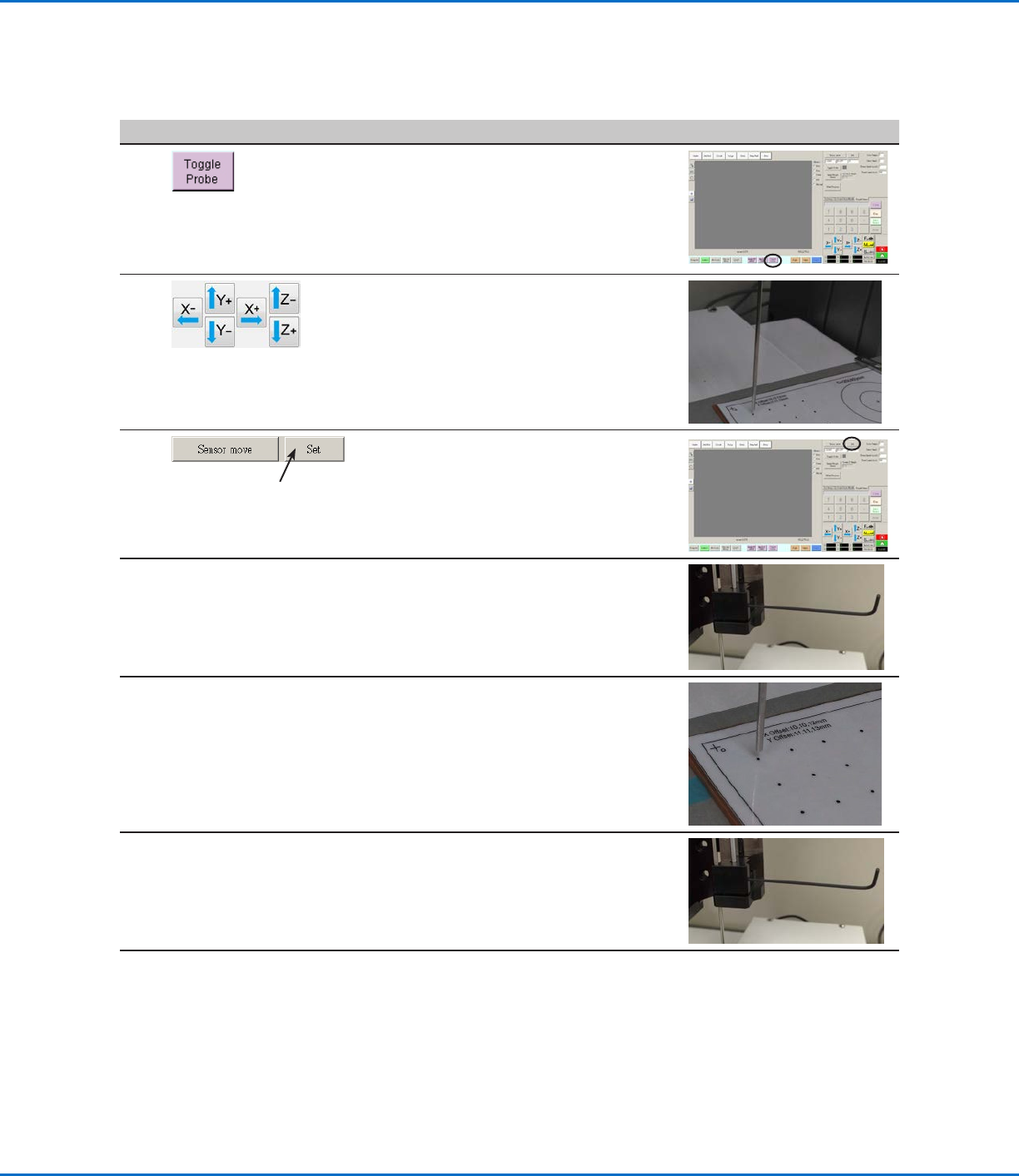
3
• Click TOGGLE PROBE.
The probe extends from the height sensor.
4
• Jog the tip to a suitable location on the
workpiece (an area that is open and will be
safe for the tip to touch) to test the height
sensor.
5
• Click SET next to Sensor Move.
6
• Use a 1.5 mm hex wrench to loosen the set
screw located inside the sensor block.
7
• Carefully grasp the probe with your fingers
and pull it down until the bottom of the
probe is about 10 mm above the workpiece.
8
• Tighten the set screw inside the sensor
block.
Continued on next page
Appendix F, Height Sensor Setup and Use (continued)
To Set Up the Height Sensor (continued)
GV Series Automated Dispensing Systems
144 www.nordsonefd.com info@nordsonefd.com +1-401-431-7000 Sales and service of Nordson EFD dispensing systems are available worldwide.
# Click Step Reference Image
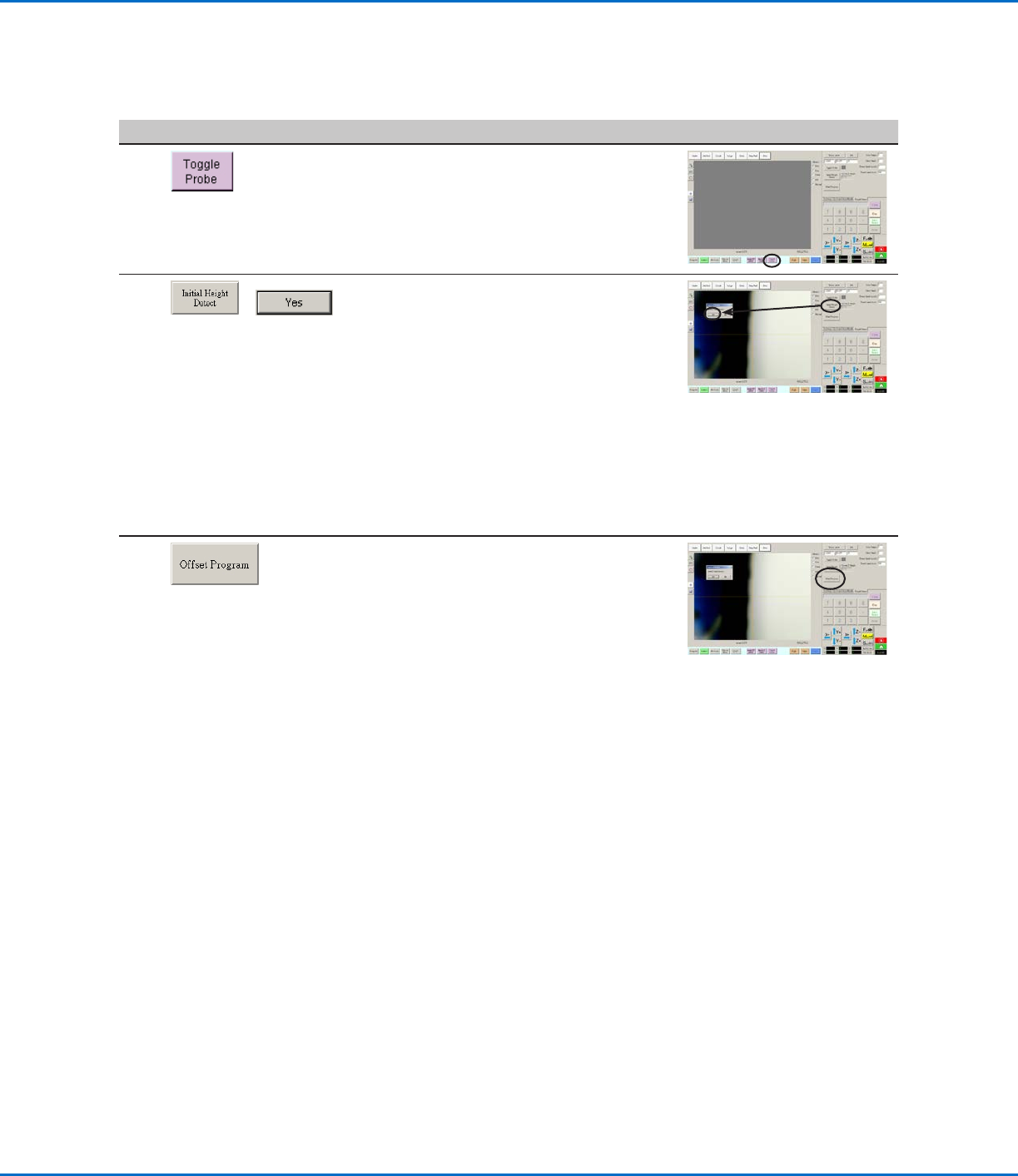
9
• Click TOGGLE PROBE to retract the probe.
10
>
• Click INITIAL HEIGHT DETECT, then click
YES to capture the Z height.
The height sensor probe touches the
workpiece surface and then shows the value
in the Current Z Height field.
The system is now ready for height sensor
detection. Do one of the following:
- Continue to the next step to update the
Z height values in the currently open
program.
- Continue to the next procedure in this
section to use this feature in a program.
11
• (Optional) To update the Z height values in
the currently open program, click OFFSET
PROGRAM.
The system checks the current Z height
by lowering and raising the probe. If the
detected Z height value is different from the
Z height values in the program, the system
prompts for confirmation to update the Z
height values. Click YES to accept the offset
value. The system automatically updates all
the Z height values in the program.
Appendix F, Height Sensor Setup and Use (continued)
To Set Up the Height Sensor (continued)
GV Series Automated Dispensing Systems
145www.nordsonefd.com info@nordsonefd.com +1-401-431-7000 Sales and service of Nordson EFD dispensing systems are available worldwide.
Appendix F, Height Sensor Setup and Use (continued)
To Use the Height Sensor Capability
PREREQUISITES
The system is properly set up. Refer to “Setting Up and Calibrating the System (Required)” on page48.
The height sensor is installed, enabled, and set up. Refer to “To Enable the Height Sensor” on page142 and to
“To Set Up the Height Sensor” on page142.
The program you want to edit using the height sensor capability is open.
# Click Step Reference Image
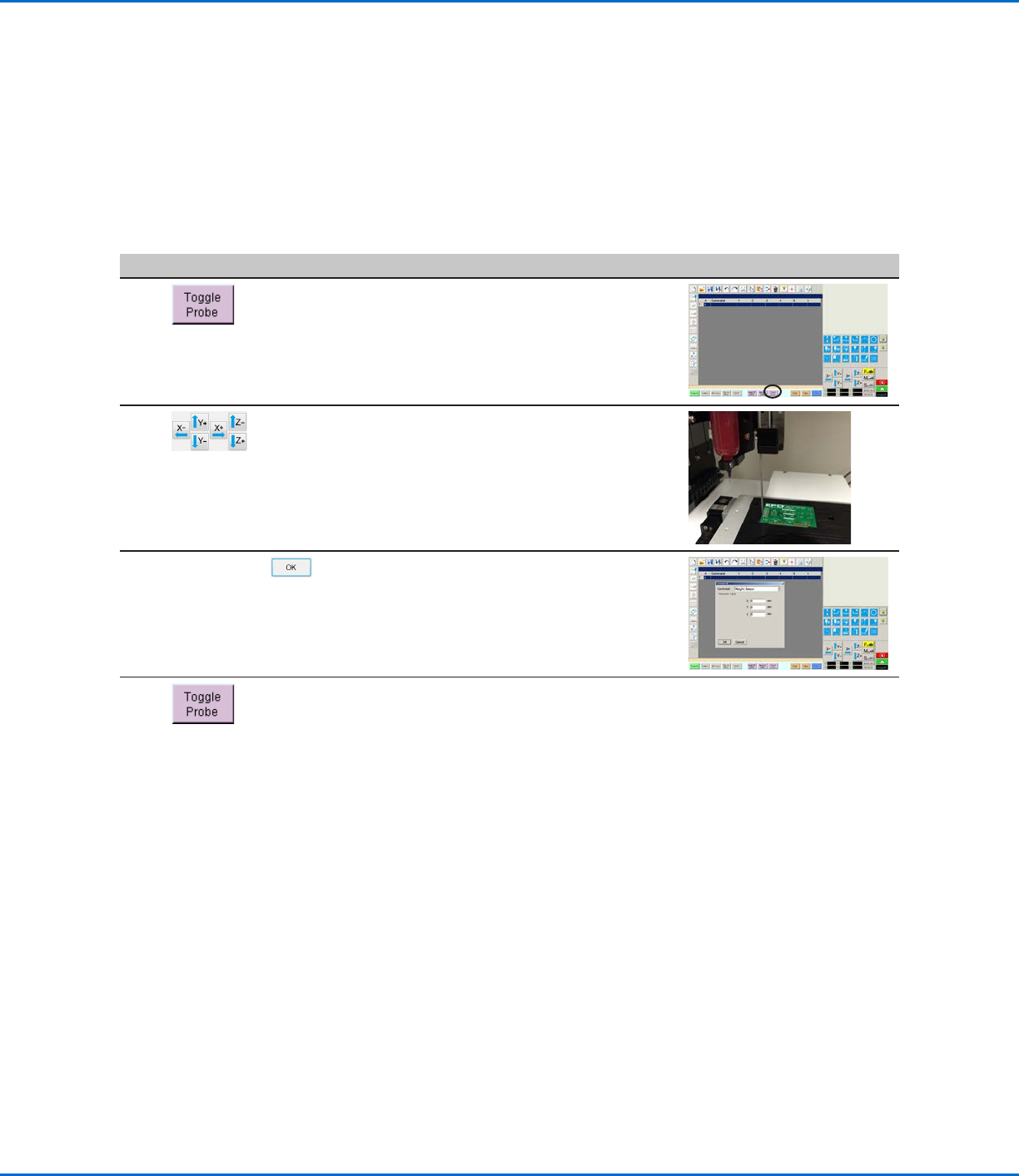
1
• Click TOGGLE PROBE.
The probe extends from the height
sensor.
2
• Jog to the location where the system
should check the height for each
workpiece.
• Use the Z jog keys to lower the
probe to approximately 10 mm (0.4")
above the target location on the
workpiece.
3
HEIGHT SENSOR >
• Double-click the address row where
you want to insert a Height Sensor
command and then select HEIGHT
SENSOR from the drop-down menu.
• Click OK to accept the XYZ values.
4
• Click TOGGLE PROBE to retract the
probe.
The system will now check the
workpiece height each time the
programs runs.