00198168-02_Technical_Training_TX-Series_EN.pdf - 第235页
10 Station Software Overviews 10.1 Station Software Start Page Overview Technical Training SIPLACE TX-Series 10/2016 235 10 Station Software Overviews 10.1 Station Software Start Page Overview Station GUI Main Overview T…

9 Control and Communication
Room for Your Sketches and Notes
234 Technical Training SIPLACE TX-Series 10/2016
10 Station Software Overviews
10.1 Station Software Start Page Overview
Technical Training SIPLACE TX-Series 10/2016 235
10 Station Software Overviews
10.1 Station Software Start Page Overview
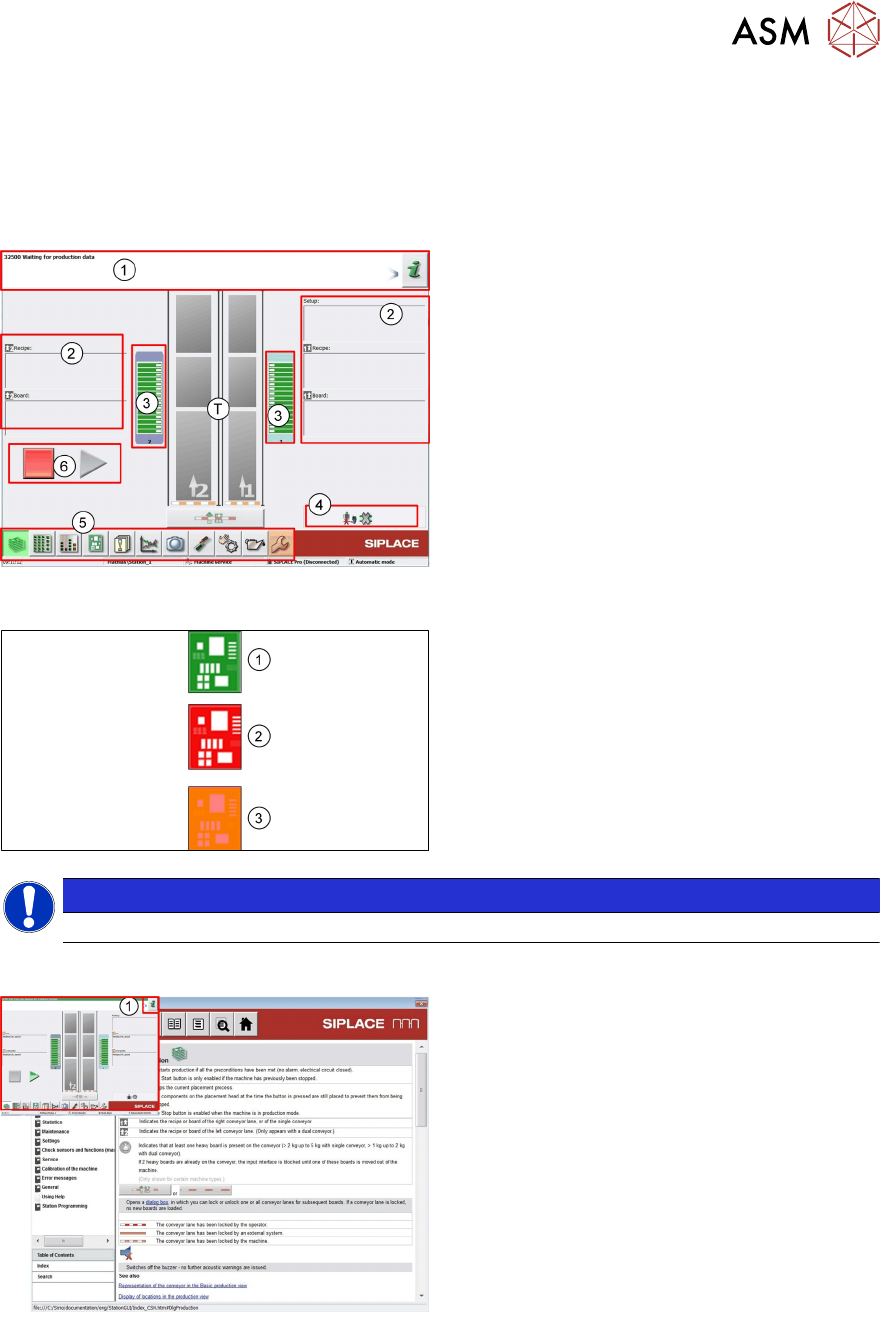
Station GUI Main Overview
T - Machine Conveyors
1. Information/Action bar. Machine Status
2. Product and setup information for transport
1 and 2
3. Feeder Table Status
4. Machine options and settings information
5. Machine Main Icons
6. Start / Stop buttons
Icon Color Meaning
1. If the icon is green then the machine is OK.
2. If the icon is red then the machine has a
problem and is no longer producing.
Action is required.
3. Orange means that the machine has a
problem but is still producing.
NOTICE
The colors of the icons in the GUI have a very clear meaning and should not be ignored.
Station GUI Help File
●
Click (1) in main or sub manual, "Help"
window will be opened.
●
The help file gives detailed error
information plus information on the
machine calibrations and settings.
●
The help file also explains the meaning of
the various icons displayed.
10 Station Software Overviews
10.2 Overview Station Software Main Menus
236 Technical Training SIPLACE TX-Series 10/2016
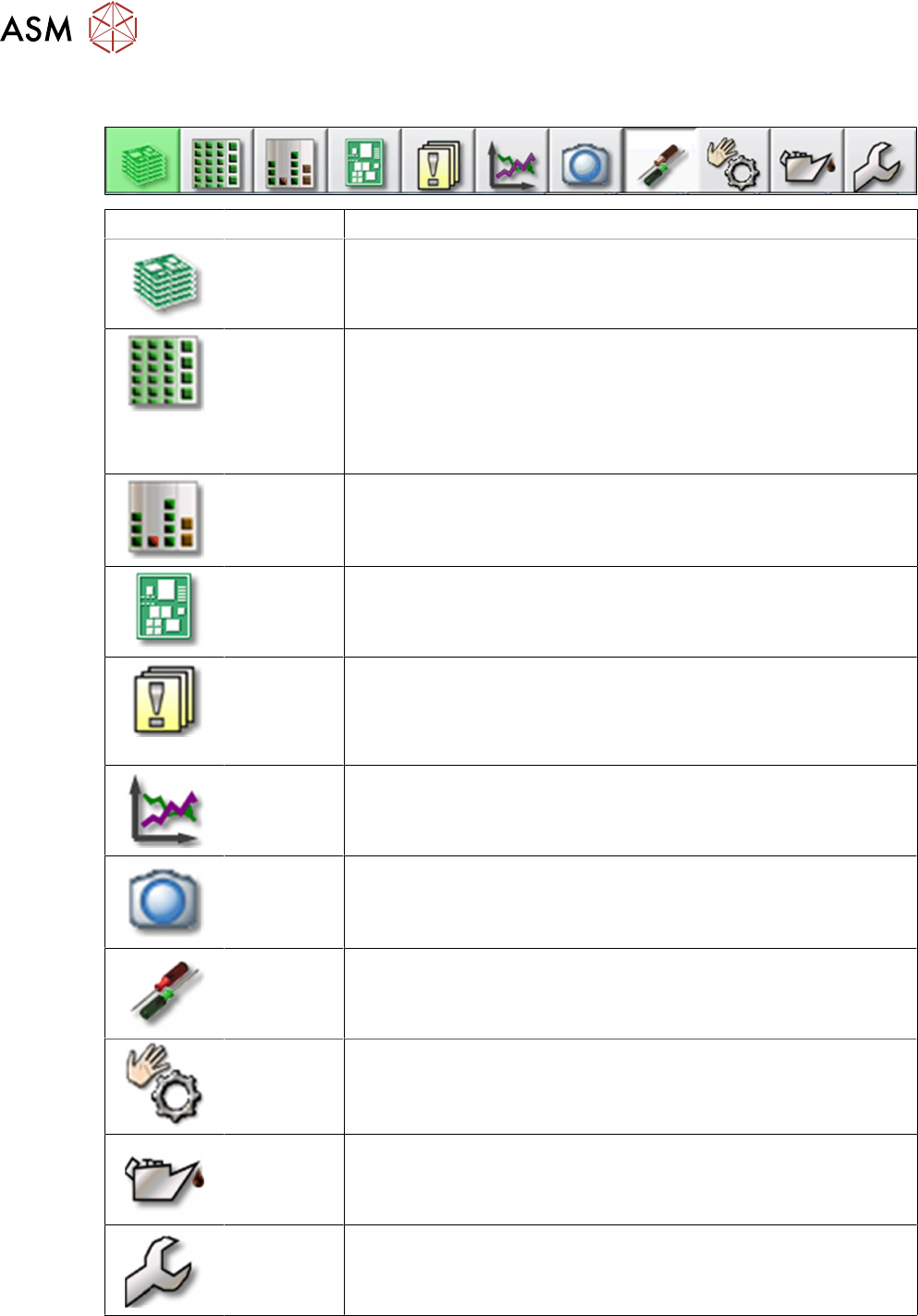
10.2 Overview Station Software Main Menus
Icon Description
Main
Operating
View
●
Production information
●
Production status
Locations
and Feeders
●
Checks and configures feeders and nozzles configuration.
●
Displays deactivated feeders and omitted feeders
●
Teaches component shapes and component pocket shapes
●
Modifies tray descriptions
●
Sets glue parameters
Component
filling levels
Displays and edits Component filling levels
PCB
Information
●
Displays and edits boards and placement positions list
●
Teaches fiducials
Messages
●
Displays notifications about current and previous events
●
Individual tables can be viewed for track errors, conveyor
errors, machine errors, general errors and linked errors
●
Displays the saved vision dumps
Performance
data
●
Shows the statistics for board and machine performance
●
Starts the OIS (Operator Information System)
Live image
●
Displays the individual live camera images
●
Views and saves the Vision dump
Settings and
Options
●
Checks & sets machine settings and GUI
●
Sets the activity level and the user interface language
●
Displays and edits the machine options and software options
Sensors and
functions
●
Information and functions for tests and diagnoses
●
Sets the behavior of start button, starts overall reference run
●
Single machine and head functions and endurance runs
Maintenance
●
Executes machine maintenance
●
Displays head statistics data
●
Head verification software
Calibration
and
configuration
●
Conducts Calibrations
●
Configures and upgrade machine
●
Backs up and restores machine data