00198168-02_Technical_Training_TX-Series_EN.pdf - 第240页
10 Station Software Overviews 10.5 Machine Settings and Options Overview 240 Technical Training SIPLACE TX-Series 10/2016 10.5 Machine Settings and Options Overview 1. Machine settings: control mode, automatic compressed…
10 Station Software Overviews
10.4 Editing a board with the station software
Technical Training SIPLACE TX-Series 10/2016 239
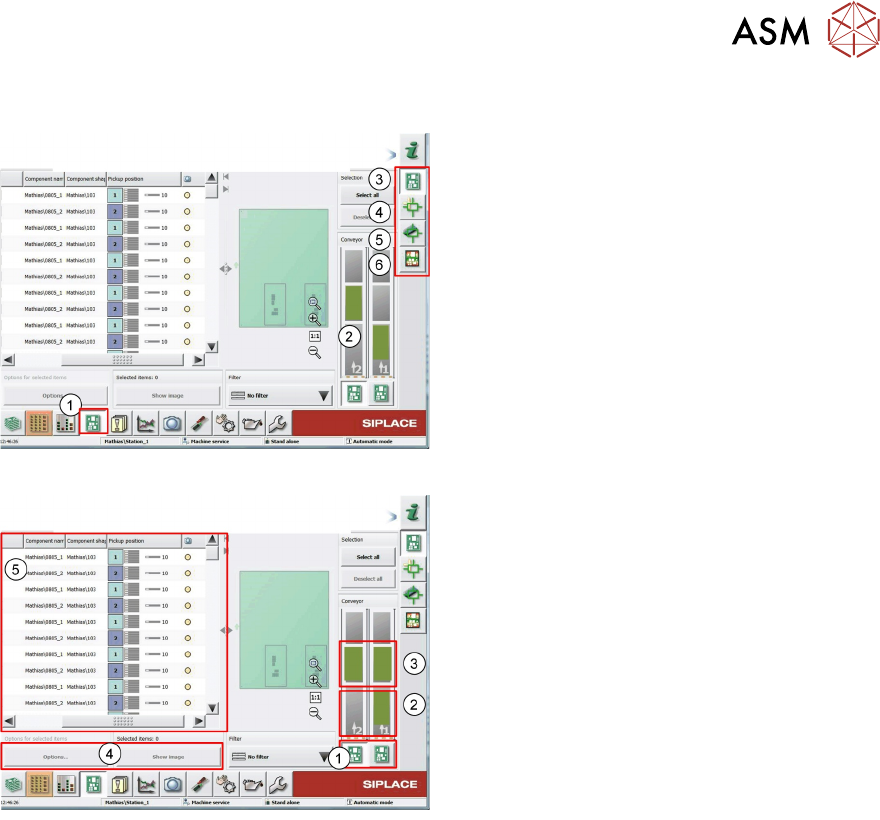
10.4 Editing a board with the station software
1. Select PCB editor to change or check
placement data
2. Active PCB
3. Display placement List skip components,
4. Check and teach fiducials
5. Check/change placement position and
upload to SIPLACE pro Server
6. Show Board height after placement
To edit a board click on a Board image.
1. If selected all changes are effective for all
boards
2. If selected all changes are effective only
for current board
3. Setting is effective for selected board and
PCB camera can be move to this position
to check placement
4. Select position in placement list
5. Modify “options” skip or place selected
position and change when to save vision
data
10 Station Software Overviews
10.5 Machine Settings and Options Overview
240 Technical Training SIPLACE TX-Series 10/2016
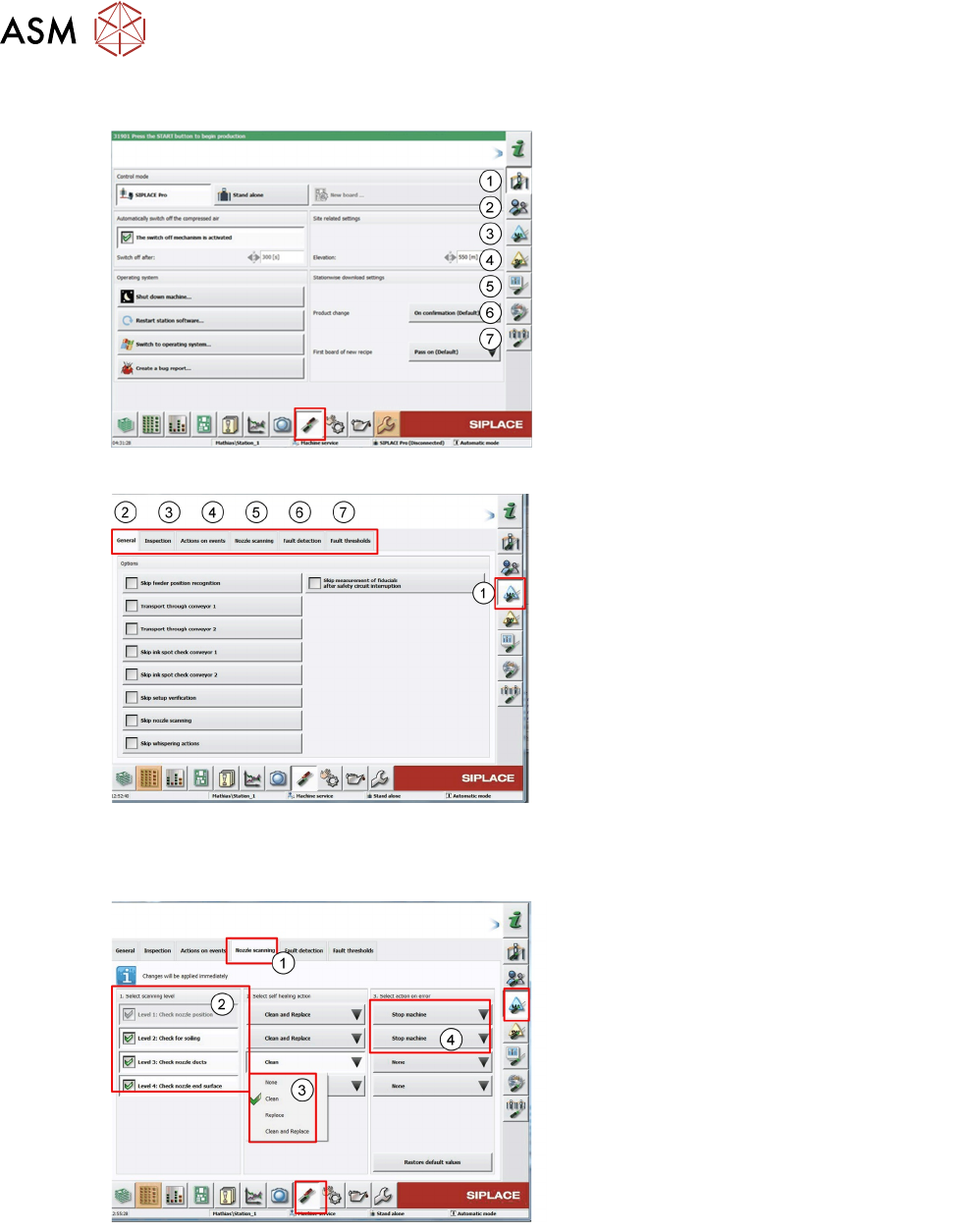
10.5 Machine Settings and Options Overview
1. Machine settings: control mode, automatic
compressed air control, shut down, bug
report
2. User setting/access
3. Machine option setting
4. Software setting
5. GUI setting
6. Summary of connected client
7. Show neighbor machine
1. Here machine behavior for certain events
can be configured.
2. Skip functions can be activated (testing)
3. Activation of PCB inspection after
placement depending on machine event
4. Setting for action to be taken for set error
numbers (automatic Bug Report)
5. Configuration of nozzle scanning option
and actions to be taken in the event of a
soiled nozzle
6. Additional check and tolerance after fault
detection(automatic feeder pitch detection)
7. Threshold setting for pickup error and
vision error
Example for configuring nozzle scanning
option.
1. Nozzle scanning tab
2. Nozzle scanning type (level)
3. Self healing action after nozzle scan fault
4. Action after nozzle scanning error
(healing action cannot repair problem)
Option selected depends on nozzle type,
factory environment, production changeover
frequency.
10 Station Software Overviews
10.6 Machine Software Options Overview
Technical Training SIPLACE TX-Series 10/2016 241
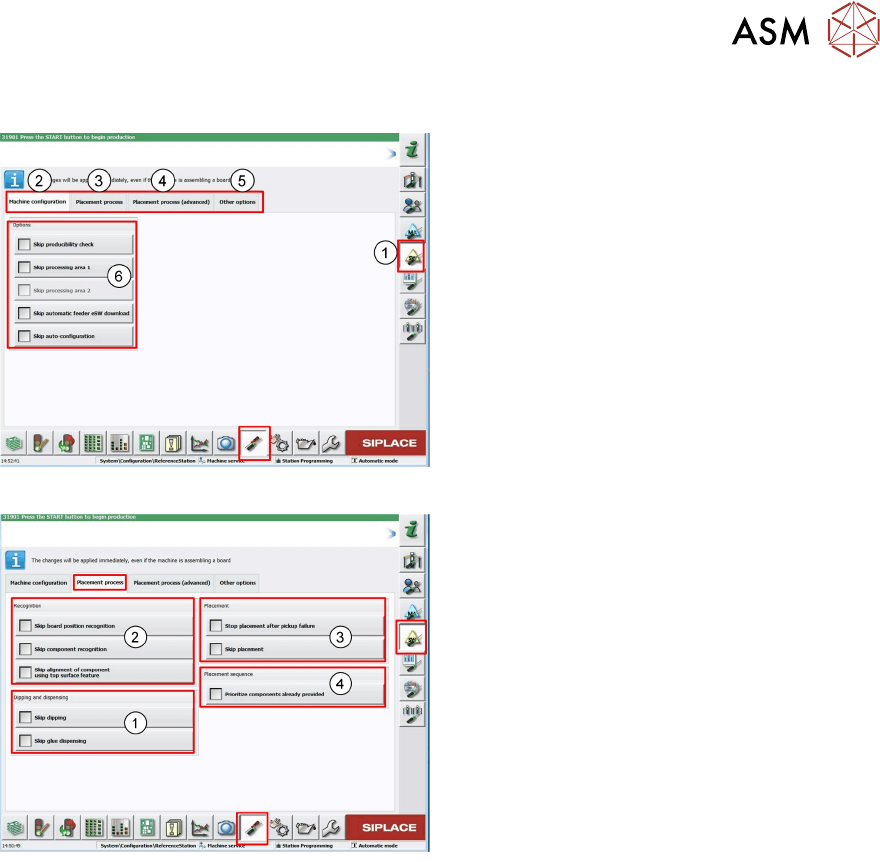
10.6 Machine Software Options Overview
1. Machine Software Options main menu
2. Configuration menu
3. Placement process (machine behavior
during placement)
4. Advanced Placement process (simulation
placement
5. Other options (deactivation machine
configuration checks)
6. Skip actions used mainly for test
1. Skip the dipping and glue dispensing
process
2. Skip fiducial and component recognition
with Vision system, only for test run
(e.g. board with foil), also the precise posi-
tion determination for top surface features
(e.g. LED components) can be skipped
3. Setting for placement, here you can skip
placement on the board means pass
through mode
4. Setting for prioritization of the tray