00198168-02_Technical_Training_TX-Series_EN.pdf - 第242页
10 Station Software Overviews 10.7 Maintenance GUI 242 Technical Training SIPLACE TX-Series 10/2016 10.7 Maintenance GUI 10.7.1 General Maintenance GUI The Maintenance GUI contains 3 maintenance functions: preventive mai…
10 Station Software Overviews
10.6 Machine Software Options Overview
Technical Training SIPLACE TX-Series 10/2016 241
10.6 Machine Software Options Overview
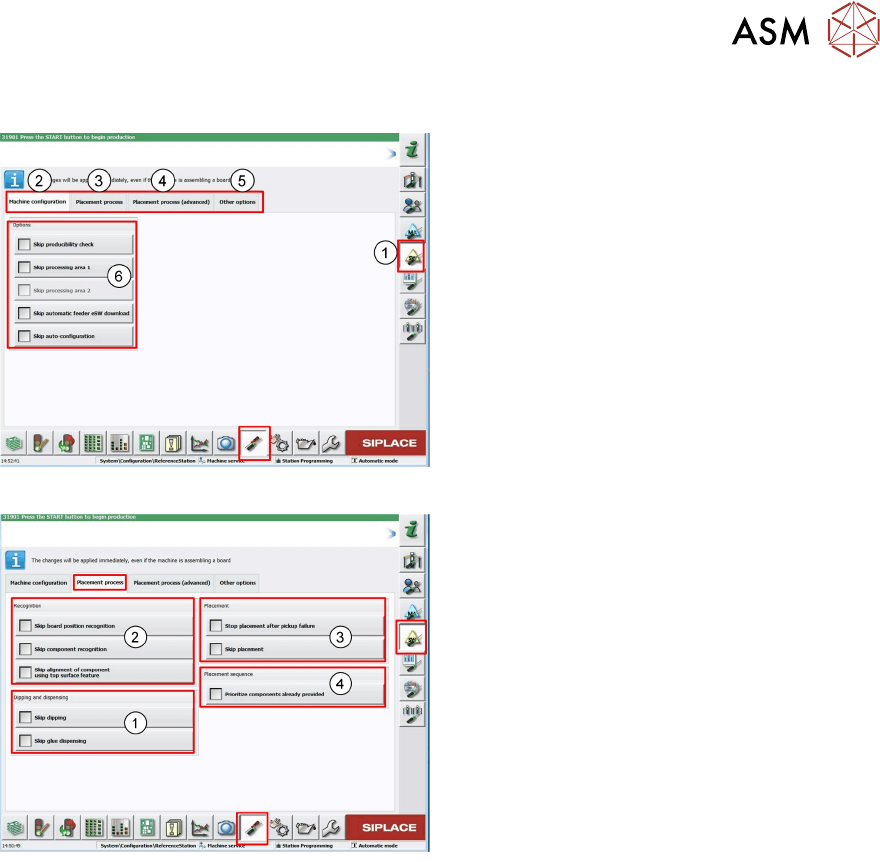
1. Machine Software Options main menu
2. Configuration menu
3. Placement process (machine behavior
during placement)
4. Advanced Placement process (simulation
placement
5. Other options (deactivation machine
configuration checks)
6. Skip actions used mainly for test
1. Skip the dipping and glue dispensing
process
2. Skip fiducial and component recognition
with Vision system, only for test run
(e.g. board with foil), also the precise posi-
tion determination for top surface features
(e.g. LED components) can be skipped
3. Setting for placement, here you can skip
placement on the board means pass
through mode
4. Setting for prioritization of the tray
10 Station Software Overviews
10.7 Maintenance GUI
242 Technical Training SIPLACE TX-Series 10/2016
10.7 Maintenance GUI
10.7.1 General Maintenance GUI
The Maintenance GUI contains 3 maintenance functions: preventive maintenance, predictive
maintenance and verification. The maintenance GUI is structured to allow quick and easy carrying
out of maintenance, troubleshooting and verification tasks.
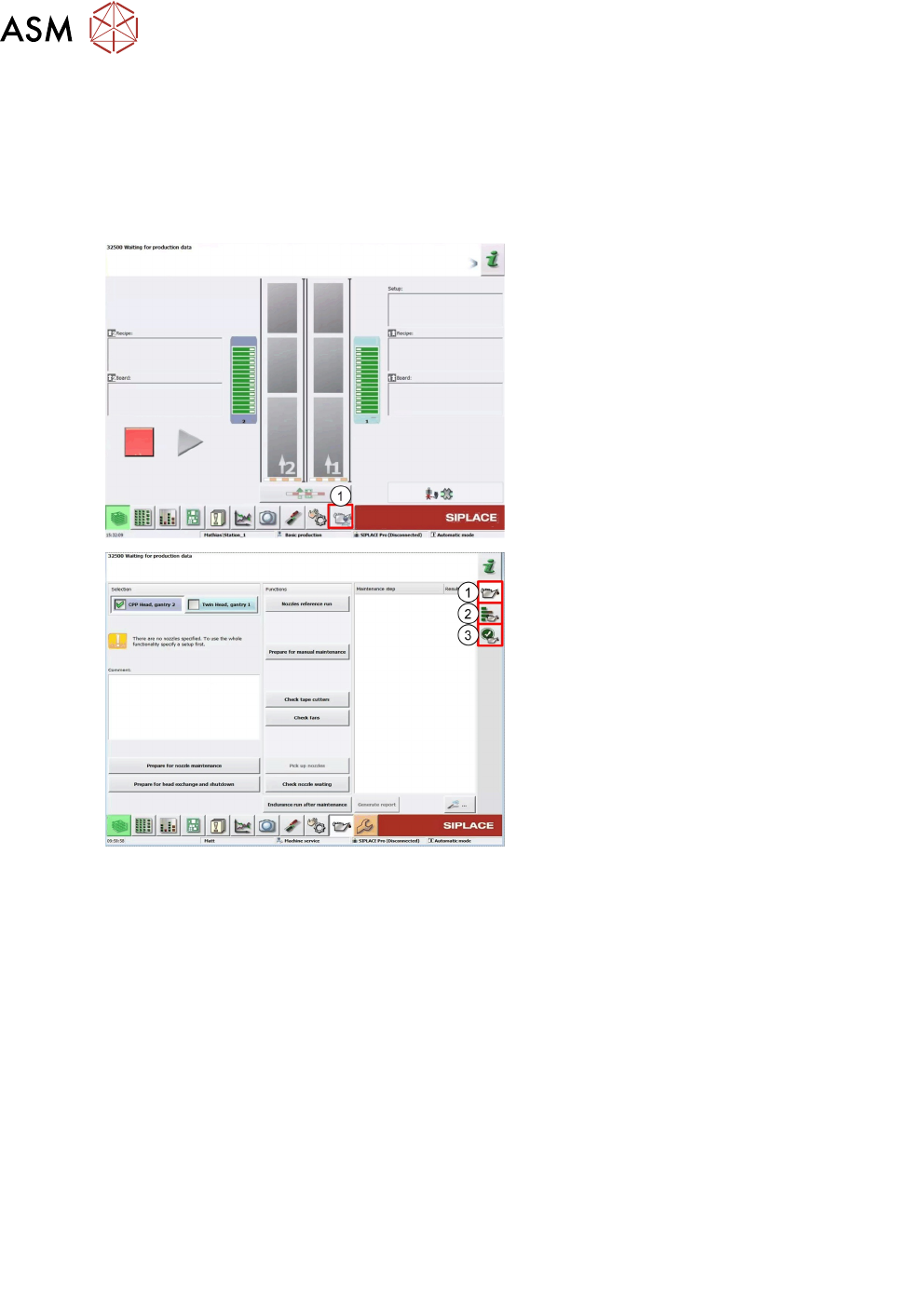
1. Access Maintenance GUI
1. Preventive
2. Predictive
3. Verification
User Level:
1. "Operator"
2. "Machine Service"
3. "Advanced production"
10.7.2 Preventive Maintenance
In order to perform maintenance efficiently four maintenance workflows have been defined
combining the individual steps to form an efficient sequences of tasks to be performed.
Maintenance workflows
Each workflow is supported with a document (Job Card), which guides you efficiently through the
maintenance work. Each task is explained in detail and illustrated with clear diagrams and the
maintenance GUI supports the workflows.
●
Workflow 1: Weekly maintenance tasks.
●
Workflow 2: Combination of weekly and 3-monthly maintenance tasks.
●
Workflow 3: Combination of weekly and 6-monthly maintenance tasks.
●
Workflow 4: Combination of weekly and 12-monthly maintenance tasks.
Planning workflows
Example for the frequency of individual workflows over a period of one year.
●
Workflow 1: 45 times / year
●
Workflow 3: 2 times / year
●
Workflow 2: 4 times / year
●
Workflow 4: 1 time / year
10 Station Software Overviews
10.7 Maintenance GUI
Technical Training SIPLACE TX-Series 10/2016 243
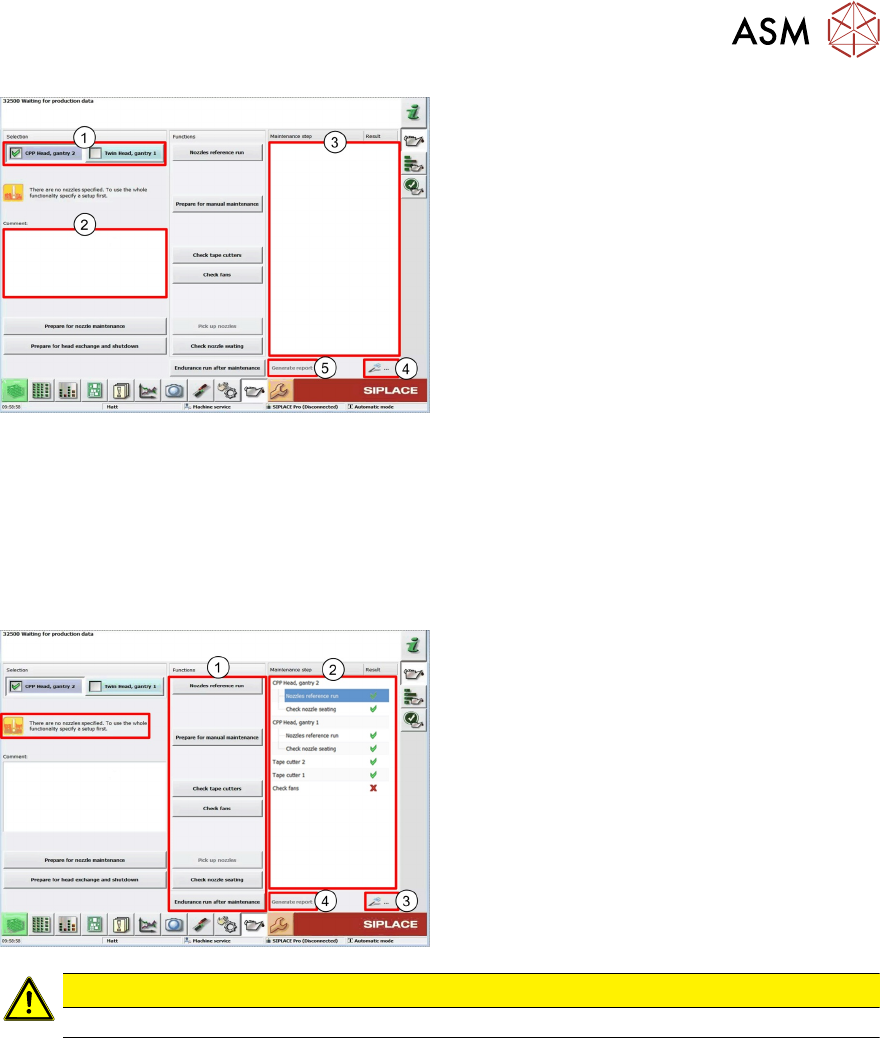
General function:
1. Select Head, Location, Gantry
2. Comments field for reports
3. Show the result of each function
4. Show the details for the selected function
in the result window
5. Report* with results and details of the
function which was carried out
* The Reports will be save on the station computer and transfer via the SW Line diagnostic to the
SIPLACE Pro computer.
Storage Location
Station: C:\Sirio\Work\MaintenanceReports
SIPLACE Pro: C:\MaintenanceReports
User Level "Operator"
1. Maintenance machine functions
2. Shows the result of each function
3. If an error occurs, the detail button shows
more information
4. The report shows all results with details
CAUTION
The machine required a recipe to carry out the preventive maintenance steps.