00193891-0702_AI_LP_Barcode_DE+EN.pdf - 第218页
2 PCB barcode scanner assembly instructions SIPLACE 2.11 PCB barcode scanner configuration 10/2009 Edition 218 2.1 1 PCB barcode scanner configuration 2.1 1.1 General notes about the barcode T oday , increasing numb ers …
SIPLACE 2 PCB barcode scanner assembly instructions
10/2009 Edition 2.10 Software configuration
217
2.10 Software configuration
2.10.1 Activation in the SITEST program
: Start SITEST.
: Se
lect "Settings" --> "Machine Configuration".
: Set th
e PCB barcode conveyor track X to "default" according to the machine configuration.
: Clic
k on "Accept" twice and restart the machine.
2.10.2 Activate in SIPLACE PRO
: Start SIPLACE PRO.
: Se
lect "Properties" --> "Station" --> "PCB barcode".
: Clic
k on the "Line" button.
: Sel
ect "Properties" --> "Barcode scanner position".
: Sele
ct the barcode scanner position (top or bottom) for the conveyor track.
2 PCB barcode scanner assembly instructions SIPLACE
2.11 PCB barcode scanner configuration 10/2009 Edition
218
2.11 PCB barcode scanner configuration
2.11.1 General notes about the barcode
Today, increasing numbers of components, individual components, semi-finished and end prod-
ucts are being uniquely identifed with a barcode, whic
h makes them easier to check. This, in turn,
makes it easier to control production, stock-keep and to trace components in the event of errors.
Both one-dimensional (1D, e.g. barcodes) and two-dimensional (2D, e.g. data matrix codes)
codes can be used.
2.11.2 Structure of 1D barcodes
Barcode types include 2/5 interleaved, Codabar, Code 39, Code 128, EAN 8, EAN 13 for industrial
applications.
The 1D barcode scanner reads the barcode using a red light laser diode and a rotating mirror
whee
l, which creates a red scanning line that is visible to the human eye.
The structure of a barcode, the nu
mber of black lines and white gaps for each character to be
coded is fixed for each barcode type. The information is located in both the lines and the gaps of
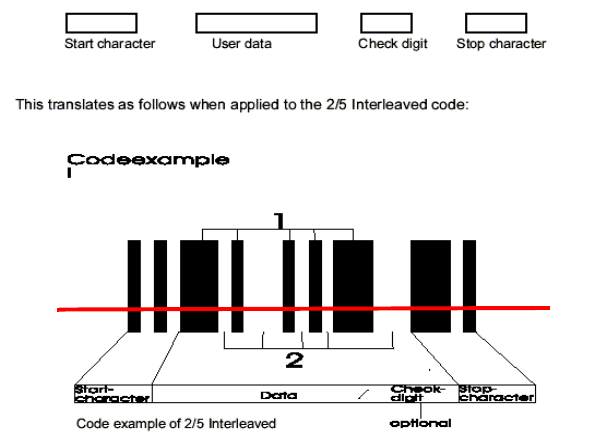
a barcode but, in general, the following structure can be defined for a barcode.
Fig. 2.11 - 1 Structure of a 1D barcode
Advantages: - up to 50 characters can be encoded, depending on the type of code.
- barcodes can be read and scanned very re
liably with the optical scanning system
- barcodes are cheap to produce
- barcode scanners are very cheap to buy
SIPLACE 2 PCB barcode scanner assembly instructions
10/2009 Edition 2.11 PCB barcode scanner configuration
219
Disadvantages: - the print quality of a barcode on the labels is a decisive factor in the scanning
result.
2.11.3 Structure of 2D barcodes
Barcode types: 2
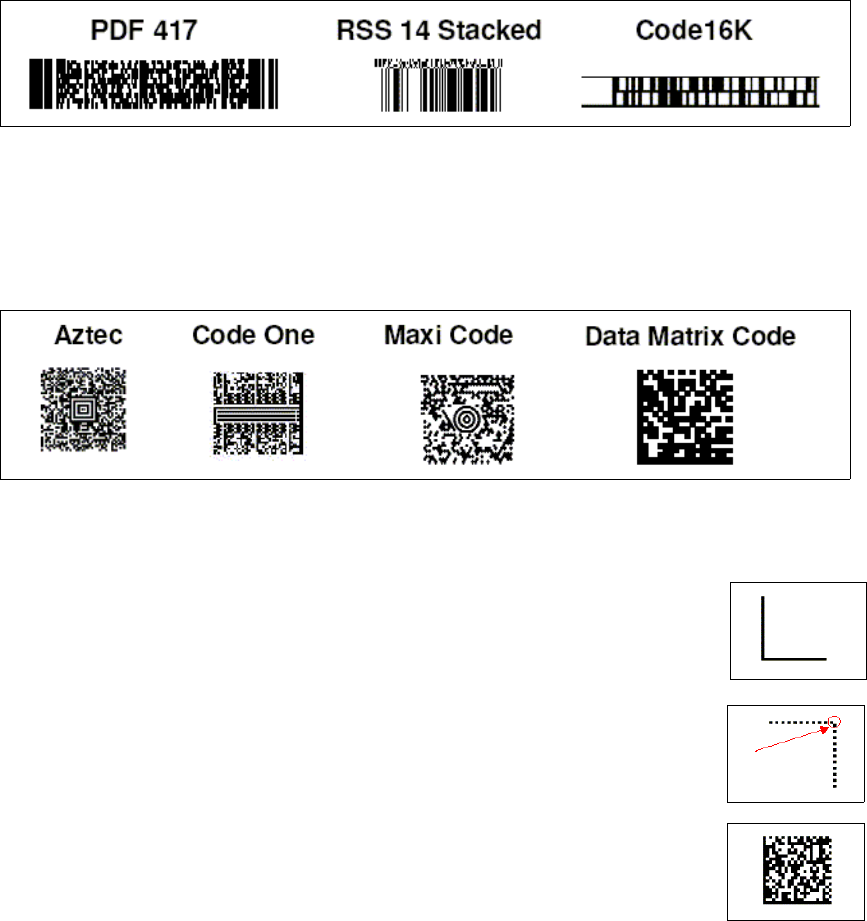
1. "Stacked" codes. These are essentially one-dimensional barcodes that are printed directly over
one another. Typical stacked barcodes include the PDF 417, RSS-14 Stacked and the 16K.
Fig. 2.11 - 2 Stacked barcodes
2. 2D barcodes, known as "matrix codes“ are another variant of the 2D barcodes. Again there are
various types commonly used, such as Aztec code, Maxi code, Code One and the data matrix
code.
Fig. 2.11 - 3 2D barcodes
Data matrix code: The data matrix code consists of 4 main components. 2
1. The fixed dividing line ('corner’). This fixed dividing line
is used for pattern recognition and to calculate the rotary
position of the data matrix code.
2. The non-closed border (opposite corner). This
open corner is used to identify the number of lines and gaps.
This is known as the "matrix density“.
On the ECC 200, the
element in the top right-hand corner is white.
3. The storage area. This contains th
e binary information in coded
form. Depending on the cell size, it also defines the number of possible
items of information.