SiplaceProInstall_eng.pdf - 第11页
2 S yst em com pon en ts an d conf ig ura tions II nsta llat ion Manu al Edi tio n 05/ 200 9 US SIPLACE Pro 7.0 9 2 Syste m compo nent s and confi gurations 2. 1 O verv iew of sy stem c ompon en t s A complete in st a ll…

Installation Manual 1 Introduction
SIPLACE Pro 7.0 Edition 05/2009 US
8
Note:
Windows Server 2000/W2K is not longer supported. This means that SIPLACE Pro 5.x and higher
versions are not compatible to Windows 2000/W2K. Therefore please make sure that you up-
grade your Windows Server 2000/W2K system to Windows 2003, Windows XP or Windows Vista.
SIPLACE Pro 5.2 is compatible with Windows Vista SP1. 1
1
2 System components and configurations IInstallation Manual
Edition 05/2009 US SIPLACE Pro 7.0
9
2 System components and configurations
2.1 Overview of system components
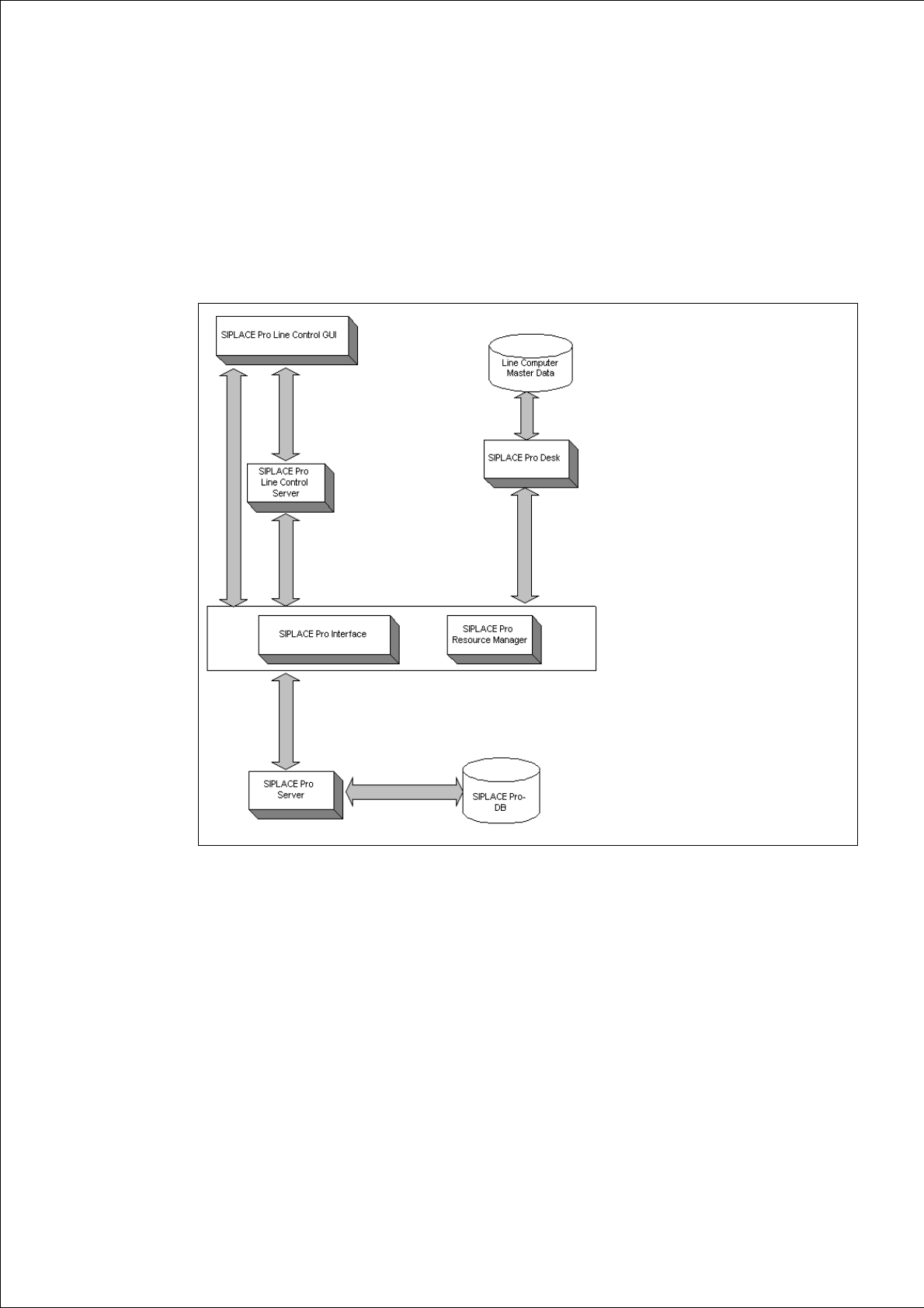
A complete installation of SIPLACE Pro consists of the following components. 2
2
Fig. 2 - 1 Overview of SIPLACE Pro system components
Æ Please read the documents "Configurations for SIPLACE Pro" and "Navigation Guide for the
Installation Procedure of SIPLACE Software Systems". You will find the documents on the
Installation CD for SIPLACE Pro (Folder "Documentation") and the Support Media DVD (Art.
No. 00383100-xx) that is added to any software product.
Installation Manual 2 System components and configurations
SIPLACE Pro 7.0 Edition 05/2009 US
10
2.2 System configurations
There are various configurations for the SIPLACE Pro installation depending on your production
environment. 2
2.2.1 "Stand alone" configuration
Install all software components on one computer. This computer then functions as both server and
client. If installing on one computer, we recommend using a computer with at least 512 MB disk
space; a high-performance computer is advantageous. 2
2.2.2 "Client/Server" configurations
If installing on separate computers, you work with one computer as the dedicated server and one
or more other computers as clients. 2
Example of a client/server configuration:
MS SQL Server, SIPLACE Pro Database, Line Control Server and SIPLACE Pro Server are in-
stalled on the server computer. One or more clients can work with this server computer. SIPLACE
Pro Desk, SIPLACE Pro Interface and Line Control GUI are installed on the client computers. 2
Note
This configuration is not mandatory. For example, you can also install Line Control Server on a
client computer or a separate computer.
It is also possible to change the configuration subsequently. 2
Warning:
Installation on separate computers cannot be performed via the network. Install the individual
components on separate computers by calling up the setup function for the components locally on
each destination computer. 2