SPF维修.pdf - 第29页
SPF 2.1 Installation Procedure SERVICE MANUAL 2.1−4 D54SEC−1 1−040−C0 2.1.4 Safety Check for Factory Power Connections Power wire check Before supplying the power from the factory , visually check that the wire insulatin…

2.1 Installation Procedure
SERVICE MANUAL
SPF
2.1−3
D54SEC−11−040−C0
7. Place the levels in the designated positions on the machine.
=REMARKS=
Make sure that the levels are calibrated.
8. Adjust all other legs, and check that the machine is still leveled.
9. Tighten all legs with locknuts and check that machine is still leveled. (Check that there are no floating
legs.)
2.1.3 Accessories, Power Supply, Air Attachments
Accessories, power supply, air attachments
1. Attach accessories (camera monitor, sub control panel, signal tower, etc.).
2. Connect the air hose to the machine body at the primary side and check the air pressure with main
regulator unit.
=Specification=
Air pressure : 0.49 MPa ( 5 kgf/cm
2
)
=REMARKS=
Remove the oil, dirt, etc. from inside of pneumatic tubing before connecting it.
3. Connect the power supply to the machine transformer at the primary side.
=Specification=
Voltage : Within AC 100 V ± 5 % (1−phase)
Within AC 200 V ± 5 % (3−phase)
4. Check the ground.
=REMARKS=
Make sure that the main breaker at the primary side turn [OFF] when-3−phase is changed the
phase.
SPF
2.1 Installation Procedure
SERVICE MANUAL
2.1−4
D54SEC−11−040−C0
2.1.4 Safety Check for Factory Power Connections
Power wire check
Before supplying the power from the factory, visually check that the wire insulating sheath has no
damage nor degradation (crack, flaw and others).
Measurement of insulation resistance of the machine
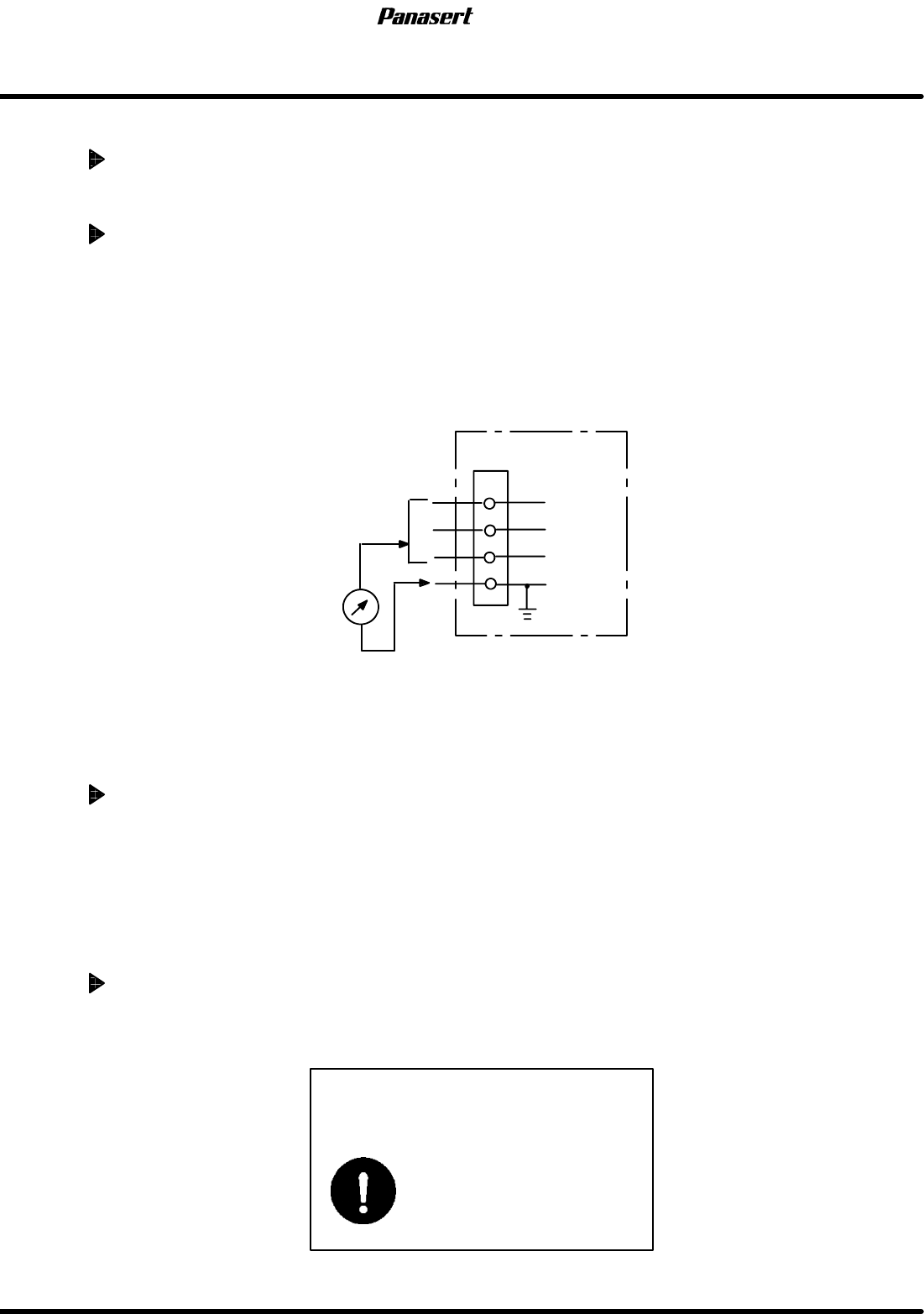
Measure the insulation performance (insulation resistance) of the machine by following the procedure
shown below before connecting the factory power and make sure that it is 5 MW or more.
1. Prepare a measuring instrument of insulation resistance tester which has the capacity of DC500 V
(common name: megger).
2. Make measuring terminal of insulation resistance tester have short circuit and make sure that it is 0 W.
3. Turn ON the machine breaker, the external transformer breaker, the machine power switch, the
external transformer power switch and others.
4. Measure the insulation resistance between the machine power wire and the ground wire (PE wire).
Insulation resistance tester
(Megger)
T
The terminals R, S and T
should be connected.
S
PE
R
Machine
=CHECK=
When the voltage regulator is connected between the machine and factory power, measure the
insulation performance of voltage regulator in the same way as the machine.
When the insulation performance is out of the criteria
1. Turn OFF the switch which is the farthest from the power side and check the change of the insulation
resistance.
2. Point out the position where the insulation resistance has a big change and check unit/wiring in detail.
Repair the wire if there are some faults.
3. When the problem persists even after re−wiring, component/unit may be defective. Exchange or repair
the component/unit.
Checks after factory power connection
1. Tell the customers to ask the electrical facility specialist (maintenance provider), who have a contract
with the customers, to measure the insulation performance.
Always shut OFF the machine
power switch before performing
wiring.
There is the possibility of
electric shock.
2.1 Installation Procedure
SERVICE MANUAL
SPF
2.1−5
D54SEC−11−040−C0
2.1.5 Safety Operation Check
DC power supply voltage check
1. Turn the power [OFF] and check the electric connections within the P783. (Make sure that they are
tight and without slack.)
2. Check the P783 DC power supply voltage with a tester.
=Specification=
Tolerance value : + 5V : + 5.00 to + 5.25V
+12V : +12.00 to +12.60V
−12V : −12.00 to −12.60V
+15V : +15.00 to +15.75V
−15V : −15.00 to −15.75V
3. Check the 24V voltage of optical module.
=Specification=
24V voltage : 23.5 to 25.5V
Safety limit operation check
1. Turn “SERVO MOTOR” on the main control panel [ON] and turn the power [ON].
2. Open the back side cover. (One of the lower covers)
=REMARKS=
There is AC servo driver.
3. Move the stage manually in the Y axis (+), (−) directions until it touches the mechanical stopper. Check
the ST axis driver must display the error No. ’38’.
4. Do the same adjustment to SQ axis (+), (−) directions , CY axis (+), (−) directions and CX axis (+), (−)
directions as the Y axis.
=HINT=
The machine must be turned [OFF] then [ON] to clear the error No.’38’ from the drivers between
the (−) and (+) limits.