00192216-01.pdf - 第51页
SIPLACE 80 S-20 / S-23HM/ F4 / F4-6 / F5 2 Retrof itting Instructions for Ceramic S ubstrate Centering Unit (Optional) 04/2000 Issue 2.4 Sequence of Retrofitting 51 Fig. 2.4.3 Assembling Holddowns, Guide Rails, Centering…

2 Retrofitting Instructions for Ceramic Substrate Centering Unit (Optional) SIPLACE 80 S-20 / S-23HM/ F4 / F4-6 / F5
2.4 Sequence of Retrofitting 04/2000 Issue
50
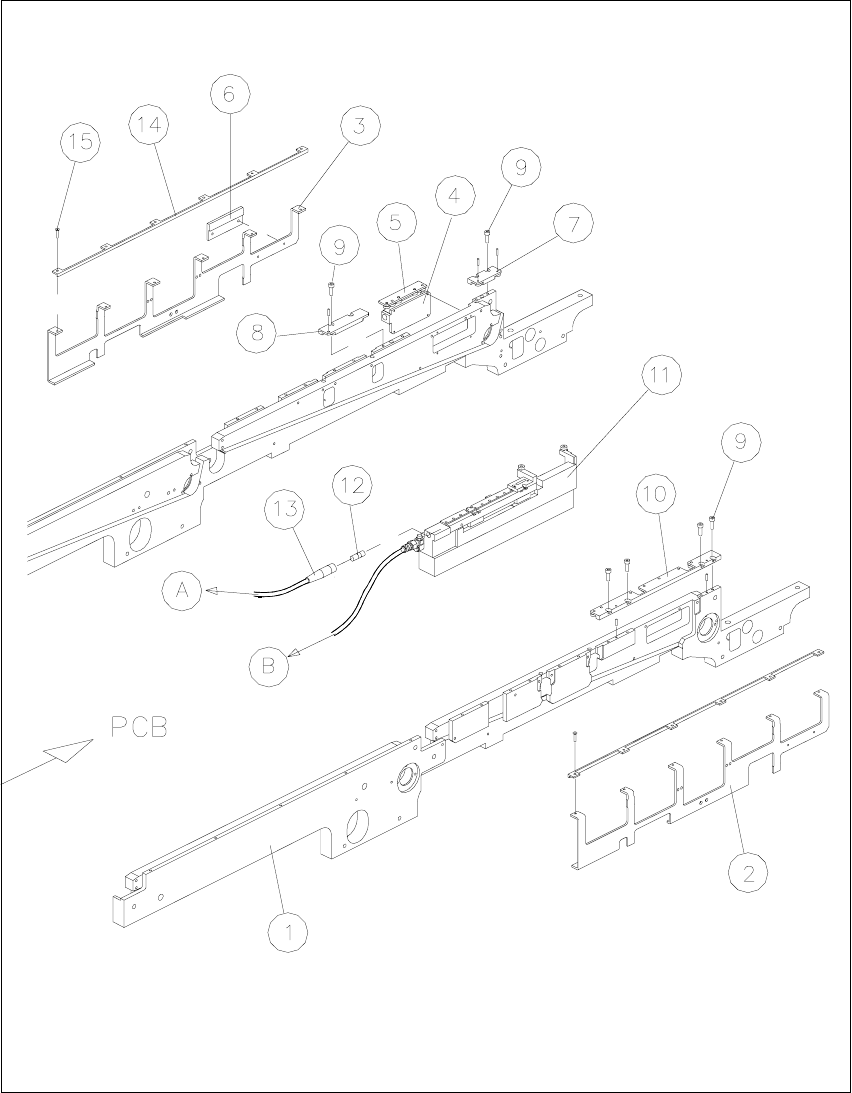
Å Install the (substrate) "Guide, short" and the (substrate) rail on the movable conveyor side (see
Fig. 2.4.3 -> 7, 8, 9):
-> Use the 2 socket hex head cap screws M3 x 8 previously removed to do so.
Å Install the (substrate) "Guide rail, RH" on the stationary conveyor side (see Fig. 2.4.3):
-> Use the 4 socket hex head cap screws M3 x 8 previously removed.
NOTE:
The 2 connecting rails included in the retrofit kit for the holddowns are not installed because they
are only required for reinstallation on the PCB centering unit (see Section 2.5).
Retain all of the parts not currently used as well as the 2 connecting rails, PCB guide rails and
disassembled ball bearings with shaft and screws so that they will be available for reinstallation
on the PCB conveyor or in case of a change in the substrate size.
Key to Fig. 2.4.3:
1. Conveyor assembly, fixed side
2. Holddown device for fixed side *)
3. Holddown device for movable side *)
4. Clamping element with rocker, installed *)
5. Thrust-piece holder (centering in Y-direction) *)
6. Rocker actuator *)
7. Guide, short (with rollers) *)
8. Rail (with rollers) *)
9. Fasteners: 2 socket hex head cap screws M3 x 8 *) each
10.Guide rail assembly, RH (long, with rollers) *)
11.Fasteners: 4 socket hex head cap screws M3 x 8 *)
12.inductive proximity switch for ceramic substrate centering unit *)
13.Cable, proximity switch, ceramic substrate centering unit *)
14.PCB holddown bracket (on stationary and movable side) *)
required only for reinstallation on PCB centering unit
15.Fasteners: 6 socket hex head cap screws M3 x 6 *) each
required only for reinstallation on PCB centering unit
*) included in the retrofit kit
SIPLACE 80 S-20 / S-23HM/ F4 / F4-6 / F5 2 Retrofitting Instructions for Ceramic Substrate Centering Unit (Optional)
04/2000 Issue 2.4 Sequence of Retrofitting
51
Fig. 2.4.3 Assembling Holddowns, Guide Rails, Centering Unit; Connecting the Centering Unit
2 Retrofitting Instructions for Ceramic Substrate Centering Unit (Optional) SIPLACE 80 S-20 / S-23HM/ F4 / F4-6 / F5
2.4 Sequence of Retrofitting 04/2000 Issue
52
&RQQHFWLQJWKH6ROHQRLG9DOYH3RVVLEO\,QVWDOOLQJQG6ROHQRLG9DOYH
Å The compressed air is already switched off.
On the RH side, loosen the screws fastening the compressed air unit (2 socket hex head cap
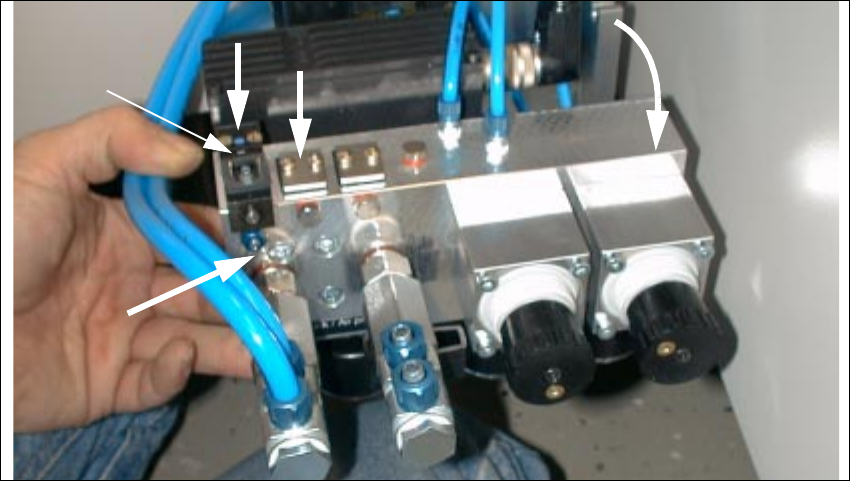
screws M 6) and carefully tip the compressed unit forward (see Fig. 2.4.4).
Fig. 2.4.4 Compressed Air Unit: Installing Pneum. Hose and Solenoid Valve Cable, 2nd Solenoid Valve
1. Solenoid valve 1 (included as standard)
2. Module location for solenoid valve 2 (in case of dual conveyor)
3. Connection of pneumatic hose for ceramic substrate centering unit 1
4. Manual actuator for solenoid valve
Å If you install a 2nd ceramic substrate centering unit, you will need a 2nd retrofit kit (see Section
2.3.1). Install the 2nd solenoid valve as follows:
Å Remove the sealing plate next to the existing solenoid valve on the back of the compressed
air unit (2 cross-slotted screws M3: see Fig. 2.4.4 -> 3).
Å Install the sealing plate (see bag in the retrofit kit and the accompanying description) at the
connector that will no longer be in use.
Å On this, install the solenoid valve from the retrofit kit (2 cross-slotted screws M3).
To be certain there are no leaks, check that the screws are tight.
2
1
3
4