WPC an:on SIPLACE SX1:SX2 Montageanleitung : Assembly Instructions.pdf - 第50页
1 Introduction 50 Mo nt ag ea nl ei tu ng / A ss em bl y In st ru ct io ns W PC a n/ on S IP LA CE S X1 /S X2 - 0 3/ 20 25 Machine switched off at the main power switch and disconnected DANGER Hazardous voltages in the p…
1 Introduction
Montageanleitung / Assembly Instructions WPC an/on SIPLACE SX1/SX2 - 03/2025 49
Machine switched off at the main switch, but still connected
DANGER
Risk of death by voltages!
Death, serious injury or considerable damage may result if these machines are handled incorrectly.
The following components still carry potentially lethal voltages on the power supply even if the main
power switch is switched off:
► Main power supply cable connection terminals
► L1, L2, and L3 of the main switch S1
► Service socket X98 (if present)
► The contactor safety breaker (CBS) still carries voltage for five minutes after switching off
at the main switch.
Make sure that you wait another five minutes before performing tasks on the CSB.
► The color of all individual wires which still carry potentially lethal voltages even if the main power
switch is switched off is orange.
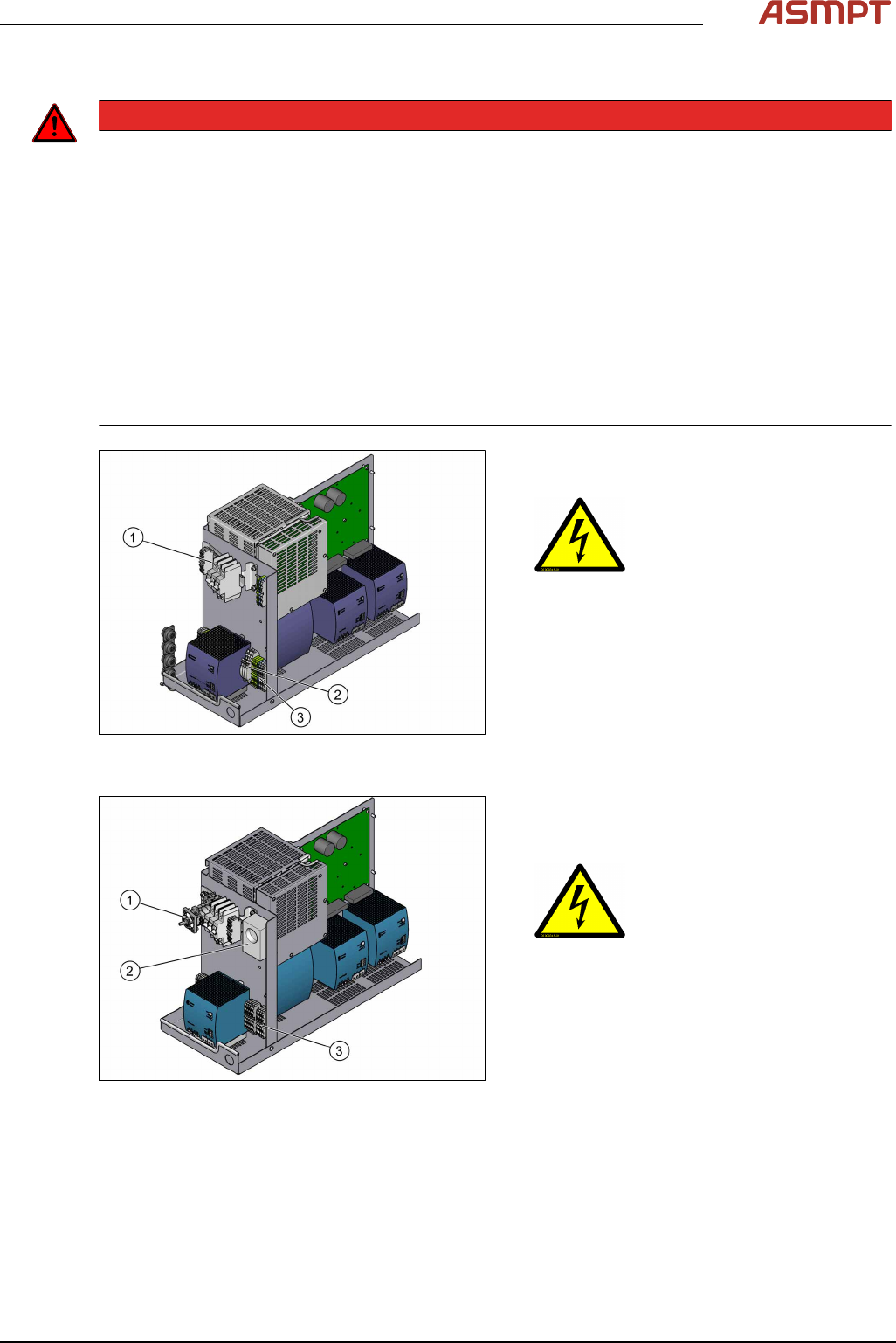
Fig.1: Power supply unit (SIPLACESX1/SX2 edition V3,
SMPS)
1. Main switch (S1)
2. Measuring points
3. Main power supply cable connection termi-
nals (X94) for the power supply cable
Fig.2: Power supply unit (SIPLACESX1/SX2 edition V2,
SMPS)
1. Main switch (S1)
2. Service socket (X98)
(up to machine no. P2038G)
3. Main power supply cable connection termi-
nals (X94) for the power supply cable
1 Introduction
50 Montageanleitung / Assembly Instructions WPC an/on SIPLACE SX1/SX2 - 03/2025
Machine switched off at the main power switch and disconnected
DANGER
Hazardous voltages in the power supply unit!
The power supply unit houses components (capacitors) that can carry hazardous voltages for about
five minutes after the machine has been switched off and the power plug has been unplugged.
► Wait at least five minutes before your start working on the power supply unit and check for
absence of voltage (see Checking For Absence of Voltage).
► Work on the power supply and the contactor safety breaker (CSB) must only be carried out by
service engineers of ASMPT SMT Solutions or by machine owner service engineers who have
been trained by ASMPT.
Compressed air conditions in the machine after switching off at the main switch
When the machine is switched off at the main power switch or if the power supply fails, the electrically-
controlled main valve of the compressed air unit closes. The pressure will drop to 0 MPa (0bar) within
five seconds.
1.1.5 Safety instructions for the compressed air supply
CAUTION
Risk of injury from compressed air!
Risk of injury when disconnecting the compressed air lines.
► Never disconnect compressed air lines while they are still pressurized.
CAUTION
Prolonged interruptions to the compressed air supply can cause damage.
When the machine is switched on, do not use the shutoff valve to interrupt the compressed air supply
for more than 30 minutes.
► If you need to shut off the compressed air system for longer in order to carry out your work, you
must switch the machine off at the main switch and disconnect it from the power supply.
1.1.6 Safety instructions for work on the cutting device
WARNING
Risk of injury when working near the cutter.
When working in the area of the tape cutter, move the component trolley out of the machine and dis-
connect the machine from the mains supply and the compressed air supply.
► Wait until the operating pressure has dropped to 0 MPa.
► Pull one of the hoses off the Y distributor on the cutter, to vent the pneumatic lines and the cut-
ters (see Venting compressed air at the cutter).
► After completing work to the cutter, you will need to connect the hose again.
► Always secure the machine against unauthorized reactivation.
► Do not reach into the tape cutter.
CAUTION
Risk of injury when performing service work on the tape cutter.
Never support the tape cutter on your body, e.g. on your knees or thighs. Do not place your feet
under the tape cutter.
► Wear appropriately thick protective gloves.
► Only hold and carry the cutter on the outer left and righthand parts.
1 Introduction
Montageanleitung / Assembly Instructions WPC an/on SIPLACE SX1/SX2 - 03/2025 51
1.1.7 Safety instructions for the gantry
CAUTION
Moving the gantry can damage the placement head.
When moving the gantry, observe the following:
► NEVER move the gantry by pushing with your hands against the placement head.
► NEVER push the gantry while the Z‑axis is lowered.
1.2 Preparatory work...
Purpose and scope
Before performing any preventive maintenance work, conversion work or service work, a procedure of
locking and tagging must be followed and warning signs must be attached if not stated otherwise. If
you do not need to switch off the machine, this will be clearly stated.
The procedure, when followed correctly, eliminates the possibility of an employee being injured.
NOTICE
Additional safety measures
This procedure represents the minimum lock out and tag out requirements for the machine during
preventive maintenance work and service work. Any additional safeguards needed to complete work
safely can be specified by facilities supervision, the safety officer, the safety committee and the health
department.
Description
Whenever it becomes necessary to isolate, control and release energy, the following procedure is to
be followed.
► Notify all affected employees.
► Switch off the machine and all additional devices. Carry out all normal stopping procedures:
ð Press the stop button.
ð Shut down the station computer.
ð Switch off the machine using the main switch.
► Isolate the machine from all its energy sources:
ð Shut off the compressed air supply.
ð Interrupt the voltage supply.
► Lock out the machine.
ð Attach a lock wherever possible.
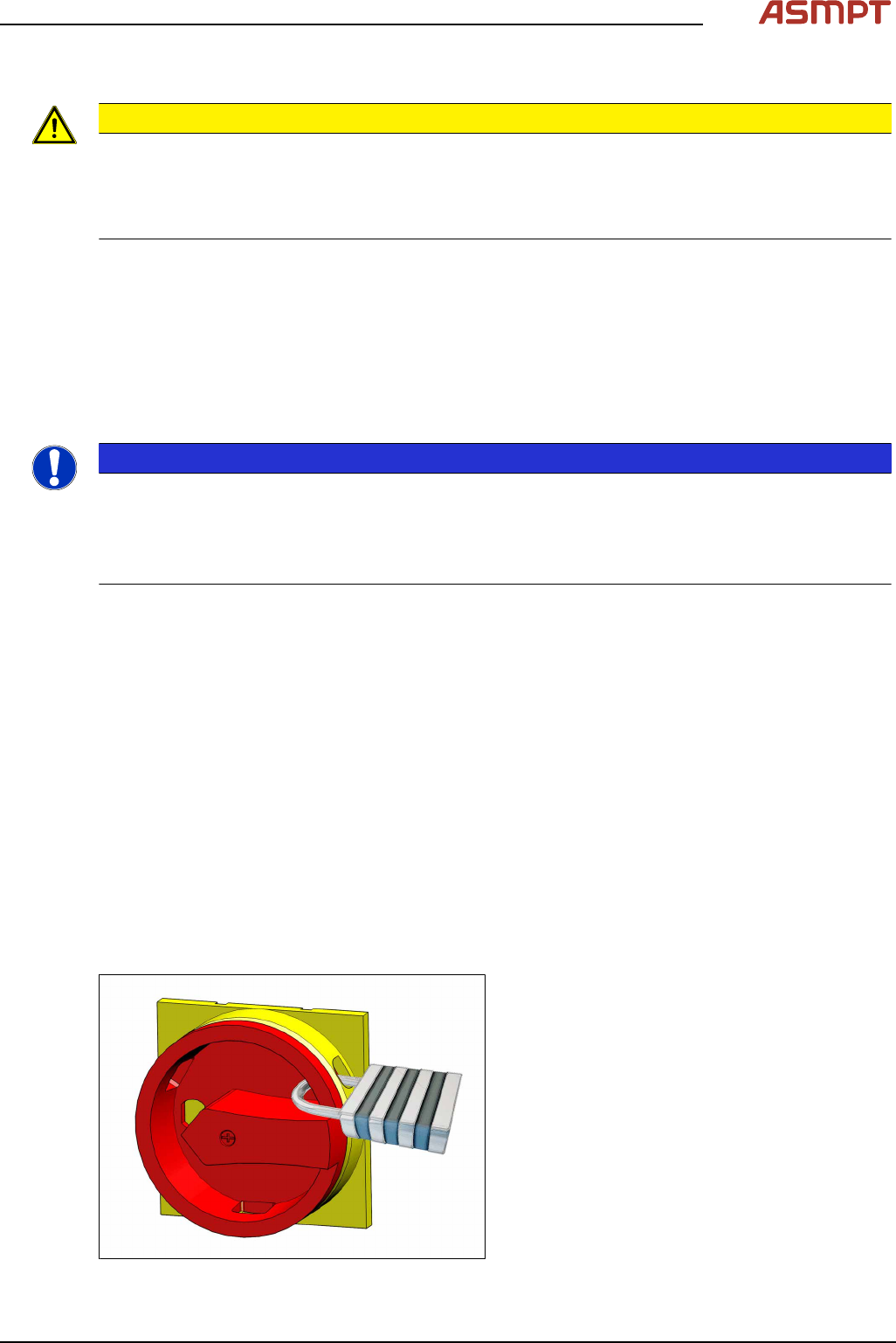
Fig.3: Attaching a padlock to the main power switch
Secure main switch
► Secure the main switch with a padlock.