OM-1076-001.pdf - 第51页
A03 Carrier Data (A03_01) 0206-002 2-30-1 Tg0502-PM-CL (10) Pick up Angle [ ° ° ° ° ° ] Set the angle at which the nozzle should be rotated before a com- ponent is picked up. Unit: ° (degree) Data Input Range: − 359° to …
A03 Carrier Data (A03_01)
0206-003 2-30 Tg0502-PM-CL
(7) Tape Return Time [sec]
Set the returning time of the tape feed cylinder.
Unit : Second
Data Input Range : 0.050 to 1.999
When this data is set, set "Tape Feed Check" to "Manual".
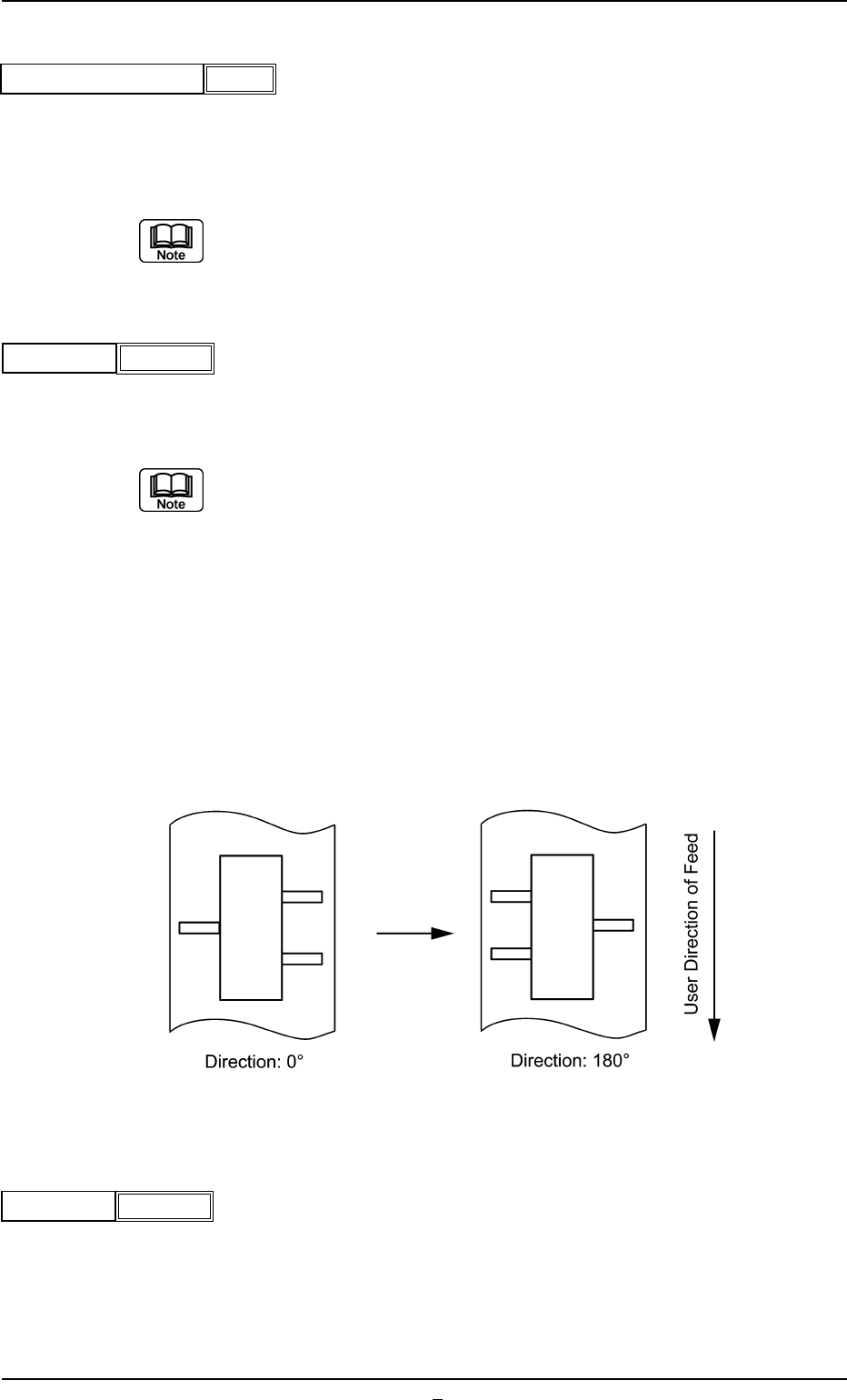
(8) Direction
Select one of the following options as a direction of tape feed.
0° 45° 90° 135° 180° 225° 270° 315°
(a) The direction is determined based on "0° " and shows the angle at
which a component is rotated counterclockwise.
(b) Set "0°" in normal cases (default) and make the component library
data.
(c) It shows the direction for the component when supplied, based on a
position set in the Component Size.
Example: When the component supply direction is changed from (A)
to (B), as shown in the following figure, change the direc-
tion from 0° to 180°. In that event, however, the placement
angle on the pattern program data must also be changed.
(A) (B)
Fig. B56
(9) Q’ty
Set the number of components to be placed in the tape feeder.
Unit : Pcs.
Data Input Range: 1 to 9999
Fig. B54
Tape return time [sec]
0.050
0
Direction
Fig. B55
1000
Q’ty
Fig. B57
A03 Carrier Data (A03_01)
0206-002 2-30-1 Tg0502-PM-CL
(10) Pick up Angle [
°°
°°
°]
Set the angle at which the nozzle should be rotated before a com-
ponent is picked up.
Unit: ° (degree)
Data Input Range: −359° to +359°
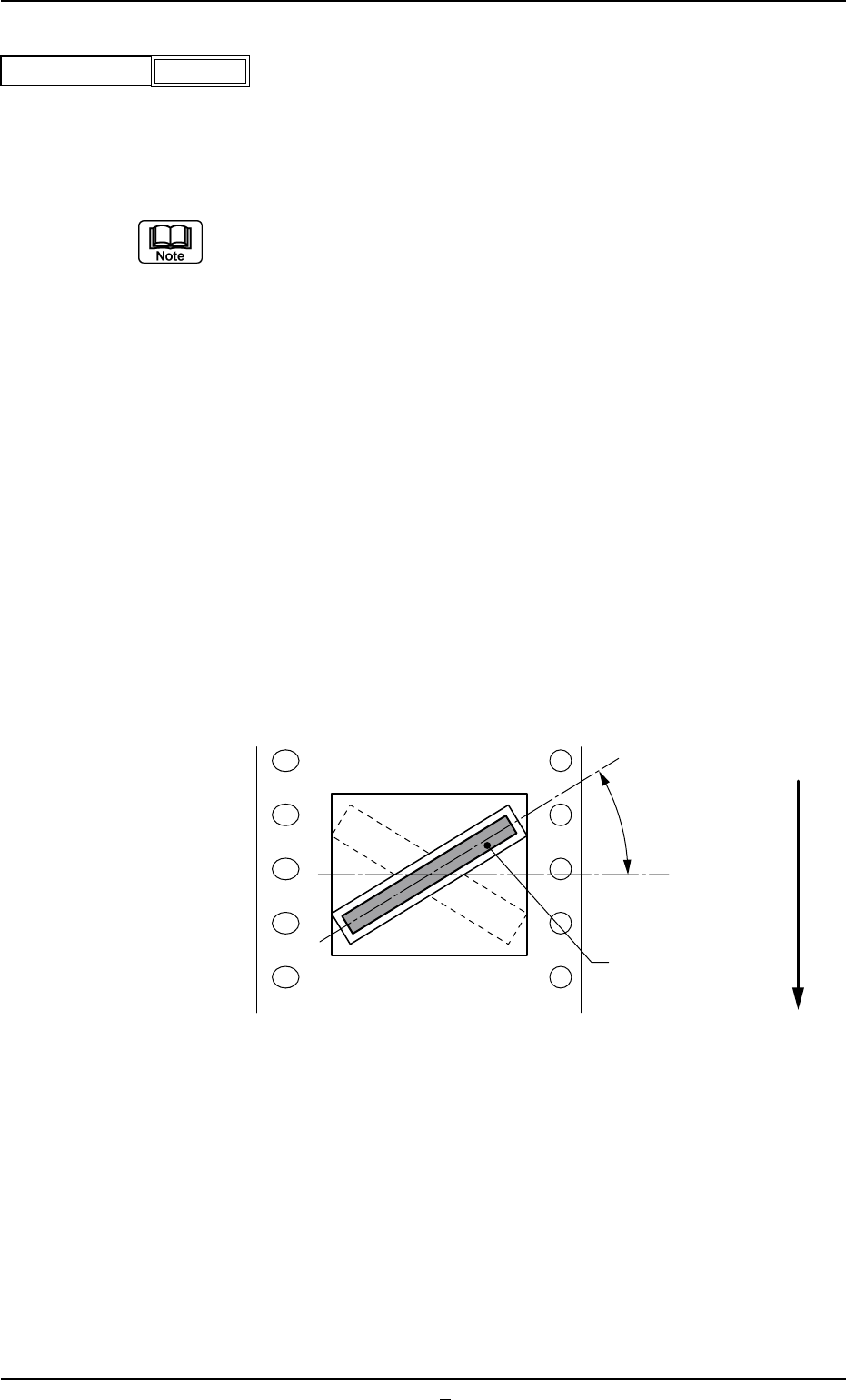
(a) Use the set parameter when the machine handles components (such
as connectors) packaged on the skew because of the limited tape
width. (In normal cases, set "+ 0°".)
(b) When a value other than "0" (zero) is set in the data box, the dimen-
sions as component shape data (X, Y,..) are determined according to
the component posture (packaged posture) for component recogni-
tion.
(c) Set a value with "+" sign to implement the pick-up operation with a
nozzle pre-rotated counterclockwise.
(d) The nozzle is pre-rotated to the angle entered in this box and picks
up a component. When the component recognition is performed, the
nozzle is rotated back to "0" (zero) degree. The component posture
(the orientation of the component positioned by the nozzle rotated
back to "0" (zero) degree) must be set as a placement angle (pack-
age posture) in the pattern program.
Example: Shown below is a component (a connector) packaged on the
skew.
−359
Pick up angle [°]
Fig.B58
Pick-Up Angle
Component
(Connector)
Top View of Component
User Direction of Feeder
Fig. B59
(11) Rejected Cmput Disch Pos
Select one of the following options to designate the position from which
the component must be discharged when a component cannot be
placed due to a component recognition error.
Auto, Recycle Conveyor, Reject Box (Large)
In normal cases, select "Auto".
Select "Recycle Conveyor" only when the machine is equipped with the
recycle component conveyor (option).
A03 Carrier Data (A03_01)
0206-003 2-31 Tg0502-PM-CL
Auto
Rejected cmpnt disch pos
Fig.B60