OM-1076-001.pdf - 第62页
B01 Shape Data (B01_01) Component T ype Select "Normal (Rectangle)" or "Round" as a component type. Round : Select this when the component is completely round with- out any polarity (directivity). Exa…
(9) Xfer Speed
Select one of the following options to designate the reduction rate of
the traverse axis transfer speed at which a pallet (tray) is pulled out of
themagazine or the pallet fed in.
Full Speed 10% Decr 20% Decr 30% Decr 40% Decr
50% Decr 60% Decr 70% Decr 80% Decr 90% Decr
Use this function when there is a possibility that the components in the
tray may deviate from the corrected position.
(10) Elevator Speed
Select one of the following options to designate the reduction rate of
the elevator ascending/descending speed.
Full Speed 10% Decr 20% Decr 30% Decr 40% Decr
50% Decr 60% Decr 70% Decr 80% Decr 90% Decr
(a) Use this function when there is a possibility that the components in
the tray may deviate from the corrected position.
(b) In actual operation, the elevator is driven according to the largest
reduction rate among the groups of components in the magazine.
(11) Matrix Missing Setting (Not Available)
A03 Carrier Data (A03_03)
0206-003 2-37 Tg0502-PM-CL
Full Speed
Xfer speed
Fig.B74-8
Full Speed
Elevator speed
Fig.B74-9
Disable
Matrix missing setting
Fig.B74-10
B01 Shape Data
(B01_01) Component Type
Select "Normal (Rectangle)" or "Round" as a component type.
Round : Select this when the component is completely round with-
out any polarity (directivity).
Example: Dielectric Element, etc.
Normal (Rectangle):
Select this for a component other than a round one.
In normal cases, select "Normal (Rectangle)".
Applicable Components: Deform (Simple)
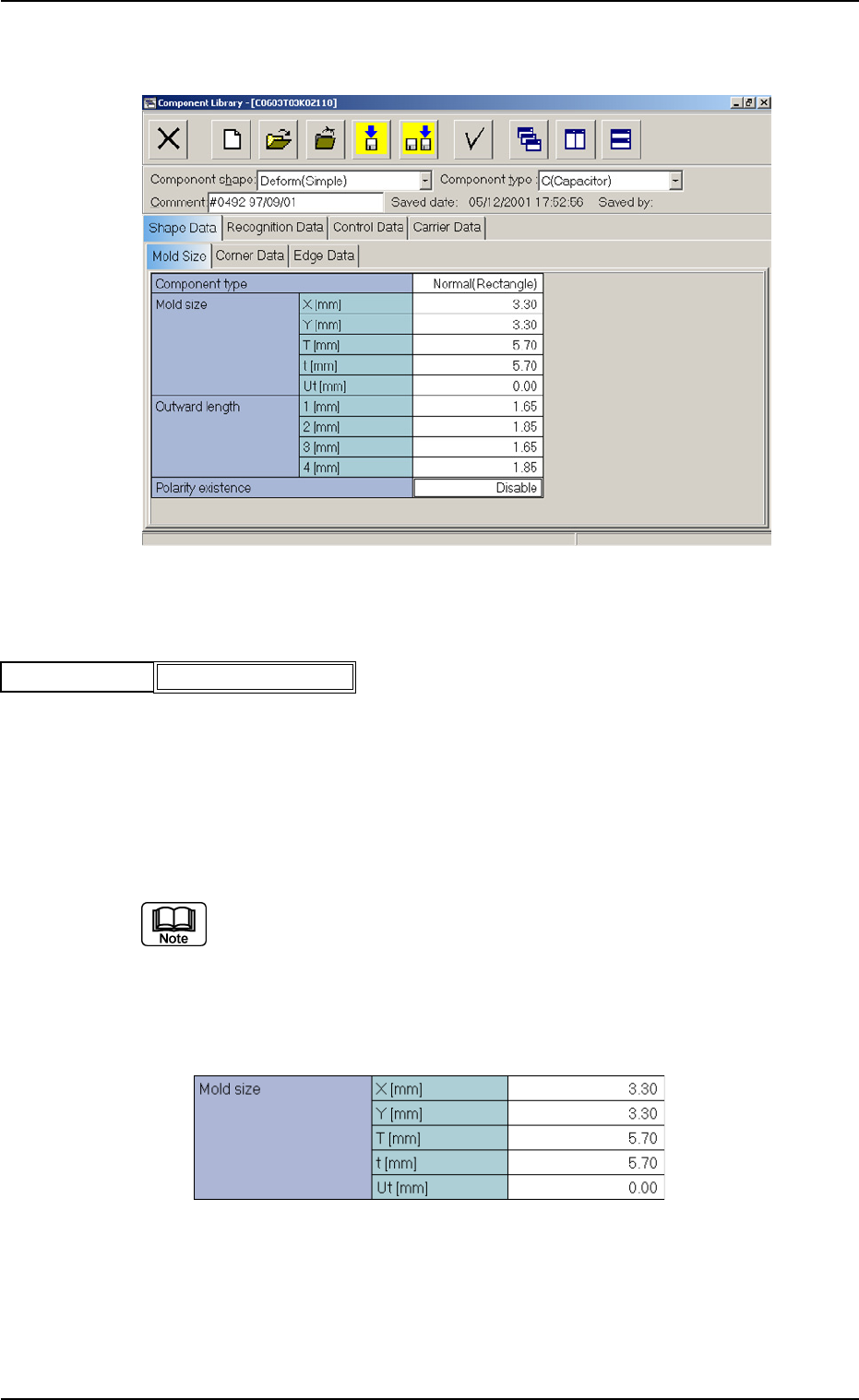
(B01_02) Mold Size
B01 Shape Data (B01_01), (B01_02)
Fig. B76
Normal (Rectangle)
Component type
0111-002 2-38 Tg0502-PM-CL
Fig. B75 Edit Window (Example) for Deform (Simple) Components
Fig. B77 Edit Window (Example) for Cylindrical Components
(1) X [mm] and Y [mm]
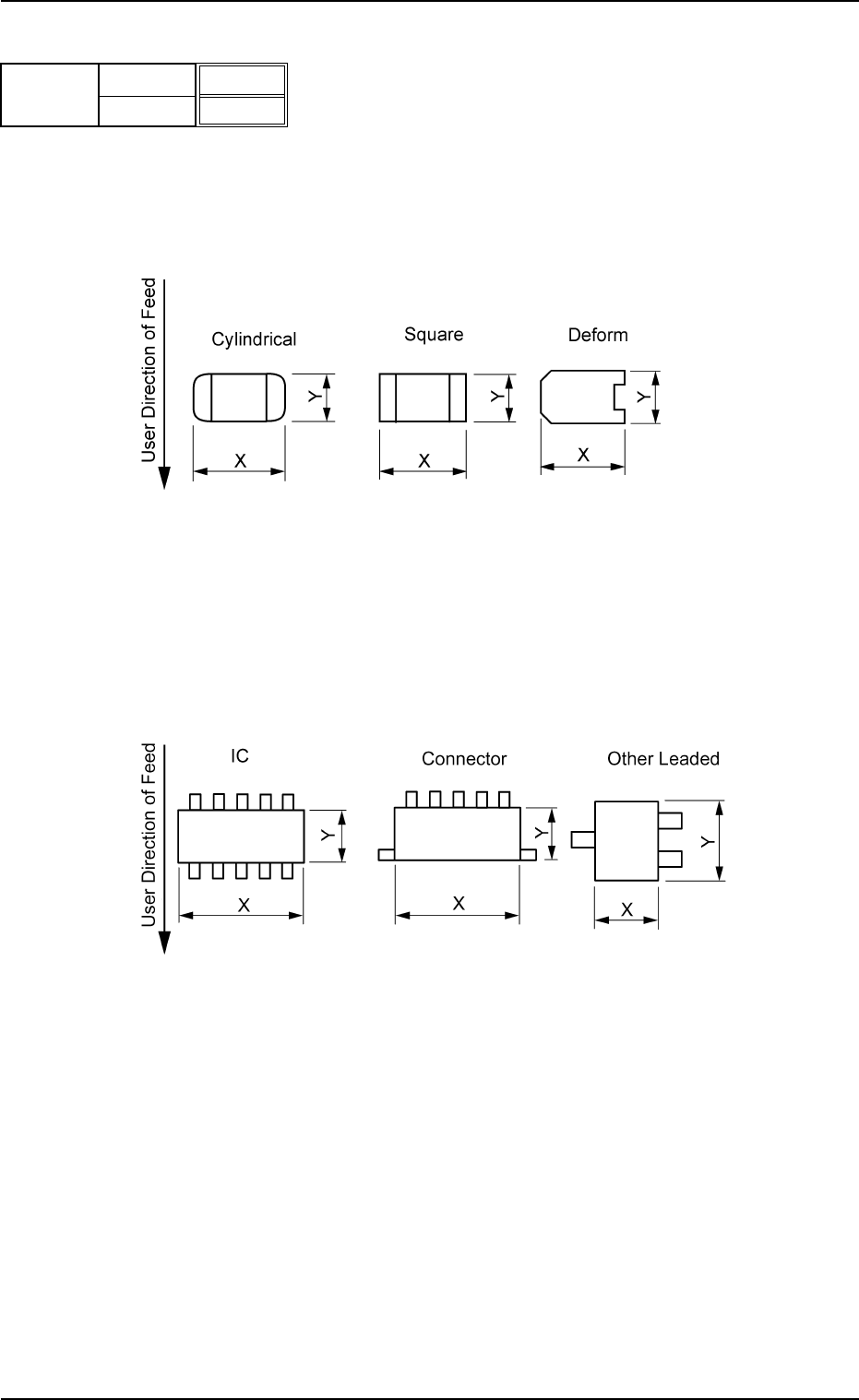
Set Dimensions X and Y of the molded section.
Unit: mm
Leadless Components
Top View of Component
Data Input Range:
X: 0.01 to 150.00
Y: 0.01 to 150.00
Leaded Components
Top View of Component
Data Input Range:
X: 0.01 to 150.00
Y: 0.01 to 150.00
B01 Shape Data (B01_02)
0206-002 2-39 Tg0502-PM-CL
Fig. B78
X [mm]
Y [mm]
3.30
3.30
Mold size
Fig. B79
Fig. B80