YSP10_Mainte_E.pdf - 第49页
2. Monthly maintenance 3-2 Chapter 3 Periodic maintenance items 2. Monthly maintenance Make periodic inspection and maintenance monthly , in addition to the daily inspection. It is also recommended to shorten the inspect…
1. Before beginning work
3-1
Chapter 3 Periodic maintenance items
1. Before beginning work
The maintenance procedures (such as lubrication) described in this chapter often require to insert a
part of your body into the machine. The following items should be understood in advance.
█
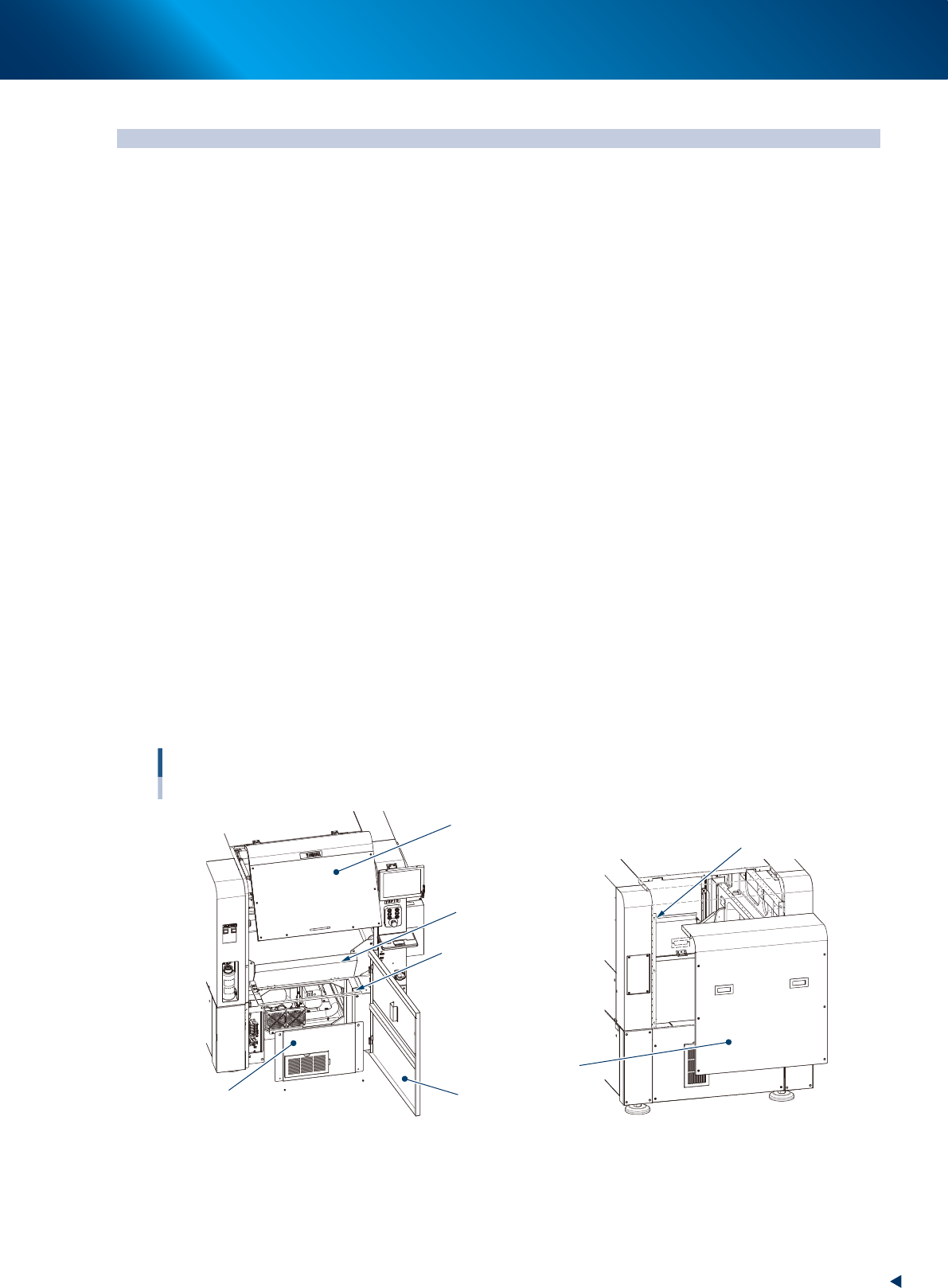
Doors and covers
The following describes the doors or covers required to open upon maintenance work.
►
Safety cover
This is a safety cover which is opened and closed frequently during maintenance work or setting up..
When the cover is opened during operation, the machine becomes emergency status.
►
Lower door
This door is not used during operation.
Upon maintenance, you can open this door and insert a part of your body into the machine, making it
easy to access maintenance point. When opening this cover during operation, the machine becomes
emergency status.
►
Maintenance door
Keep down this door during normal operation.
Pulling up this door makes easier to access the maintenance point during maintenance.
The machine cannot perform the automatic operation with the door up.
►
Front panel
This panel is inside the lower door and is usually fixed.
To clean or replace the blower filter, open the door to access the part.
►
Rear cover (Of standard type machine)
The cover is fixed six points using screws. This is removed when the work from the rear side is
necessary.
When the machine is installed the automatic mask exchange unit (option), the rear cover is separated in
three parts, upper rear cover, mask setup cover and center rear cover.
Doors, cvers and panels
Opening points upon maintenance
Safety cover
Loosen 6 screws to
remove the cover uplifting.
Lower door
Rear cover
Maintenance door
(working position)
Maintenance door
(operating position)
Front panel
Front of machine Rear of machine
(Standard type)
53300-KMJ-00
█
Applying grease
For lubrication of grease;
• When using the grease gun, use a nozzle that fits the size of grease nipple.
• Use the grease specified in this document.
• Inject until the grease begins to seep out from the gap between linear guide and block and guide.
2. Monthly maintenance
3-2
Chapter 3 Periodic maintenance items
2. Monthly maintenance
Make periodic inspection and maintenance monthly, in addition to the daily inspection. It is also
recommended to shorten the inspection interval depending on the operating time or the environment of
the machine.
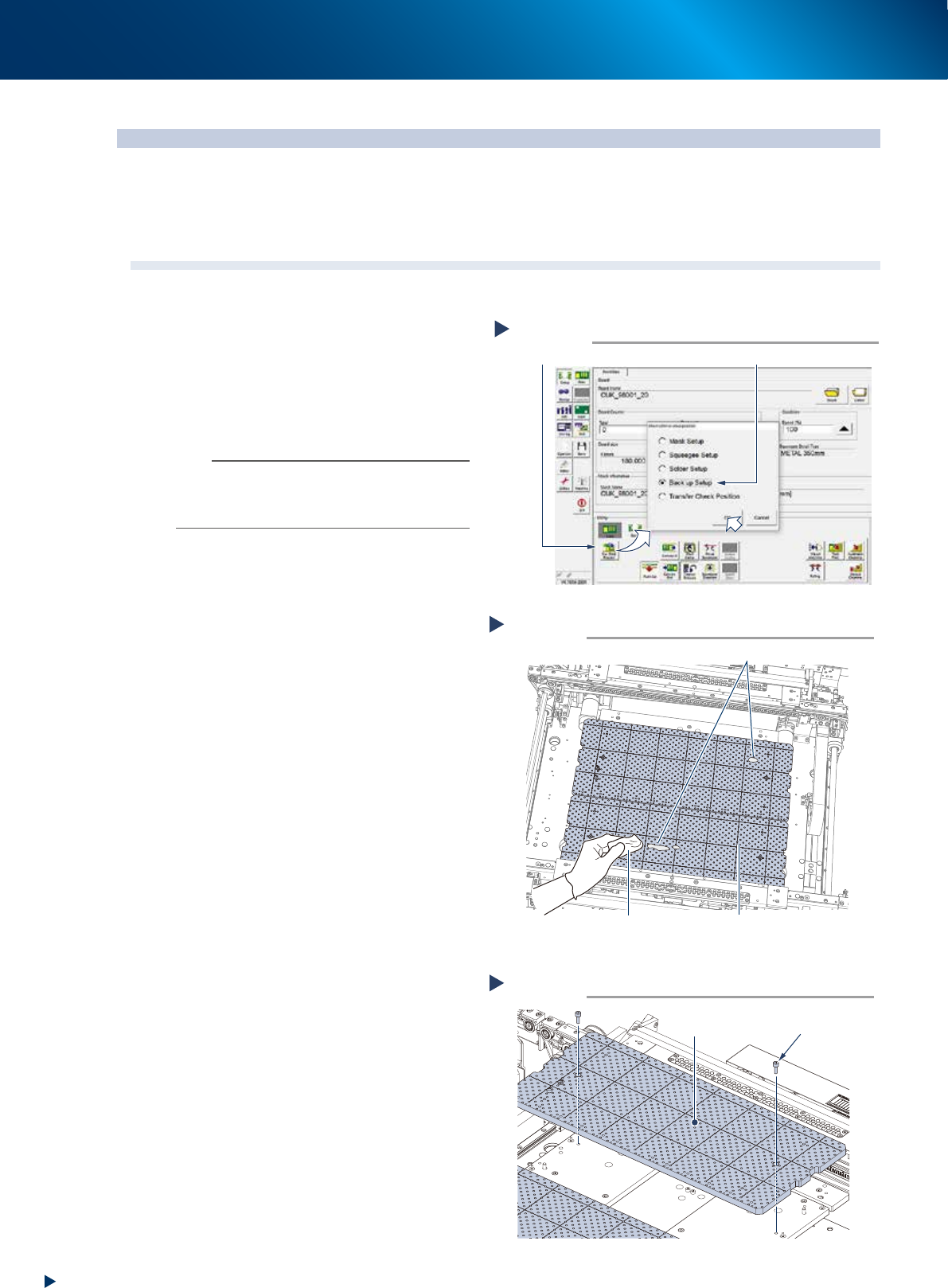
2.1 Cleaning matrix plate
The matrix plate should be cleaned periodically as the solder or foreign objects may adhere on its surface.
1
Raise the PU-axis.
1. Read any board data.
2. Press the [Sw. Prod. Position] button on
[Setup] - [Setup] screen.
3. Select "Back up Setup", then press the [OK]
button.
n
NOTE
When selecting "Back up Setup", the conveyor width
becomes to its maximum width, and then the pushup plate
(PU-axis) raises. Also, the squeegee unit and cleaning unit
moves to machine rear side.
2
Check the matrix plate condition.
1. Press the emergency stop button and open
the machine safety cover and lower door,
and lift up the maintenance door.
2. Check if there is no solder or foreign object
adheres on the matrix plate.
3
Clean matrix plate using a lint-free
cloth applied of a few drops of ethanol
when some solder etc. adheres.
When it is extremely dirty, detach and
clean the matrix plate by the procedure
of Step 4 and later.
4
Detach matrix plate.
1. Remove mounting bolts of matrix plate (2
bolts per 1 plate) using a hexagon wrench
(4mm).
2. Detach matrix plate (front and rear, 2pcs.)
5
Clean detached matrix plate using a
lint-free cloth applied of a few drops of
ethanol to wipe off such as solder.
Cleaning matrix plate
Step 3
Matrix plateLint-free cloth applied with
a few drops of ethanol
Solder adherence
533A1-KMJ-00
Detaching matrix plate
Step 4
Matrix plate
Mounting bolt
53399-KMJ-00
Raising PU-axis
Step 1
Select “Backup Setup”
[Sw. Prod. Position] button
54331-KMJ-00
2. Monthly maintenance
3-3
Chapter 3 Periodic maintenance items
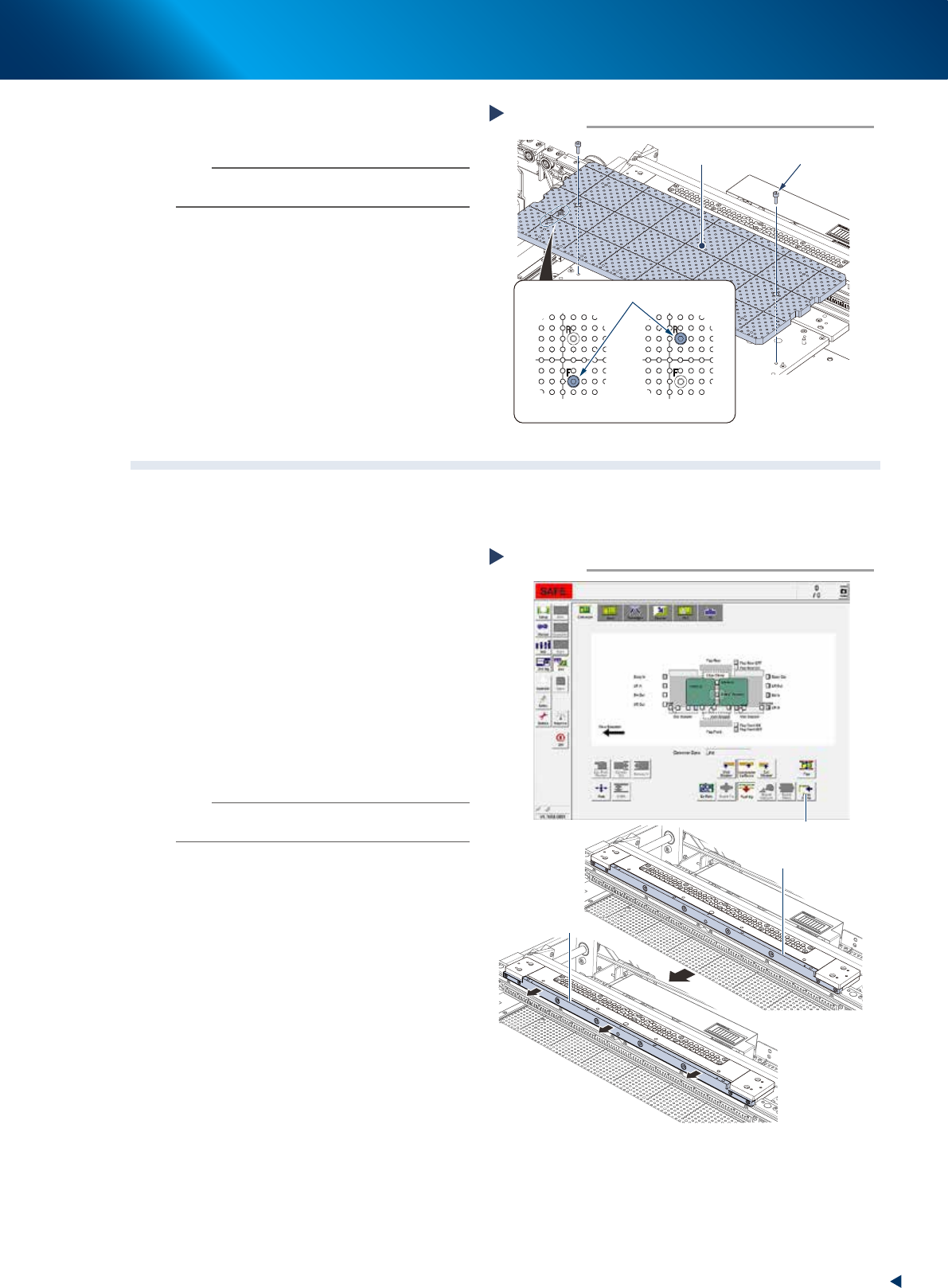
6
Attach matrix plates (front and rear) by
tightening the mounting bolts.
n
NOTE
Matrix plates have a bolt at the position which is written
"F(FRONT)/R(REAR)" to prevent the misplacement.
7
Attach the machine safety cover,
maintenance door and lower door to
their original positions, then cancel the
emergency stop.
2.2 Motion check of edge clamp
The edge clamp clutches a board from side upon fixing a board. The motion error of edge clamp may cause
the printing offset. The periodic check of edge clamp motion is recommended to prevent the error.
e
1
Prepare before work by pressing the
emergency stop button and opening
machine safety cover.
2
Check the motion of edge clamp.
1. Move the edge clamp by pressing the [Edge
Clamp] button of [Unit] - [Conveyor] screen.
2. When the edge clamp does not move
smoothly, check if there is dirt, such as
solder, around it.
When some dirt is found, wipe off with a
lint-free cloth applied of a few drops of
ethanol.
n
NOTE
When the edge clamp motion does not improve after
cleaning, contact your sales representative.
3
Close machine safety cover and cancel
the emergency stop.
Attaching matrix plate
Step 6
Matrix plate
Mounting bolt
Plate/front side
Plate/rear side
Misplacement prevention bolt
533A0-KMJ-00
Motion check of edge clamp
Step 2
[Edge Clamp] button
Edge plate
Edge plate
Operating
condition
Pre-operating
condition
54347-KMJ-00