YSP10_Mainte_E.pdf - 第52页
2. Monthly maintenance 3-5 Chapter 3 Periodic maintenance items 2.4 Suction unit As to the suction unit, the filter should be cleaned periodically and be replaced as necessary . 2.4.1 Cleaning and replacing the filter 1 …
2. Monthly maintenance
3-4
Chapter 3 Periodic maintenance items
2.3 Motion check of board flap
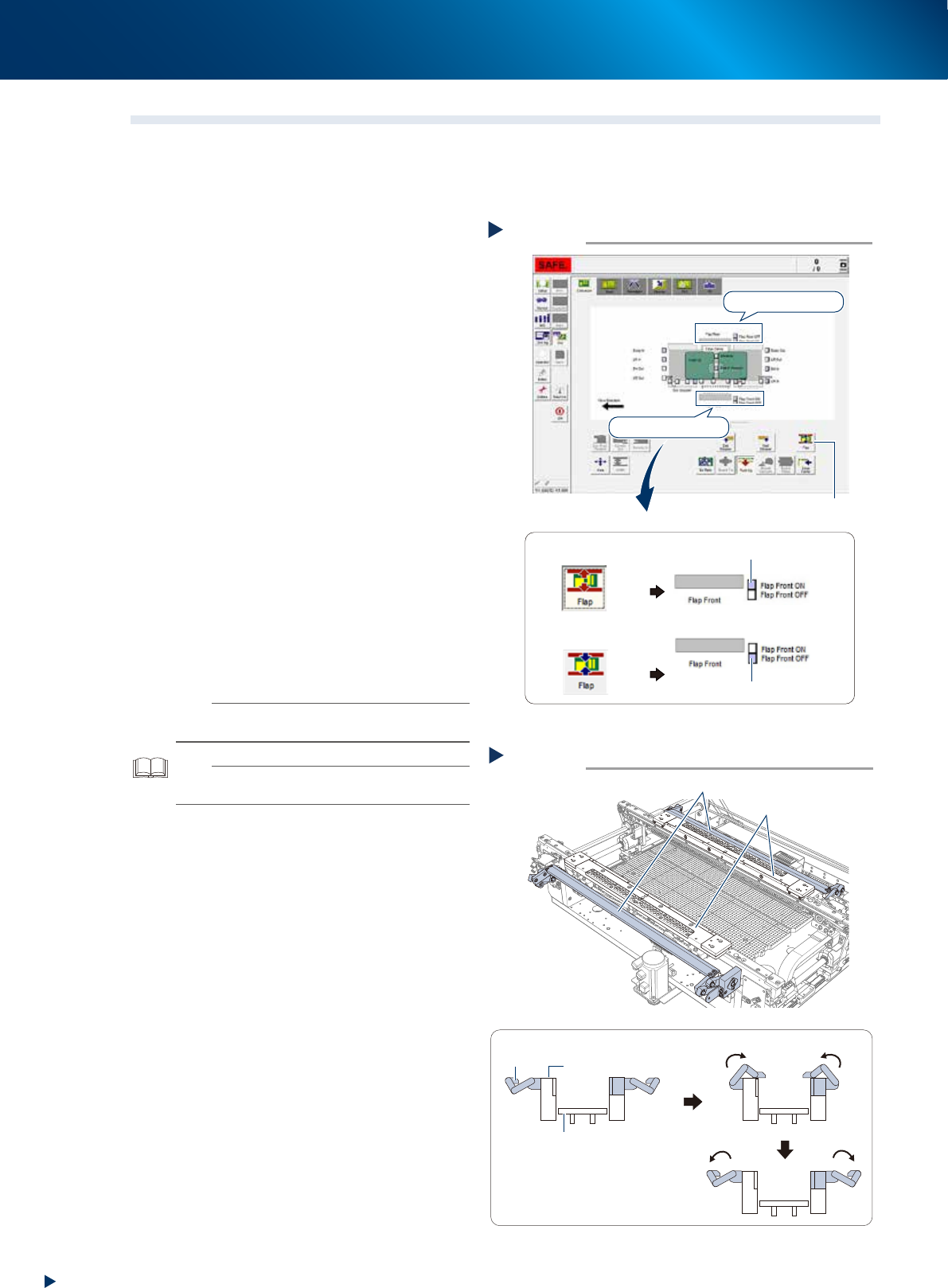
The board flap (hereinafter referred to as flap) presses the board along its Y-direction edges to flatten the
upward warp. As the motion error of flap causes printing offset, the flap should be checked periodically if it
operates correctly, and if the flap detection sensor actuates normally.
1
e
Prepare before work by pressing the
emergency stop button and opening
machine safety cover.
2
Check the motion of ap detection
sensor.
1. Press the [Flap] button on [Unit] - [Conveyor]
screen, and confirm that the sensors, "Flap
front actuated" and "Flap rear actuated",
are turned ON.
2. Press the [Flap] button again, and confirm
that the sensors, "Flap front cancelled" and
"Flap rear cancelled", are turned ON.
3
Check the ap motion.
1. Actuate the flap by pressing the [Flap]
button on [Unit] - [Conveyor] screen, and
confirm its smooth motion.
2. When the flap does not actuate smoothly,
check if the dirt such as solder adheres on
the flap mechanism.
When the flap is dirty, wipe off using a
lint-free cloth applied of a few drops of
ethanol.
The solder may adhere on underside of flap,
wipe off it carefully.
n
NOTE
When the flap motion does not improve after cleaning,
contact your sales representative.
TIP
See Ch.2 "2.5 Mask vacuum unit, board flap and edge
clamp plate" for the flap cleaning procedure.
4
Close machine safety cover and cancel
the emergency stop.
Motion check of flap
Step 3
Flap
Viewed from side of printing table
■ The smooth operation of flaps
Flap
Pushup plate
Mask plate
Mask plate
533A3-KMJ-00
Condition check of flap detection sensor
Step 2
The [Flap] button is
pressed
The [Flap] button is
not pressed
[Flap] button
Sensor on flap rear
Sensor on flap front
■ Example of sensor on flap front
“Flap Front OFF” sensor ON
“Flap Front ON” sensor ON
54350-KMJ-00
2. Monthly maintenance
3-5
Chapter 3 Periodic maintenance items
2.4 Suction unit
As to the suction unit, the filter should be cleaned periodically and be replaced as necessary.
2.4.1 Cleaning and replacing the filter
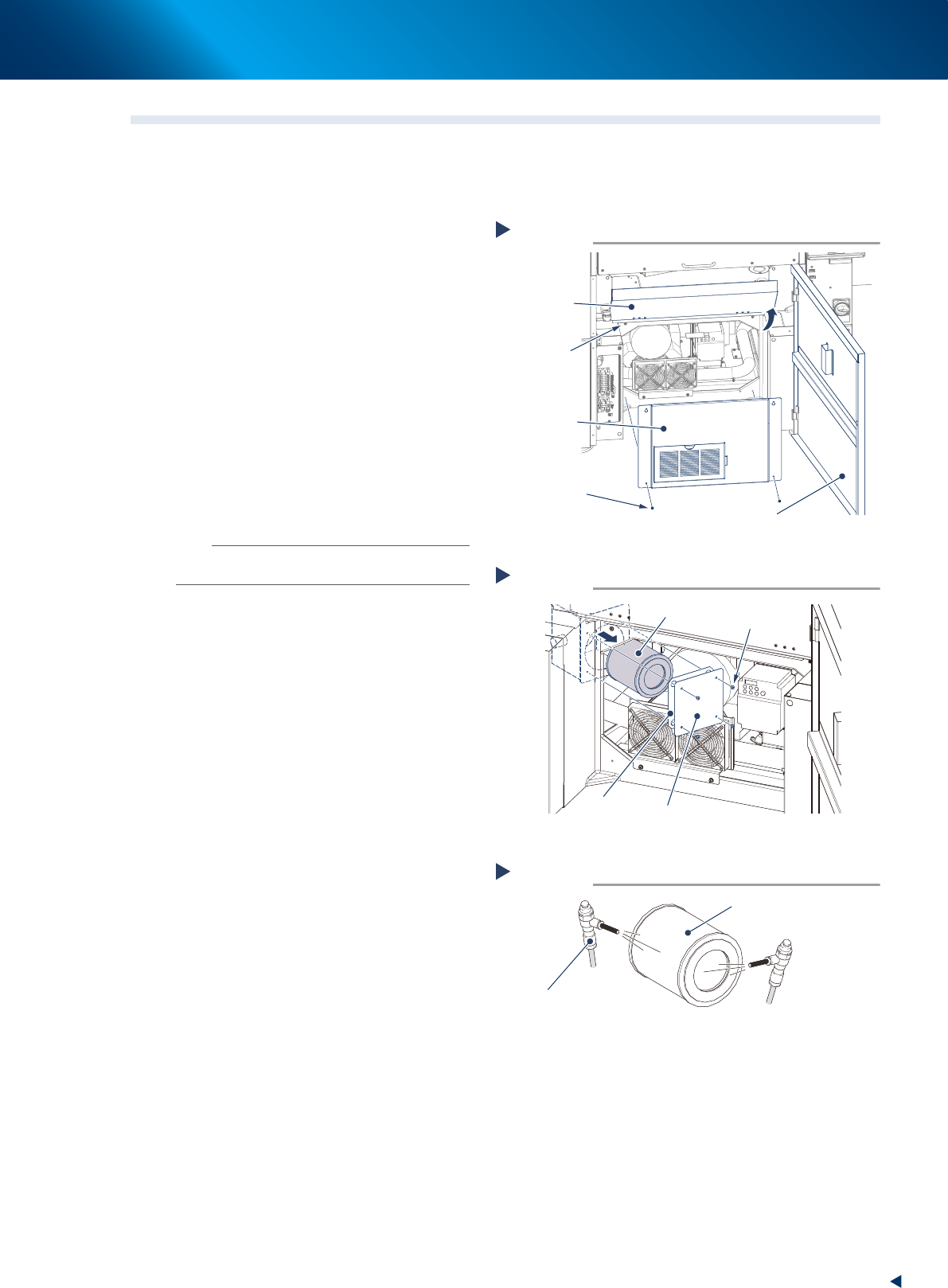
1
e
Remove the front panel.
1. Press the emergency stop button to ensure
the safety of the work.
2. Open the lower door and pull up the
maintenance door.
3. Loosen (but leave there) the upper 2 screws
on the front panel with Phillips screwdriver.
4. Pull out the lower 2 screws and remove the
front panel uplifting a little.
2
Remove 4 screws mounting the lter
cover with Phillips screwdriver and pull
out the cylindrical shape lter.
3
Clean the inside and outside of lter
with an air blow tool.
n
NOTE
Replace the filter when it is badly soiled, or cannot be
cleaned up thoroughly.
4
Insert the lter into its original position
and reattach the lter cover.
5
Reattach the front panel and put the
maintenance door and lower door back
in place.
1. Tighten the screws on the front panel with
Phillips screwdriver.
2. Pull down the maintenance door and close
the lower door.
Opening the cover
Step 1
Maintenance
door
Just loosen the
upper 2 screws.
Front panel
Screw
Lower door
53301-KMJ-00
Pulling out the filter
Step 2
Filter
Screw
Filter cover
Gasket
53302-KMJ-00
Cleaning the filter
Step 3
Filter
Air blow tool
53303-KMJ-00
2. Monthly maintenance
3-6
Chapter 3 Periodic maintenance items
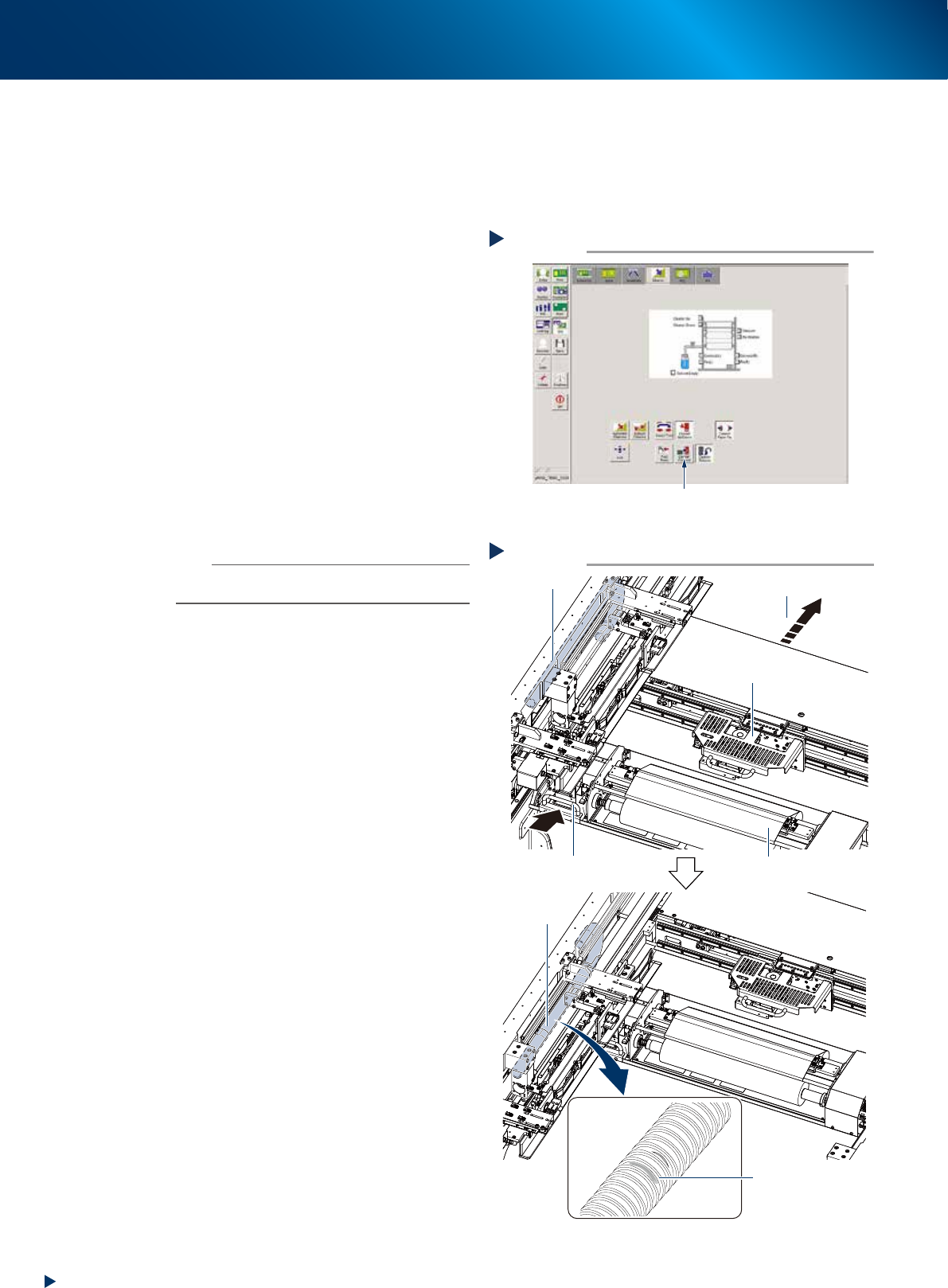
2.4.2 Visual inspection of blower hose
The blower hose deteriorated and cracked cannot perform normal mask vacuum and intervenes the solder
printing. YSP10 monitors the mask vacuum pressure upon actuating the cleaning unit, using the negative
pressure gauge of cleaning unit. But, separately from that, visual inspection is recommended approximately
once a month to prevent any trouble.
1
Prepare for work.
1. Press the [Cleaner Connect] button on [Unit]
- [Cleaner] screen and connect the cleaning
unit and camera unit.
e
2. Press the emergency stop button and open
machine safety cover and lower door, lift up
the maintenance door.
3. Move the squeegee unit to machine rear
side by grabbing its handle.
2
Check the blower hose condition
visually.
Check if there is any wound, crack or
deterioration and discoloring caused by
repeating motion, by grabbing the cleaning
unit handle and moving the cleaning unit and
camera unit to machine rear side.
n
NOTE
When any wound or crack on the blower hose is found,
replace it by referring Ch4 "2. Blower hose"
3
Return machine safety cover,
maintenance door and lower door to
their original position, then cancel the
emergency stop.
4
Return the cleaning unit to its original
position by pressing the [Cleaner
Connect] button on [Unit] - [Cleaner]
button again.
The cleaning unit moves to its original position
(front side of machine) and disconnects from
the camera unit.
Checking blower hose condition
Step 2
Camera unit
Cleaner
Check blower
hose condition
No crack or discoloring
on blower hose
Blower hose
Move to machine rear side
Handle
Checking blower hose condition
Step 2
Camera unit
Cleaner
Check blower
hose condition
No crack or discoloring
on blower hose
Blower hose
Move to machine rear side
Handle
533A2-KMJ-00
Connecting cleaner and camera unit
Step 1
Press the [Cleaner Connect] button.
54349-KMJ-00