YSP10_Mainte_E.pdf - 第74页
3. 3-month maintenance 3-27 Chapter 3 Periodic maintenance items 5 Lubri cate the Z-axis shaft guide s. Apply the prescribed grease ( NSL) to the surf ace of shaf t guide by hand. 6 Lower the Z-axis. 1. Close machine saf…
3. 3-month maintenance
3-26
Chapter 3 Periodic maintenance items
3.3 Z-axis
This section describes the procedure for cleaning and lubricating the Z-axis of YSP10 printing stage.
A stepstool may facilitate your work.
3.3.1 Cleaning and lubricating the Z-axis
1
e
Detach the machine rear cover.
Press the emergency stop button to ensure
safety work.
Standard type machine:
Remove 6 mounting screws on machine rear
cover using Phillips screwdriver and detach the
machine rear cover by lifting it up.
With automatic mask exchange unit:
Remove 4 mounting screws on machine center
rear cover and detach the machine rear cover.
c
CAUTION
Be careful not to be injured by dropping down the cover.
2
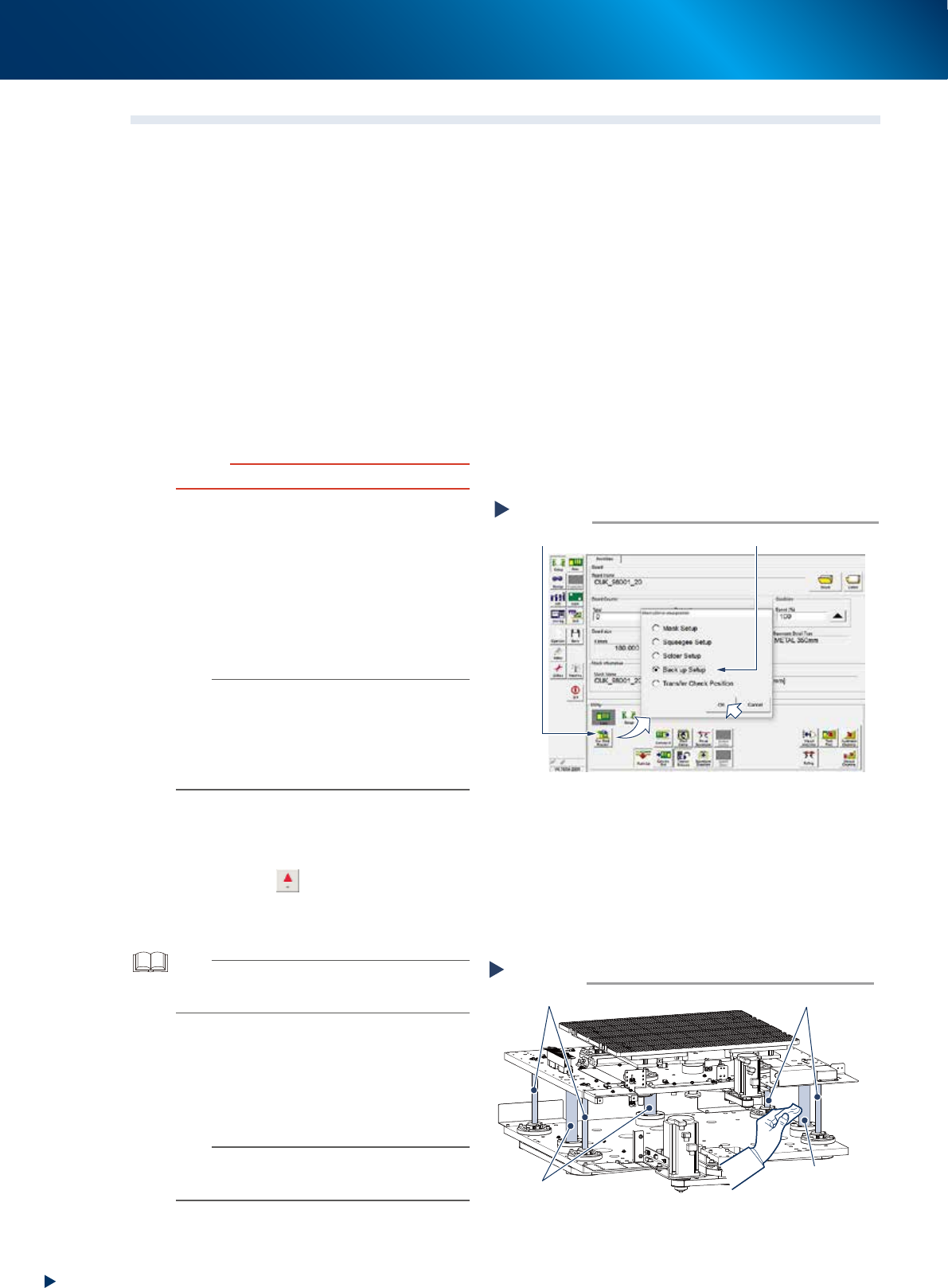
Change the conveyor width maximum.
1. Read any board data.
2. Press the [Sw. Prod. Position] button on the
[Setup] - [Setup] tab screen.
3. Select "Back up Setup" and press the [OK]
button.
4. Press the RESET button on operation panel
after "Back up Setup" is performed.
n
NOTE
• Upon selecting "Backup Setup", the conveyor width is
changed maximum, then the pushup plate (PU-axis)
raises. Also, the squeegee unit and cleaning unit move
to machine rear side.
• As pressing the RESET button, the cleaning unit moves
to machine front side and the camera unit to rear side,
and then, PU-axis lowers.
3
Raise the Z-axis.
1. Press the [Move Axes] button on [Unit]
- [Conveyor] screen and open "Y/Z" tab.
2. Press the [
] button of Z-axis, or enter a
value directly by using the [PTP] button, and
raise the Z-axis to its maximum to positive
direction.
TIP
Though it varies depending on machine character, the
maximum value which can be entered for Z-axis is to an
extent of 70 mm.
4
Clean around the Z-axis.
1. Press the emergency stop button and open
machine safety cover and lower door.
2. Clean the Z-axis ball screws (4) and shaft
guides (3) using a lint-free cloth.
n
NOTE
• Clean ball screws and shaft guides on far side of
machine by accessing from rear side.
• Carefully wipe the lead grooves of the ball screw.
Cleaning Z-axis
Step 4
Z-axis shaft guides
Z-axis shaft guide
Z-axis ball screws
Z-axis ball screws
53343-KMJ-10
Change the conveyor width maximum
Step 2
Select “Back up Setup”
[Sw. Prod. Position] button
54309-KMJ-00
3. 3-month maintenance
3-27
Chapter 3 Periodic maintenance items
5
Lubricate the Z-axis shaft guides.
Apply the prescribed grease (NSL) to the
surface of shaft guide by hand.
6
Lower the Z-axis.
1. Close machine safety cover and lower door,
and cancel the emergency stop.
2. Press the RESET button on operation panel
and lower the Z-axis.
7
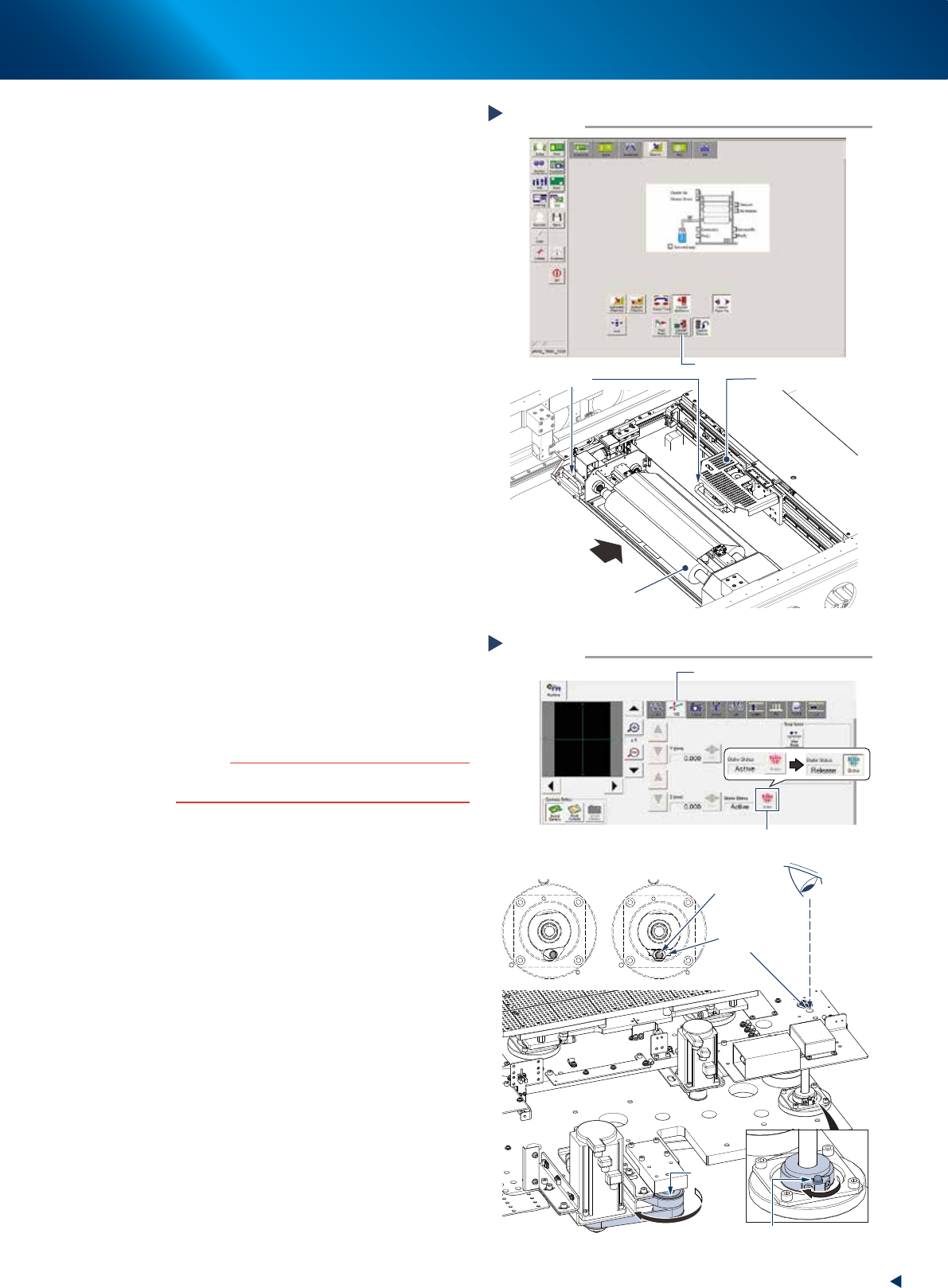
Move the camera unit and cleaning unit
to machine rear side.
1. Press the [Cleaner Connect] button on [Unit]
- [Cleaner] screen to connect the cleaning
unit and camera unit.
e
2. Press the emergency stop button and open
machine safety cover and lower door.
3. Grab the handle of cleaning unit or camera
unit, then move them to machine rear side.
8
Align the grease nipple position of ball
screws.
1. Press the [Units] - [Axis Move] button to
select "Y/Z" tab.
2. Press the [Brake] button of Z-axis, then the
Z-axis brake is released and Z-axis lowers to
its downmost.
3. Rotate the pulley unit illustrated at right by
hand, then the Z-axis ball screw nut rotates.
Rotate the pulley until the grease nipple can
be seen from the grease gun insertion hole.
The Z-axis raises by rotating the pulley
counterclockwise.
4. When the positions are aligned, press the
[Brake] button of Z-axis to put a brake on.
c
CAUTION
When the Z-axis raises too much, it may interfere with the
cleaning unit.
Moving cleaning unit and camera unit
Step 7
Press the [Cleaner Connect] button
Handle
Camera unit
Cleaning unit
Move to machine rear side
54310-KMJ-00
Align grease nipple positions
Step 8
Looking from above
Checking for the grease nipple position
Grease nipple
Shifted Aligned
Pulley
Grease nipple
Grease gun
insertion hole
Z-axis raising
Press the [Brake] button
“Y/Z” tab
54311-KMJ-00
3. 3-month maintenance
3-28
Chapter 3 Periodic maintenance items
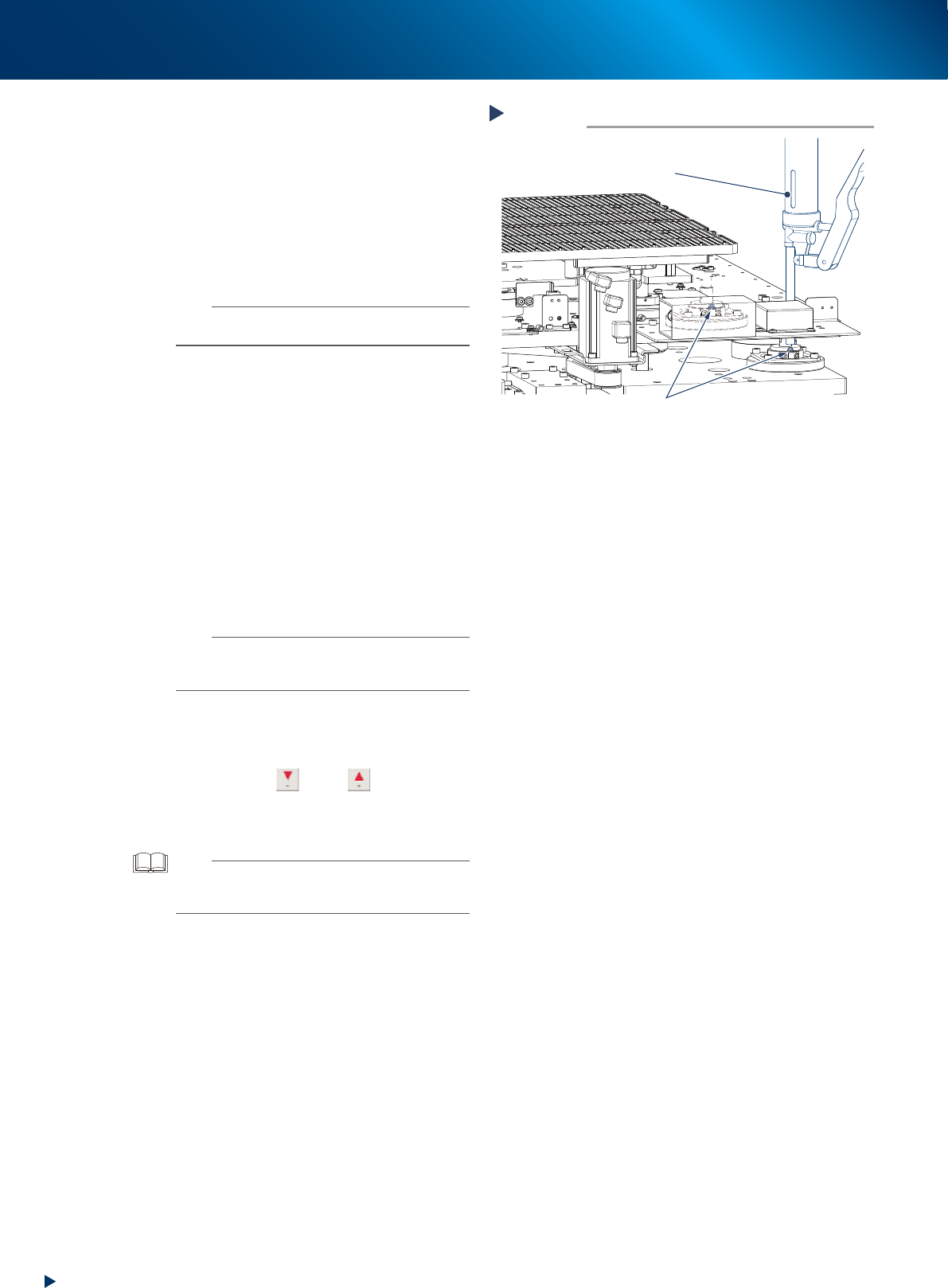
9
Lubricate the Z-axis ball screws.
Using a grease gun (standard type nozzle),
inject the prescribed grease (NSL) from the
grease gun insertion holes of Z-axis to the
grease nipples of ball screws, until the grease
seep out from the gap.
0
Lubricate all the grease nipples.
Repeat the procedures of Step9 to inject grease
to the rest 3 nipples (a total of 4).
n
NOTE
When one grease nipple position is aligned, also the
other three nipples could be aligned.
q
Wipe away excess grease.
Use a lint-free cleaning cloth to wipe away
excess grease from the 4 Z-axis ball screws
through the side of the table.
w
Reset the machine.
1. Confirm that the camera axis and cleaner
axis do not interfere with the conveyor
surface.
2. Close machine safety cover and lower door,
then cancel the emergency stop.
3. Return to the board production preparation
mode by pressing the RESET button on
operation panel.
n
NOTE
As pressing the RESET button, the cleaning unit moves to
machine front side and the camera unit to rear side, and
then, PU-axis lowers.
e
Spread the grease.
1. Press the [Move Axes] button on the [Units]
screen to open "Y/Z" tab.
2. Press the [
] and [ ] button of
Z-axis, or enter a value directly by using the
[PTP] button, and move the Z-axis up and
down for several times.
TIP
Though it varies depending on machine character, the
value which can be entered for Z-axis is almost from -70 to
70 mm.
r
Reattach the covers of machine rear
side.
Standard type:
Return the machine rear cover to its original
position using Phillips screwdriver.
With automatic mask exchange unit:
Return the machine center rear cover to its
original position using Phillips screwdriver.
Step 9
Lubricating Z-axis ball screws
Grease gun
(Standard type nozzle)
Grease nipple
53345-KMJ-20