YSP10_Mainte_E.pdf - 第94页
3. Conveyor transfer belt 4-5 Chapter 4 The parts to be replaced and its procedures 3. Conveyor transfer belt The conveyor transfer belt (hereinafter r eferred to as belt) should be r eplaced when the significant wounds,…
2. Blower hose
4-4
Chapter 4 The parts to be replaced and its procedures
5
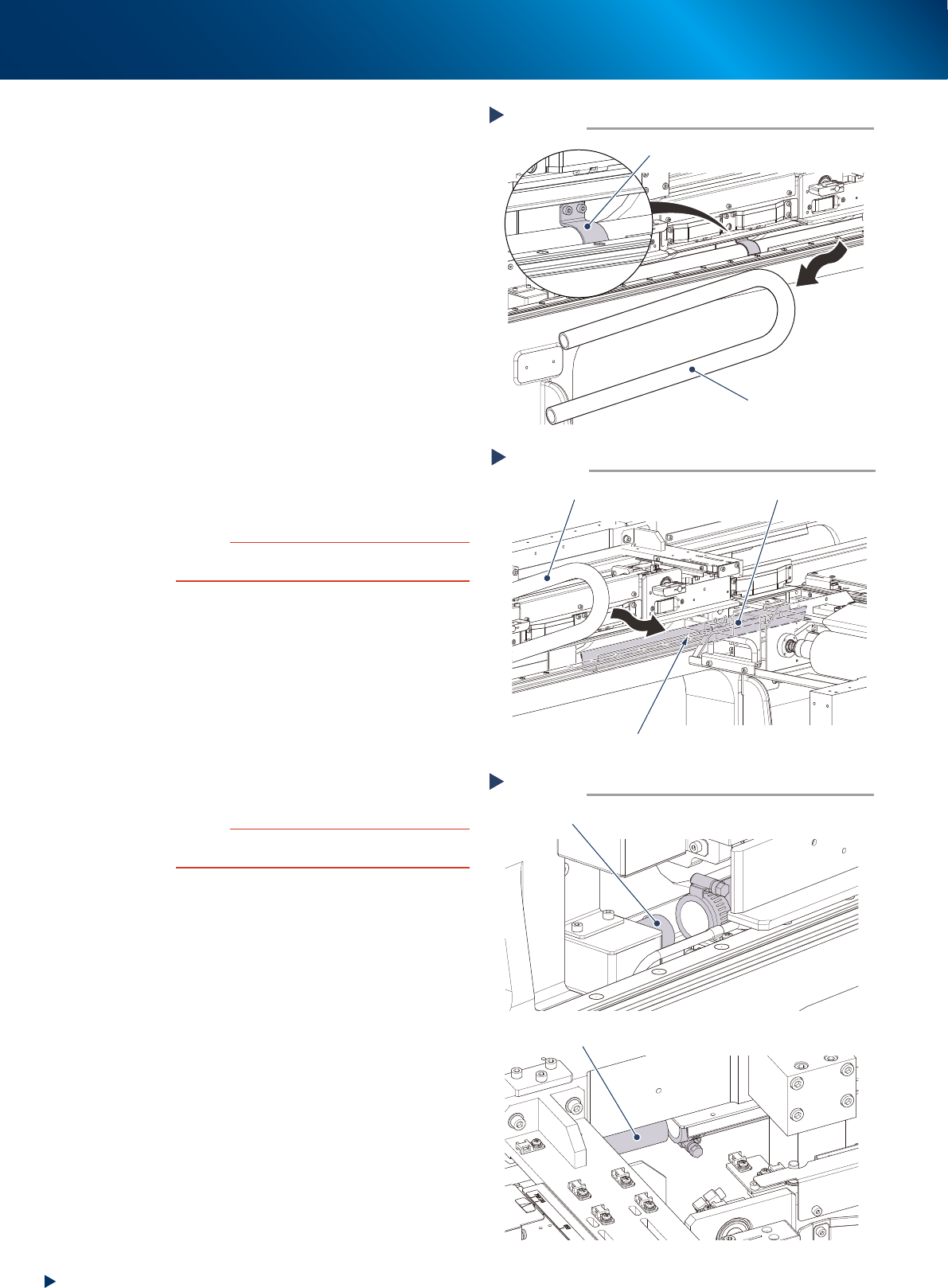
Pull off the old blower hose as follows:
1. Remove the hose settlement bracket.
2. Pull off the old blower hose.
6
Attach the new blower hose as follows:
1. Wipe away the dirt and old grease from the
hose guide with a lint-free cloth.
2. Apply the grease thinly with your fingers on
the hose guide.
3. Insert the new blower hose alongside of the
hose guide.
4. Attach the hose settlement bracket.
7
Connect the pump side end of the
blower hose temporarily to the joint.
8
Fix the cleaning unit end of the blower
hose as follows:
1. Move the cleaning unit to the front side by
hands.
2. Connect the blower hose to the joint and fix
the hose band with the flat-head screwdriver.
c
CAUTION
When moving the cleaning unit holding its handle, make
sure not to contact your hand to other units.
9
Fix the pump end of the blower hose
which was temporarily connected, using
the at-head screwdriver to tighten the
hose band.
0
Move the cleaning unit to former
position as follows:
1. Move the cleaner head to former position
(front side) by hands.
2. Press the [Cleaner Release] button on the
[Unit] - [Cleaner] tab to fix the cleaner unit.
c
CAUTION
When moving the cleaning unit holding its handle, make
sure not to contact your hand to other units.
Pulling off the hose
Step 5
The hose settlement bracket
(use 4mm wrench)
Blower hose
53418-KMJ-00
Attaching the blower hose
Step 6
New blower hose
Hose guide
Clean up and apply the grease thinly.
53419-KMJ-00
Attaching the blower hose
Step 8, 9
Joint (pump end)
Joint (cleaning unit end)
53420-KMJ-00
3. Conveyor transfer belt
4-5
Chapter 4 The parts to be replaced and its procedures
3. Conveyor transfer belt
The conveyor transfer belt (hereinafter referred to as belt) should be replaced when the significant
wounds, dirt or pilling is found at the periodic inspection. Follow these steps to replace the belt.
n
NOTE
The conveyor of flow direction of "R to L" is described as example in this document. The basic procedure and required
parts are also the same for "L to R" conveyor.
█
Replacement procedure
1
Change the conveyor width to a
convenient width for maintenance
work.
1. Read any board data.
2. Press the [Width] button on [Unit] -
[Conveyor] screen to display "Conveyor
Width" screen.
3. Enter a width wide enough for a hex wrench
to be inserted in the "Target Width" box and
press the [OK] button.
2
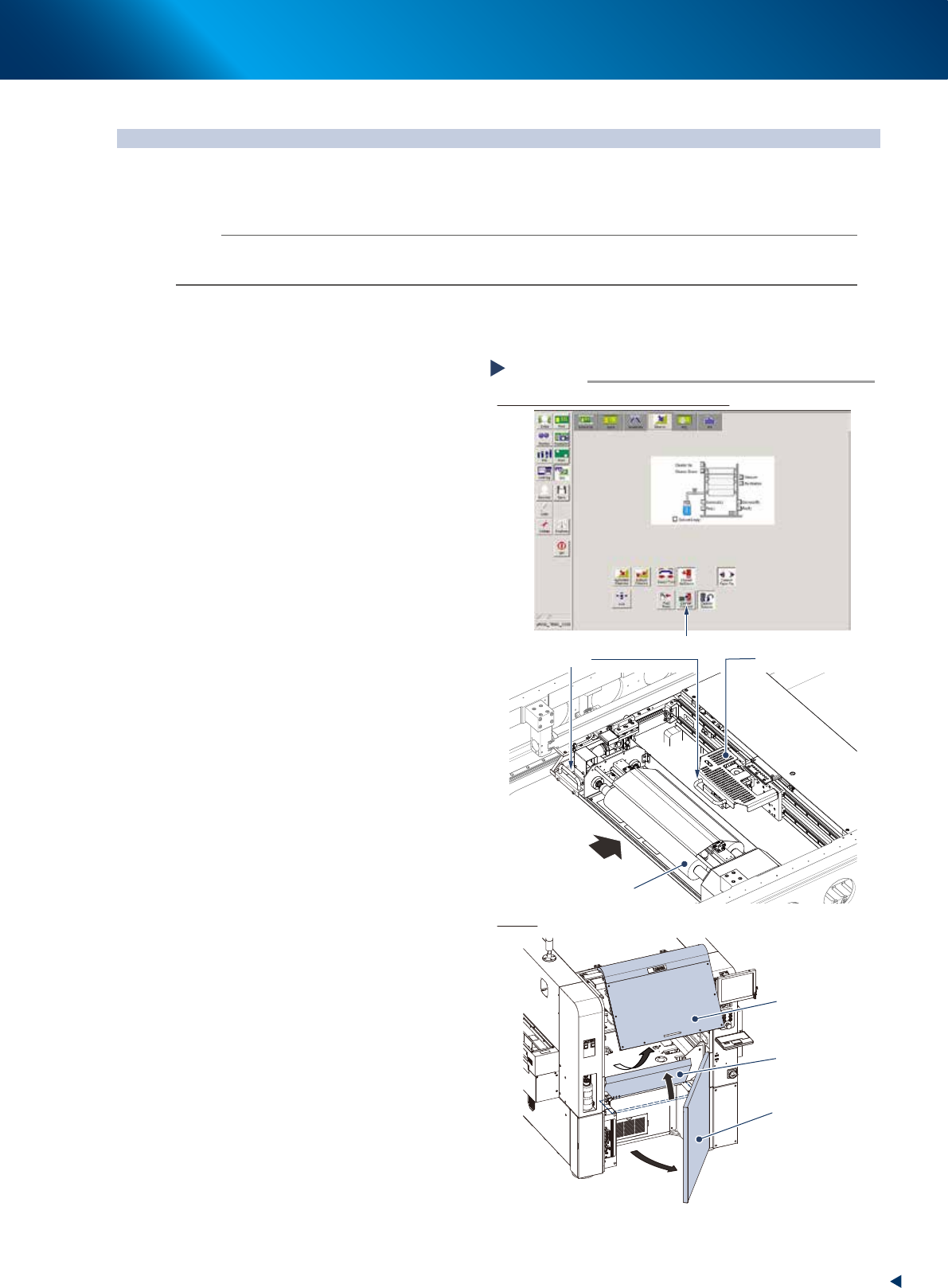
Prepare for work.
1. Press the [Cleaner Connect] button on [Unit]
- [Cleaner] screen to connect the cleaning
unit and camera unit.
e
2. Press the emergency stop button and open
machine safety cover.
3. Move the cleaning unit and camera unit to
machine rear side grabbing one of their
handles.
4. Open the lower door and lift up the
maintenance cover.
Preparing for work
Moving the cleaning unit and camera unit
Covers
Step 2
Press the [Cleaner Connect] button
Handle
Camera unit
Cleaning unit
Move to machine rear side
Maintenance cover
Safety cover
Lower door
54402-KMJ-00
3. Conveyor transfer belt
4-6
Chapter 4 The parts to be replaced and its procedures
3
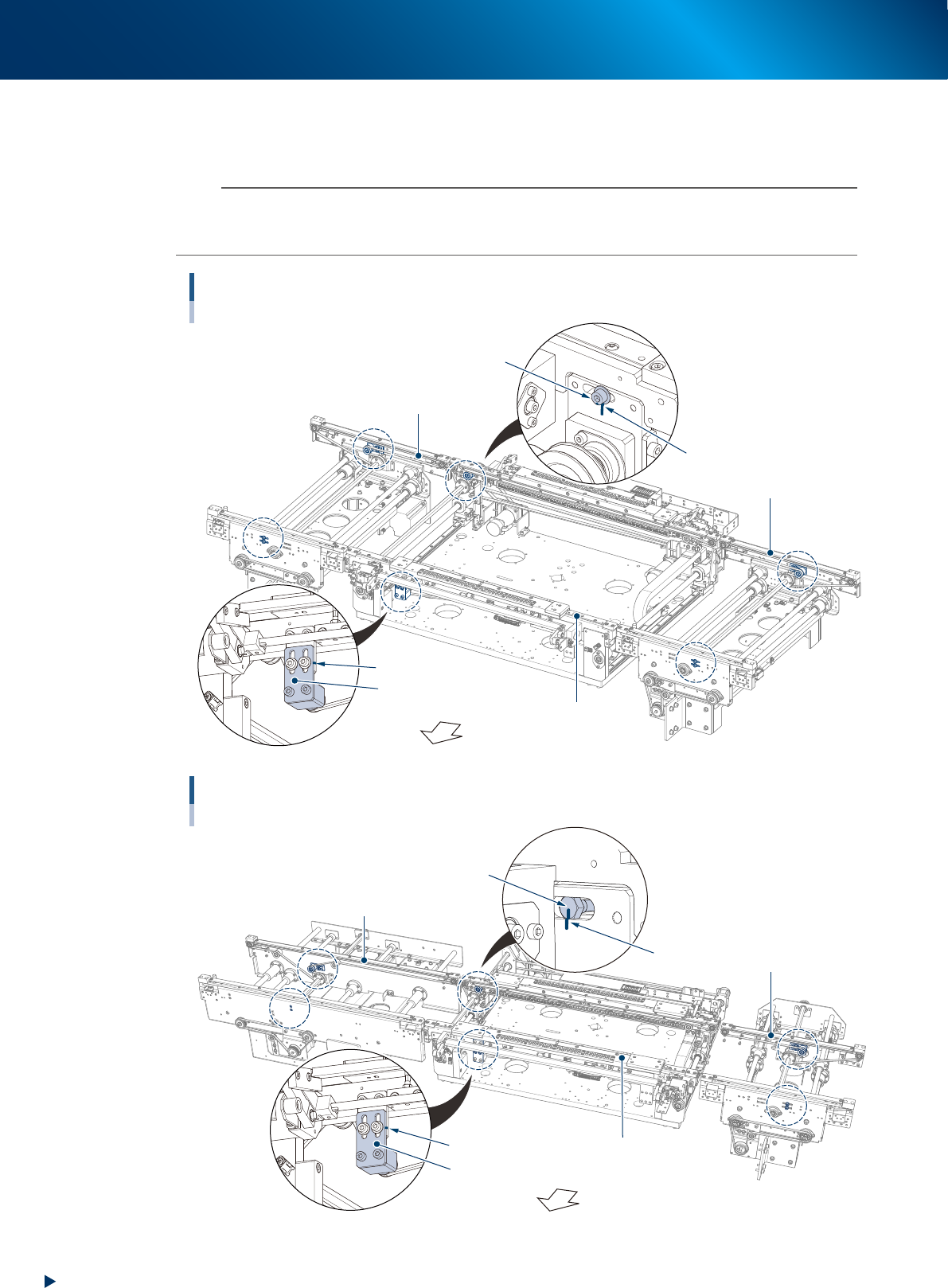
Using the permanent marker, mark the positions of the pulley bracket or pulley
mounting bolt which stay at the tension adjustment position shown below before
loosening the belt tension.
n
NOTE
As to tension pulley and pulley bracket:
The pulley on the moving side conveyor of center conveyor (both standard and L650 type) and the fixed side conveyor of
entrance/exit conveyor is directly fixed by the bolt. The pulley position of other conveyor is adjusted by the pulley bracket.
Tension marking points (R to L flow, standard conveyor type)
Circled by dash line (6 points)
Pulley fixing bolt
Pulley bracket
Marking
Fixed side
Moving side
Machine front side
Marking
Exit conveyor
Center conveyor
Entrance conveyor
53422-KMJ-00
Bolt on the opposite side of the pulley
Tension marking points (R to L flow, L650 type machine with extention conveyor)
Circled by dash line (6 points)
Pulley bracket
Extension conveyor of exit side
Marking
Fixed side
Moving side
Machine front side
Marking
Entrance conveyor
Center conveyor
53440-KMJ-10