5TROUBLESHOOTING_.pdf - 第109页
3.3 . 1 Reset Procedure from Component Recognition Error ( 1 L 90 — ) Order of Error Codes ( Display C ) • ( Display A ) • ( Display B ) • ( Cause ) • ( Remedy ) ( Display C ) 1 L 90 B 012 ( Display A ) Component Library…
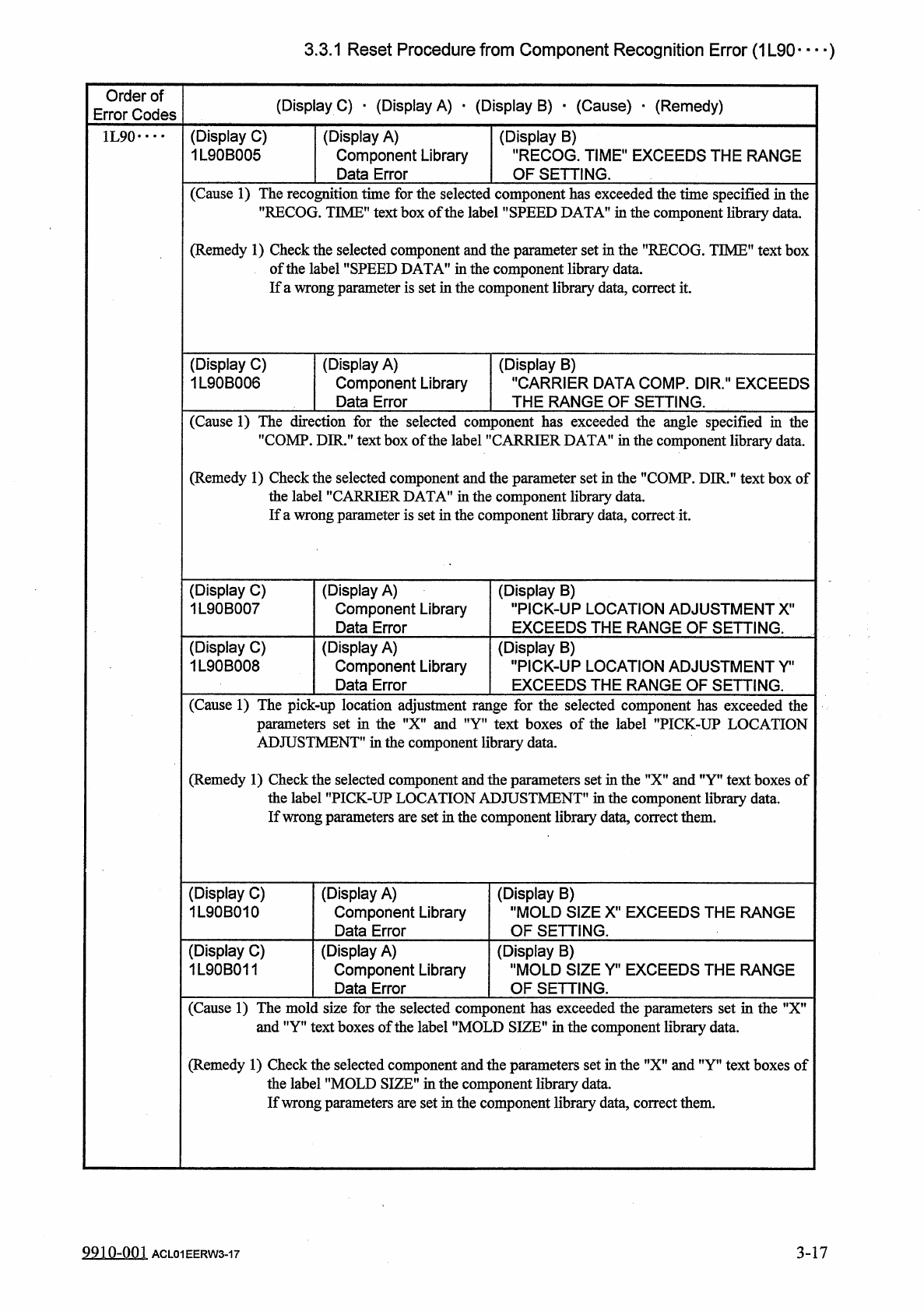
3.3
.
1
Reset
Procedure
from
Component
Recognition
Error
(
1
L
90
—
)
Order
of
Error
Codes
(
Display
C
)
■
(
Display
A
)
•
(
Display
B
)
■
(
Cause
)
■
(
Remedy
)
(
Display
C
)
1
L
90
B
005
(
Display
A
)
Component
Library
Data
Error
(
Display
B
)
"
RECOG
.
TIME
"
EXCEEDS
THE
RANGE
OF
SETTING
.
1
L
90
•
•
•
•
(
Cause
1
)
The
recognition
time
for
the
selected
component
has
exceeded
the
time
specified
in
the
"
RECOG
.
TIME
”
text
box
of
the
label
’
’
SPEED
DATA
"
in
the
component
library
data
.
(
Remedy
1
)
Check
the
selected
component
and
the
parameter
set
in
the
"
RECOG
.
TIME
"
text
box
of
the
label
"
SPEED
DATAf
,
in
the
component
library
data
.
If
a
wrong
parameter
is
set
in
the
component
library
data
,
correct
it
.
(
Display
C
)
1
L
90
B
006
(
Display
A
)
Component
Library
Data
Error
(
Display
B
)
"
CARRIER
DATA
COMP
.
DIR
.
"
EXCEEDS
THE
RANGE
OF
SETTING
.
(
Cause
1
)
The
direction
for
the
selected
component
has
exceeded
the
angle
specified
in
tiie
"
COMP
.
DIR
.
"
text
box
of
the
label
"
CARRIER
DATA
"
in
the
component
library
data
.
(
Remedy
1
)
Check
the
selected
component
and
the
parameter
set
in
the
’
’
COMP
.
DIR
.
”
text
box
of
the
label
"
CARRIER
DATA
"
in
the
component
library
data
.
If
a
wrong
parameter
is
set
in
the
component
library
data
,
correct
it
.
(
Display
C
)
1
L
90
B
007
(
Display
A
)
Component
Library
Data
Error
(
Display
B
)
"
PICK
-
UP
LOCATION
ADJUSTMENT
X
'
EXCEEDS
THE
RANGE
OF
SETTING
.
(
Display
C
)
1
L
90
B
008
(
Display
A
)
Component
Library
Data
Error
(
Display
B
)
"
PICK
-
UP
LOCATION
ADJUSTMENT
Y
"
EXCEEDS
THE
RANGE
OF
SETTING
.
(
Cause
1
)
The
pick
-
up
location
adjustment
range
for
the
selected
component
has
exceeded
the
parameters
set
in
the
"
X
"
and
”
Y
"
text
boxes
of
the
label
’
’
PICK
-
UP
LOCATION
ADJUSTMENT
"
in
the
component
library
data
.
(
Remedy
1
)
Check
the
selected
component
and
the
parameters
set
in
the
"
X
"
and
”
Y
”
text
boxes
of
the
label
"
PICK
-
UP
LOCATION
ADJUSTMENT
"
in
the
component
library
data
.
If
wrong
parameters
are
set
in
the
component
library
data
,
correct
them
.
(
Display
C
)
1
L
90
B
010
(
Display
A
)
Component
Library
Data
Error
(
Display
B
)
"
MOLD
SIZE
X
"
EXCEEDS
THE
RANGE
OF
SETTING
.
(
Display
C
)
1
L
90
B
011
(
Display
A
)
Component
Library
Data
Error
(
Display
B
)
"
MOLD
SIZE
Yn
EXCEEDS
THE
RANGE
OF
SETTING
.
(
Cause
1
)
The
mold
size
for
the
selected
component
has
exceeded
the
parameters
set
in
the
"
X
"
and
"
Y
"
text
boxes
of
the
label
"
MOLD
SIZE
"
in
the
component
library
data
.
(
Remedy
1
)
Check
the
selected
component
and
the
parameters
set
in
the
"
X
"
and
"
Y
"
text
boxes
of
the
label
"
MOLD
SIZE
"
in
the
component
library
data
.
If
wrong
parameters
are
set
in
the
component
library
data
,
correct
them
.
9910
-
001
3
-
17
ACL
01
EERW
3
-
17
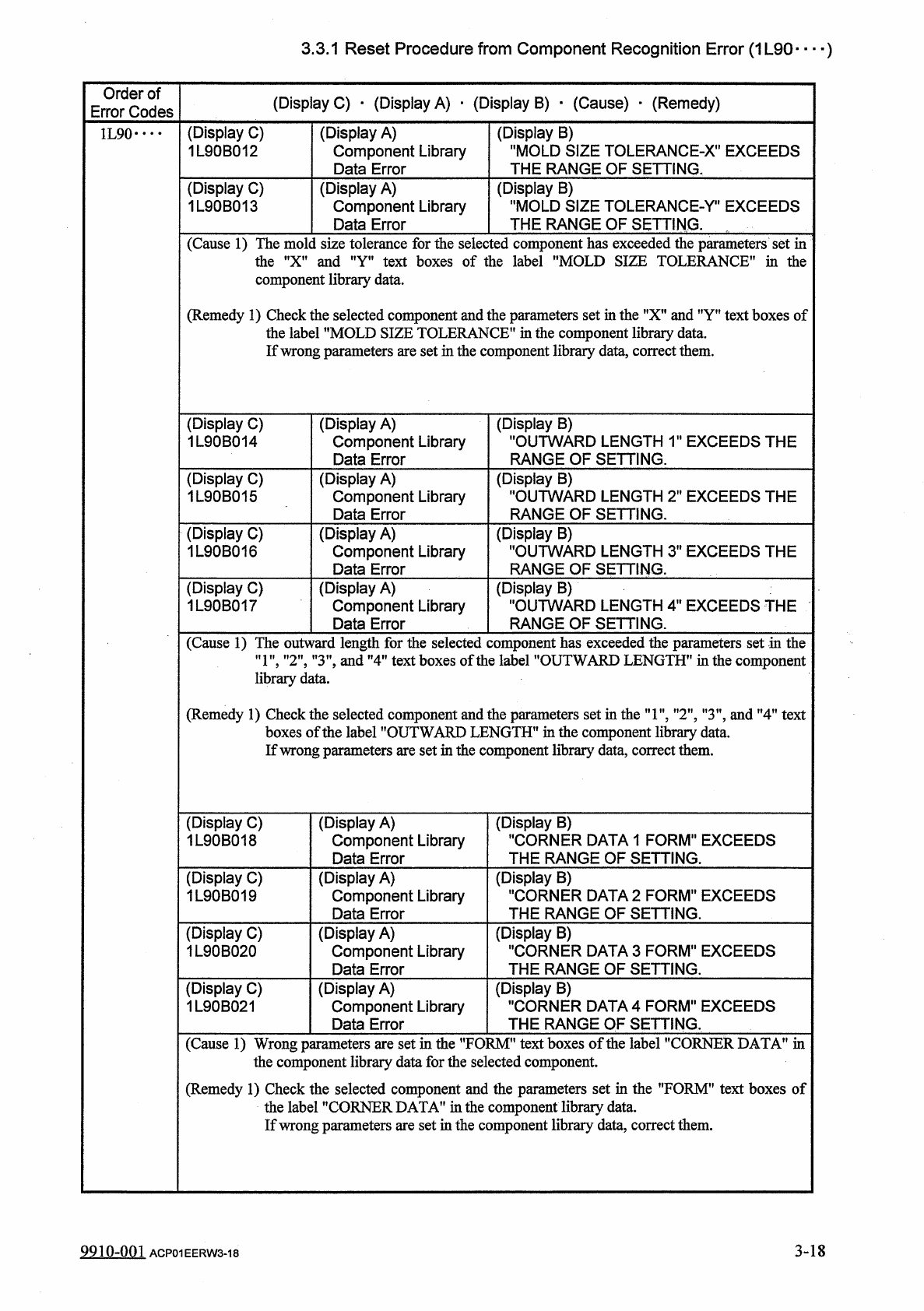
3.3
.
1
Reset
Procedure
from
Component
Recognition
Error
(
1
L
90
—
)
Order
of
Error
Codes
(
Display
C
)
•
(
Display
A
)
•
(
Display
B
)
•
(
Cause
)
•
(
Remedy
)
(
Display
C
)
1
L
90
B
012
(
Display
A
)
Component
Library
Data
Error
(
Display
B
)
"
MOLD
SIZE
TOLERANCE
-
X
"
EXCEEDS
THE
RANGE
OF
SETTING
.
1
L
90
•
•
••
(
Display
C
)
1
L
90
B
013
(
Display
B
)
"
MOLD
SIZE
TOLERANCE
-
r
1
EXCEEDS
THE
RANGE
OF
SETTING
.
(
Display
A
)
Component
Library
Data
Error
(
Cause
1
)
The
mold
size
tolerance
for
the
selected
component
has
exceeded
the
parameters
set
in
the
"
X
"
and
"
Y
"
text
boxes
of
the
label
"
MOLD
SIZE
TOLERANCE
”
in
the
component
library
data
.
(
Remedy
1
)
Check
the
selected
component
and
the
parameters
set
in
the
"
X
"
and
"
Y
"
text
boxes
of
the
label
"
MOLD
SIZE
TOLERANCE
"
in
the
component
library
data
.
If
wrong
parameters
are
set
in
the
component
library
data
,
correct
them
.
(
Display
B
)
"
OUTWARD
LENGTH
1
"
EXCEEDS
THE
RANGE
OF
SETTING
.
(
Display
C
)
1
L
90
B
014
(
Display
A
)
Component
Library
Data
Error
(
Display
C
)
1
L
90
B
015
(
Display
A
)
Component
Library
Data
Error
(
Display
B
)
"
OUTWARD
LENGTH
2
M
EXCEEDS
THE
RANGE
OF
SETTING
.
(
Display
C
)
1
L
90
B
016
(
Display
A
)
Component
Library
Data
Error
(
Display
B
)
"
OUTWARD
LENGTH
3
"
EXCEEDS
THE
RANGE
OF
SETTING
.
(
Display
C
)
1
L
90
B
017
(
Display
A
)
Component
Library
Data
Error
(
Display
B
)
"
OUTWARD
LENGTH
4
"
EXCEEDS
THE
RANGE
OF
SETTING
.
(
Cause
1
)
The
outward
length
for
the
selected
component
has
exceeded
the
parameters
set
in
the
”
1
"
,
"
2
"
,
"
3
”
,
and
"
4
"
text
boxes
of
the
label
"
OUTWARD
LENGTH
”
in
the
component
library
data
.
(
Remedy
1
)
Check
the
selected
component
and
the
parameters
set
in
the
"
1
"
,
"
2
"
,
"
3
”
,
and
"
4
"
text
boxes
of
the
label
"
OUTWARD
LENGTH
"
in
the
component
library
data
.
If
wrong
parameters
are
set
in
the
component
library
data
,
correct
them
.
(
Display
C
)
1
L
90
B
018
(
Display
B
)
"
CORNER
DATA
1
FORM
"
EXCEEDS
THE
RANGE
OF
SETTING
.
(
Display
A
)
Component
Library
Data
Error
(
Display
C
)
1
L
90
B
019
(
Display
B
)
"
CORNER
DATA
2
FORM
"
EXCEEDS
THE
RANGE
OF
SETTING
.
(
Display
A
)
Component
Library
Data
Error
(
Display
C
)
1
L
90
B
020
(
Display
B
)
"
CORNER
DATA
3
FORM
"
EXCEEDS
THE
RANGE
OF
SETTING
.
(
Display
A
)
Component
Library
Data
Error
(
Display
C
)
1
L
90
B
021
(
Display
A
)
Component
Library
Data
Error
(
Display
B
)
"
CORNER
DATA
4
FORM
"
EXCEEDS
THE
RANGE
OF
SETTING
.
(
Cause
1
)
Wrong
parameters
are
set
in
the
^
FORM
*
1
text
boxes
of
the
label
"
CORNER
DATA
"
in
the
component
library
data
for
the
selected
component
.
(
Remedy
1
)
Check
the
selected
component
and
the
parameters
set
in
the
"
FORM
"
text
boxes
of
the
label
"
CORNER
DATA
”
in
the
component
library
data
.
If
wrong
parameters
are
set
in
the
component
library
data
,
correct
them
.
3
-
18
9910
-
001
ACP
01
EERW
3
-
18
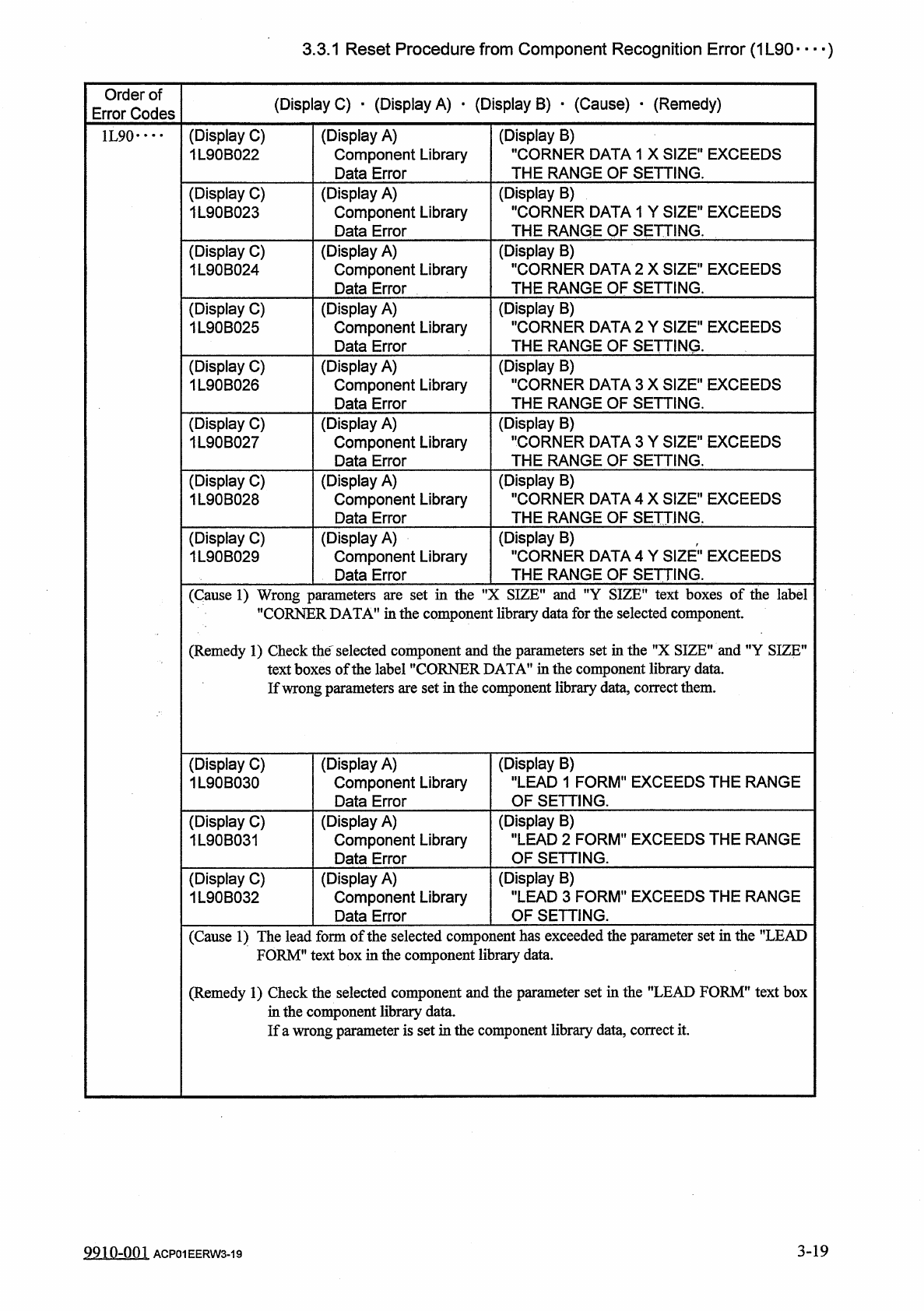
3.3
.
1
Reset
Procedure
from
Component
Recognition
Error
(
1
L
90
—
)
Order
of
Error
Codes
(
Display
C
)
■
(
Display
A
)
•
(
Display
B
)
•
(
Cause
)
•
(
Remedy
)
(
Display
C
)
1
L
90
B
022
(
Display
B
)
"
CORNER
DATA
1
X
SIZE
"
EXCEEDS
THE
RANGE
OF
SETTING
.
(
Display
A
)
Component
Library
Data
Error
1
L
90
•
…
(
Display
B
)
"
CORNER
DATA
1
Y
SIZE
"
EXCEEDS
THE
RANGE
OF
SETTING
,
(
Display
C
)
1
L
90
B
023
(
Display
A
)
Component
Library
Data
Error
(
Display
B
)
•
•
CORNER
DATA
2
X
SIZE
"
EXCEEDS
THE
RANGE
OF
SETTING
.
(
Display
C
)
1
L
90
B
024
(
Display
A
)
Component
Library
Data
Error
(
Display
B
)
"
CORNER
DATA
2
Y
SIZE
"
EXCEEDS
THE
RANGE
OF
SETTING
.
(
Display
C
)
1
L
90
B
025
(
Display
A
)
Component
Library
Data
Error
(
Display
B
)
"
CORNER
DATA
3
X
SIZE
"
EXCEEDS
THE
RANGE
OF
SETTING
.
(
Display
A
)
Component
Library
Data
Error
(
Display
C
)
1
L
90
B
026
(
Display
B
)
"
CORNER
DATA
3
Y
SIZE
"
EXCEEDS
THE
RANGE
OF
SETTING
.
(
Display
C
)
1
L
90
B
027
(
Display
A
)
Component
Library
Data
Error
(
Display
B
)
"
CORNER
DATA
4
X
SIZE
"
EXCEEDS
THE
RANGE
OF
SETTING
.
(
Display
C
)
1
L
90
B
028
(
Display
A
)
Component
Library
Data
Error
(
Display
B
)
,
"
CORNER
DATA
4
Y
SIZE
"
EXCEEDS
THE
RANGE
OF
SETTING
.
(
Display
A
)
Component
Library
Data
Error
(
Display
C
)
1
L
90
B
029
(
Cause
1
)
Wrong
parameters
are
set
in
the
"
X
SIZE
"
and
"
Y
SIZE
"
text
boxes
of
the
label
"
CORNER
DATA
'
1
in
the
component
library
data
for
the
selected
component
.
(
Remedy
1
)
Check
the
一
selected
component
and
the
parameters
set
in
the
"
X
SIZE
"
and
"
Y
SIZE
"
text
boxes
of
the
label
"
CORNER
DATA
"
in
the
component
library
data
.
If
wrong
parameters
are
set
in
the
component
library
data
,
correct
them
.
(
Display
B
)
"
LEAD
1
FORM
"
EXCEEDS
THE
RANGE
OF
SETTING
.
(
Display
C
)
1
L
90
B
030
(
Display
A
)
Component
Library
Data
Error
(
Display
B
)
"
LEAD
2
FORM
"
EXCEEDS
THE
RANGE
OF
SETTING
.
(
Display
A
)
Component
Library
Data
Error
(
Display
C
)
1
L
90
B
031
(
Display
B
)
"
LEAD
3
FORM
"
EXCEEDS
THE
RANGE
OF
SETTING
.
(
Display
C
)
1
L
90
B
032
(
Display
A
)
Component
Library
Data
Error
(
Cause
1
)
The
lead
form
of
the
selected
component
has
exceeded
the
parameter
set
in
the
"
LEAD
FORM
"
text
box
in
the
component
library
data
.
(
Remedy
1
)
Check
the
selected
component
and
the
parameter
set
in
the
"
LEAD
FORM
"
text
box
in
the
component
library
data
.
If
a
wrong
parameter
is
set
in
the
component
library
data
,
correct
it
.
3
-
19
9910
-
001
ACP
01
EERW
3
-
19