5TROUBLESHOOTING_.pdf - 第121页
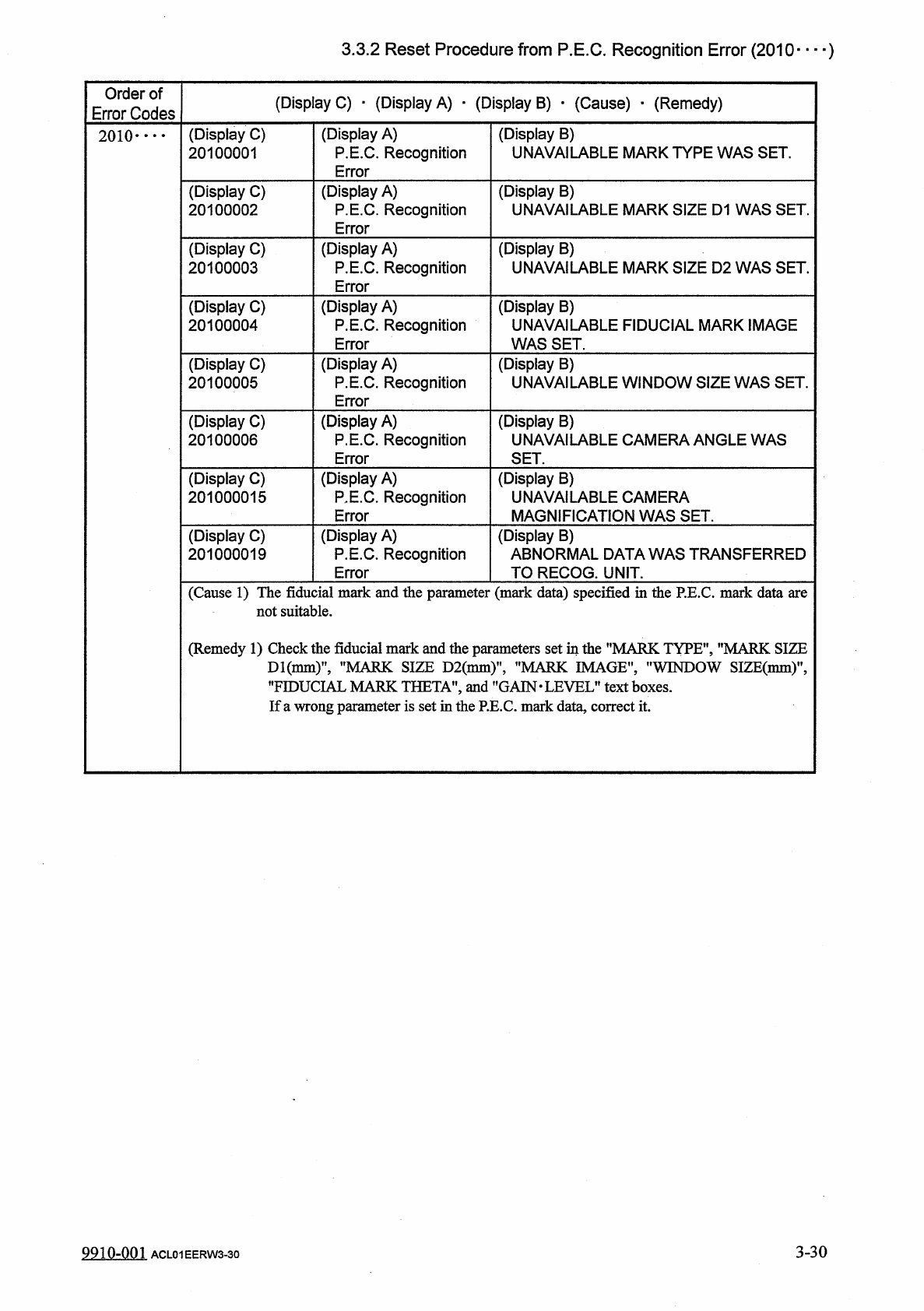
3.3 . 2 Reset Procedure from P . E . C . Recognition Error ( 2010 — ) Order of Error Codes ( Display C ) • ( Display A ) ■ ( Display B ) • ( Cause ) • ( Remedy ) ( Display A ) P . E . C . Recognition Error ( Display B ) …
3.3
.
2
Reset
Procedure
from
P
.
E
.
C
.
Recognition
Error
3.3
.
2
Reset
Procedure
from
P
.
E
.
C
.
Recognition
Error
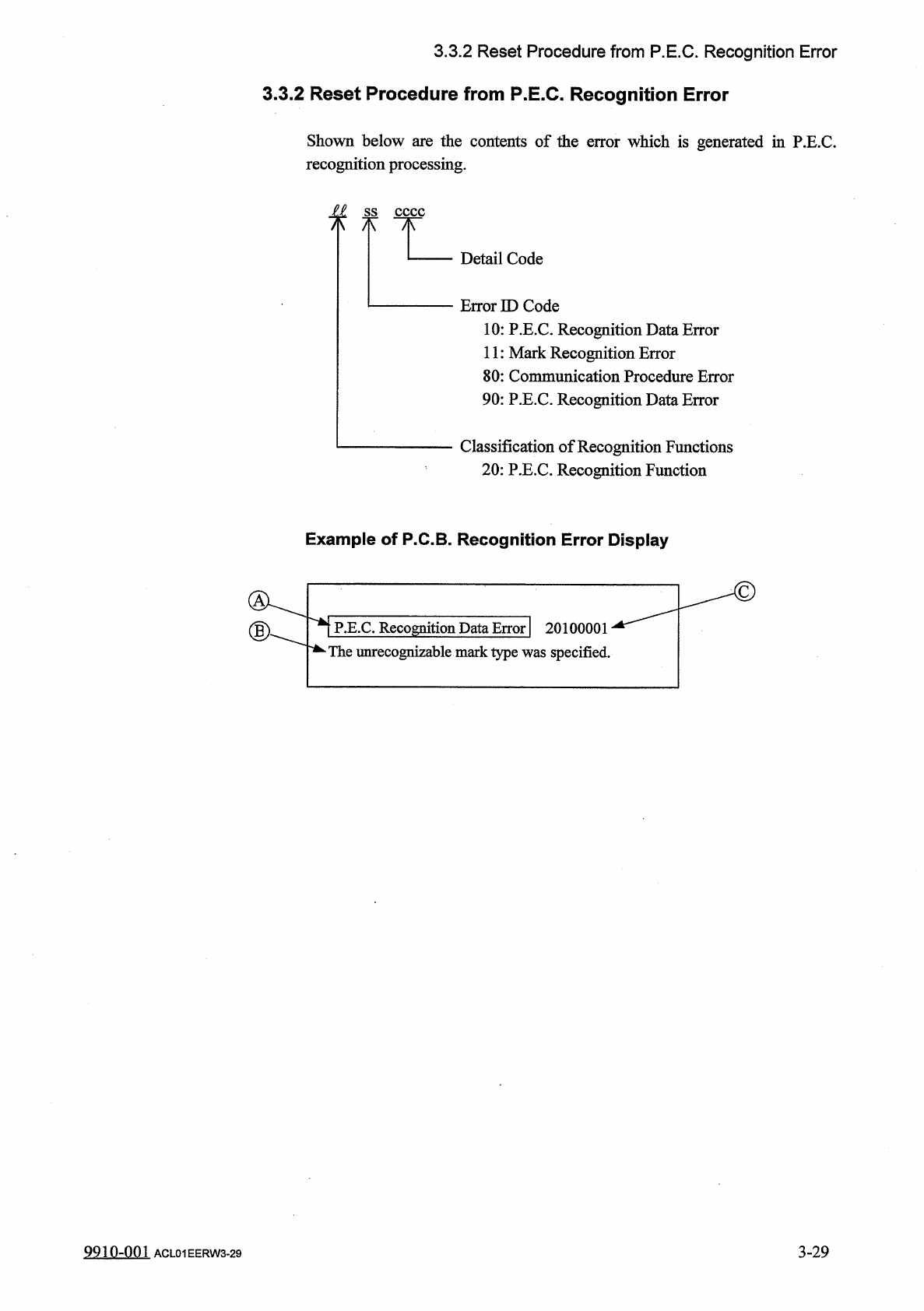
Shown
below
are
the
contents
of
the
error
which
is
generated
in
P
.
E
.
C
.
recognition
processing
.
f
f
Detail
Code
Error
ID
Code
10
:
P
.
E
.
C
.
Recognition
Data
Error
11
:
Mark
Recognition
Error
80
:
Communication
Procedure
Error
90
:
P
.
E
.
C
.
Recognition
Data
Error
Classification
of
Recognition
Functions
20
:
P
.
E
.
C
.
Recognition
Function
Example
of
P
.
C
.
B
.
Recognition
Error
Display
P
.
E
.
C
.
Recognition
Data
Error
|
20100001
*
The
unrecognizable
mark
type
was
specified
.
3
-
29
9910
-
001
ACL
01
EERW
3
-
29
3.3
.
2
Reset
Procedure
from
P
.
E
.
C
.
Recognition
Error
(
2010
—
)
Order
of
Error
Codes
(
Display
C
)
•
(
Display
A
)
■
(
Display
B
)
•
(
Cause
)
•
(
Remedy
)
(
Display
A
)
P
.
E
.
C
.
Recognition
Error
(
Display
B
)
UNAVAILABLE
MARK
TYPE
WAS
SET
.
(
Display
C
)
20100001
2010
-
•
•
•
(
Display
C
)
20100002
(
Display
A
)
P
.
E
.
C
.
Recognition
Error
(
Display
B
)
UNAVAILABLE
MARK
SIZE
D
1
WAS
SET
.
(
Display
C
)
20100003
(
Display
A
)
P
.
E
.
C
.
Recognition
Error
(
Display
B
)
UNAVAILABLE
MARK
SIZE
D
2
WAS
SET
.
(
Display
C
)
20100004
(
Display
A
)
P
.
E
.
C
.
Recognition
Error
(
Display
B
)
UNAVAILABLE
FIDUCIAL
MARK
IMAGE
WAS
SET
.
(
Display
A
)
P
.
E
.
C
.
Recognition
Error
(
Display
B
)
UNAVAILABLE
WINDOW
SIZE
WAS
SET
.
(
Display
C
)
20100005
(
Display
C
)
20100006
(
Display
A
)
P
.
E
.
C
.
Recognition
Error
(
Display
B
)
UNAVAILABLE
CAMERA
ANGLE
WAS
SET
.
(
Display
C
)
201000015
(
Display
A
)
P
,
E
.
C
.
Recognition
Error
(
Display
B
)
UNAVAILABLE
CAMERA
MAGNIFICATION
WAS
SET
.
(
Display
C
)
201000019
(
Display
A
)
P
.
E
.
C
.
Recognition
Error
(
Display
B
)
ABNORMAL
DATA
WAS
TRANSFERRED
TO
RECOG
.
UNIT
.
(
Cause
1
)
The
fiducial
mark
and
the
parameter
(
mark
data
)
specified
in
the
P
.
E
.
C
.
mark
data
are
not
suitable
.
(
Remedy
1
)
Check
the
fiducial
mark
and
the
parameters
set
in
the
"
MARK
TYPE
"
,
"
MARK
SIZE
Dl
(
nmi
)
,
,
,
"
MARK
SIZE
D
2
(
mm
)
"
,
"
MARK
IMAGE
"
,
"
WINDOW
SIZE
(
mm
)
"
,
”
FIDUCIAL
MARK
THETA
'
and
"
GAIN
.
LEVEL
"
text
boxes
.
If
a
wrong
parameter
is
set
in
the
P
.
E
.
C
.
mark
data
,
correct
it
.
3
-
30
9910
-
001
ACL
01
EERW
3
-
30
3.3
.
2
Reset
Procedure
from
P
.
E
.
C
.
Recognition
Error
(
2011
…
■
)
Order
of
Error
Codes
(
Display
C
)
■
(
Display
A
)
■
(
Display
B
)
_
(
Cause
)
•
(
Remedy
)
(
Display
A
)
Mark
Recognition
Error
(
Display
C
)
20110001
(
Display
B
)
SPECIFIED
MARK
WAS
NOT
FOUND
IN
WINDOW
OF
RECOG
.
MONITOR
.
2011
•
…
(
Display
C
)
20110002
(
Display
A
)
Mark
Recognition
Error
(
Display
B
)
IMAGE
AROUND
FIDUCIAL
MARK
WAS
UNSTABLE
.
(
Display
A
)
Mark
Recognition
Error
(
Display
C
)
20110003
(
Display
B
)
ERROR
OF
MARK
FIGURE
SIMILITUDE
WAS
EXTENSIVE
.
(
Display
C
)
20110004
(
Display
A
)
Mark
Recognition
Error
(
Display
B
)
ERROR
OF
MARK
SIMILITUDE
OR
MARK
SIZE
WAS
EXTENSIVE
.
(
Display
C
)
20110005
(
Display
A
)
Mark
Recognition
Error
(
Display
B
)
X
-
COORDINATE
ERROR
OF
MEASURING
POINT
WAS
EXTENSIVE
.
(
Display
C
)
20110006
(
Display
A
)
Mark
Recognition
Error
(
Display
B
)
Y
-
COORDINATE
ERROR
OF
MEASURING
POINT
WAS
EXTENSIVE
.
(
Display
C
)
20110009
(
Display
A
)
Mark
Recognition
Error
(
Display
B
)
RECOGNITION
WAS
ABORTED
.
(
Cause
1
)
The
fiducial
mark
and
the
fiducial
mark
coordinates
X
and
Y
"
or
the
mark
data
are
not
suitable
.
(
Remedy
1
)
Follow
the
steps
below
to
reset
the
machine
to
the
normal
condition
.
_
(
1
)
When
the
[
RESET
]
button
is
pressed
,
the
"
RE
.
C
.
MANUAL
ALIGNMENT
"
display
opens
and
a
fiducial
mark
appears
on
the
recognition
monitor
.
Follow
the
instructions
described
on
the
display
to
reset
the
machine
to
the
normal
condition
.
<
P
.
E
.
C
.
MNUAL
AIIGNU
£
NT
>
…
PROCEDURE
t
.
PLEAE
SELECT
THE
DISHED
DIRECTION
AND
SPEED
.
2
.
PREASE
PRESS
1
HE
(
HOVE
)
BUTTON
.
3
_
1
暖瞧
"
P
.
E
.
C
.
MANUAL
ALIGNMENT
"
Display
Actual
Fiducial
Mark
Crossline
Displayed
Fiducial
Mark
Sample
Display
on
Recognition
Monitor
(
Continued
to
the
next
page
)
3
-
31
9910
-
001
ACL
01
EERW
3
-
31