5TROUBLESHOOTING_.pdf - 第123页
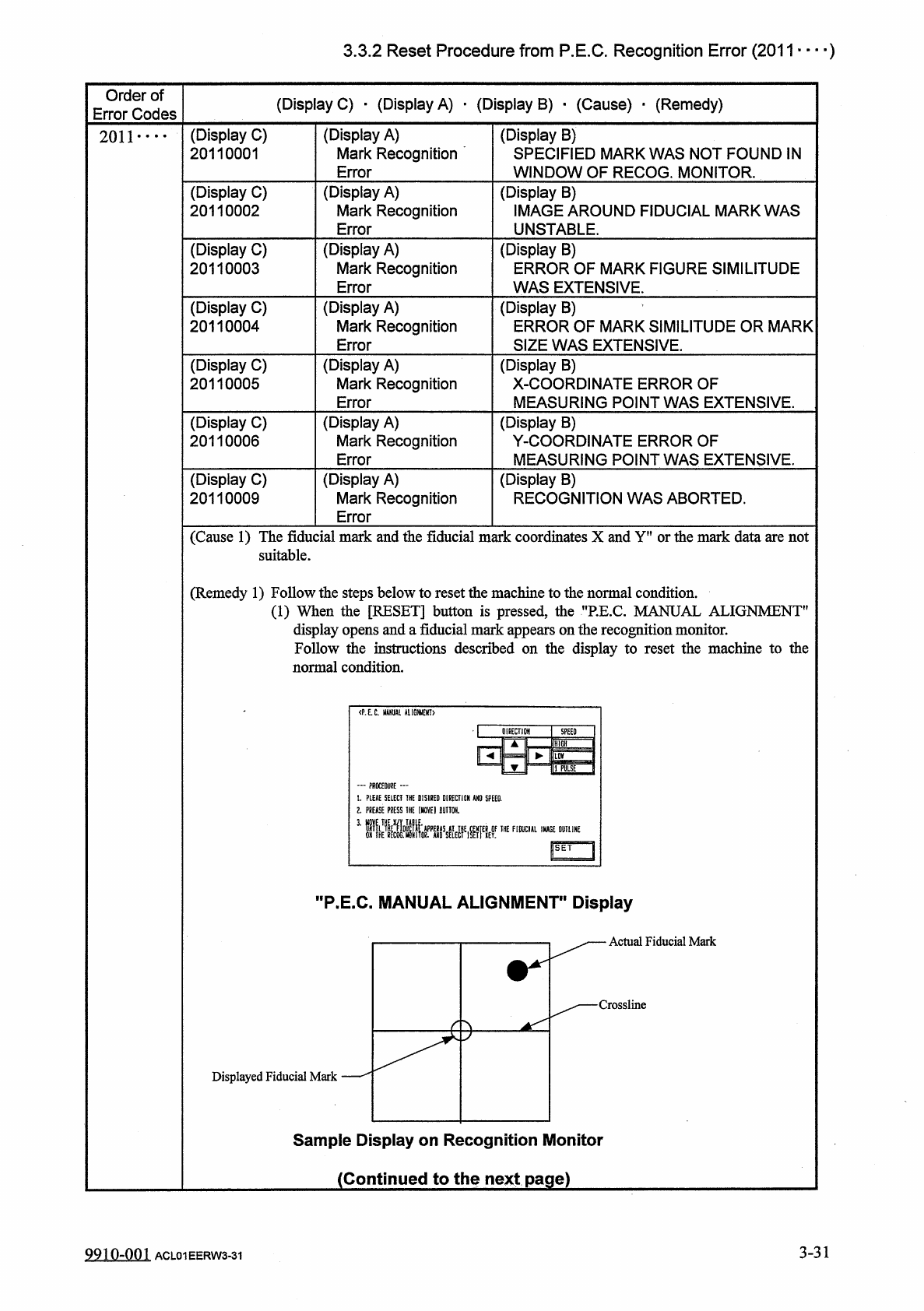
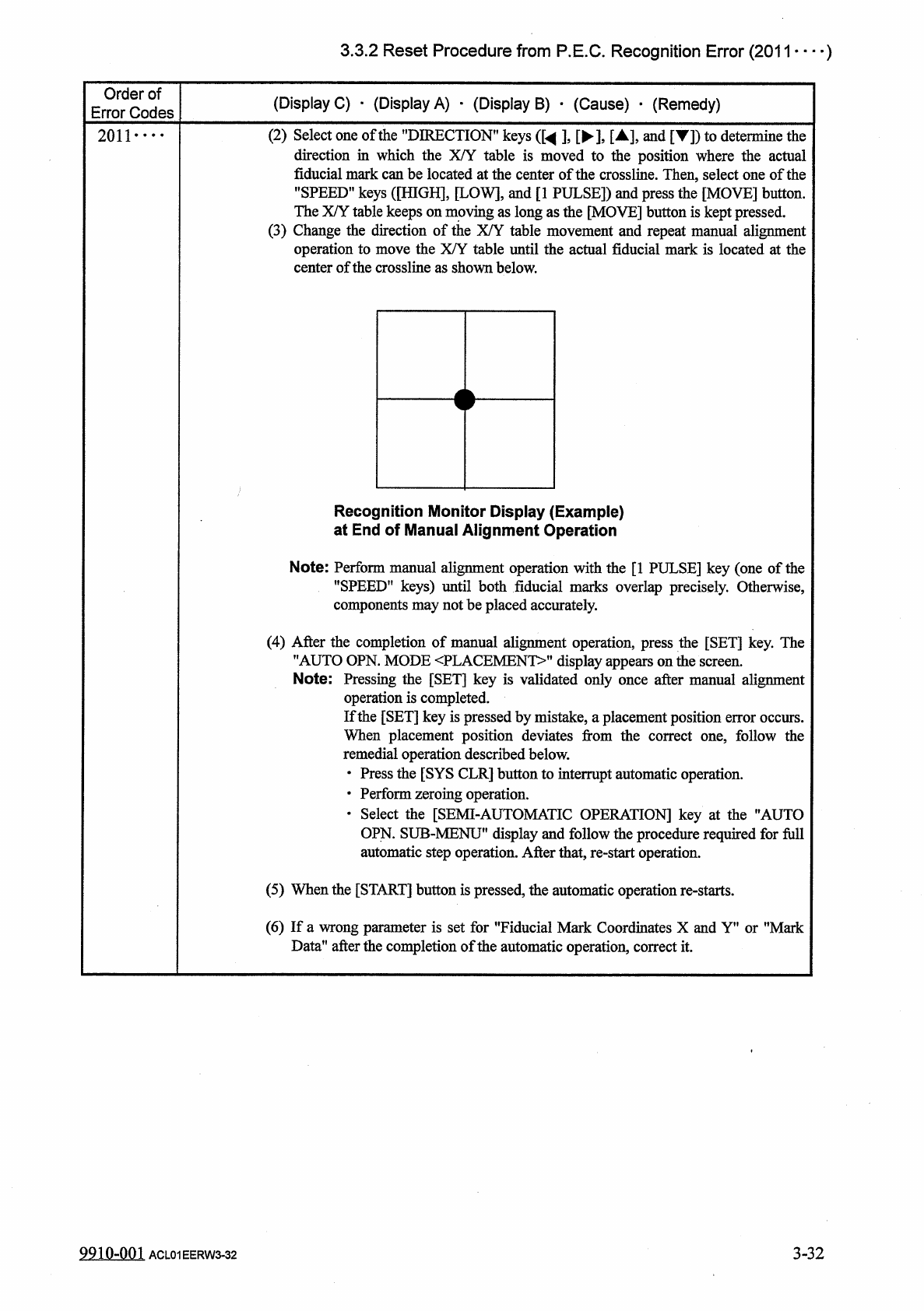
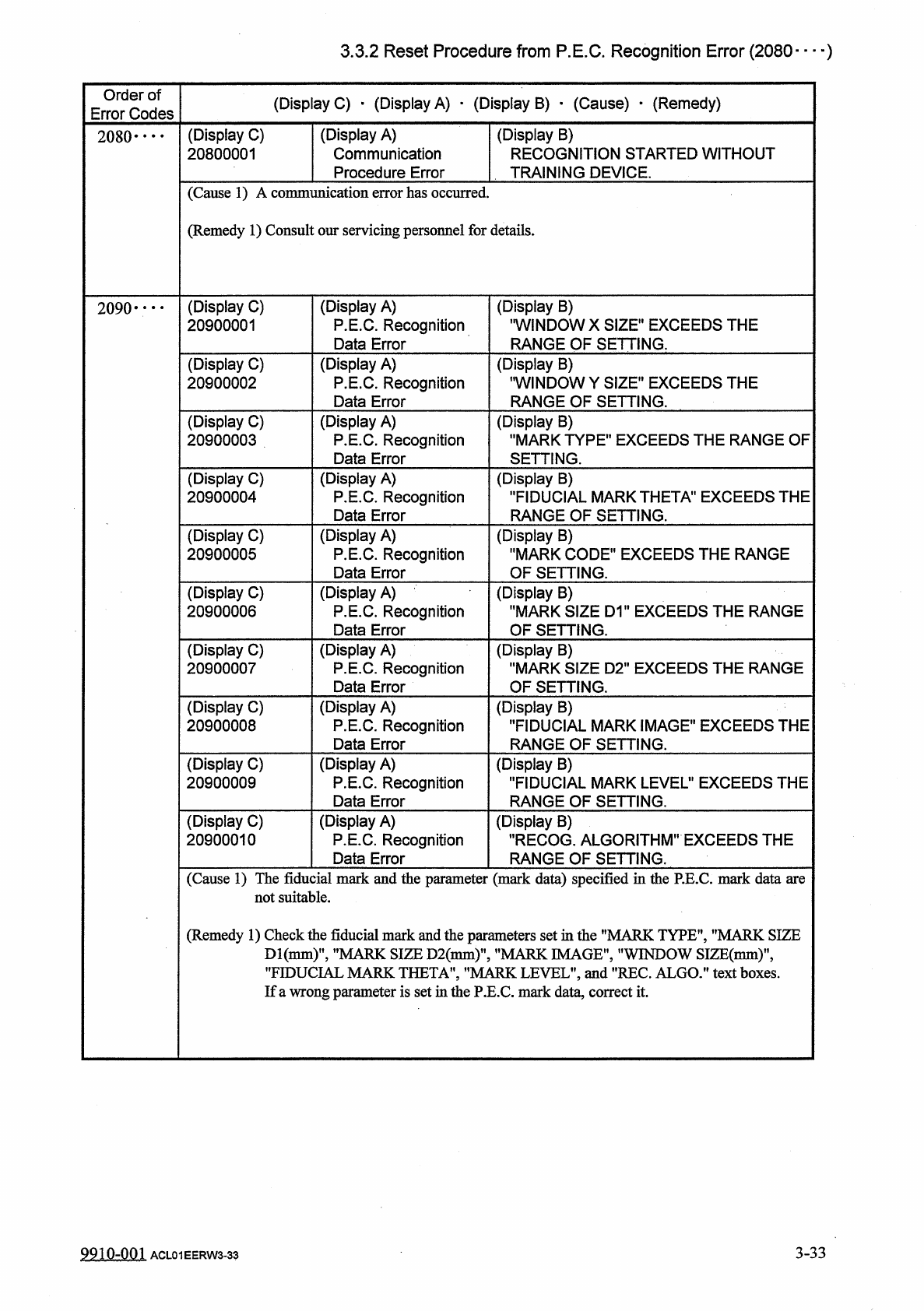
3.3 . 2 Reset Procedure from P . E . C . Recognition Error ( 2011 • • • _ ) Order of Error Codes ( Display C ) . ( Display A ) . ( Display B ) • ( Cause ) _ ( Remedy ) 2011 . . ( 2 ) Select one of the " DIRECTION &q…
3.3
.
2
Reset
Procedure
from
P
.
E
.
C
.
Recognition
Error
(
2011
…
■
)
Order
of
Error
Codes
(
Display
C
)
■
(
Display
A
)
■
(
Display
B
)
_
(
Cause
)
•
(
Remedy
)
(
Display
A
)
Mark
Recognition
Error
(
Display
C
)
20110001
(
Display
B
)
SPECIFIED
MARK
WAS
NOT
FOUND
IN
WINDOW
OF
RECOG
.
MONITOR
.
2011
•
…
(
Display
C
)
20110002
(
Display
A
)
Mark
Recognition
Error
(
Display
B
)
IMAGE
AROUND
FIDUCIAL
MARK
WAS
UNSTABLE
.
(
Display
A
)
Mark
Recognition
Error
(
Display
C
)
20110003
(
Display
B
)
ERROR
OF
MARK
FIGURE
SIMILITUDE
WAS
EXTENSIVE
.
(
Display
C
)
20110004
(
Display
A
)
Mark
Recognition
Error
(
Display
B
)
ERROR
OF
MARK
SIMILITUDE
OR
MARK
SIZE
WAS
EXTENSIVE
.
(
Display
C
)
20110005
(
Display
A
)
Mark
Recognition
Error
(
Display
B
)
X
-
COORDINATE
ERROR
OF
MEASURING
POINT
WAS
EXTENSIVE
.
(
Display
C
)
20110006
(
Display
A
)
Mark
Recognition
Error
(
Display
B
)
Y
-
COORDINATE
ERROR
OF
MEASURING
POINT
WAS
EXTENSIVE
.
(
Display
C
)
20110009
(
Display
A
)
Mark
Recognition
Error
(
Display
B
)
RECOGNITION
WAS
ABORTED
.
(
Cause
1
)
The
fiducial
mark
and
the
fiducial
mark
coordinates
X
and
Y
"
or
the
mark
data
are
not
suitable
.
(
Remedy
1
)
Follow
the
steps
below
to
reset
the
machine
to
the
normal
condition
.
_
(
1
)
When
the
[
RESET
]
button
is
pressed
,
the
"
RE
.
C
.
MANUAL
ALIGNMENT
"
display
opens
and
a
fiducial
mark
appears
on
the
recognition
monitor
.
Follow
the
instructions
described
on
the
display
to
reset
the
machine
to
the
normal
condition
.
<
P
.
E
.
C
.
MNUAL
AIIGNU
£
NT
>
…
PROCEDURE
t
.
PLEAE
SELECT
THE
DISHED
DIRECTION
AND
SPEED
.
2
.
PREASE
PRESS
1
HE
(
HOVE
)
BUTTON
.
3
_
1
暖瞧
"
P
.
E
.
C
.
MANUAL
ALIGNMENT
"
Display
Actual
Fiducial
Mark
Crossline
Displayed
Fiducial
Mark
Sample
Display
on
Recognition
Monitor
(
Continued
to
the
next
page
)
3
-
31
9910
-
001
ACL
01
EERW
3
-
31
3.3
.
2
Reset
Procedure
from
P
.
E
.
C
.
Recognition
Error
(
2011
•
•
•
_
)
Order
of
Error
Codes
(
Display
C
)
.
(
Display
A
)
.
(
Display
B
)
•
(
Cause
)
_
(
Remedy
)
2011
.
.
(
2
)
Select
one
of
the
"
DIRECTION
"
keys
(
[
^
]
,
[
►
]
,
[
▲
]
,
and
[
T
]
)
to
determine
the
direction
in
which
the
XAT
table
is
moved
to
the
position
where
the
actual
fiducial
mark
can
be
located
at
the
center
of
the
crossline
.
Then
,
select
one
of
the
"
SPEED
"
keys
(
[
HIGH
]
,
[
LOW
]
,
and
[
1
PULSE
]
)
and
press
the
[
MOVE
]
button
.
The
X
/
Y
table
keeps
on
moving
as
long
as
the
[
MOVE
]
button
is
kept
pressed
.
(
3
)
Change
the
direction
of
the
X
/
Y
table
movement
and
repeat
manual
alignment
the
actual
fiducial
mark
is
located
at
the
ion
to
move
the
X
/
Y
table
until
of
the
crossline
as
shown
below
.
operati
center
<
Recognition
Monitor
Display
(
Example
)
at
End
of
Manual
Alignment
Operation
Note
:
Perform
manual
alignment
operation
with
the
[
1
PULSE
]
key
(
one
of
the
"
SPEED
"
keys
)
until
both
fiducial
marks
overlap
precisely
.
Otherwise
,
components
may
not
be
placed
accurately
.
(
4
)
After
the
completion
of
manual
alignment
operati
"
AUTO
OPN
.
MODE
〈
PLACEMENT
^
,
display
a
;
Note
:
Pressing
the
[
SET
]
key
is
validated
only
operation
is
completed
.
If
the
[
SET
]
key
is
pressed
by
mistake
,
a
placement
position
error
occurs
.
When
placement
position
deviates
from
the
correct
one
,
follow
the
remedial
operation
described
below
.
•
Press
the
[
SYS
CLR
]
button
to
interrupt
automatic
operation
.
•
Perform
zeroing
operation
.
•
Select
the
[
SEMI
-
AUTOMATIC
OPERATION
]
key
at
the
"
AUTO
OPN
.
SUB
-
MENU
*
*
display
and
follow
the
procedure
required
for
full
automatic
step
operation
.
After
that
,
re
-
start
operation
.
tion
,
press
the
[
SET
]
key
.
The
once
after
manual
alignment
(
5
)
When
the
[
START
]
button
is
pressed
,
the
automatic
operation
re
-
starts
.
(
6
)
If
a
wrong
parameter
is
set
for
"
Fiducial
Mark
Coordinates
X
and
Y
,
f
or
"
Mark
Data
"
after
the
completion
of
the
automatic
operation
,
correct
it
.
9910
-
001
ACL
01
EERW
3
-
32
3
-
32
3.3
.
2
Reset
Procedure
from
P
.
E
.
C
.
Recognition
Error
(
2080
—
)
Order
of
Error
Codes
(
Display
C
)
•
(
Display
A
)
•
(
Display
B
)
•
(
Cause
)
•
(
Remedy
)
(
Display
A
)
Communication
Procedure
Error
(
Display
B
)
RECOGNITION
STARTED
WITHOUT
TRAINING
DEVICE
.
(
Display
C
)
20800001
2080
*
•
•
•
(
Cause
1
)
A
communication
error
has
occurred
.
(
Remedy
1
)
Consult
our
servicing
personnel
for
details
.
(
Display
C
)
20900001
(
Display
A
)
P
.
E
.
C
.
Recognition
Data
Error
(
Display
B
)
’
•
WINDOW
X
SIZE
"
EXCEEDS
THE
RANGE
OF
SETTING
.
2090
•
…
(
Display
C
)
20900002
(
Display
A
)
P
.
E
.
C
.
Recognition
Data
Error
(
Display
B
)
'
WINDOW
Y
SIZE
"
EXCEEDS
THE
RANGE
OF
SETTING
.
(
Display
C
)
20900003
(
Display
A
)
P
.
E
.
C
.
Recognition
Data
Error
(
Display
B
)
"
MARK
TYPE
"
EXCEEDS
THE
RANGE
OF
SETTING
.
(
Display
C
)
20900004
(
Display
A
)
P
.
E
.
C
.
Recognition
Data
Error
(
Display
B
)
"
FIDUCIAL
MARK
THETA
"
EXCEEDS
THE
RANGE
OF
SETTING
.
(
Display
C
)
20900005
(
Display
A
)
P
.
E
.
C
.
Recognition
Data
Error
(
Display
B
)
"
MARK
CODE
"
EXCEEDS
THE
RANGE
OF
SETTING
.
(
Display
C
)
20900006
(
Display
A
)
P
.
E
.
C
.
Recognition
Data
Error
(
Display
B
)
"
MARK
SIZE
D
1
"
EXCEEDS
THE
RANGE
OF
SETTING
.
(
Display
C
)
20900007
(
Display
A
)
P
.
E
.
C
.
Recognition
Data
Error
(
Display
B
)
"
MARK
SIZE
D
2
"
EXCEEDS
THE
RANGE
OF
SETTING
.
(
Display
C
)
20900008
(
Display
A
)
P
.
E
.
C
.
Recognition
Data
Error
(
Display
B
)
"
FIDUCIAL
MARK
IMAGE
"
EXCEEDS
THE
RANGE
OF
SETTING
.
(
Display
C
)
20900009
(
Display
A
)
P
.
E
.
C
.
Recognition
Data
Error
(
Display
B
)
"
FIDUCIAL
MARK
LEVEL
"
EXCEEDS
THE
RANGE
OF
SETTING
.
(
Display
C
)
20900010
(
Display
A
)
P
.
E
.
C
.
Recognition
Data
Error
(
Display
B
)
•
'
RECOG
.
ALGORITHM
"
EXCEEDS
THE
RANGE
OF
SETTING
.
(
Cause
1
)
The
fiducial
mark
and
the
parameter
(
mark
data
)
specified
in
the
P
.
E
.
C
.
mark
data
are
not
suitable
.
(
Remedy
1
)
Check
the
fiducial
mark
and
the
parameters
set
in
the
"
MARK
TYPE
'
"
MARK
SIZE
"
FIDUCIAL
If
a
wrong
parameter
is
set
in
the
P
.
E
.
C
.
mark
data
,
correct
it
.
SIZE
D
2
(
mm
)
'
"
MARK
IMAGE
'
"
WINDOW
SIZE
(
mm
)
'
THETA
'
"
MARK
LEVEL
'
and
"
REC
.
ALGO
.
"
text
boxes
.
MARKS
.
MARK
3
-
33
9910
-
001
ACL
01
EERW
3
-
33