5TROUBLESHOOTING_.pdf - 第134页
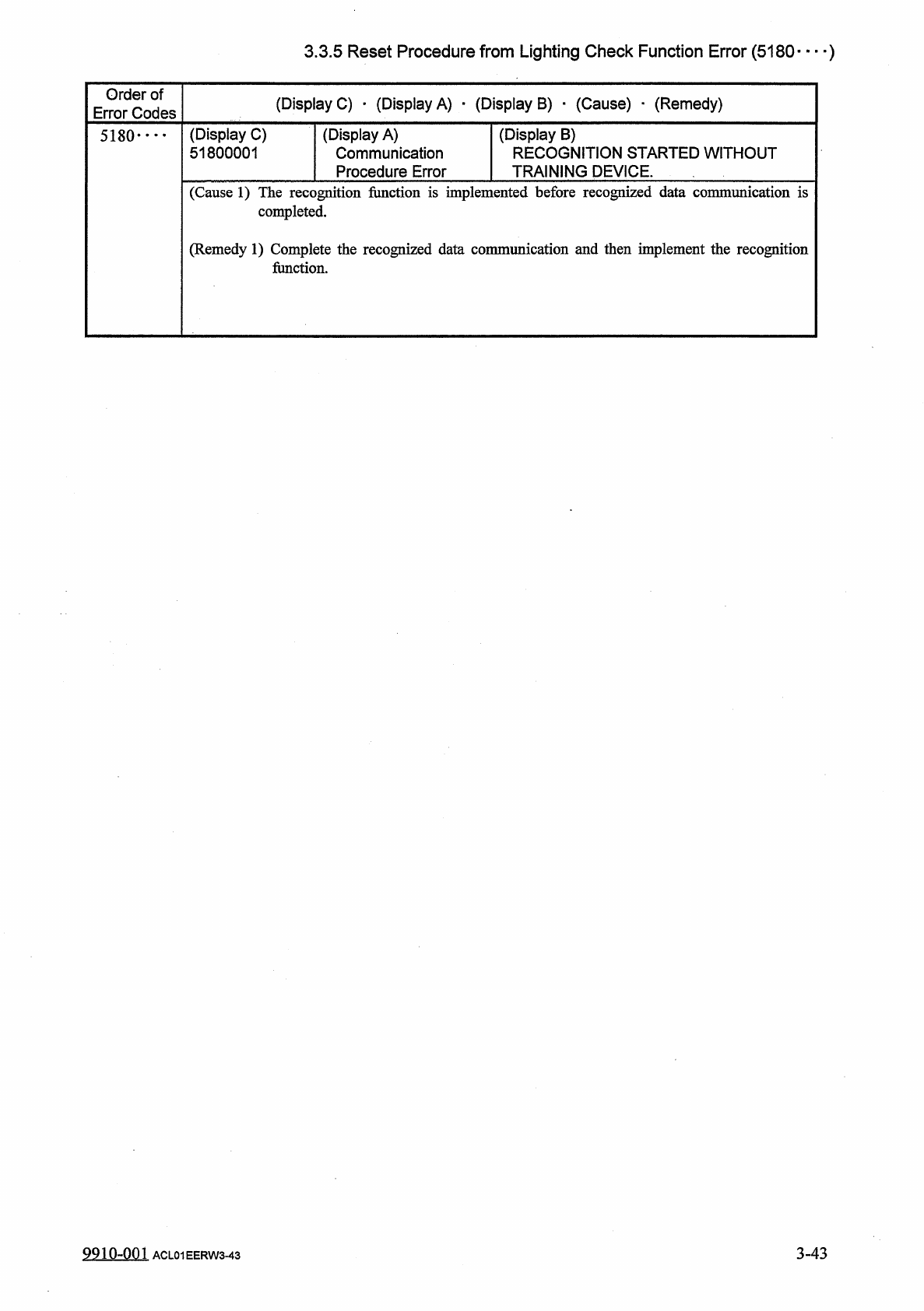
3.3 . 5 Reset Procedure from Lighting Check Function Error ( 5180 — ) Order of Error Codes ( Display C ) • ( Display A ) • ( Display B ) • ( Cause ) _ ( Remedy ) ( Display C ) 51800001 ( Display A ) Communication Procedu…
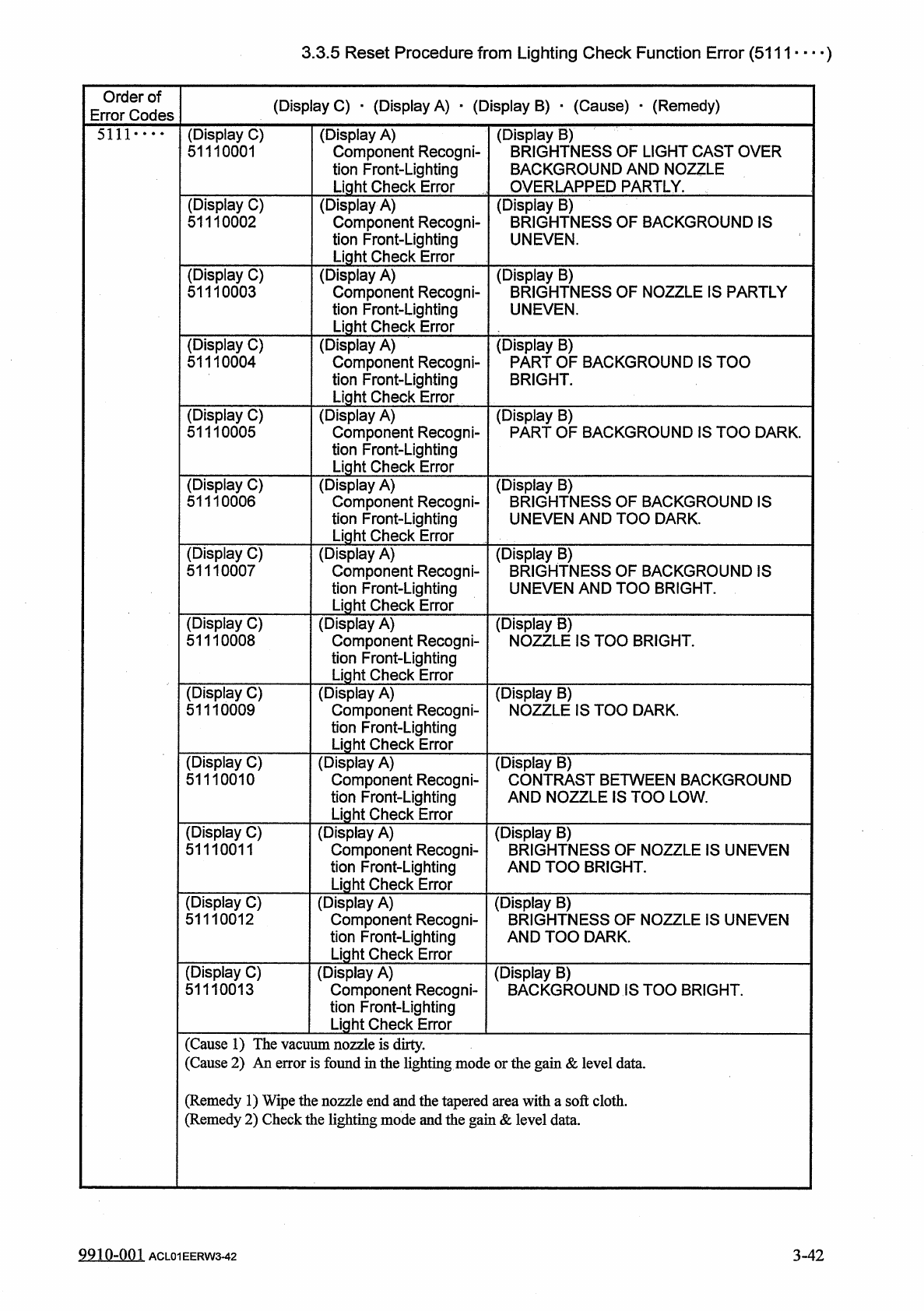
3.3
.
5
Reset
Procedure
from
Lighting
Check
Function
Error
(
5111
—
)
Order
of
Error
Codes
(
Display
C
)
■
(
Display
A
)
■
(
Display
B
)
•
(
Cause
)
•
(
Remedy
)
(
Display
B
)
BRIGHTNESS
OF
LIGHT
CAST
OVER
BACKGROUND
AND
NOZZLE
OVERLAPPED
PARTLY
.
5111
•
…
(
Display
C
)
51110001
(
Display
A
)
Component
Recogni
-
tion
Front
-
Lighting
Light
Check
Error
(
Display
C
)
51110002
(
Display
A
)
Component
Recogni
-
tion
Front
-
Lighting
Light
Check
Error
(
Display
B
)
BRIGHTNESS
OF
BACKGROUND
IS
UNEVEN
.
(
Display
C
)
51110003
(
Display
A
)
Component
Recogni
-
tion
Front
-
Lighting
Light
Check
Error
(
Display
B
)
BRIGHTNESS
OF
NOZZLE
IS
PARTLY
UNEVEN
.
(
Display
C
)
51110004
(
Display
A
)
Component
Recogni
-
tion
Front
-
Lighting
Light
Check
Error
(
Display
B
)
PART
OF
BACKGROUND
IS
TOO
BRIGHT
.
(
Display
C
)
51110005
(
Display
A
)
Component
Recogni
-
tion
Front
-
Lighting
Light
Check
Error
(
Display
B
)
PART
OF
BACKGROUND
IS
TOO
DARK
.
(
Display
C
)
51110006
(
Display
A
)
Component
Recogni
-
tion
Front
-
Lighting
Light
Check
Error
(
Display
B
)
BRIGHTNESS
OF
BACKGROUND
IS
UNEVEN
AND
TOO
DARK
.
(
Display
C
)
51110007
(
Display
A
)
Component
Recogni
-
tion
Front
-
Lighting
Light
Check
Error
(
Display
B
)
BRIGHTNESS
OF
BACKGROUND
IS
UNEVEN
AND
TOO
BRIGHT
.
(
Display
C
)
51110008
(
Display
A
)
Component
Recogni
-
tion
Front
-
Lighting
Light
Check
Error
(
Display
B
)
NOZZLE
IS
TOO
BRIGHT
.
(
Display
C
)
51110009
(
Display
A
)
Component
Recogni
-
tion
Front
-
Lighting
Light
Check
Error
(
Display
B
)
NOZZLE
IS
TOO
DARK
.
(
Display
C
)
51110010
(
Display
A
)
Component
Recogni
-
tion
Front
-
Lighting
Light
Check
Error
(
Display
B
)
CONTRAST
BETWEEN
BACKGROUND
AND
NOZZLE
IS
TOO
LOW
.
(
Display
C
)
51110011
(
Display
A
)
Component
Recogni
-
tion
Front
-
Lighting
Light
Check
Error
(
Display
B
)
BRIGHTNESS
OF
NOZZLE
IS
UNEVEN
AND
TOO
BRIGHT
.
(
Display
C
)
51110012
(
Display
A
)
Component
Recogni
-
tion
Front
-
Lighting
Light
Check
Error
(
Display
B
)
BRIGHTNESS
OF
NOZZLE
IS
UNEVEN
AND
TOO
DARK
.
(
Display
C
)
51110013
(
Display
A
)
Component
Recogni
-
tion
Front
-
Lighting
Light
Check
Error
(
Display
B
)
BACKGROUND
IS
TOO
BRIGHT
.
(
Cause
1
)
The
vacuum
nozzle
is
dirty
.
(
Cause
2
)
An
error
is
found
in
the
lighting
mode
or
the
gain
&
level
data
.
(
Remedy
1
)
Wipe
the
nozzle
end
and
the
tapered
area
with
a
soft
cloth
.
(
Remedy
2
)
Check
the
lighting
mode
and
the
gain
&
level
data
.
9910
-
001
3
-
42
ACL
01
EERW
3
-
42
3.3
.
5
Reset
Procedure
from
Lighting
Check
Function
Error
(
5180
—
)
Order
of
Error
Codes
(
Display
C
)
•
(
Display
A
)
•
(
Display
B
)
•
(
Cause
)
_
(
Remedy
)
(
Display
C
)
51800001
(
Display
A
)
Communication
Procedure
Error
(
Display
B
)
RECOGNITION
STARTED
WITHOUT
TRAINING
DEVICE
.
5180
•
•
•
•
(
Cause
1
)
The
recognition
fimction
is
implemented
before
recognized
data
communication
is
completed
.
(
Remedy
1
)
Complete
the
recognized
data
communication
and
then
implement
the
recognition
fimction
.
3
-
43
9910
-
001
ACL
01
EERW
3
-
43
3.3
.
6
Reset
Procedure
from
Camera
Gain
/
Level
Automatic
Setting
Function
Error
3.3
.
6
Reset
Procedure
from
Camera
Gain
/
Level
Automatic
Setting
Function
Error
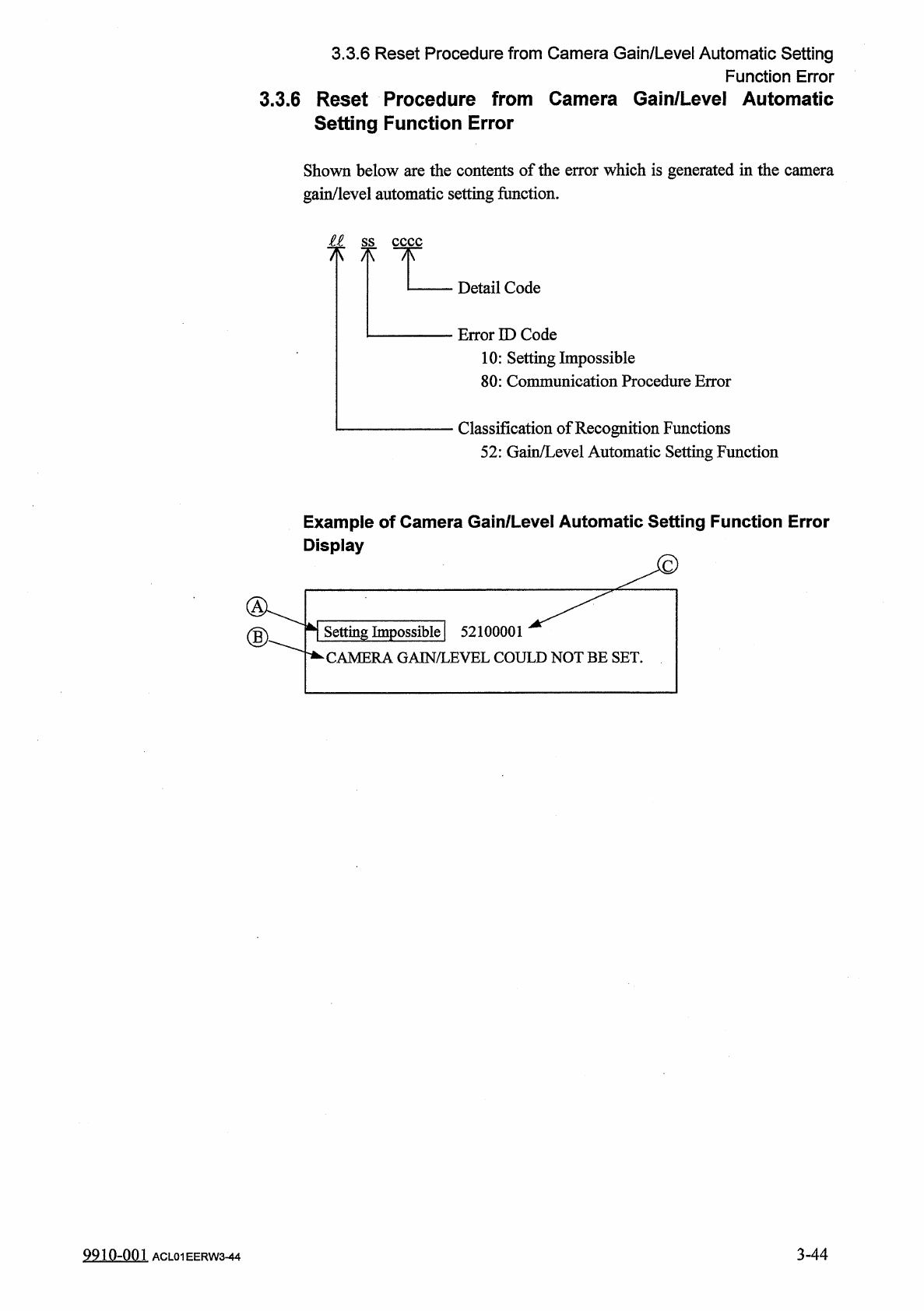
Shown
below
are
the
contents
of
the
error
which
is
generated
in
the
camera
gain
/
level
automatic
setting
function
.
ss
cccc
7
K
"
TIT
Detail
Code
Error
ID
Code
10
:
Setting
Impossible
80
:
Communication
Procedure
Error
Classification
of
Recognition
Functions
52
:
Gain
/
Level
Automatic
Setting
Function
Example
of
Camera
Gain
/
Level
Automatic
Setting
Function
Error
Display
Setting
Impossible
|
CAMERA
GAIN
/
LEVEL
COULD
NOT
BE
SET
.
52100001
9910
-
001
3
-
44
ACL
01
EERW
3
-
44