5TROUBLESHOOTING_.pdf - 第22页
2.2 Troubleshooting after Error Display 2.2 Troubleshooting after Error Display 1 麵 l P CLEAR AND ALARM A 12 / 31 ( THU ) 12 : 34 12 / 31 ( THU ) 12 : 34 趣鴨 _ : 12 : 34 II : 謂醐 ⑽ » 1 说 III ! I 3 s NOT DETECTED . DETECT…
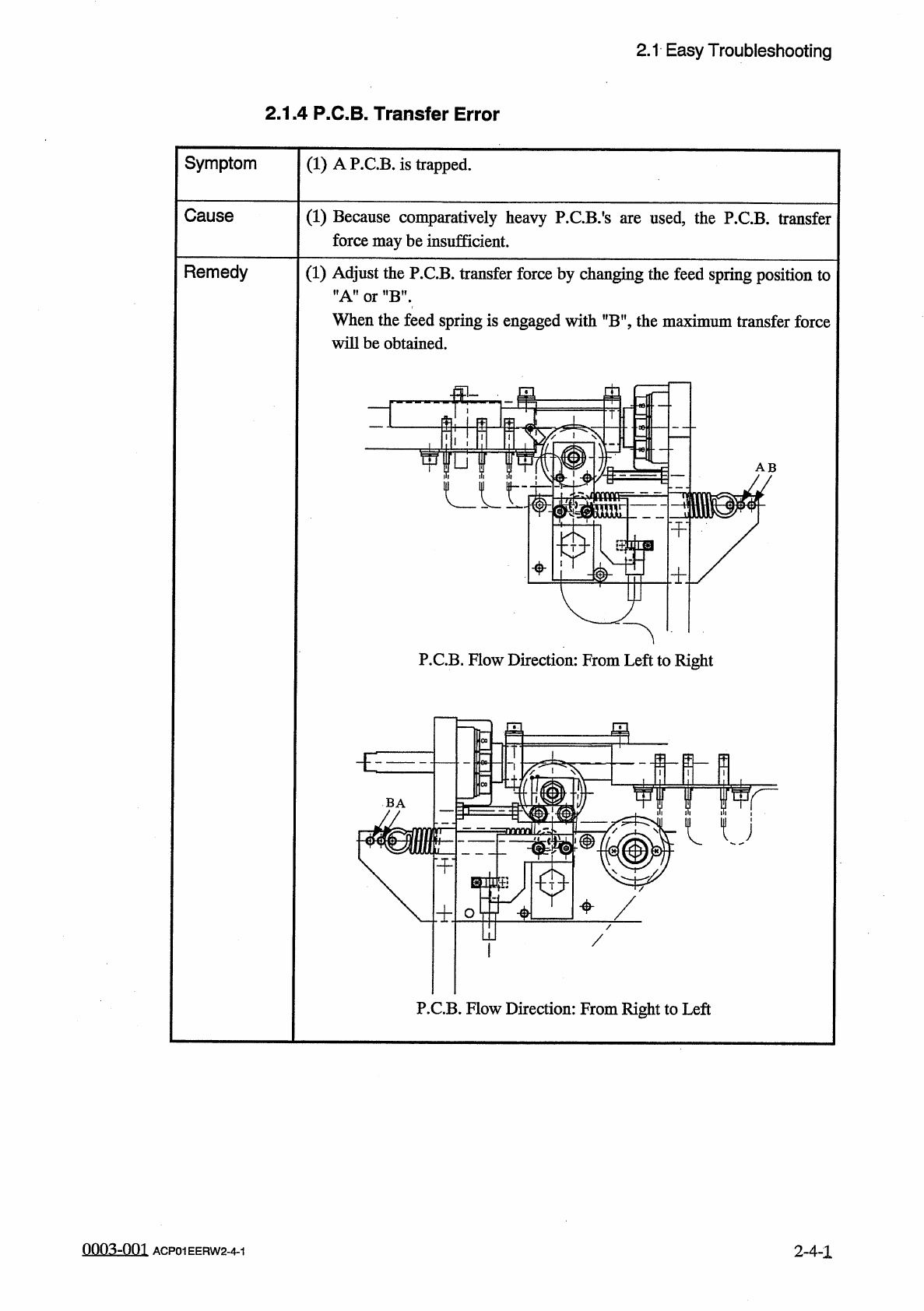
2.1
Easy
Troubleshooting
2.1
.
4
P
.
C
.
B
.
Transfer
Error
Symptom
(
1
)
A
P
.
C
.
B
.
is
trapped
.
Cause
(
1
)
Because
comparatively
heavy
P
.
C
.
B
.
'
s
are
used
,
the
P
.
CB
.
transfer
force
maybe
insufficient
.
Remedy
(
1
)
Adjust
the
P
.
CB
.
transfer
force
by
changing
the
feed
spring
position
to
,
,
A
"
or
"
B
”
.
When
the
feed
spring
is
engaged
with
"
B
"
,
the
maximum
transfer
force
will
be
obtained
.
AB
P
.
CB
.
Flow
Direction
:
From
Left
to
Right
a
BA
m
命
/
P
.
C
.
B
.
Flow
Direction
:
From
Right
to
Left
0003
-
001
ACP
01
EERW
2
-
4
-
1
2
-
4
-
1
2.2
Troubleshooting
after
Error
Display
2.2
Troubleshooting
after
Error
Display
1
麵
l
P
CLEAR
AND
ALARM
A
12
/
31
(
THU
)
12
:
34
12
/
31
(
THU
)
12
:
34
趣鴨
_
:
12
:
34
II
:
謂醐
⑽
»
1
说
III
!
I
3
s
NOT
DETECTED
.
DETECTED
.
:
PHS
70
E
/
R
B
mil
:
[
你
mil
洳
OR
.
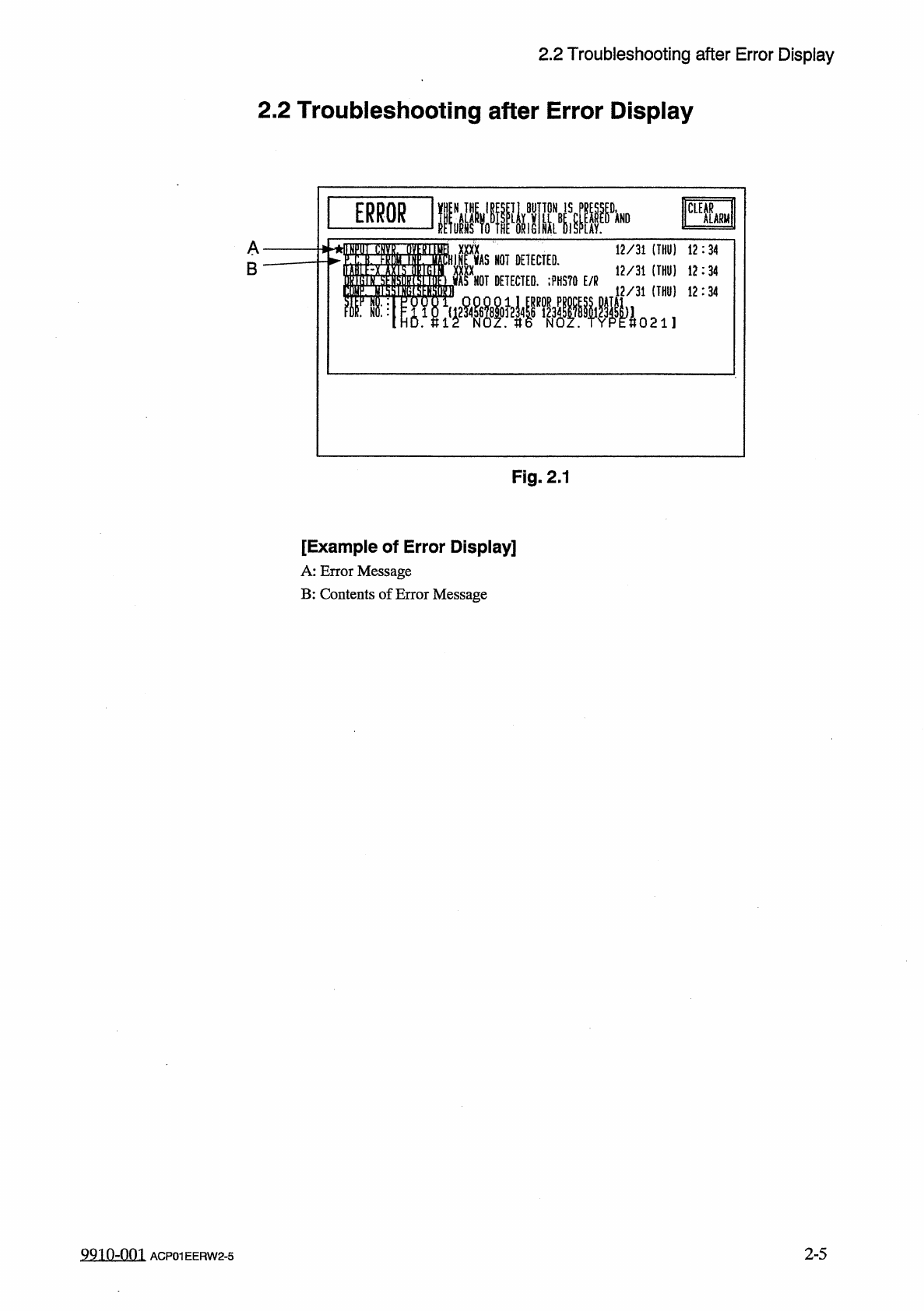
Fig
.
2.1
[
Example
of
Error
Display
]
A
:
Error
Message
B
:
Contents
of
Error
Message
2
-
5
9910
-
001
ACP
01
EERW
2
-
5
2.2
Troubleshooting
after
Error
Display
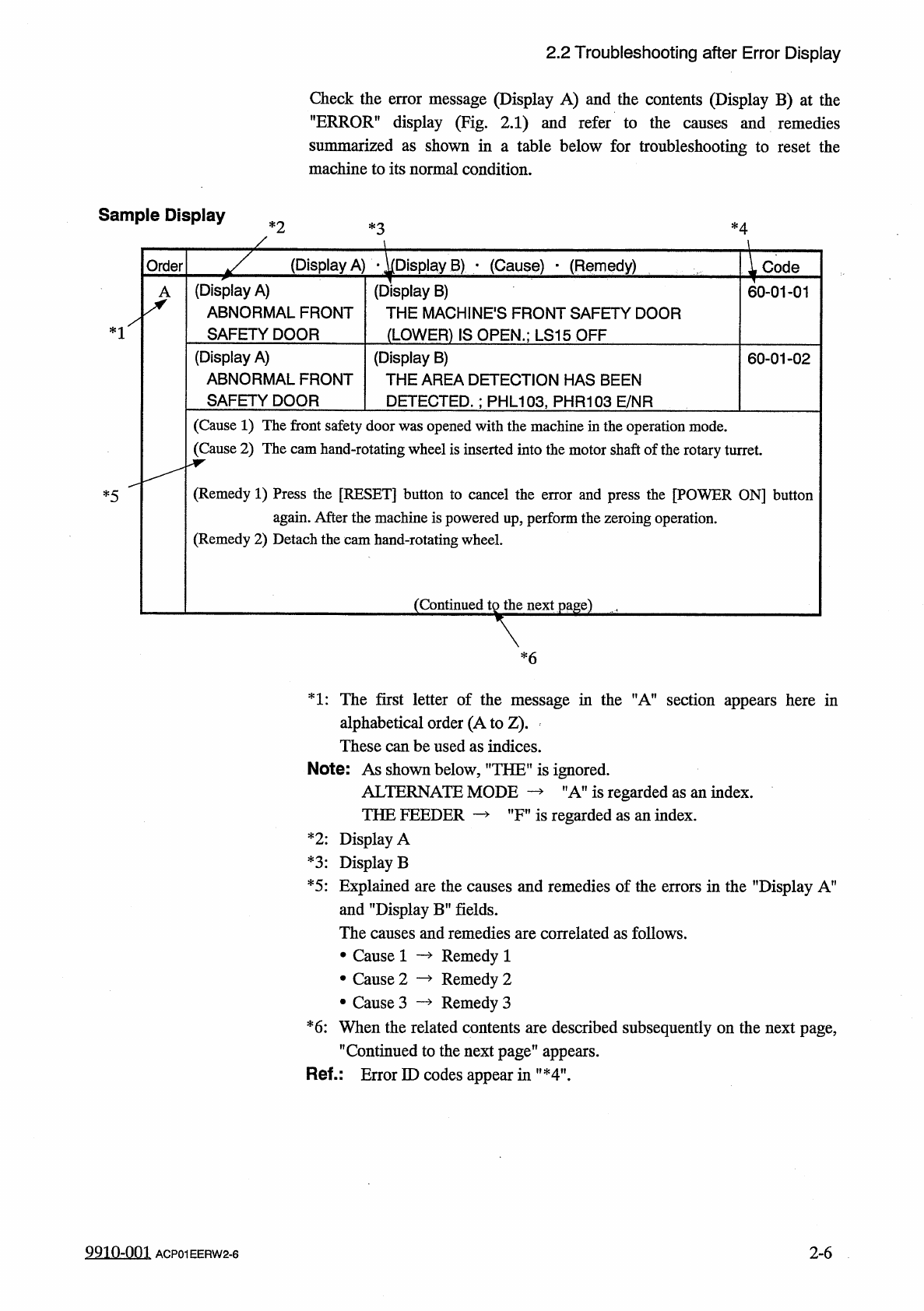
Check
the
error
message
(
Display
A
)
and
the
contents
(
Display
B
)
at
the
"
ERROR
”
display
(
Fig
.
2.1
)
and
refer
to
the
causes
and
remedies
summarized
as
shown
in
a
table
below
for
troubleshooting
to
reset
the
machine
to
its
normal
condition
.
Sample
Display
*
2
*
4
*
3
(
Display
A
)
•
^
Display
B
)
■
(
Cause
)
-
(
Remedy
)
Order
Code
(
Display
A
)
ABNORMAL
FRONT
SAFETY
DOOR
(
Display
B
)
THE
MACHINES
FRONT
SAFETY
DOOR
(
LOWER
)
IS
OPEN
.
;
LS
15
OFF
60
-
01
-
01
*
1
(
Display
A
)
ABNORMAL
FRONT
SAFETY
DOOR
(
Display
B
)
THE
AREA
DETECTION
HAS
BEEN
DETECTED
.
:
PHL
103
,
PHR
103
E
/
NR
60
-
01
-
02
(
Cause
1
)
The
front
safety
door
was
opened
with
the
machine
in
the
operation
mode
.
(
Cause
2
)
The
cam
hand
-
rotating
wheel
is
inserted
into
the
motor
shaft
of
the
rotary
turret
.
(
Remedy
1
)
Press
the
[
RESET
]
button
to
cancel
the
error
and
press
the
[
POWER
ON
]
button
again
.
After
the
machine
is
powered
up
,
perform
the
zeroing
operation
.
(
Remedy
2
)
Detach
the
cam
hand
-
rotating
wheel
.
*
5
(
Continued
tg
the
next
page
)
,
*
6
1
:
The
first
letter
of
the
message
in
the
"
A
”
section
appears
here
in
alphabetical
order
(
A
to
Z
)
.
These
can
be
used
as
indices
.
Note
:
As
shown
below
,
”
THEU
is
ignored
.
ALTERNATE
MODE
THE
FEEDER
—
"
A
”
is
regarded
as
an
index
.
"
Fn
is
regarded
as
an
index
.
*
2
:
Display
A
*
3
:
Display
B
*
5
:
Explained
are
the
causes
and
remedies
of
the
errors
in
the
"
Display
A
”
and
"
Display
B
”
fields
.
The
causes
and
remedies
are
correlated
as
follows
.
Remedy
1
Remedy
2
Remedy
3
*
6
:
When
the
related
contents
are
described
subsequently
on
the
next
page
,
,
f
Continued
to
the
next
page
"
appears
.
Ref
-
:
Error
ID
codes
appear
in
"
*
4
"
.
•
Cause
1
•
Cause
2
•
Cause
3
99
in
-
nm
2
-
6
ACP
01
EERW
2
-
6