5TROUBLESHOOTING_.pdf - 第56页
2.2 Troubleshooting after Error Display ( H ) ( Display A ) • ( Display B ) y ( Causg ) - ( Remedy ) Order Code ( Display A ) HEAD SKIP H ( Display B ) COMMUNICATION ERROR 70 76 - 03 - 01 ( Display A ) HEAD SKIP ( Displa…
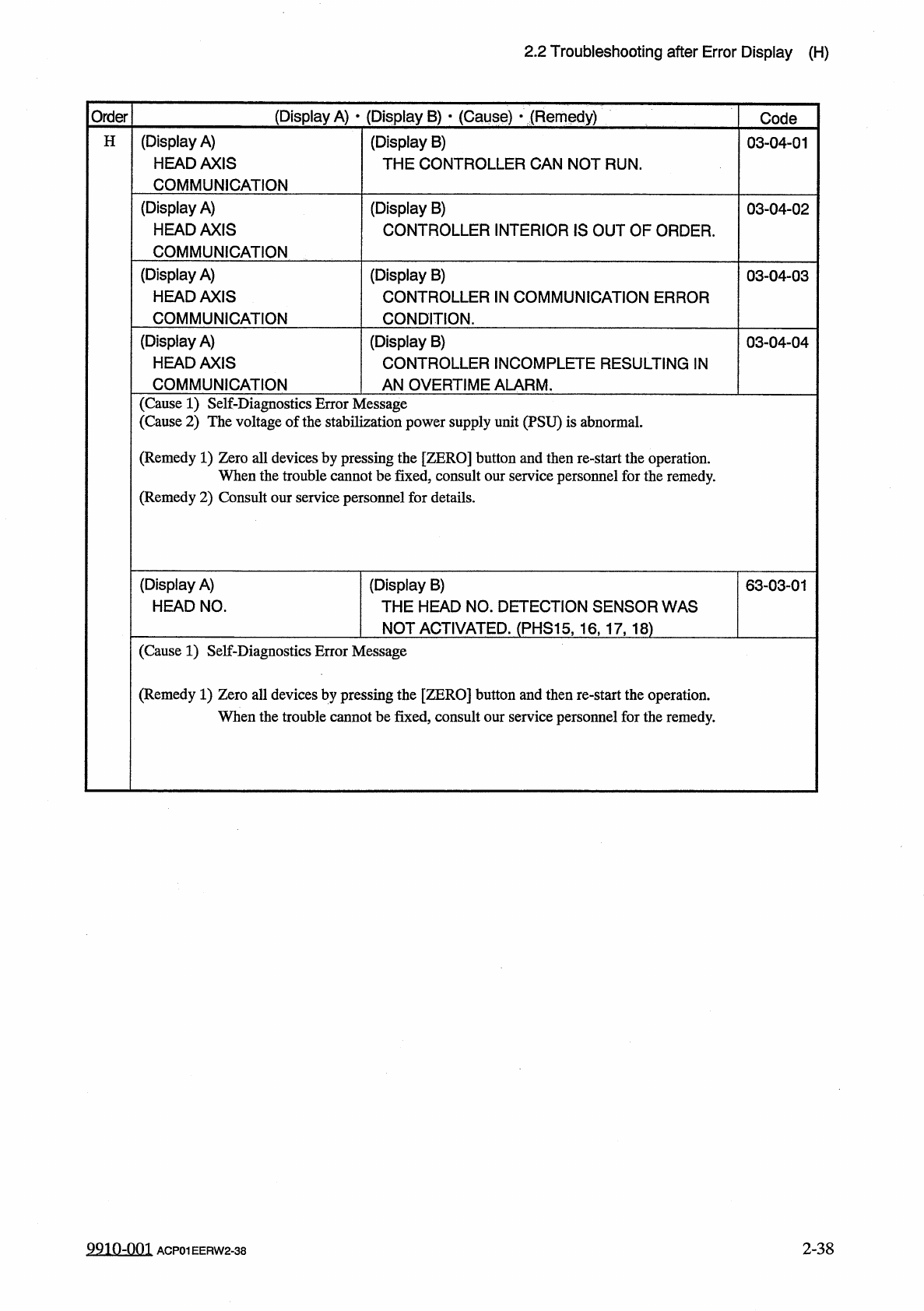
2.2
Troubleshooting
after
Error
Display
(
H
)
(
Display
A
)
•
(
Display
B
)
•
(
Cause
)
•
(
Remedy
)
Order
Code
(
Display
A
)
HEAD
AXIS
COMMUNICATION
H
(
Display
B
)
THE
CONTROLLER
CAN
NOT
RUN
.
03
-
04
-
01
(
Display
A
)
HEAD
AXIS
COMMUNICATION
(
Display
B
)
CONTROLLER
INTERIOR
IS
OUT
OF
ORDER
.
03
-
04
-
02
(
Display
A
)
HEAD
AXIS
COMMUNICATION
(
Display
B
)
CONTROLLER
IN
COMMUNICATION
ERROR
CONDITION
.
03
-
04
-
03
(
Display
A
)
HEAD
AXIS
(
Display
B
)
CONTROLLER
INCOMPLETE
RESULTING
IN
03
-
04
-
04
COMMUNICATION
AN
OVERTIME
ALARM
.
(
Cause
1
)
Self
-
Diagnostics
Error
Message
(
Cause
2
)
The
voltage
of
the
stabilization
power
supply
unit
(
PSU
)
is
abnormal
.
(
Remedy
1
)
Zero
all
devices
by
pressing
the
[
ZERO
]
button
and
then
re
-
start
the
operation
.
When
the
trouble
cannot
be
fixed
,
consult
our
service
personnel
for
the
remedy
.
(
Remedy
2
)
Consult
our
service
personnel
for
details
.
(
Display
A
)
HEAD
NO
.
(
Display
B
)
THE
HEAD
NO
.
DETECTION
SENSOR
WAS
NOT
ACTIVATED
.
(
PHS
15
,
16
,
17
,
18
)
63
-
03
-
01
(
Cause
1
)
Self
-
Diagnostics
Error
Message
(
Remedy
1
)
Zero
all
devices
by
pressing
the
[
ZERO
]
button
and
then
re
-
start
the
operation
.
When
the
trouble
cannot
be
fixed
,
consult
our
service
personnel
for
the
remedy
.
2
-
38
9910
-
001
ACP
01
EERW
2
-
38
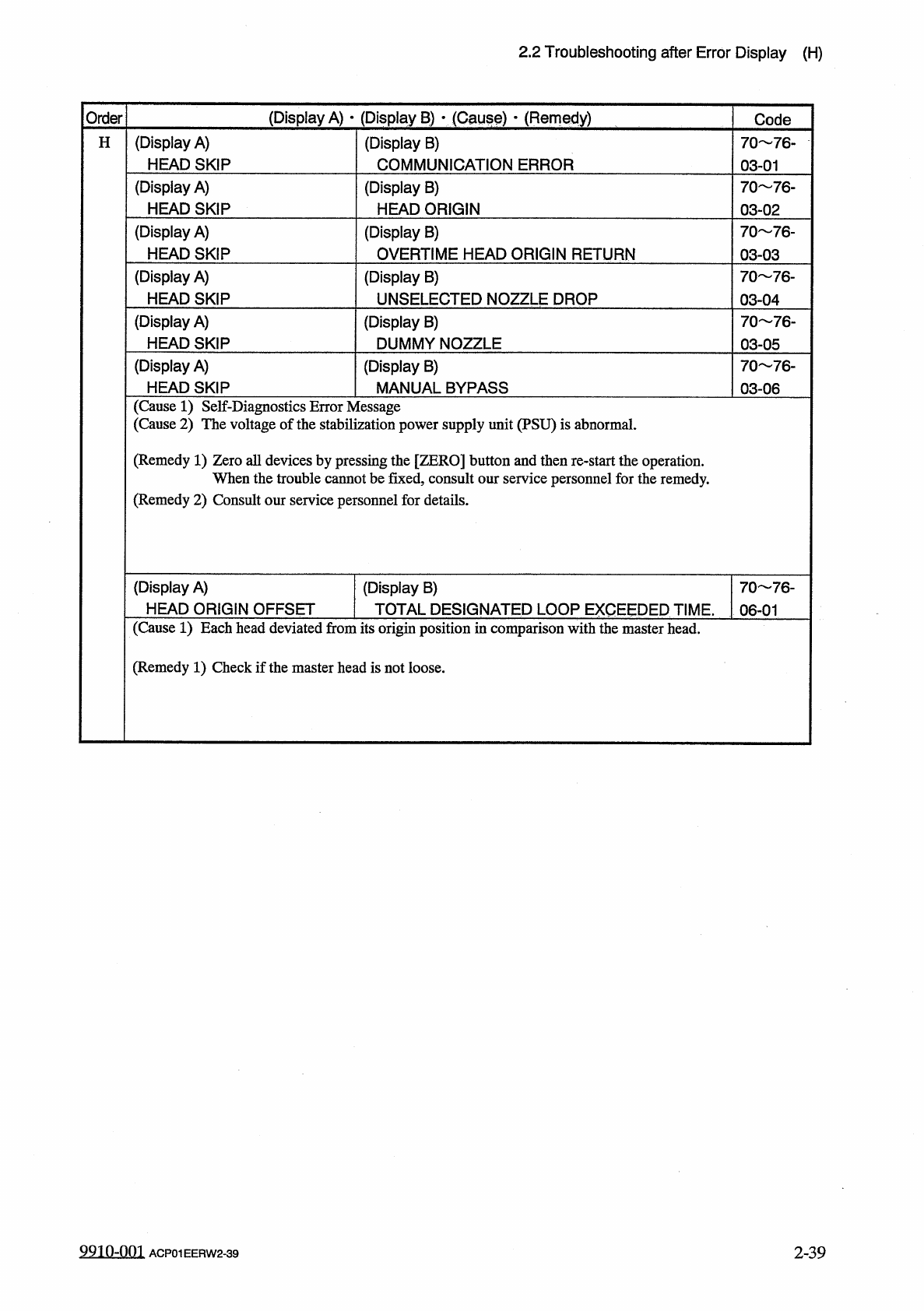
2.2
Troubleshooting
after
Error
Display
(
H
)
(
Display
A
)
•
(
Display
B
)
y
(
Causg
)
-
(
Remedy
)
Order
Code
(
Display
A
)
HEAD
SKIP
H
(
Display
B
)
COMMUNICATION
ERROR
70
76
-
03
-
01
(
Display
A
)
HEAD
SKIP
(
Display
B
)
HEAD
ORIGIN
70
76
-
03
-
02
(
Display
A
)
HEAD
SKIP
(
Display
B
)
OVERTIME
HEAD
ORIGIN
RETURN
70
76
-
03
-
03
(
Display
A
)
HEAD
SKIP
(
Display
B
)
UNSELECTED
NOZZLE
DROP
70
76
-
03
-
04
(
Display
A
)
HEAD
SKIP
(
Display
B
)
DUMMY
NOZZLE
70
76
-
03
-
05
(
Display
A
)
HEAD
SKIP
(
Display
B
)
MANUAL
BYPASS
70
76
-
03
-
06
(
Cause
1
)
Self
-
Diagnostics
Error
Message
(
Cause
2
)
The
voltage
of
the
stabilization
power
supply
unit
(
PSU
)
is
abnormal
.
(
Remedy
1
)
Zero
all
devices
by
pressing
the
[
ZERO
]
button
and
then
re
-
start
the
operation
.
When
the
trouble
cannot
be
fixed
,
consult
our
service
personnel
for
the
remedy
.
(
Remedy
2
)
Consult
our
service
personnel
for
details
.
(
Display
A
)
HEAD
ORIGIN
OFFSET
(
Display
B
)
TOTAL
DESIGNATED
LOOP
EXCEEDED
TIME
.
06
-
01
70
76
-
(
Cause
1
)
Each
head
deviated
from
its
origin
position
in
comparison
with
the
master
head
.
(
Remedy
1
)
Check
if
the
master
head
is
not
loose
.
9910
-
001
2
-
39
ACP
01
EERW
2
-
39
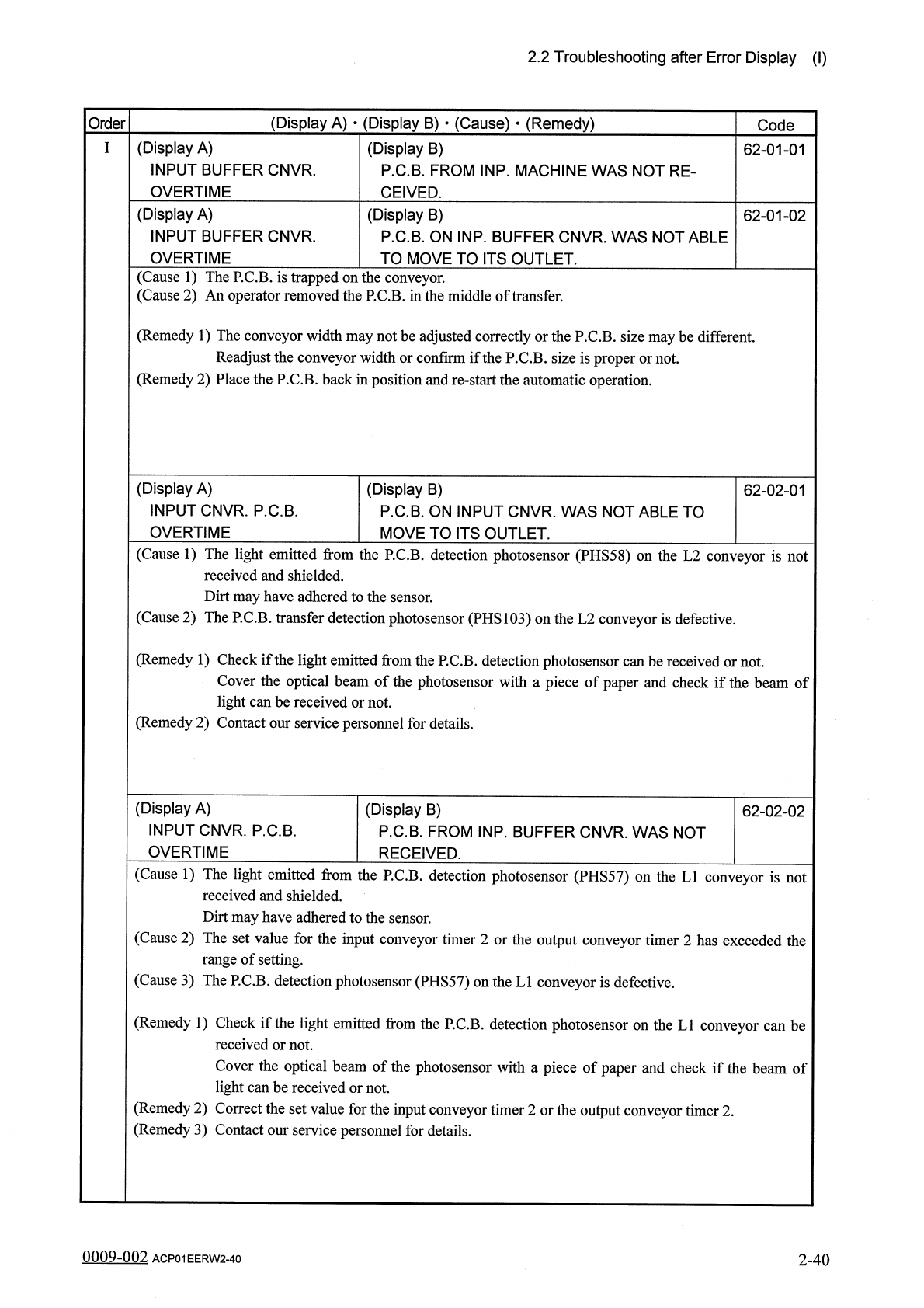
2.2
Troubleshooting
after
Error
Display
(
I
)
(
Display
A
)
•
(
Display
B
)
•
(
Cause
)
•
(
Remedy
)
Order
Code
(
Display
A
)
INPUT
BUFFER
CNVR
.
OVERTIME
(
Display
B
)
P
.
C
.
B
.
FROM
INP
.
MACHINE
WAS
NOT
RE
-
CEIVED
.
62
-
01
-
01
(
Display
A
)
INPUT
BUFFER
CNVR
.
OVERTIME
(
Display
B
)
P
.
C
.
B
.
ON
INP
.
BUFFER
CNVR
.
WAS
NOT
ABLE
TO
MOVE
TO
ITS
OUTLET
.
62
-
01
-
02
(
Cause
1
)
The
P
.
C
.
B
.
is
trapped
on
the
conveyor
.
(
Cause
2
)
An
operator
removed
the
P
.
C
.
B
.
in
the
middle
of
transfer
.
(
Remedy
1
)
The
conveyor
width
may
not
be
adjusted
correctly
or
the
P
.
C
.
B
.
size
maybe
different
.
Readjust
the
conveyor
width
or
confirm
if
the
P
.
C
.
B
.
size
is
proper
or
not
.
(
Remedy
2
)
Place
the
P
.
C
.
B
.
back
in
position
and
re
-
start
the
automatic
operation
.
(
Display
A
)
INPUT
CNVR
.
P
.
C
.
B
.
OVERTIME
(
Display
B
)
P
.
C
.
B
.
ON
INPUT
CNVR
.
WAS
NOT
ABLE
TO
MOVE
TO
ITS
OUTLET
.
62
-
02
-
01
(
Cause
1
)
The
light
emitted
from
the
P
.
C
.
B
.
detection
photosensor
(
PHS
58
)
on
the
L
2
conveyor
is
not
received
and
shielded
.
Dirt
may
have
adhered
to
the
sensor
.
(
Cause
2
)
The
P
.
C
.
B
.
transfer
detection
photosensor
(
PHS
103
)
on
the
L
2
conveyor
is
defective
.
(
Remedy
1
)
Check
if
the
light
emitted
from
the
P
.
C
.
B
.
detection
photosensor
can
be
received
or
not
.
Cover
the
optical
beam
of
the
photosensor
with
a
piece
of
paper
and
check
if
the
beam
of
light
can
be
received
or
not
.
(
Remedy
2
)
Contact
our
service
personnel
for
details
.
(
Display
A
)
INPUT
CNVR
.
P
.
C
.
B
.
OVERTIME
(
Display
B
)
P
.
C
.
B
.
FROM
INP
.
BUFFER
CNVR
.
WAS
NOT
RECEIVED
.
62
-
02
-
02
(
Cause
1
)
The
light
emitted
from
the
P
.
C
.
B
.
detection
photosensor
(
PHS
57
)
on
the
LI
conveyor
is
not
received
and
shielded
.
Dirt
may
have
adhered
to
the
sensor
.
(
Cause
2
)
The
set
value
for
the
input
conveyor
timer
2
or
the
output
conveyor
timer
2
has
exceeded
the
range
of
setting
.
(
Cause
3
)
The
P
.
C
.
B
.
detection
photosensor
(
PHS
57
)
on
the
LI
conveyor
is
defective
.
(
Remedy
1
)
Check
if
the
light
emitted
from
the
P
.
C
.
B
.
detection
photosensor
on
the
LI
conveyor
can
be
received
or
not
.
Cover
the
optical
beam
of
the
photosensor
with
a
piece
of
paper
and
check
if
the
beam
of
light
can
be
received
or
not
.
(
Remedy
2
)
Correct
the
set
value
for
the
input
conveyor
timer
2
or
the
output
conveyor
timer
2
.
(
Remedy
3
)
Contact
our
service
personnel
for
details
.
0009
-
002
2
-
40
ACP
01
EERW
2
-
40