5TROUBLESHOOTING_.pdf - 第59页
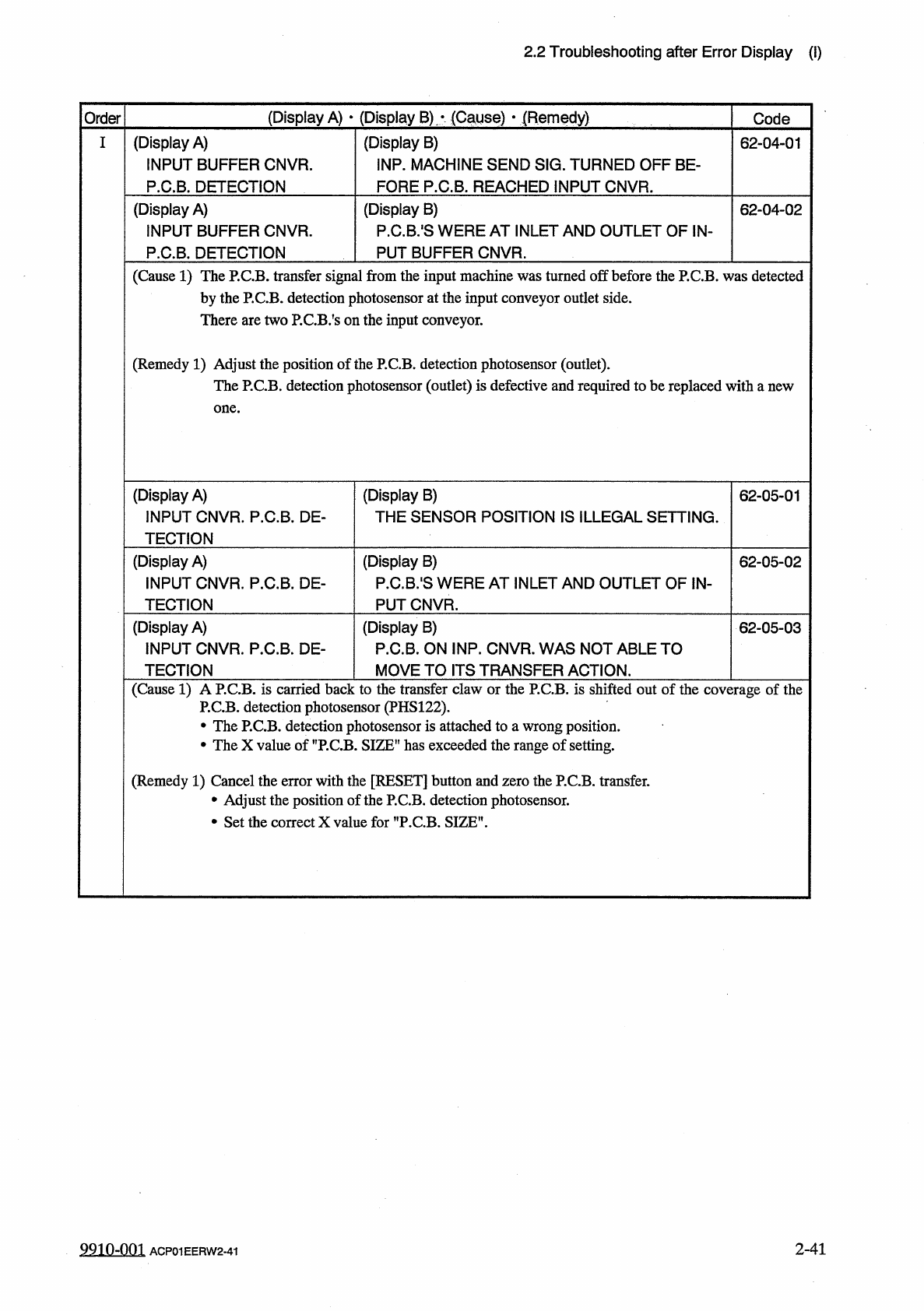
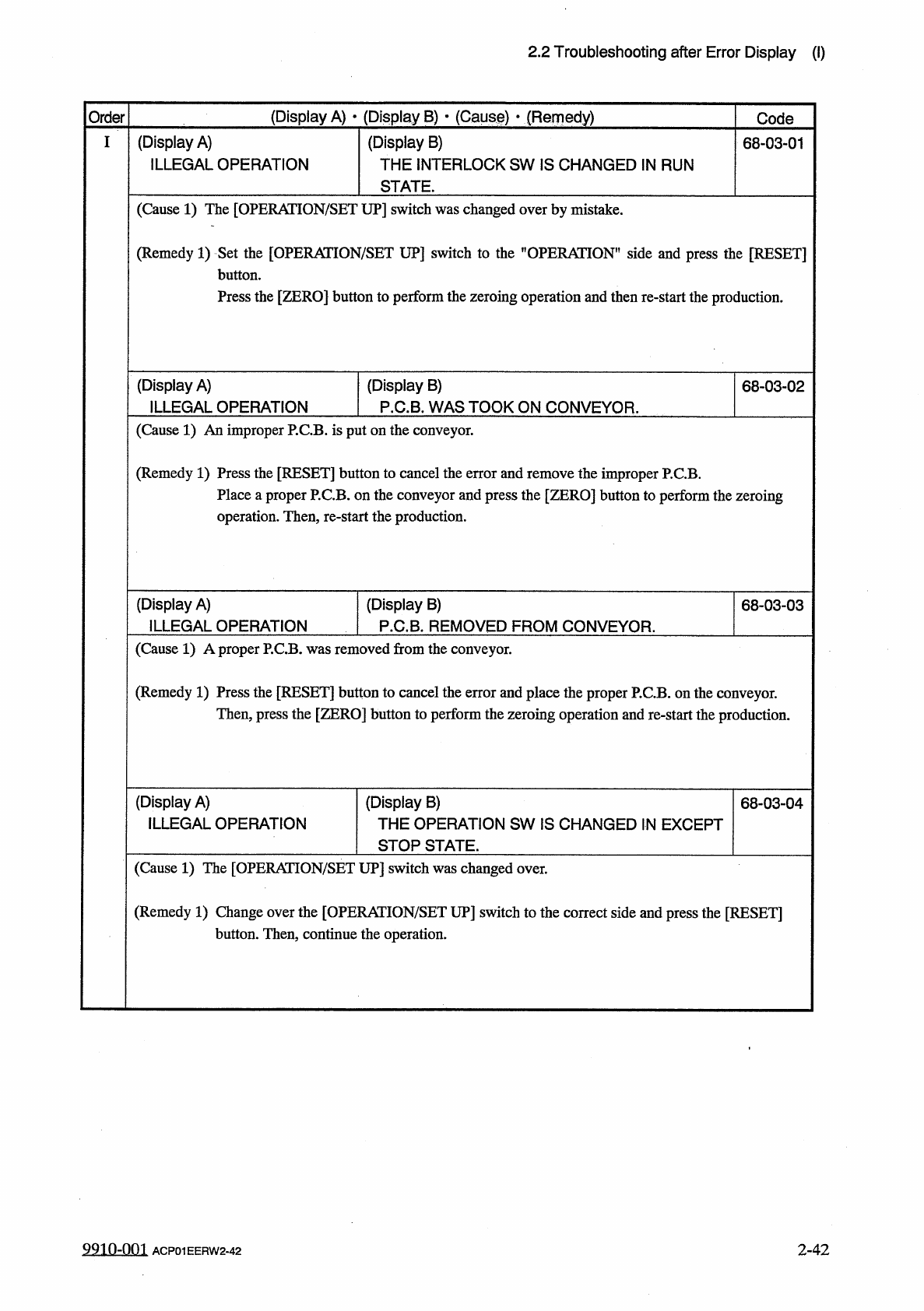
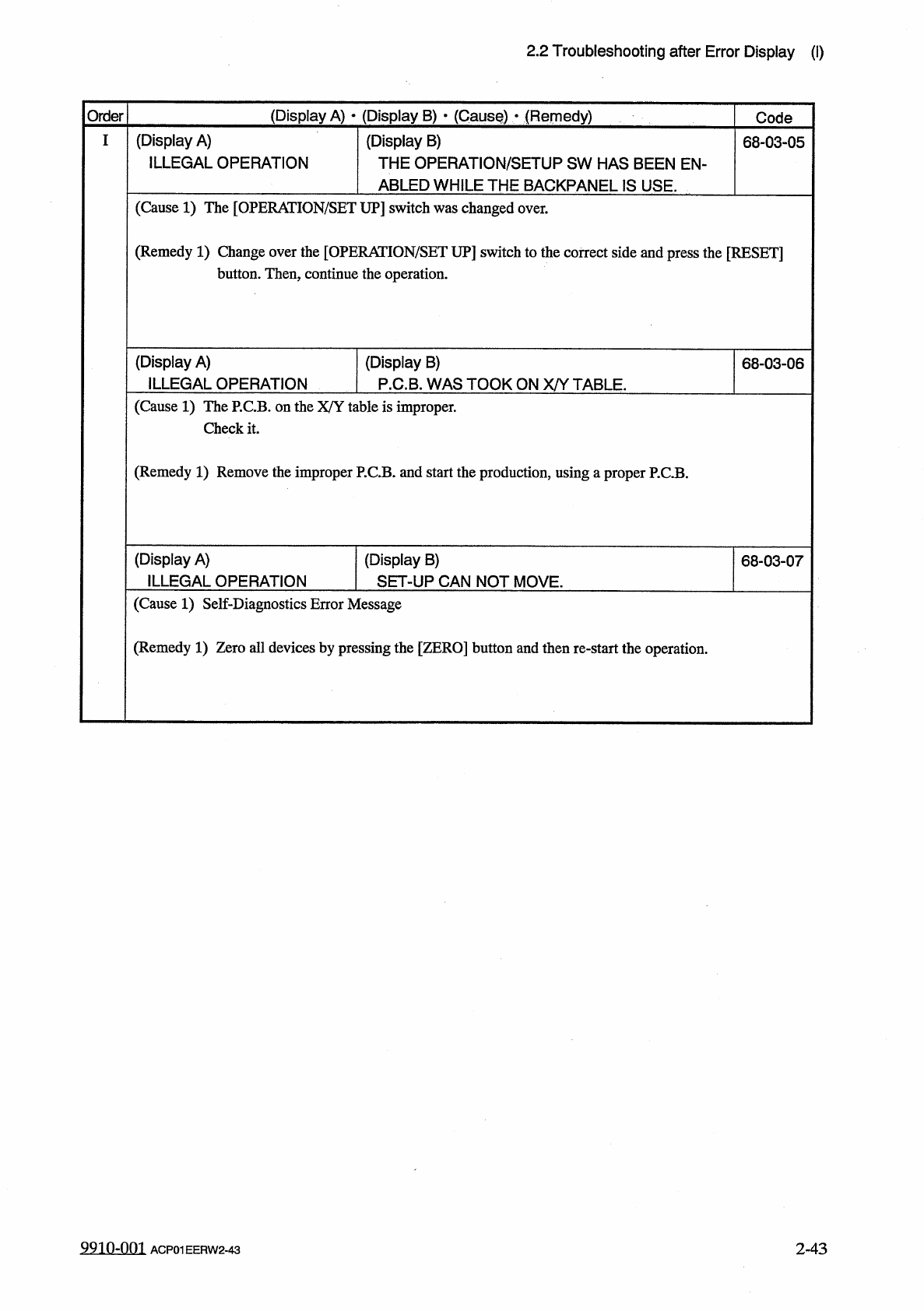
2.2 Troubleshooting after Error Display ( I ) ( Display A ) • ( Display B ) * ( Cause ) • ( Remedy ) Order Code ( Display A ) ILLEGAL OPERATION ( Display B ) THE INTERLOCK SW IS CHANGED IN RUN STATE . 68 - 03 - 01 ( Caus…
2.2
Troubleshooting
after
Error
Display
(
I
)
(
Display
A
)
•
(
Display
B
)
,
*
(
Cause
)
■
(
Remedy
)
Order
Code
(
Display
A
)
INPUT
BUFFER
CNVR
.
P
.
C
.
B
.
DETECTION
(
Display
B
)
INP
.
MACHINE
SEND
SIG
.
TURNED
OFF
BE
-
FORE
P
.
C
.
B
.
REACHED
INPUT
CNVR
.
I
62
-
04
-
01
(
Display
A
)
INPUT
BUFFER
CNVR
.
P
.
C
.
B
.
DETECTION
(
Display
B
)
P
.
C
.
B
.
'
S
WERE
AT
INLET AND
OUTLET
OF
IN
-
PUT
BUFFER
CNVR
.
62
-
04
-
02
(
Cause
1
)
The
P
.
C
.
B
.
transfer
signal
from
the
input
machine
was
turned
off
before
the
P
.
C
.
B
.
was
detected
by
the
P
.
C
.
B
.
detection
photosensor
at
the
input
conveyor
outlet
side
.
There
are
two
P
.
CB
/
s
on
the
input
conveyor
.
(
Remedy
1
)
Adjust
the
position
of
the
P
.
C
.
B
.
detection
photosensor
(
outlet
)
.
The
P
.
C
.
B
.
detection
photosensor
(
outlet
)
is
defective
and
required
to
be
replaced
with
a
new
one
.
(
Display
A
)
INPUT
CNVR
.
P
.
C
.
B
.
DE
-
TECTION
(
Display
B
)
THE
SENSOR
POSITION
IS
ILLEGAL
SETTING
.
62
-
05
-
01
(
Display
A
)
INPUT
CNVR
.
P
.
C
.
B
.
DE
-
TECTION
(
Display
B
)
P
.
C
.
B
.
'
S
WERE
AT
INLET
AND
OUTLET
OF
iN
-
PUT
CNVR
.
62
-
05
-
02
(
Display
A
)
INPUT
CNVR
.
P
.
C
.
B
.
DE
-
TECTION
(
Display
B
)
P
.
C
.
B
.
ON
INP
.
CNVR
.
WAS
NOT
ABLE
TO
MOVE
TO
ITS
TRANSFER
ACTION
.
62
-
05
-
03
(
Cause
1
)
A
P
.
C
.
B
.
is
carried
back
to
the
transfer
claw
or
the
P
.
C
.
B
.
is
shifted
out
of
the
coverage
of
the
P
.
C
.
B
.
detection
photosensor
(
PHS
122
)
.
•
The
P
.
C
.
B
.
detection
photosensor
is
attached
to
a
wrong
position
.
•
The
X
value
of
SIZE
”
has
exceeded
the
range
of
setting
.
(
Remedy
1
)
Cancel
the
error
with
the
[
RESET
]
button
and
zero
the
P
.
C
.
B
.
transfer
.
•
Adjust
the
position
of
the
P
.
C
.
B
.
detection
photosensor
.
•
Set
the
correct
X
value
for
"
P
.
C
.
B
.
SIZE
”
.
2
-
41
9910
-
001
ACP
01
EERW
2
-
41
2.2
Troubleshooting
after
Error
Display
(
I
)
(
Display
A
)
•
(
Display
B
)
*
(
Cause
)
•
(
Remedy
)
Order
Code
(
Display
A
)
ILLEGAL
OPERATION
(
Display
B
)
THE
INTERLOCK
SW
IS
CHANGED
IN
RUN
STATE
.
68
-
03
-
01
(
Cause
1
)
The
[
OPERATION
/
SET
UP
]
switch
was
changed
over
by
mistake
.
(
Remedy
1
)
Set
the
[
OPERATION
/
SET
UP
]
switch
to
the
"
OPERATION
"
side
and
press
the
[
RESET
]
button
.
Press
the
[
ZERO
]
button
to
perform
the
zeroing
operation
and
then
re
-
start
the
production
.
(
Display
A
)
ILLEGAL
OPERATION
(
Display
B
)
P
.
C
.
B
.
WAS
TOOK
ON
CONVEYOR
.
68
-
03
-
02
(
Cause
1
)
An
improper
P
.
C
.
B
.
is
put
on
the
conveyor
.
(
Remedy
1
)
Press
the
[
RESET
]
button
to
cancel
the
error
and
remove
the
improper
P
.
C
.
B
.
Place
a
proper
P
.
C
.
B
.
on
the
conveyor
and
press
the
[
ZERO
]
button
to
perform
the
zeroing
operation
.
Then
,
re
-
start
the
production
.
(
Display
A
)
ILLEGAL
OPERATION
(
Display
B
)
P
.
C
.
B
.
REMOVED
FROM
CONVEYOR
.
68
-
03
-
03
(
Cause
1
)
A
proper
P
.
C
.
B
.
was
removed
from
the
conveyor
.
(
Remedy
1
)
Press
the
[
RESET
]
button
to
cancel
the
error
and
place
the
proper
P
.
C
.
B
.
on
the
conveyor
.
Then
,
press
the
[
ZERO
]
button
to
perform
the
zeroing
operation
and
re
-
start
the
production
.
(
Display
A
)
ILLEGAL
OPERATION
(
Display
B
)
THE
OPERATION
SW
IS
CHANGED
IN
EXCEPT
STOP
STATE
.
68
-
03
-
04
(
Cause
1
)
The
[
OPERATION
/
SET
UP
]
switch
was
changed
over
.
(
Remedy
1
)
Change
over
the
[
OPERATION
/
SET
UP
]
switch
to
the
correct
side
and
press
the
[
RESET
]
button
.
Then
,
continue
the
operation
.
9910
-
001
ACP
01
EERW
2
-
42
2
-
42
2.2
Troubleshooting
after
Error
Display
(
I
)
Order
(
Display
A
)
•
(
Display
B
)
•
(
CausQ
)
•
(
Remedy
)
Code
(
Display
A
)
ILLEGAL
OPERATION
I
(
Display
B
)
THE
OPERATION
/
SETUP
SW
HAS
BEEN
EN
-
ABLED
WHILE
THE
BACKPANEL
IS
USE
.
68
-
03
-
05
(
Cause
1
)
The
[
OPERAIION
/
SET
UP
]
switch
was
changed
over
.
(
Remedy
1
)
Change
over
the
[
OPERAIION
/
SET
UP
]
switch
to
the
correct
side
and
press
the
[
RESET
]
button
.
Then
,
continue
the
operation
.
(
Display
A
)
ILLEGAL
OPERATION
(
Display
B
)
P
.
C
.
B
.
WAS
TOOK
ON
X
/
Y
TABLE
.
68
-
03
-
06
(
Cause
1
)
The
P
.
C
.
B
.
on
the
X
/
Y
table
is
improper
.
Check
it
.
(
Remedy
1
)
Remove
the
improper
P
.
C
.
B
.
and
start
the
production
,
using
汪
proper
P
.
C
.
B
.
(
Display
A
)
ILLEGAL
OPERATION
(
Display
B
)
SET
-
UP
CAN
NOT
MOVE
.
68
-
03
-
07
(
Cause
1
)
Self
-
Diagnostics
Error
Message
(
Remedy
1
)
Zero
all
devices
by
pressing
the
[
ZERO
]
button
and
then
re
-
start
the
operation
.
9910
-
001
ACP
01
EERW
2
-
43
2
-
43