5TROUBLESHOOTING_.pdf - 第60页
2.2 Troubleshooting after Error Display ( I ) Order ( Display A ) • ( Display B ) • ( CausQ ) • ( Remedy ) Code ( Display A ) ILLEGAL OPERATION I ( Display B ) THE OPERATION / SETUP SW HAS BEEN EN - ABLED WHILE THE BACKP…
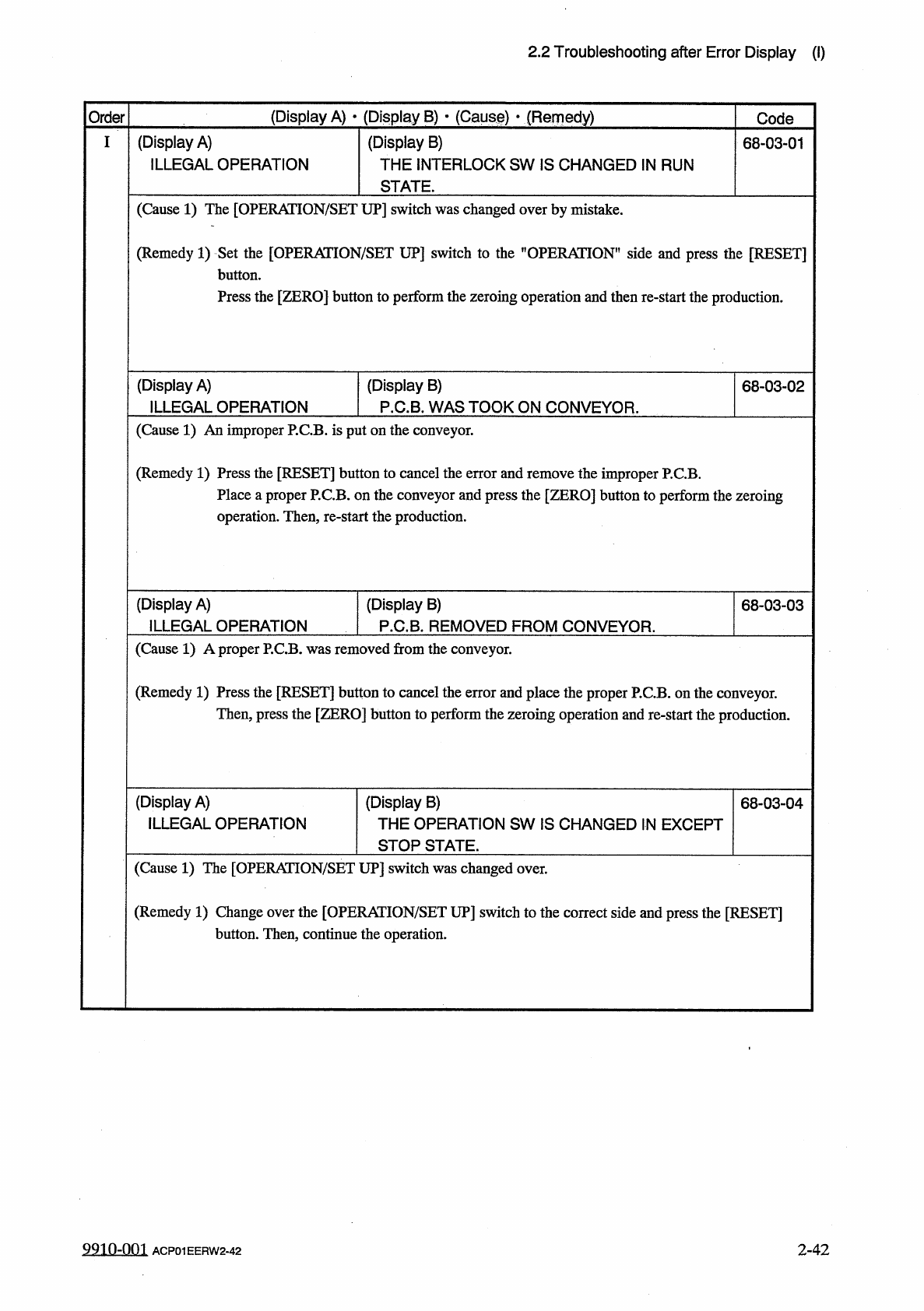
2.2
Troubleshooting
after
Error
Display
(
I
)
(
Display
A
)
•
(
Display
B
)
*
(
Cause
)
•
(
Remedy
)
Order
Code
(
Display
A
)
ILLEGAL
OPERATION
(
Display
B
)
THE
INTERLOCK
SW
IS
CHANGED
IN
RUN
STATE
.
68
-
03
-
01
(
Cause
1
)
The
[
OPERATION
/
SET
UP
]
switch
was
changed
over
by
mistake
.
(
Remedy
1
)
Set
the
[
OPERATION
/
SET
UP
]
switch
to
the
"
OPERATION
"
side
and
press
the
[
RESET
]
button
.
Press
the
[
ZERO
]
button
to
perform
the
zeroing
operation
and
then
re
-
start
the
production
.
(
Display
A
)
ILLEGAL
OPERATION
(
Display
B
)
P
.
C
.
B
.
WAS
TOOK
ON
CONVEYOR
.
68
-
03
-
02
(
Cause
1
)
An
improper
P
.
C
.
B
.
is
put
on
the
conveyor
.
(
Remedy
1
)
Press
the
[
RESET
]
button
to
cancel
the
error
and
remove
the
improper
P
.
C
.
B
.
Place
a
proper
P
.
C
.
B
.
on
the
conveyor
and
press
the
[
ZERO
]
button
to
perform
the
zeroing
operation
.
Then
,
re
-
start
the
production
.
(
Display
A
)
ILLEGAL
OPERATION
(
Display
B
)
P
.
C
.
B
.
REMOVED
FROM
CONVEYOR
.
68
-
03
-
03
(
Cause
1
)
A
proper
P
.
C
.
B
.
was
removed
from
the
conveyor
.
(
Remedy
1
)
Press
the
[
RESET
]
button
to
cancel
the
error
and
place
the
proper
P
.
C
.
B
.
on
the
conveyor
.
Then
,
press
the
[
ZERO
]
button
to
perform
the
zeroing
operation
and
re
-
start
the
production
.
(
Display
A
)
ILLEGAL
OPERATION
(
Display
B
)
THE
OPERATION
SW
IS
CHANGED
IN
EXCEPT
STOP
STATE
.
68
-
03
-
04
(
Cause
1
)
The
[
OPERATION
/
SET
UP
]
switch
was
changed
over
.
(
Remedy
1
)
Change
over
the
[
OPERATION
/
SET
UP
]
switch
to
the
correct
side
and
press
the
[
RESET
]
button
.
Then
,
continue
the
operation
.
9910
-
001
ACP
01
EERW
2
-
42
2
-
42
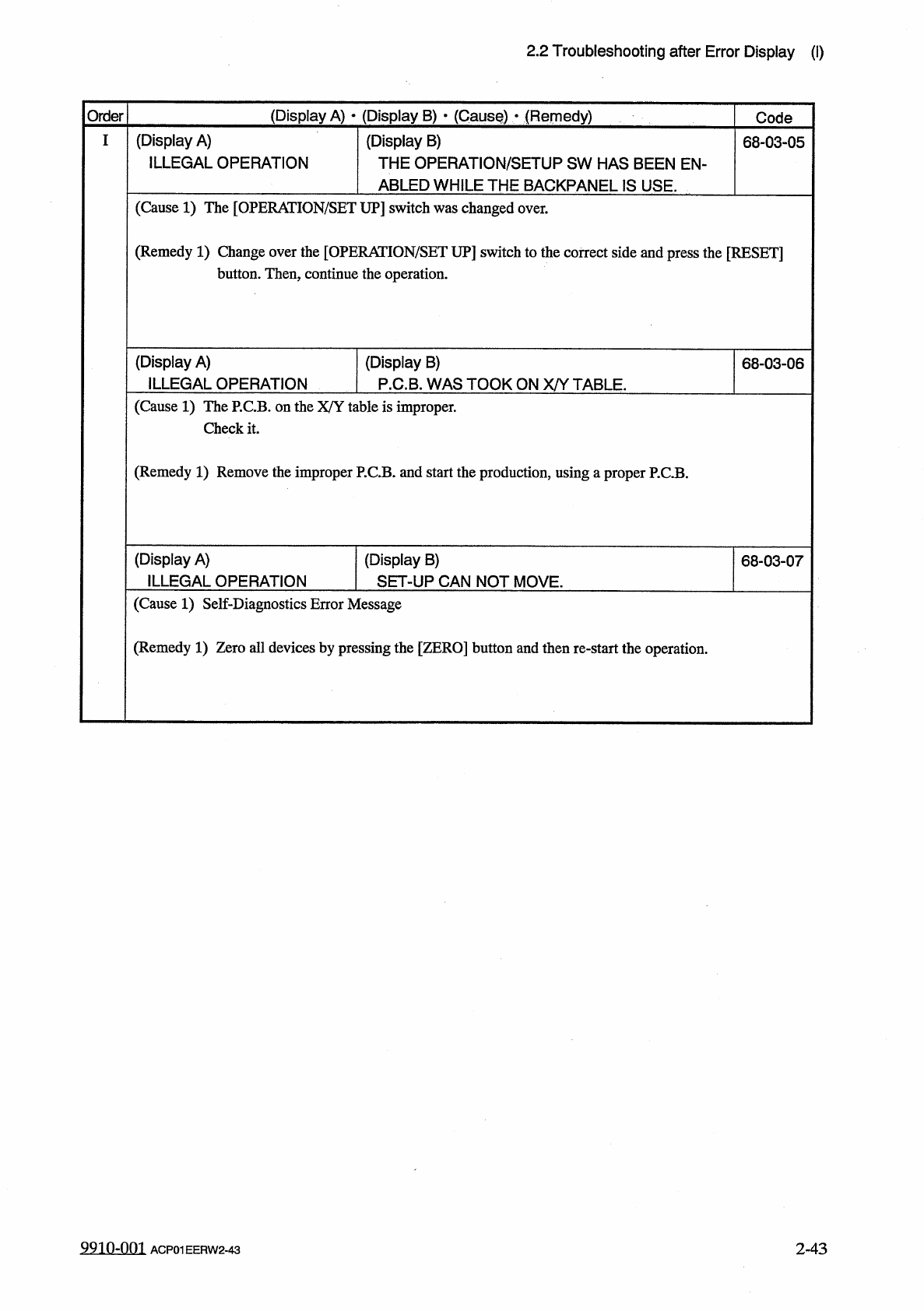
2.2
Troubleshooting
after
Error
Display
(
I
)
Order
(
Display
A
)
•
(
Display
B
)
•
(
CausQ
)
•
(
Remedy
)
Code
(
Display
A
)
ILLEGAL
OPERATION
I
(
Display
B
)
THE
OPERATION
/
SETUP
SW
HAS
BEEN
EN
-
ABLED
WHILE
THE
BACKPANEL
IS
USE
.
68
-
03
-
05
(
Cause
1
)
The
[
OPERAIION
/
SET
UP
]
switch
was
changed
over
.
(
Remedy
1
)
Change
over
the
[
OPERAIION
/
SET
UP
]
switch
to
the
correct
side
and
press
the
[
RESET
]
button
.
Then
,
continue
the
operation
.
(
Display
A
)
ILLEGAL
OPERATION
(
Display
B
)
P
.
C
.
B
.
WAS
TOOK
ON
X
/
Y
TABLE
.
68
-
03
-
06
(
Cause
1
)
The
P
.
C
.
B
.
on
the
X
/
Y
table
is
improper
.
Check
it
.
(
Remedy
1
)
Remove
the
improper
P
.
C
.
B
.
and
start
the
production
,
using
汪
proper
P
.
C
.
B
.
(
Display
A
)
ILLEGAL
OPERATION
(
Display
B
)
SET
-
UP
CAN
NOT
MOVE
.
68
-
03
-
07
(
Cause
1
)
Self
-
Diagnostics
Error
Message
(
Remedy
1
)
Zero
all
devices
by
pressing
the
[
ZERO
]
button
and
then
re
-
start
the
operation
.
9910
-
001
ACP
01
EERW
2
-
43
2
-
43
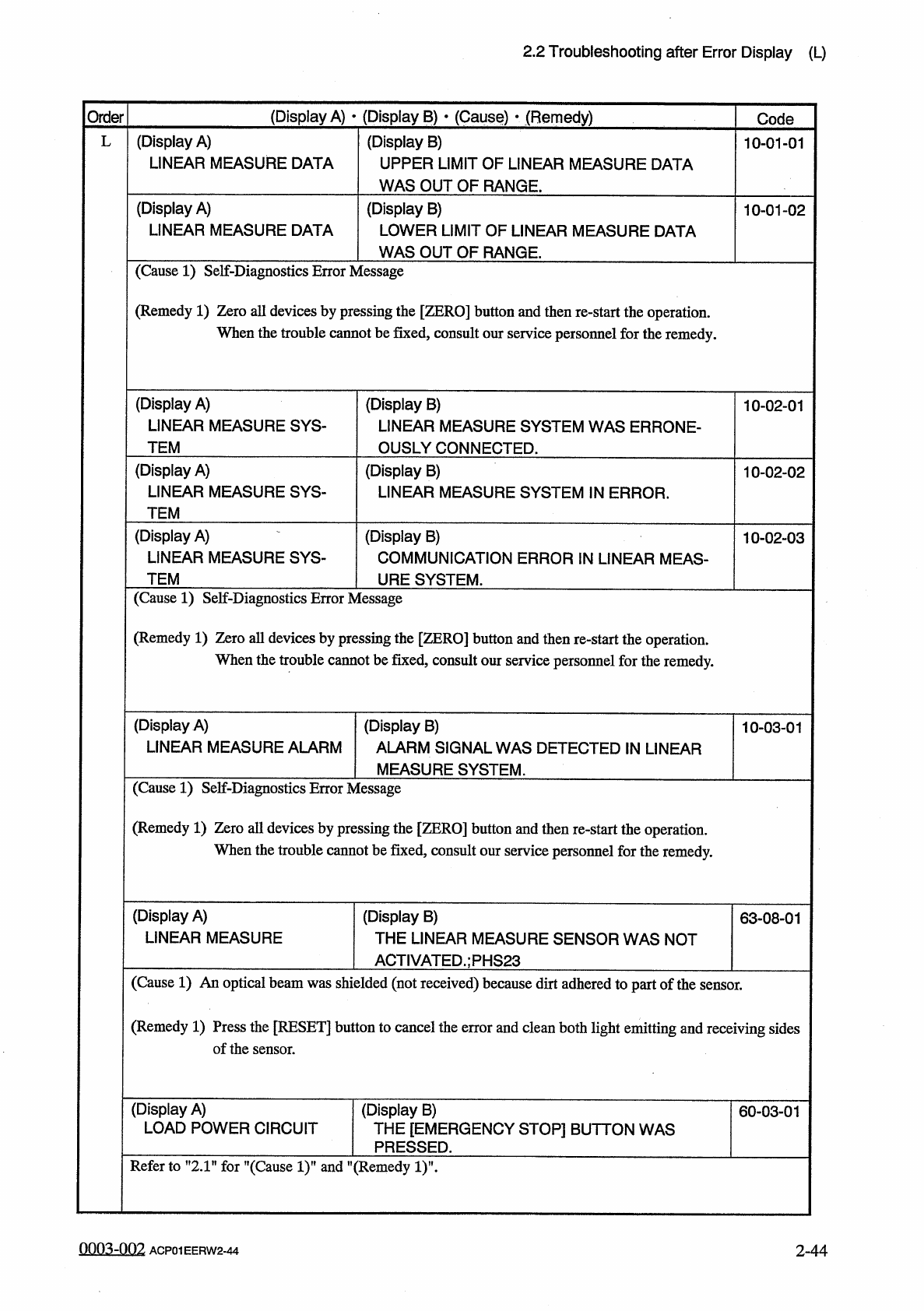
2.2
Troubleshooting
after
Error
Display
(
L
)
(
Display
A
)
•
(
Display
B
)
•
(
Cause
)
■
(
Remedy
)
Order
Code
(
Display
A
)
LINEAR
MEASURE
DATA
(
Display
B
)
UPPER
LIMIT
OF
LINEAR
MEASURE
DATA
WAS
OUT
OF
RANGE
.
L
10
-
01
-
01
(
Display
B
)
LOWER
LIMIT
OF
LINEAR
MEASURE
DATA
WAS
OUT
OF
RANGE
.
(
Display
A
)
LINEAR
MEASURE
DATA
10
-
01
-
02
(
Cause
1
)
Self
-
Diagnostics
Error
Message
(
Remedy
1
)
Zero
all
devices
by
pressing
the
[
ZERO
]
button
and
then
re
-
start
the
operation
.
When
the
trouble
cannot
be
fixed
,
consult
our
service
personnel
for
the
remedy
.
(
Display
A
)
LINEAR
MEASURE
SYS
-
(
Display
B
)
LINEAR
MEASURE
SYSTEM
WAS
ERRONE
-
OUSLY
CONNECTED
.
10
-
02
-
01
TEM
(
Display
A
)
LINEAR
MEASURE
SYS
-
(
Display
B
)
LINEAR
MEASURE
SYSTEM
IN
ERROR
.
10
-
02
-
02
TEM
(
Display
B
)
COMMUNICATION
ERROR
IN
LINEAR
MEAS
-
URE
SYSTEM
.
(
Display
A
)
LINEAR
MEASURE
SYS
-
10
-
02
-
03
TEM
(
Cause
1
)
Self
-
Diagnostics
Error
Message
(
Remedy
1
)
Zero
all
devices
by
pressing
the
[
ZERO
]
button
and
then
re
-
start
the
operation
.
When
the
trouble
cannot
be
fixed
,
consult
our
service
personnel
for
the
remedy
.
(
Display
A
)
LINEAR
MEASURE
ALARM
(
Display
B
)
ALARM
SIGNAL
WAS
DETECTED
IN
LINEAR
MEASURE
SYSTEM
.
10
-
03
-
01
(
Cause
1
)
Self
-
Diagnostics
Error
Message
(
Remedy
1
)
Zero
all
devices
by
pressing
the
[
ZERO
]
button
and
then
re
-
start
the
operation
.
When
the
trouble
cannot
be
fixed
,
consult
our
service
personnel
for
the
remedy
.
(
Display
A
)
LINEAR
MEASURE
(
Display
B
)
THE
LINEAR
MEASURE
SENSOR
WAS
NOT
ACTIVATED
.
;
PHS
23
63
-
08
-
01
(
Cause
1
)
An
optical
beam
was
shielded
(
not
received
)
because
dirt
adhered
to
part
of
the
sensor
.
(
Remedy
1
)
Press
the
[
RESET
]
button
to
cancel
the
error
and
clean
both
light
emitting
and
receiving
sides
of
the
sensor
.
(
Display
A
)
LOAD
POWER
CIRCUIT
(
Display
B
)
THE
[
EMERGENCY
STOP
]
BUTTON
WAS
PRESSED
.
60
-
03
-
01
Refer
to
”
2.1
"
for
’
’
(
Cause
1
)
”
and
"
(
Remedy
1
)
'
0003
-
002
ACP
01
EERW
2
-
44
2
-
44