5TROUBLESHOOTING_.pdf - 第67页
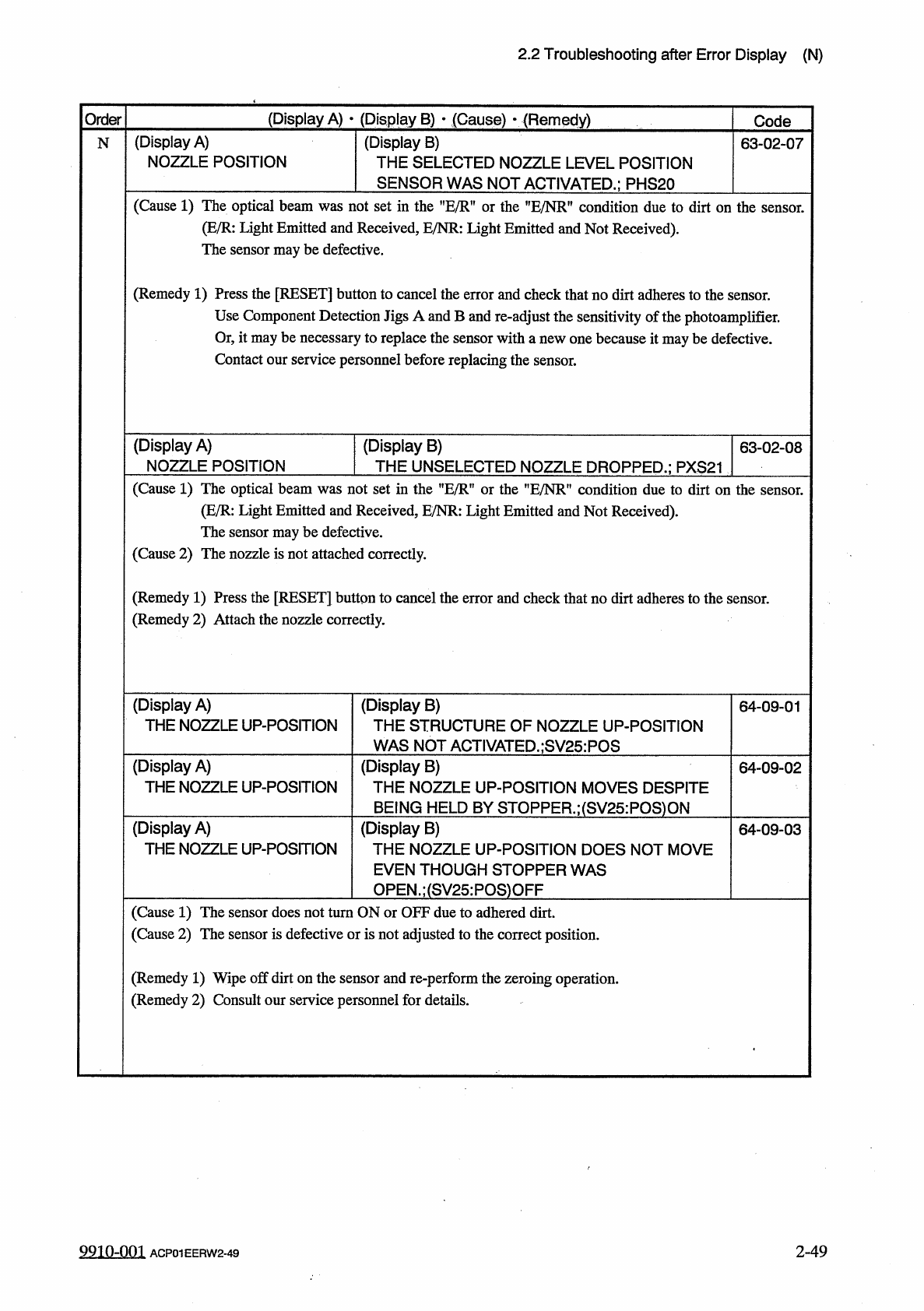
2.2 Troubleshooting after Error Display ( N ) ( Display A ) • ( Display B ) • ( Cause ) • ( Remedy ) Order Code ( Display A ) THE NOZZLE DOWN - POSITION ( Display B ) THE STRUCTURE OF NOZZLE DOWN - POS 1 T 1 QN WAS NOT A…
2.2
Troubleshooting
after
Error
Display
(
N
)
(
Display
A
)
•
(
Display
B
)
•
(
Cause
)
r
{
Remedy
)
Order
Code
(
Display
A
)
NOZZLE
POSITION
(
Display
B
)
THE
SELECTED
NOZZLE
LEVEL
POSITION
SENSOR
WAS
NOT
ACTIVATED
.
;
PHS
20
N
63
-
02
-
07
(
Cause
1
)
The
optical
beam
was
not
set
m
the
,
fE
/
R
,
f
or
the
HE
/
NR
"
condition
due
to
dirt
on
the
sensor
.
(
E
/
R
:
Light
Emitted
and
Received
,
E
/
NR
:
Light
Emitted
and
Not
Received
)
.
The
sensor
may
be
defective
.
(
Remedy
1
)
Press
the
[
RESET
]
button
to
cancel
the
error
and
check
that
no
dirt
adheres
to
the
Use
Component
Detection
Jigs
A
and
B
and
re
-
adjust
the
sensitivity
of
the
photoamplifier
.
Or
,
it
may
be
necessary
to
replace
the
sensor
with
a
new
one
because
it
may
be
defective
.
Contact
our
service
personnel
before
replacing
the
sensor
.
sensor
.
(
Display
A
)
NOZZLE
POSITION
(
Display
B
)
THE
UNSELECTED
NOZZLE
DROPPED
.
;
PXS
21
63
-
02
-
08
(
Cause
1
)
The
optical
beam
was
not
set
in
the
"
E
/
R
"
or
the
”
E
/
NR
”
condition
due
to
dirt
on
the
sensor
.
(
E
/
R
:
Light
Emitted
and
Received
,
E
/
NR
:
Light
Emitted
and
Not
Received
)
.
The
sensor
may
be
defective
.
(
Cause
2
)
The
nozzle
is
not
attached
correctly
.
(
Remedy
1
)
Press
the
[
RESET
]
button
to
cancel
the
error
and
check
that
no
dirt
adheres
to
the
sensor
.
(
Remedy
2
)
Attach
the
nozzle
correctly
.
(
Display
A
)
THE
NOZZLE
UP
-
POSITION
(
Display
B
)
THE
STRUCTURE
OF
NOZZLE
UP
-
POSITION
WAS
NOT
ACTIVATED
.
;
SV
25
:
POS
64
-
09
-
01
(
Display
A
)
THE
NOZZLE
UP
-
POSITION
(
Display
B
)
THE
NOZZLE
UP
-
POSITION
MOVES
DESPITE
BEING
HELD
BY
STOPPER
.
;
(
SV
25
:
POS
)
ON
(
Display
B
)
THE
NOZZLE
UP
-
POSITION
DOES
NOT
MOVE
EVEN
THOUGH
STOPPER
WAS
OPEN
.
;
(
SV
25
:
POS
)
OFF
64
-
09
-
02
(
Display
A
)
THE
NOZZLE
UP
-
POSITION
64
-
09
-
03
(
Cause
1
)
The
sensor
does
not
turn
ON
or
OFF
due
to
adhered
dirt
.
(
Cause
2
)
The
sensor
is
defective
or
is
not
adjusted
to
the
correct
position
.
(
Remedy
1
)
Wipe
off
dirt
on
the
sensor
and
re
-
perform
the
zeroing
operation
.
(
Remedy
2
)
Consult
our
service
personnel
for
details
.
9910
-
001
2
-
49
ACP
01
EERW
2
-
49
2.2
Troubleshooting
after
Error
Display
(
N
)
(
Display
A
)
•
(
Display
B
)
•
(
Cause
)
•
(
Remedy
)
Order
Code
(
Display
A
)
THE
NOZZLE
DOWN
-
POSITION
(
Display
B
)
THE
STRUCTURE
OF
NOZZLE
DOWN
-
POS
1
T
1
QN
WAS
NOT
ACTIVATED
•
:
SV
26
N
64
-
10
-
01
(
Display
A
)
THE
NOZZLE
DOWN
-
POSITION
(
Display
B
)
THE
NOZZLE
DOWN
-
POSITION
MOVES
DE
-
SPITE
BEING
HELD
BY
STOPPER
.
;
(
SV
26
:
POS
)
64
-
10
-
02
ON
(
Display
A
)
THE
NOZZLE
DOWN
-
POSITION
(
Display
B
)
THE
NOZZLE
DOWN
-
POSITION
DOES
NOT
MOVE
EVEN
THOUGH
STOPPER
WAS
OPEN
.
;
(
SV
26
:
POS
)
OFF
64
-
10
-
03
(
Cause
1
)
The
sensor
does
not
turn
ON
or
OFF
due
to
adhered
dirt
.
(
Cause
2
)
The
sensor
is
defective
or
is
not
adjusted
to
the
correct
position
.
(
Remedy
1
)
Wipe
off
dirt
on
the
sensor
and
re
-
perform
the
zeroing
operation
.
(
Remedy
2
)
Consult
our
service
personnel
for
details
.
(
Display
A
)
NOZZLE
DATA
Note
(
Display
B
)
Note
65
-
05
-
01
Note
:
Refer
to
”
3.3
.
5
Reset
Procedure
from
Lighting
Check
Function
Error
”
for
the
detailed
error
display
.
(
Display
A
)
NOZZLE
RECOG
.
Note
(
Display
B
)
Note
70
76
-
01
-
01
Note
:
Refer
to
"
3.3
.
3
Reset
Procedure
from
Nozzle
Recognition
Error
"
for
the
detailed
error
display
.
(
Display
A
)
NOZZLE
SKIP
(
Display
B
)
NOZZLE
DOWN
ERROR
(
L
)
70
76
-
02
-
01
(
Display
A
)
NOZZLE
SKIP
(
Display
B
)
70
76
-
02
-
02
NOZZLE
DOWN
ERROR
(
H
)
(
Display
B
)
(
Display
A
)
NOZZLE
SKIP
70
re
-
ctos
RECOGNITION
TEACH
ERROR
(
Cause
1
)
When
the
selected
nozzle
reached
the
L
or
H
level
during
operation
,
the
optical
beam
of
the
sensor
was
shielded
(
not
received
)
.
The
sensor
may
be
defective
.
(
Remedy
1
)
Remove
the
dirt
on
the
nozzle
end
and
insert
the
nozzle
deep
inside
.
The
sensor
may
be
defective
.
If
necessary
,
replace
the
sensor
with
a
new
one
.
Contact
our
service
personnel
before
replacing
the
sensor
.
9910
-
001
ACP
01
EERW
2
-
50
2
-
50
2.2
Troubleshooting
after
Error
Display
(
N
)
(
Display
A
)
•
(
Display
B
)
•
(
Cause
)
•
(
Remedy
)
Code
Order
(
Display
B
)
TEACH
ERROR
DATA
(
Display
A
)
NOZZLE
SKIP
N
70
76
-
02
-
04
(
Cause
1
)
Dirt
and
dust
adhere
to
the
nozzle
and
an
error
is
found
in
the
nozzle
teaching
operation
.
(
Remedy
1
)
Remove
dirt
and
dust
from
the
nozzle
end
and
re
-
perform
the
nozzle
teaching
operation
.
(
Display
B
)
LIGHTING
CHECK
(
Display
A
)
NOZZLE
SKIP
70
76
-
02
-
05
(
Cause
1
)
The
diffusion
plate
of
the
nozzle
may
be
dusty
and
dirty
or
scratched
.
(
Remedy
1
)
Clean
the
diffusion
plate
or
replace
it
with
a
new
one
.
(
Display
A
)
NOZZLE
SKIP
(
Display
B
)
NOZZLE
LEVEL
70
76
_
02
-
06
(
Cause
1
)
This
error
occurs
when
the
AL
value
exceeds
the
tolerance
(
土
0.31
)
in
comparison
with
the
master
nozzle
in
the
offset
data
.
(
Remedy
1
)
Check
if
a
big
value
(
more
than
0.1
mm
)
is
set
as
an
L
level
of
the
master
nozzle
in
the
offset
data
.
(
In
normal
cases
,
less
than
0.1
mm
must
be
set
.
)
Check
if
the
nozzle
is
broken
or
dirt
adheres
to
the
end
.
(
Display
A
)
NOZZLE
SKIP
(
Display
B
)
NOZZLE
DROP
70
76
-
02
-
07
(
Cause
1
)
When
a
’
’
NOZ
.
DOWN
ERR
(
L
)
,
?
error
occurs
,
the
nozzle
is
bypassed
and
the
nozzle
bypass
appears
as
a
low
nozzle
item
.
data
indicates
that
"
BYPASSED
1
(
Remedy
1
)
Press
the
[
NOZZLE
BYPASS
RESET
]
key
at
the
’
’
NOZZLE
BYPASS
DATA
"
display
.
This
error
item
is
canceled
.
(
Display
A
)
NOZZLE
SKIP
(
Display
B
)
DUMMY
NOZZLE
70
76
-
02
-
08
(
Cause
1
)
This
appears
when
the
nozzle
is
bypassed
manually
.
(
Remedy
1
)
When
the
[
ALL
HD
*
NOZ
MAN
.
BYPASS
RESET
]
key
is
pressed
at
the
"
MANUAL
NOZ
-
ZLE
BYPASS
'
1
display
,
the
manual
bypass
designation
of
the
heads
are
all
canceled
.
(
Display
A
)
NOZZLE
SKIP
(
Display
B
)
MANUAL
BYPASS
70
76
-
02
-
09
(
Cause
1
)
This
appears
when
the
nozzle
is
bypassed
manually
.
(
Remedy
1
)
When
the
[
ALL
HD
-
NOZ
MAN
.
BYPASS
RESET
]
key
is
pressed
at
the
"
MANUAL
NOZ
-
ZLE
BYPASS
"
display
,
the
manual
bypass
designation
of
the
heads
are
all
canceled
.
9910
-
001
2
-
51
ACP
01
EERW
2
-
51