5TROUBLESHOOTING_.pdf - 第69页
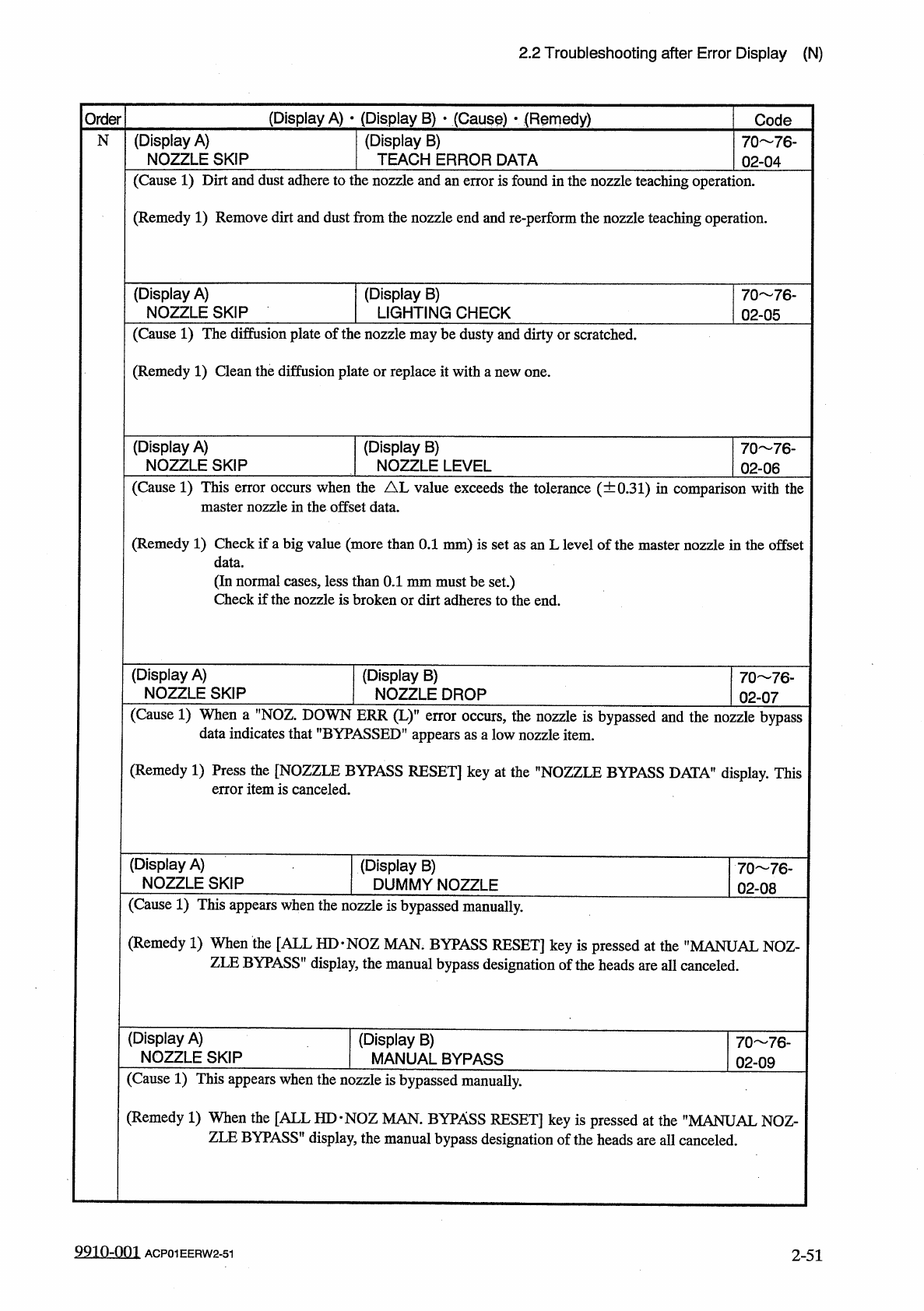
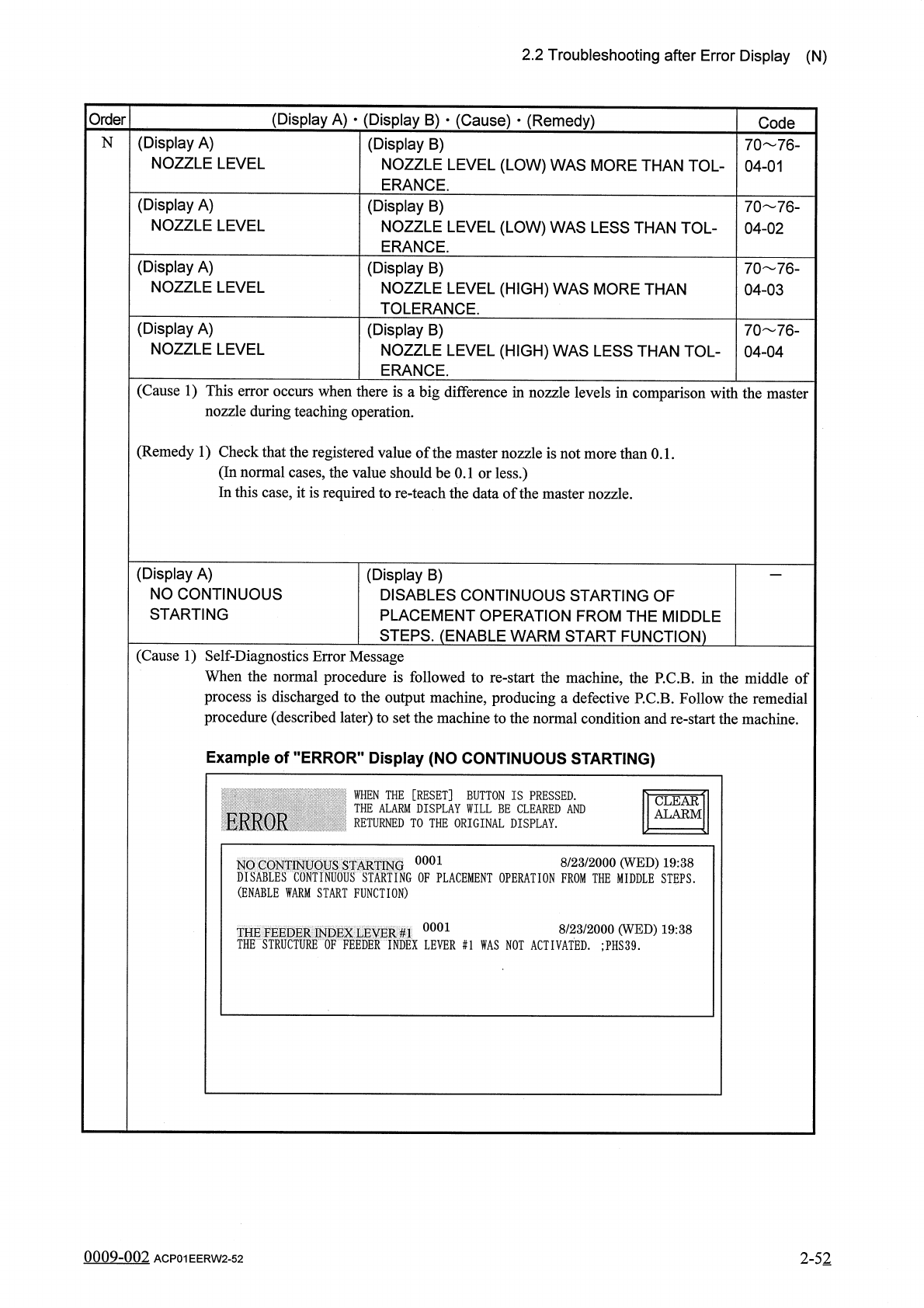
2.2 Troubleshooting after Error Display ( N ) ( Display A ) • ( Display B ) • ( Cause ) • ( Remedy ) Order Code ( Display A ) NOZZLE LEVEL N 70 76 - 04 - 01 ( Display B ) NOZZLE LEVEL ( LOW ) WAS MORE THAN TOL - ERANCE .…
2.2
Troubleshooting
after
Error
Display
(
N
)
(
Display
A
)
•
(
Display
B
)
•
(
Cause
)
•
(
Remedy
)
Code
Order
(
Display
B
)
TEACH
ERROR
DATA
(
Display
A
)
NOZZLE
SKIP
N
70
76
-
02
-
04
(
Cause
1
)
Dirt
and
dust
adhere
to
the
nozzle
and
an
error
is
found
in
the
nozzle
teaching
operation
.
(
Remedy
1
)
Remove
dirt
and
dust
from
the
nozzle
end
and
re
-
perform
the
nozzle
teaching
operation
.
(
Display
B
)
LIGHTING
CHECK
(
Display
A
)
NOZZLE
SKIP
70
76
-
02
-
05
(
Cause
1
)
The
diffusion
plate
of
the
nozzle
may
be
dusty
and
dirty
or
scratched
.
(
Remedy
1
)
Clean
the
diffusion
plate
or
replace
it
with
a
new
one
.
(
Display
A
)
NOZZLE
SKIP
(
Display
B
)
NOZZLE
LEVEL
70
76
_
02
-
06
(
Cause
1
)
This
error
occurs
when
the
AL
value
exceeds
the
tolerance
(
土
0.31
)
in
comparison
with
the
master
nozzle
in
the
offset
data
.
(
Remedy
1
)
Check
if
a
big
value
(
more
than
0.1
mm
)
is
set
as
an
L
level
of
the
master
nozzle
in
the
offset
data
.
(
In
normal
cases
,
less
than
0.1
mm
must
be
set
.
)
Check
if
the
nozzle
is
broken
or
dirt
adheres
to
the
end
.
(
Display
A
)
NOZZLE
SKIP
(
Display
B
)
NOZZLE
DROP
70
76
-
02
-
07
(
Cause
1
)
When
a
’
’
NOZ
.
DOWN
ERR
(
L
)
,
?
error
occurs
,
the
nozzle
is
bypassed
and
the
nozzle
bypass
appears
as
a
low
nozzle
item
.
data
indicates
that
"
BYPASSED
1
(
Remedy
1
)
Press
the
[
NOZZLE
BYPASS
RESET
]
key
at
the
’
’
NOZZLE
BYPASS
DATA
"
display
.
This
error
item
is
canceled
.
(
Display
A
)
NOZZLE
SKIP
(
Display
B
)
DUMMY
NOZZLE
70
76
-
02
-
08
(
Cause
1
)
This
appears
when
the
nozzle
is
bypassed
manually
.
(
Remedy
1
)
When
the
[
ALL
HD
*
NOZ
MAN
.
BYPASS
RESET
]
key
is
pressed
at
the
"
MANUAL
NOZ
-
ZLE
BYPASS
'
1
display
,
the
manual
bypass
designation
of
the
heads
are
all
canceled
.
(
Display
A
)
NOZZLE
SKIP
(
Display
B
)
MANUAL
BYPASS
70
76
-
02
-
09
(
Cause
1
)
This
appears
when
the
nozzle
is
bypassed
manually
.
(
Remedy
1
)
When
the
[
ALL
HD
-
NOZ
MAN
.
BYPASS
RESET
]
key
is
pressed
at
the
"
MANUAL
NOZ
-
ZLE
BYPASS
"
display
,
the
manual
bypass
designation
of
the
heads
are
all
canceled
.
9910
-
001
2
-
51
ACP
01
EERW
2
-
51
2.2
Troubleshooting
after
Error
Display
(
N
)
(
Display
A
)
•
(
Display
B
)
•
(
Cause
)
•
(
Remedy
)
Order
Code
(
Display
A
)
NOZZLE
LEVEL
N
70
76
-
04
-
01
(
Display
B
)
NOZZLE
LEVEL
(
LOW
)
WAS
MORE
THAN
TOL
-
ERANCE
.
(
Display
A
)
NOZZLE
LEVEL
(
Display
B
)
NOZZLE
LEVEL
(
LOW
)
WAS
LESS
THAN
TOL
-
ERANCE
.
70
76
-
04
-
02
(
Display
A
)
NOZZLE
LEVEL
(
Display
B
)
NOZZLE
LEVEL
(
HIGH
)
WAS
MORE
THAN
TOLERANCE
.
70
76
-
04
-
03
(
Display
A
)
NOZZLE
LEVEL
70
76
-
04
-
04
(
Display
B
)
NOZZLE
LEVEL
(
HIGH
)
WAS
LESS
THAN
TOL
-
ERANCE
.
(
Cause
1
)
This
error
occurs
when
there
is
a
big
difference
in
nozzle
levels
in
comparison
with
the
master
nozzle
during
teaching
operation
.
(
Remedy
1
)
Check
that
the
registered
value
of
the
master
nozzle
is
not
more
than
0.1
.
(
In
normal
cases
,
the
value
should
be
0.1
or
less
.
)
In
this
case
,
it
is
required
to
re
-
teach
the
data
of
the
master
nozzle
.
(
Display
A
)
NO
CONTINUOUS
STARTING
(
Display
B
)
DISABLES
CONTINUOUS
STARTING
OF
PLACEMENT
OPERATION
FROM
THE
MIDDLE
STEPS
.
(
ENABLE
WARM
START
FUNCTION
)
(
Cause
1
)
Self
-
Diagnostics
Error
Message
When
the
normal
procedure
is
followed
to
re
-
start
the
machine
,
the
P
.
C
.
B
.
in
the
middle
of
process
is
discharged
to
the
output
machine
,
producing
a
defective
P
.
C
.
B
.
Follow
the
remedial
procedure
(
described
later
)
to
set
the
machine
to
the
normal
condition
and
re
-
start
the
machine
.
Example
of
"
ERROR
"
Display
(
NO
CONTINUOUS
STARTING
)
WHEN
THE
[
RESET
]
BUTTON
IS
PRESSED
.
:
THE
ALARM
DISPLAY
WILL
BE
CLEARED
AND
RETURNED
TO
THE
ORIGINAL
DISPLAY
.
CLEAR
ALARM
ERROR
0001
8
/
23
/
2000
(
WED
)
19
:
38
NO
CONTINUOUS
STARTING
DISABLES
CONTINUOUS
STARTING
OF
PLACEMENT
OPERATION
FROM
THE
MIDDLE
STEPS
.
(
ENABLE
WARM
START
FUNCTION
)
0001
8
/
23
/
2000
(
WED
)
19
:
38
THE
FEEDER
INDEX
LEVER
#
1
THE
STRUCTURE
OF
FEEDER
INDEX
LEVER
#
1
WAS
NOT
ACTIVATED
.
:
PHS
39
.
2
-
52
0009
-
002
ACP
01
EERW
2
-
52
2.2
Troubleshooting
after
Error
Display
(
N
)
(
Display
A
)
•
(
Display
B
)
•
(
Cause
)
•
(
Remedy
)
Order
Code
Error
"
No
Continuous
Starting
'
N
Display
A
Display
B
Code
ROTARY
TURRET
ORIGIN
ROTARY
TURRET
IS
NOT
AT
ORIGIN
.
02
-
01
-
05
ROTARY
TURRET
TIMING
TASK
HAS
NOT
BEEN
COMPLETED
UNABLE
TO
CON
-
TINUE
.
02
-
02
-
01
ROTARY
TURRET
TIMING
TASK
HAS
NOT
BEEN
COMPLETED
DURING
ALLOWED
TIME
.
02
-
02
-
02
FDR
.
CRG
.
AXIS
MOTOR
#
1
TIMING
TASK
HAS
NOT
BEEN
COMPLETED
UNABLE
TO
CON
-
TINUE
.
06
-
02
-
01
FDR
.
CRG
.
AXIS
MOTOR
#
2
TIMING
TASK
HAS
NOT
BEEN
COMPLETED
UNABLE
TO
CON
-
TINUE
.
07
-
02
-
01
NOZZLE
POSITION
THE
SELECTED
NOZZLE
LEVEL
POSITION
SENSOR
WAS
NOT
ACTIVATED
.
;
PHS
19
,
20
63
-
02
-
05
HEAD
NO
.
THE
HEAD
NO
.
DETECTION
SENSOR
WAS
NOT
ACTI
-
VATED
.
(
PHS
15
,
16
,
17
,
18
)
63
-
03
-
01
CAM
PHASE
GAP
OF
CAM
PHASE
HAS
BEEN
DETECTED
.
;
PHS
60
,
61
,
62
ON
63
-
05
-
01
THE
COMP
.
PICK
-
UP
LEVER
THE
STRUCTURE
OF
COMP
.
PICK
-
UP
LEVER
WAS
NOT
ACTIVATED
.
;
PHS
35
64
-
02
-
01
THE
FEEDER
INDEX
LEVER
#
2
THE
STRUCTURE
OF
FEEDER
INDEX
LEVER
#
2
WAS
NOT
ACTIVATED
.
;
PHS
36
64
-
03
-
01
THE
FEEDER
INDEX
LEVER
#
1
THE
STRUCTURE
OF
FEEDER
INDEX
LEVER
#
1
WAS
NOT
ACTIVATED
.
;
PHS
39
64
-
06
-
01
(
Next
Page
)
0009
-
001
2
-
52
-
1
ACP
01
EERW
2
-
52
-
1