5TROUBLESHOOTING_.pdf - 第9页
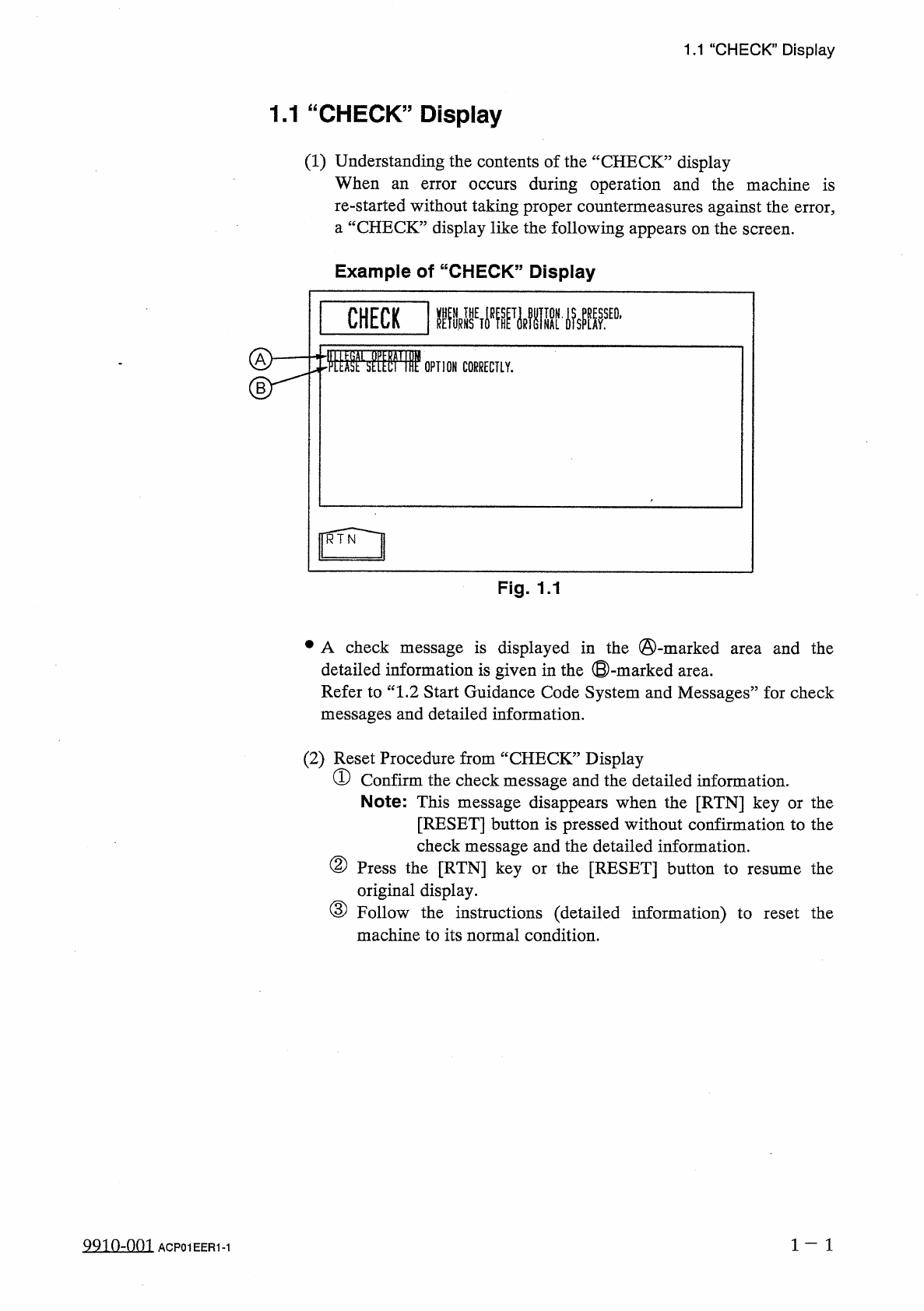
1.1 “ CHECK ” Display 1.1 “ CHECK ” Display ( 1 ) Understanding the contents of the “ CHECK ” display When an error occurs during operation and the machine is re - started without taking proper countermeasures against th…
1
in
■
"
GHiDr
R
飄腦讎讎腿腦讎讎臓讎讎锻
Page
1.1
“
CHECK
”
Display
1.2
Start
Guidance
Code
System
and
Messages
1.3
"
ERROR
55
Display
99
in
-
nm
ACP
01
EERCC
1
1.1
“
CHECK
”
Display
1.1
“
CHECK
”
Display
(
1
)
Understanding
the
contents
of
the
“
CHECK
”
display
When
an
error
occurs
during
operation
and
the
machine
is
re
-
started
without
taking
proper
countermeasures
against
the
error
,
a
“
CHECK
”
display
like
the
following
appears
on
the
screen
.
Example
of
“
CHECK
”
Display
CHECK
fiiWi
OPTION
CORRECTLY
.
Fig
.
1.1
•
A
check
message
is
displayed
in
the
©
-
marked
detailed
information
is
given
in
the
©
-
marked
area
.
Refer
to
“
1.2
Start
Guidance
Code
System
and
Messages
”
for
check
messages
and
detailed
information
.
and
the
area
(
2
)
Reset
Procedure
from
“
CHECK
”
Display
①
Confirm
the
check
message
and
the
detailed
information
.
Note
:
This
message
disappears
when
the
[
RTN
]
key
or
the
[
RESET
]
button
is
pressed
without
confirmation
to
the
check
message
and
the
detailed
information
.
②
Press
the
[
RTN
]
key
or
the
[
RESET
]
button
to
original
display
.
③
Follow
the
instructions
(
detailed
information
)
to
reset
the
machine
to
its
normal
condition
.
the
resume
5210
=
001
ACP
01
EER
1
-
1
1.2
Start
Guidance
Code
System
and
Messages
1.2
Start
Guidance
Code
System
and
Messages
(
1
)
Start
Guidance
Codes
Start
guidance
codes
are
classified
as
follows
and
expressed
in
®
through
④
below
.
①
Priority
Code
②
Block
Code
③
Classification
Code
④
Management
Code
of
CPU
2
AA
BB
CC
DD
TT
①
②
③
④
(
2
)
Start
Guidance
Messages
Priority
Start
Guidance
Code
Item
Description
Remarks
No
.
01
Emergency
Stop
TURN
ON
THE
[
POWER
ON
]
BUTTON
.
010101
XX
Air
Pressure
Drop
INCREASE
THE
AIR
PRESSURE
AND
PRESS
THE
[
POWER
ON
]
BUTTON
TO
SUPPLY
POWER
TO
THE
MACHINE
.
010201
XX
CLOSE
THE
FEEDER
SAFETY
GUARD
AND
PRESS
THE
[
POWER
ON
]
BUTTON
TO
POWER
UP
THE
MACHINE
.
010202
XX
Feeder
Axis
Central
Safety
Guard
CLOSE
THE
FEEDER
SAFETY
GUARD
.
010301
XX
CLOSE
THE
SAFETY
GUARD
LOCATED
AT
CRG
.
#
1
HOME
POSITION
.
010302
XX
CLOSE
THE
SAFETY
DOOR
AND
PRESS
THE
[
POWER
ON
]
BUTTON
TO
POWER
UP
THE
MACHINE
.
010303
XX
Front
Safety
Door
.
CLOSE
THE
SAFETY
DOOR
AND
PRESS
THE
[
POWER
ON
]
BUTTON
TO
SUPPLY
POWER
TO
THE
MACHINE
.
010401
XX
PRESS
THE
[
READY
]
BUTTON
AND
THEN
THE
[
ZERO
]
BUTTON
TO
ZERO
ALL
DEVICES
.
010402
XX
Operator
’
s
Error
SET
OPERATION
MODE
TO
"
PLACEMENT
”
.
02
030101
XX
PLEASE
SELECT
AVAILABLE
MENU
.
030102
XX
INPUT
REGISTERED
TEST
ID
.
030103
XX
SELECT
CORRECT
COMBINATION
OF
CAMERA
AND
LIGHTING
MODE
.
030104
XX
SELECT
AVAILABLE
CARRIAGE
.
030105
XX
CANCEL
THE
COMPONENT
SHORTAGE
DESIGNATED
POSITION
STOP
FUNCTION
.
Displayed
only
when
the
machine
is
equipped
with
the
option
.
030106
XX
RECOVERY
MODE
IS
NOT
AVAILABLE
WHILE
GROUPED
COMPONENT
FUNCTION
IS
IMPLEMENTED
.
Displayed
only
when
the
machine
is
equipped
with
the
option
.
030107
XX
SET
"
ENABLE
"
FOR
DESTINATION
ALTERNATE
FEEDER
.
030108
XX
MACHINE
IS
IN
"
PAUSE
”
MODE
.
030109
XX
1
-
2
QQin
-
nm
ACP
01
EER
1
-
2