5TROUBLESHOOTING_.pdf - 第93页
3.1 . 2 Troubleshooting 3.1 . 2 Troubleshooting Check the contents in " C : Error Code " , Display B " and refer to the related troubleshooting table to reset the machine to the normal condition . ' A…
3.1
Understanding
the
Contents
of
the
"
ERROR
"
Displays
and
the
Troubleshooting
Tables
3.1
Understanding
the
Contents
of
the
"
ERROR
"
Displays
and
the
Troubleshooting
Tables
3.1
.
1
"
ERROR
"
Display
When
an
error
occurs
during
operation
and
a
display
like
the
following
appears
on
the
screen
,
check
the
displayed
contents
and
refer
to
the
troubleshooting
tables
to
reset
the
machine
to
the
normal
condition
.
C
IPS
A
hlSSIfJgllOQUOQI
二
:
二
:
rrFO
咖
FDR
NO
.
:
[
F
110
C
1234567890123456
1234567890123456
)
1
:
【
HD
.
#
12
NOZ
舫
NOZ
.
TYPE
#
011
】
12
/
31
(
THU
)
12
:
34
|
B
D
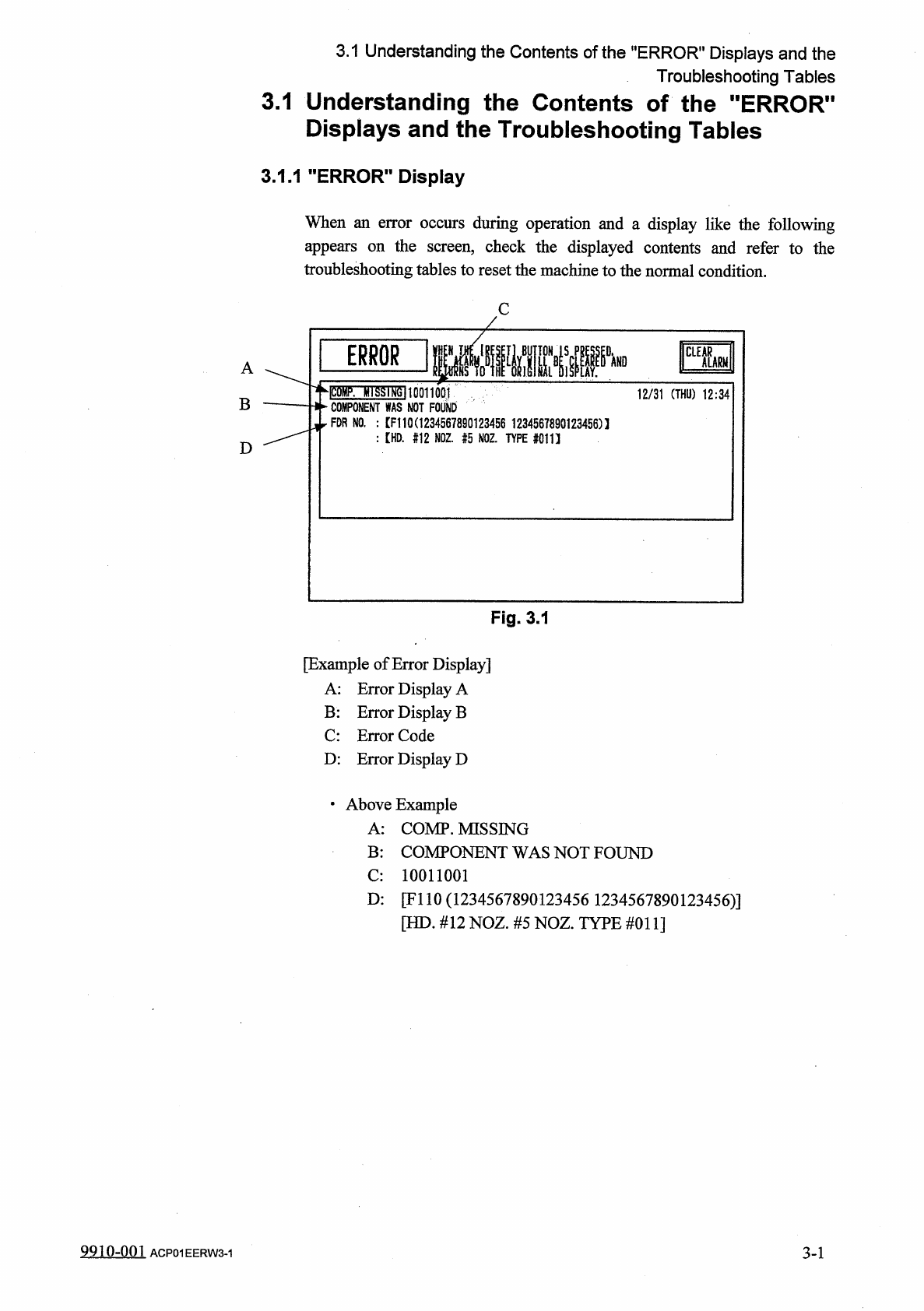
Fig
.
3.1
[
Example
of
Error
Display
]
A
:
Error
Display
A
B
:
Error
Display
B
C
:
Error
Code
D
:
Error
Display
D
•
Above
Example
A
:
COMP
.
MISSING
B
:
COMPONENT
WAS
NOT
FOUND
C
:
10011001
D
:
[
FI
10
(
1234567890123456
1234567890123456
)
]
[
HD
.
#
12
NOZ
.
#
5
NOZ
.
TYPE
#
011
]
9910
-
001
ACP
01
EERW
3
-
1
3
-
1
3.1
.
2
Troubleshooting
3.1
.
2
Troubleshooting
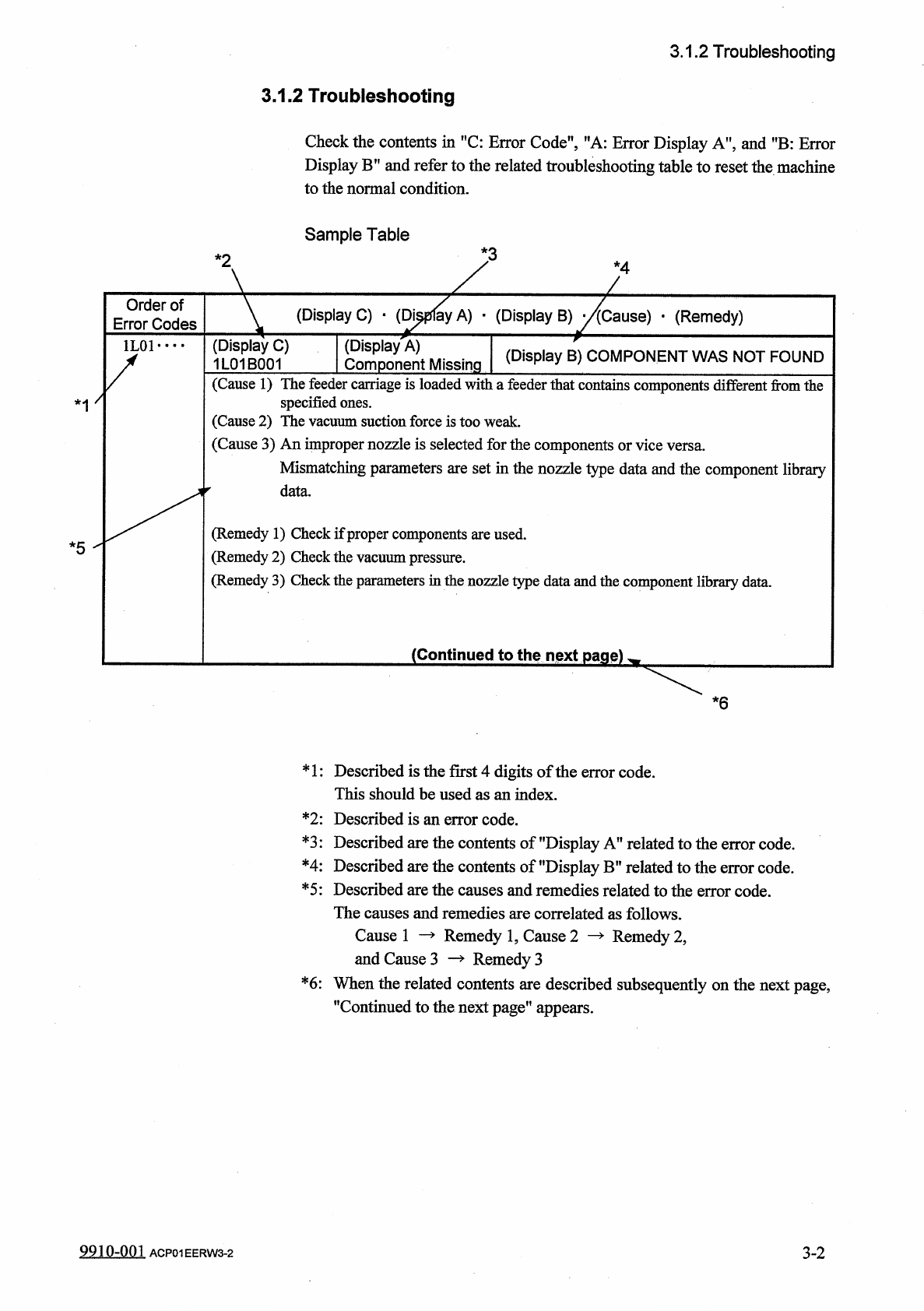
Check
the
contents
in
"
C
:
Error
Code
"
,
Display
B
"
and
refer
to
the
related
troubleshooting
table
to
reset
the
machine
to
the
normal
condition
.
'
A
:
Error
Display
A
"
,
and
"
B
:
Error
Sample
Table
*
2
*
4
(
Display
C
)
•
(
Di
^
pflay
A
)
-
(
Display
B
)
^
/
fcause
)
•
(
Remedy
)
(
Display
A
)
(
Display
B
)
COMPONENT
WAS
NOT
FOUND
Order
of
Error
Codes
(
Display
C
)
1
L
01
B
001
Component
Missing
(
Cause
1
)
The
feeder
carriage
is
loaded
witiia
feeder
that
contains
components
different
from
the
specified
ones
.
(
Cause
2
)
The
vacuum
suction
force
is
too
weak
.
(
Cause
3
)
An
improper
nozzle
is
selected
for
the
components
or
vice
versa
.
Mismatching
parameters
are
set
in
the
nozzle
type
data
and
the
component
library
*
1
(
Remedy
1
)
Check
if
proper
components
are
used
.
(
Remedy
2
)
Check
the
vacuum
pressure
.
(
Remedy
3
)
Check
the
parameters
in
the
nozzle
type
data
and
the
component
library
data
.
*
5
^
(
Continued
to
the
ngxt
page
)
^
*
6
*
1
:
Described
is
the
first
4
digits
of
the
error
code
.
This
should
be
used
as
an
index
.
Described
is
an
error
code
.
Described
are
the
contents
of
"
Display
A
"
related
to
the
Described
are
the
contents
of
"
Display
B
"
related
to
the
Described
are
the
causes
and
remedies
related
to
the
error
code
.
The
causes
and
remedies
are
correlated
as
follows
.
*
2
:
*
3
:
code
.
code
.
error
error
*
4
:
*
5
:
Cause
1
—
Remedy
1
,
Cause
2
—
>
Remedy
2
,
and
Cause
3
Remedy
3
When
the
related
contents
are
described
subsequently
on
the
next
page
,
"
Continued
to
the
next
page
"
appears
.
*
6
:
9910
-
Q
01
ACP
01
EERW
3
-
2
3
-
2
3.2
Basic
System
of
Recognition
Error
Codes
3.2
Basic
System
of
Recognition
Error
Codes
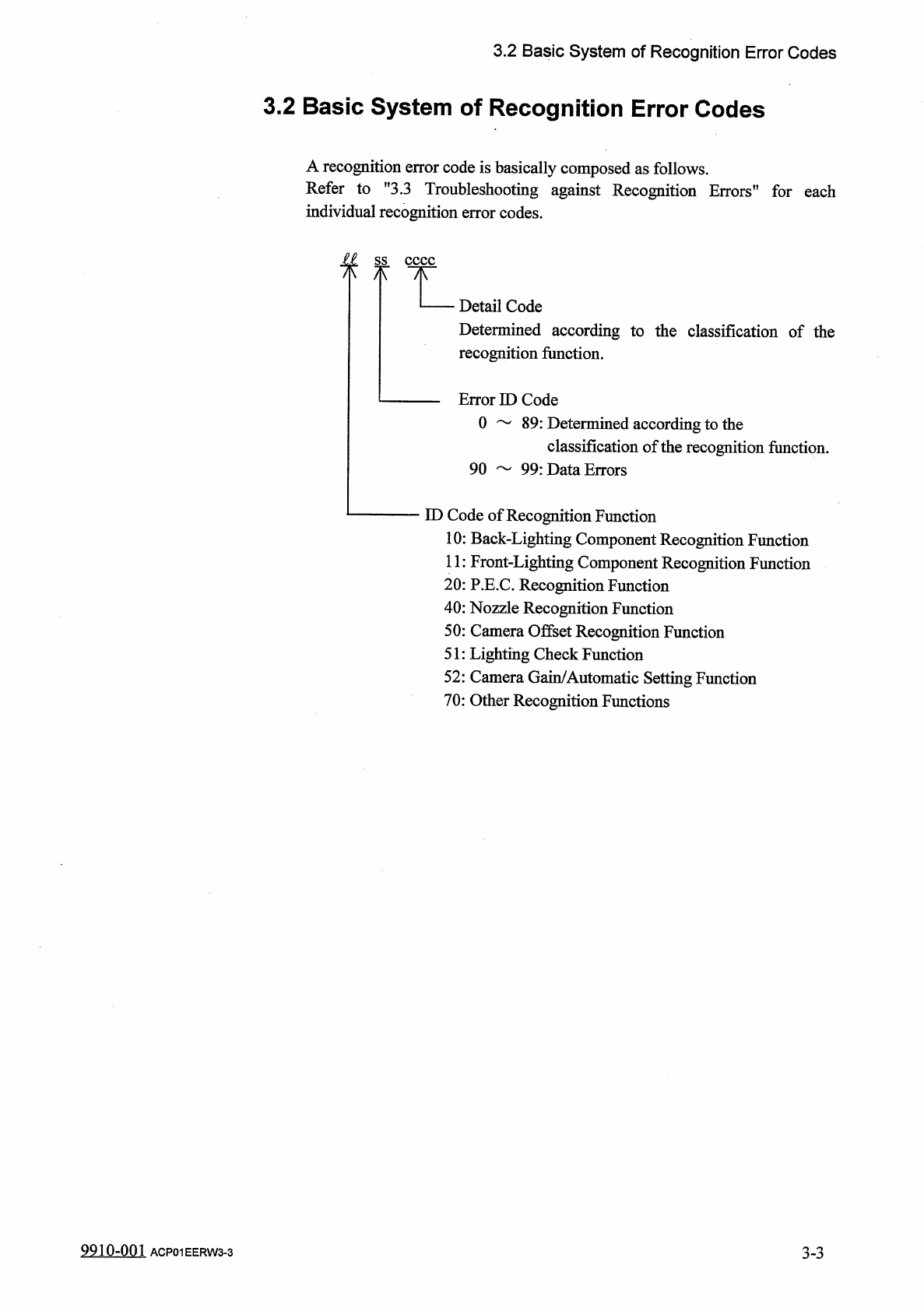
A
recognition
error
code
is
basically
composed
as
follows
.
Refer
to
,
f
3.3
Troubleshooting
against
Recognition
Errors
,
!
for
each
individual
recognition
error
codes
.
£
L
ss
八
Detail
Code
Determined
according
to
the
classification
of
the
recognition
function
.
Error
ID
Code
0
89
:
Determined
according
to
the
classification
of
the
recognition
function
.
90
99
:
Data
Errors
ID
Code
of
Recognition
Function
10
:
Back
-
Lighting
Component
Recognition
Function
11
:
Front
-
Lighting
Component
Recognition
Function
20
:
P
.
E
.
C
.
Recognition
Function
40
:
Nozzle
Recognition
Function
50
:
Camera
Offset
Recognition
Function
51
:
Lighting
Check
Function
52
:
Camera
Gain
/
Automatic
Setting
Function
70
:
Other
Recognition
Functions
3
-
3
9910
-
001
ACP
01
EERW
3
-
3