2500_Users_Manual-.pdf - 第118页
Operation Antistatic Precautions The devices that you will be handling and programming on the 2500 are sensitive to static and can be damaged by accidental and unintended electrostatic discharge while you are handling th…
1950-3
2
4
5
6
8
9
10
7
1
3
Type "t l " on the PC keyboard
7
6
11
b
a
a
b
11
12
a
b
Operation
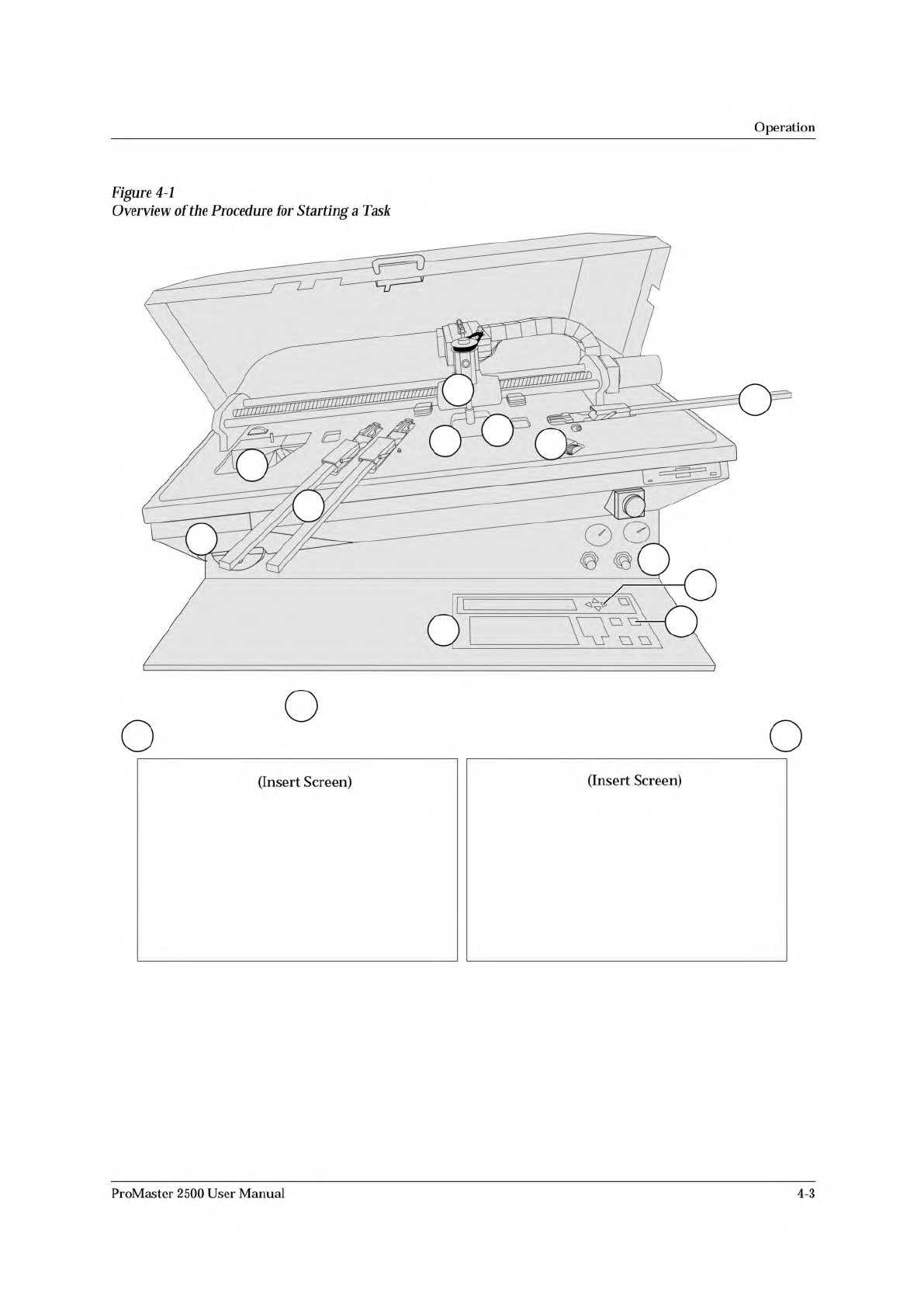
Figure
4-1
Overview
of
the
Procedure
for
Starting
a
Task
(Insert
Screen)
(Insert
Screen)
ProMaster
2500
User
Manual
4-3
Operation
Antistatic
Precautions
The
devices
that
you
will
be
handling
and
programming
on
the
2500
are
sensitive
to
static
and
can
be
damaged
by
accidental
and
unintended
electrostatic
discharge
while
you
are
handling
them.
To
minimize
possible
damage
to
devices,
wear
your
wrist
strap
and
plug
the
end
into
the
ground
strap
connector
in
the
lower
left
corner
of
the
2500
(see
Figure
1-2).
CAUTION:
The
devices
being
processed
through
the
ProMaster
2500
and
components
on
Se
system's
circuit
boards
are
static
sensitive
and
may
be
damaged
“
electrostatic
discharge
(ESD).
To
help
eliminate
damage
from
ESD,
operators
and
service
personnel
should
wear
an
antistatic
wrist
strap
while
using
the
equipment.
The
wrist
strap
should
be
connected
to
the
grounding
plug.
It
should
contain
a
IM
ohm
(minimum
value)
to
10M
ohm
(maximum
value)
isolating
resistor.
Raising
the
Hood
While
a
Task
is
Running
The
2500
has
been
designed
to
operate
only
when
the
hood
is
down
in
the
operating
position
(see
Figure
1-2).
A
safety
interlock
switch
is
activated
when
the
hood
is
raised
to
stop
all
handler
motion
and
laser
marking.
It
must
be
lowered
into
operating
position
before
you
can
start
a
Task.
Do
not
lift
the
hood
while
the
handler
is
processing
devices.
If
you
raise
the
hood,
the
2500
will
immediately
stop
processing
and
leave
the
condition
of
the
devices
being
programmed
in
an
unknown
state.
Devices
in
the
programming
modules
may
not
complete
the
programming
operation
correctly
and
should
be
removed
and
discarded.
If
you
need
to
examine
something
under
the
hood
while
a
Job/Task
is
running,
select
Pause
from
the
TaskLink
screen
to
stop
the
2500,
after
the
current
device
(s)
has
completed
the
programming
cycle.
If
you
lift
the
hood
without
pausing
TaskLink
and
want
to
continue
running
the
Job/Task,
lower
the
hood
to
continue
operation.
WARNING:
Any
attempt
to
bypass
the
hood
interlock
could
result
in
operator
injury.
Do
not
attempt
to
defeat
this
safety
feature.
Operating
Noise
Level
The
typical
operating
noise
level
of
the
2500
may
exceed
70
dB
because
of
the
many
complex
functions
taking
place
at
the
same
time,
such
as:
•
Heavy
subassemblies
being
driven
rapidly
by
motors
along
sizable
lead
screws.
•
Air
actuators
being
rapidly
turned
on
and
off.
•
Vacuum
motors
making
noise.
WARNING:
Long
term
exposure
to
noise
levels
in
excess
of
70
dB
could
cause
hearing
loss.
Personnel
working
near
the
2500
should
wear
hearing
protection.
4-4
ProMaster
2500
User
Manual
Operation
Starting
the
2500
System
The
system
has
been
configured
to
power
up
in
remote
mode,
ready
to
communicate
with
TaskLink.
To
start
the
system,
follow
this
brief
procedure:
1.
Turn
on
the
2500.
The
2500
will
power
up
in
remote
mode.
2.
On
your
PC,
move
to
the
directory
where
TaskLink
is
installed.
3.
On
your
PC
keyboard
from
the
DOS
prompt
enter
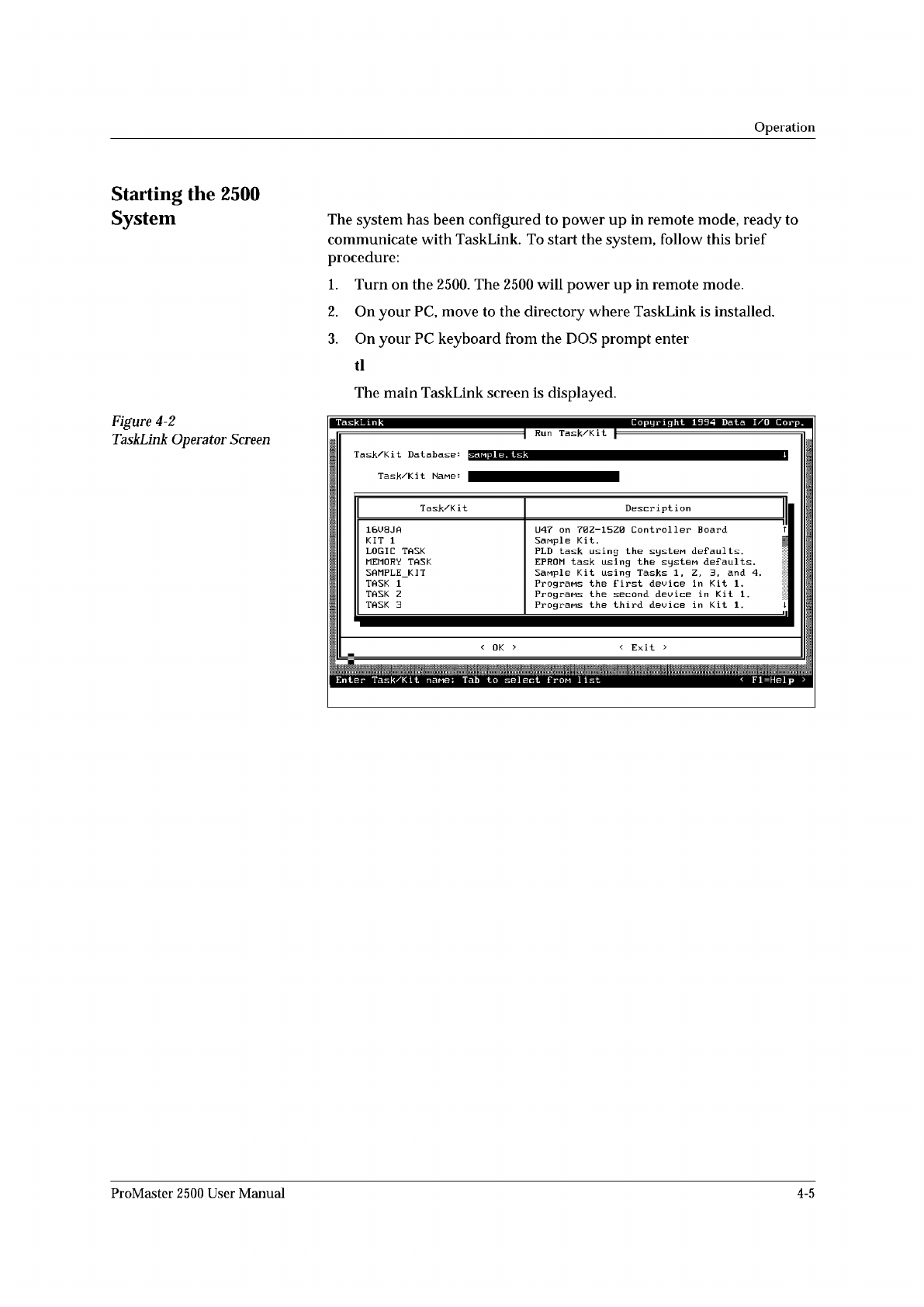
The
main
TaskLink
screen
is
displayed.
Figure
4-2
TaskLink
Operator
Screen
Enter
Task/Ki
t
nane:
Tab
to
select
f
pom
1
ist
<
Fl=Help
>
Task/Kit
Description
16U8JA
U47
on
70Z-15Z0
Controller
Board
T
KIT
1
Sanple
Kit.
|
LOGIC
TASK
PLD
task
using
the
systeM
defaults.
MEMORY
TASK
EPROM
task
using
the
system
defaults.
SAMPLE_KIT
Sanple
Kit
using
Tasks
1
,
Z,
3,
and
4.
TASK
1
Programs
the
first
device
in
Kit
1
.
TASK
Z
Programs
the
second
device
in
Kit
1.
TASK
3
Prograns
the
third
device
in
Kit
1.
1
ProMaster
2500
User
Manual
4-5