2500_Users_Manual-.pdf - 第120页
↵ Operation Entering Your Password Figure 4-3 Enter Your Name on the Security Screen Figure 4-4 TaskLink Main Operator Screen The system administrator may configure your ProMaster 2500 for a security level that requires …
Operation
Starting
the
2500
System
The
system
has
been
configured
to
power
up
in
remote
mode,
ready
to
communicate
with
TaskLink.
To
start
the
system,
follow
this
brief
procedure:
1.
Turn
on
the
2500.
The
2500
will
power
up
in
remote
mode.
2.
On
your
PC,
move
to
the
directory
where
TaskLink
is
installed.
3.
On
your
PC
keyboard
from
the
DOS
prompt
enter
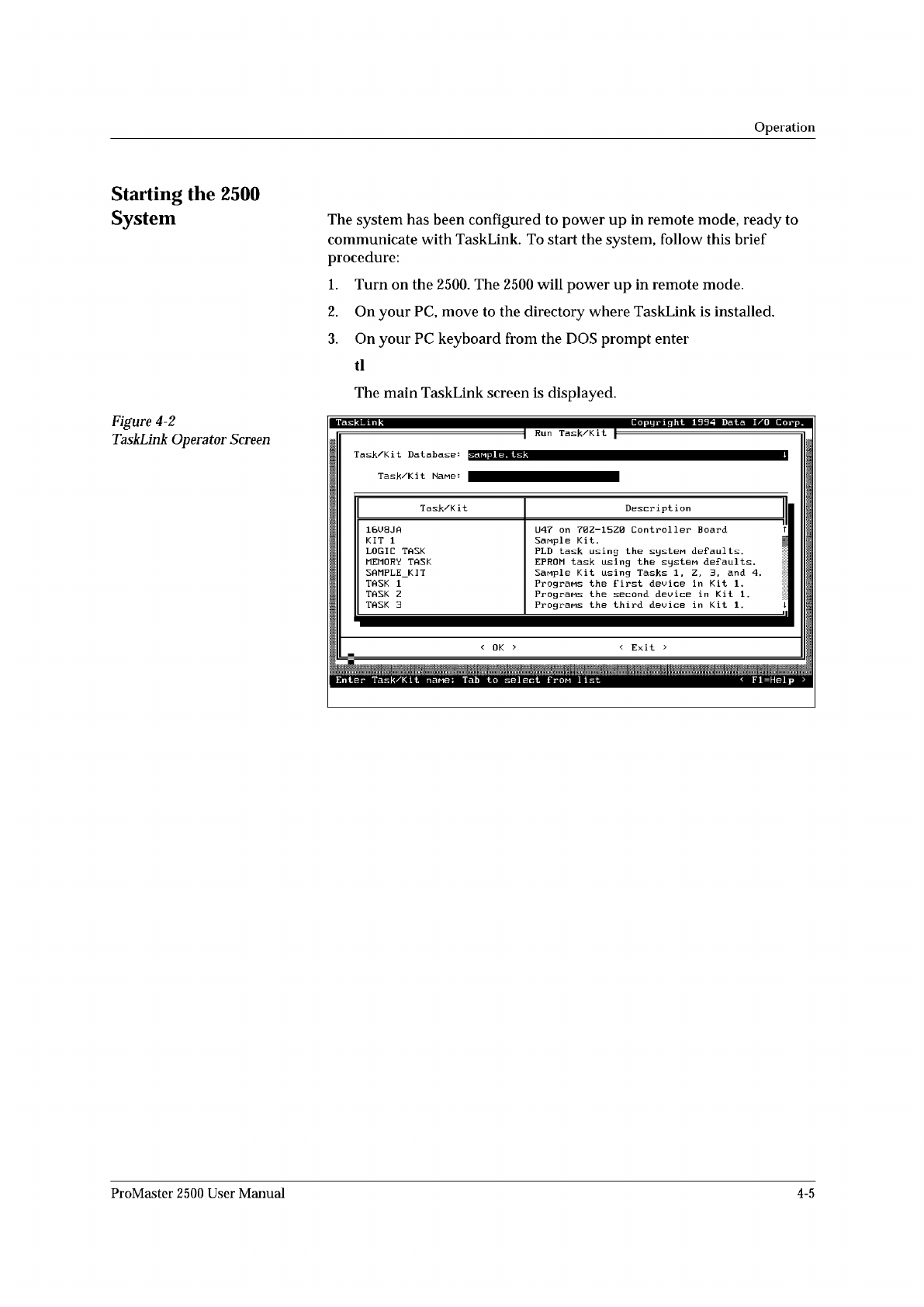
The
main
TaskLink
screen
is
displayed.
Figure
4-2
TaskLink
Operator
Screen
Enter
Task/Ki
t
nane:
Tab
to
select
f
pom
1
ist
<
Fl=Help
>
Task/Kit
Description
16U8JA
U47
on
70Z-15Z0
Controller
Board
T
KIT
1
Sanple
Kit.
|
LOGIC
TASK
PLD
task
using
the
systeM
defaults.
MEMORY
TASK
EPROM
task
using
the
system
defaults.
SAMPLE_KIT
Sanple
Kit
using
Tasks
1
,
Z,
3,
and
4.
TASK
1
Programs
the
first
device
in
Kit
1
.
TASK
Z
Programs
the
second
device
in
Kit
1.
TASK
3
Prograns
the
third
device
in
Kit
1.
1
ProMaster
2500
User
Manual
4-5
↵
Operation
Entering
Your
Password
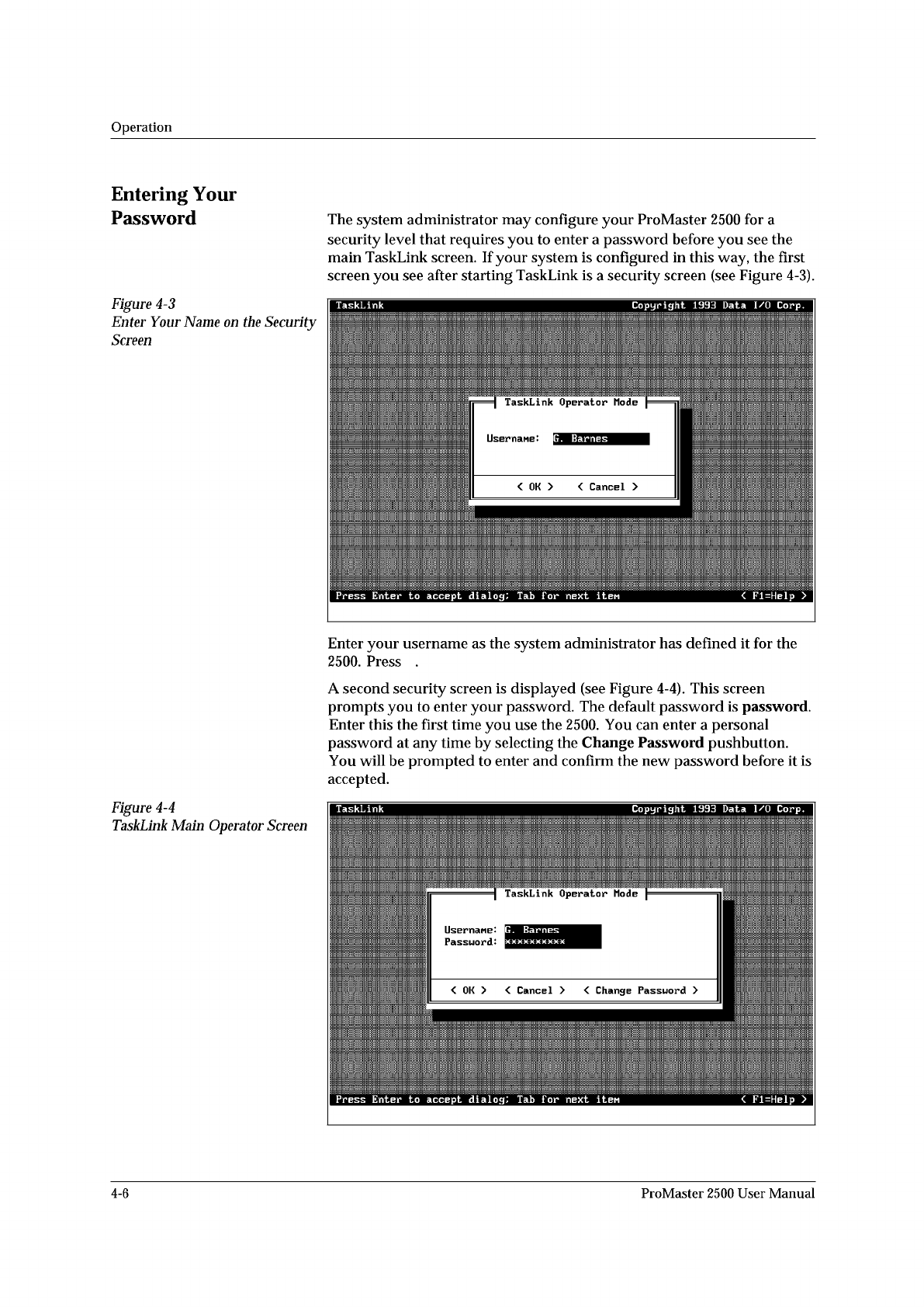
Figure
4-3
Enter
Your
Name
on
the
Security
Screen
Figure
4-4
TaskLink
Main
Operator
Screen
The
system
administrator
may
configure
your
ProMaster
2500
for
a
security
level
that
requires
you
to
enter
a
password
before
you
see
the
main
TaskLink
screen.
If
your
system
is
configured
in
this
way,
the
first
screen
you
see
after
starting
TaskLink
is
a
security
screen
(see
Figure
4-3).
Enter
your
username
as
the
system
administrator
has
defined
it
for
the
2500.
Press
.
A
second
security
screen
is
displayed
(see
Figure
4-4).
This
screen
prompts
you
to
enter
your
password.
The
default
password
is
password.
Enter
this
the
first
time
you
use
the
2500.
You
can
enter
a
personal
password
at
any
time
by
selecting
the
Change
Password
pushbutton.
You
will
be
prompted
to
enter
and
confirm
the
new
password
before
it
is
accepted.
4-6
ProMaster
2500
User
Manual
Contact with programmer established
Attempting to contact programmer...
Contact with handler established
Attempting to contact handler...
Operation
If
you
forget
your
password,
the
system
administrator
will
have
to
remove
your
name
from
the
list
of
users
and
then
re-enter
it.
This
allows
you
to
start
again
with
the
default
password.
Checking
TaskLink
Communication
with
the
2500
To
confirm
that
communication
between
TaskLink
and
the
2500's
programming
electronics
has
been
established,
press
CTRL
+
Fl
on
the
PC
keyboard.
Note:
The
2500's
power-up
self-test
takes
approximately
two
minutes
to
complete.
During
this
time,
TaskLink
will
not
be
able
to
establish
communication
with
the
2500.
If
a
successful
communication
link
is
established,
the
PC
screen
displays
a
green
box
that
contains
the
following
message:
If
there
is
a
problem,
the
PC
screen
displays
a
red
box
that
contains
the
following
message:
and
the
PC
screen
displays
several
suggested
troubleshooting
actions
to
take
to
investigate
the
problem.
To
confirm
that
communication
between
TaskLink
and
the
Remote
port
on
the
2500
has
been
established,
press
Ctrl
+
F2
on
the
PC
keyboard.
If
a
successful
communication
link
is
established,
the
PC
screen
displays
a
green
box
that
contains
the
following
message:
If
there
is
a
problem,
the
PC
screen
displays
a
red
box
that
contains
this
message:
and
the
PC
screen
displays
several
suggested
troubleshooting
actions
to
take
to
investigate
the
problem.
Reconfiguring
the
System
for
a
New
Device
This
section
describes
the
various
steps
you
must
check
before
you
start
a
Task
using
a
new
device
type.
The
new
part
may
have
a
different
size
or
be
a
different
package
type
(such
as
DIP,
SOIC,
or
PLCC).
Each
time
you
change
devices
types
between
Tasks,
answer
the
following
questions
and
reconfigure
the
2500
if
required
before
starting
the
new
Task:
•
Does
the
device
need
a
different
programming
module?
•
Does
the
programming
module
need
to
be
reconfigured?
•
Does
the
track
width
need
to
be
adjusted?
•
Does
the
track
air
need
to
be
adjusted?
•
Is
the
correct
chuck
installed
on
the
beam?
ProMaster
2500
User
Manual
4-7