2500_Users_Manual-.pdf - 第157页
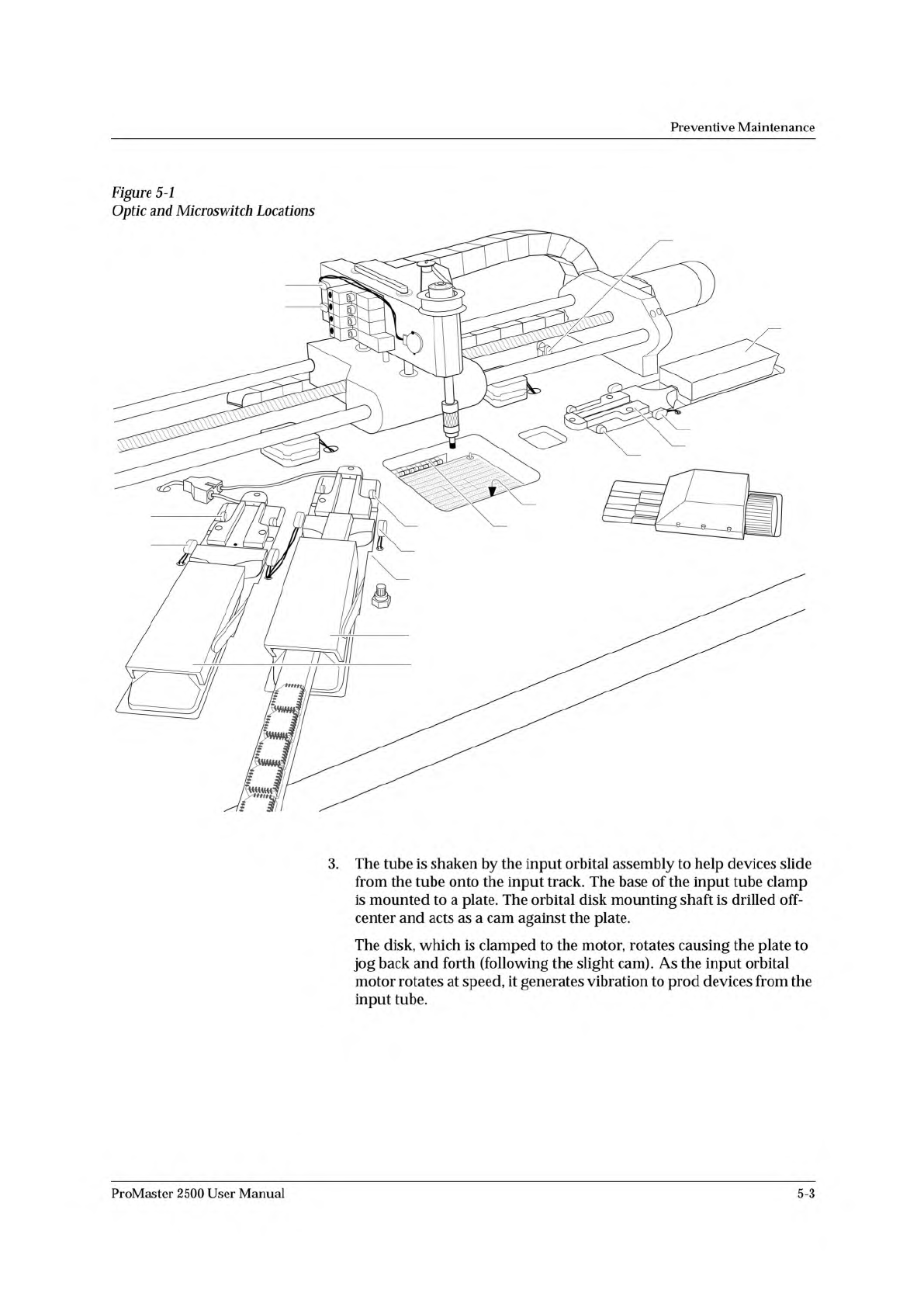
1939-1 1 15 (Under main plate) 2 17 3 4 13 14 20 (Output tube 1) 21 (Output tube 2) 19 11 12 16 (Under main plate) 22 23 Preventive Maintenance Figure 5-1 Optic and Microswitch Locations 3. The tube is shaken by the inpu…
Preventive
Maintenance
Theory
of
Operation
This
section
describes
the
operation
of
each
of
the
ProMaster
2500's
major
components.
TaskLink
You
will
normally
operate
the
2500
under
the
system
control
of
the
TaskLink
software
program,
running
on
a
personal
computer
(PC).
TaskLink
uses
a
set
of
computer
remote
control
commands
to
communicate
with
the
2500.
These
commands
control
the
programming,
handling,
labeling,
and
binning
operations
of
the
2500.
During
a
typical
communication
sequence
between
TaskLink
and
the
2500,
TaskLink
issues
a
command
to
a
subsystem,
then
yields
control
to
that
subsystem
and
waits
for
a
reply.
The
communication
sequence
will
usually
occur
in
the
following
manner:
1.
TaskLink
sends
a
program
command
to
the
Programming
Electronics
(PE)
subsystem
and
waits
for
the
PE
to
complete
the
procedure.
2.
When
the
PE
has
completed
the
procedure,
it
sends
a
signal
to
TaskLink
indicating
whether
the
device
has
passed
or
failed.
3.
If
the
device
passed,
TaskLink
looks
at
the
task
to
determine
what
additional
procedures
need
to
be
performed.
TaskLink
then
sends
the
next
command
to
the
2500.
If
the
device
failed,
TaskLink
displays
an
error
message
on
your
PC
monitor.
If
the
error
is
related
to
device
testing
or
programming,
the
error
code
is
recorded
in
a
log
file
on
the
hard
disk
of
your
PC.
Error
messages
are
described
in
Chapter
6.
4.
When
a
device
passes
the
programming/
verify
operation,
TaskLink
receives
a
category
signal
from
the
programming
electronics,
and
sends
it
to
the
2500.
The
2500
checks
the
signal
against
the
bin
map
and
processes
the
device
accordingly.
Device
Processing
This
section
describes
the
flow
of
a
device
through
the
2500.
A
device
travels
from
the
input
tube
to
the
programming
station,
then
to
the
labeling
station
(if
the
device
passes
the
verification
tests),
and
then
to
one
of
two
output
tubes.
Device
Moves
to
Programming
Station
A
device
travels
from
the
input
tube
to
the
programming
station
in
the
following
manner:
1.
When
TaskLink
runs
a
task,
it
prompts
the
handler
to
perform
a
brief
self-calibration
initializing
routine
before
loading
the
first
device.
One
of
the
checks
performed
during
this
routine
is
to
see
if
the
hood
is
raised.
If
the
hood
is
raised,
the
handler
displays
a
warning
message
prompting
the
operator
to
lower
the
hood
before
continuing
the
task.
2.
The
operator
inserts
a
tube
containing
blank
(unprogrammed)
devices
into
the
input
tube
holder.
This
action
is
detected
by
the
input
tube
holder
microswitches
(19
in
Figure
5-3).
5-2
ProMaster
2500
User
Manual
1939-1
1
15 (Under main plate)
2
17
3
4
13
14
20 (Output tube 1)
21 (Output tube 2)
19
11
12
16 (Under main plate)
22
23
Preventive
Maintenance
Figure
5-1
Optic
and
Microswitch
Locations
3.
The
tube
is
shaken
by
the
input
orbital
assembly
to
help
devices
slide
from
the
tube
onto
the
input
track.
The
base
of
the
input
tube
clamp
is
mounted
to
a
plate.
The
orbital
disk
mounting
shaft
is
drilled
off-
center
and
acts
as
a
cam
against
the
plate.
The
disk,
which
is
clamped
to
the
motor,
rotates
causing
the
plate
to
jog
back
and
forth
(following
the
slight
cam).
As
the
input
orbital
motor
rotates
at
speed,
it
generates
vibration
to
prod
devices
from
the
input
tube.
ProMaster
2500
User
Manual
5-3
CONTINUITY TEST FAIL
CONTINUITY TEST
FAIL
Preventive
Maintenance
Device
Is
Inserted
into
Programming
Module
Device
Is
Programmed
4.
A
device,
positioned
against
the
programming
station
stop
guide,
blocks
the
beam
of
the
part
detect
optic.
The
handler
detects
the
blocked
optic
and
advances
the
beam
until
it
is
centered
over
the
device
(the
location
is
determined
by
the
pre-defined
package
size
downloaded
by
TaskLink).
The
handler's
firmware
stores
the
package
dimensions
for
all
supported
package
types.
The
firmware
prompts
the
operator
to
align
the
first
device
in
a
run.
The
beam's
traverse
motor
advances
the
number
of
motor
steps
necessary
to
align
the
chuck
over
the
center
of
the
waiting
device.
5.
The
beam
up/down
solenoid
(solenoid
test
4
in
Figure
5-16)
switches
on
the
low
pressure
air
to
lower
the
beam.
The
beam
down
optic
(3
in
Figure
5-1),
mounted
on
the
side
of
the
beam,
senses
the
vertical
position
of
the
beam
and
triggers
the
high
pressure
solenoid
to
complete
the
lowering
of
the
beam
to
the
device.
The
rubber
chuck
tip
creates
a
vacuum
seal
on
the
device.
When
the
vacuum
seal
has
been
created,
a
switch
on
the
left
side
of
the
beam
is
triggered.
The
2500
detects
the
vacuum
and
the
beam
picks
up
the
device.
The
beam
rises
with
the
device
on
its
tip,
moves
to
the
programming
station,
pauses
so
that
the
operator
can
align
the
first
device
in
a
run,
and
lowers
the
device
into
the
programming
module.
Before
the
device
is
programmed,
TaskLink
and
the
PE
perform
several
device
tests.
Each
device-related
operation
performed
by
the
PE
is
part
of
a
programming
algorithm
specified
by
the
device
manufacturer.
In
most
cases
these
specifications
instruct
the
PE
to
perform
the
following
procedures:
1.
A
pre-programming
check
of
the
device
2.
The
programming
of
the
device
3.
A
post-programming
data
verification
cycle
A
typical
pre-programming
sequence
includes
the
following
steps:
•
Check
for
presence
of
a
device
in
the
programming
module
—
This
verifies
that
a
device
is
in
the
programming
block.
•
Continuity
test
—
This
confirms
that
the
device
pins
have
continuity
with
the
module's
contacts.
Dirty
module
contacts
or
a
misaligned
device
can
cause
the
handler
to
fail
this
test.
In
case
of
failure,
TaskLink
displays
and
records
the
test
result
in
the
log
file.
•
Check
for
misjustified
device
—
This
confirms
that
the
device
ground
and
VCC
pins
match
the
programming
module's
ground
and
VCC.
(Refer
to
the
device
alignment
procedure,
beginning
on
page
4-22.)
This
test
also
detects
devices
that
have
been
installed
backwards.
When
this
test
fails,
TaskLink
displays
5-4
ProMaster
2500
User
Manual