2500_Users_Manual-.pdf - 第19页
pmhelp@data-io.com Preface Technical Assistance You can contact Data I/O for technical assistance by calling, sending a fax or electronic mail (e-mail), or using the Bulletin Board Service (BBS). To help us give you quic…
Preface
Japan
For
technical
assistance,
repair,
or
warranty
service,
contact:
Data
I/O
Japan
Osaki
CN
Building
2F
5-10-10
Osaki
Shinagawa-Ku
Tokyo
141
Telephone:
3-3779-2152
Fax:
3-3779-2203
Germany
For
technical
assistance,
repair,
or
warranty
service,
contact:
Data
I/O
GmbH
Lochhamer
Schlag
5a
82166
Grafelfing
Telephone:
089-858580
Fax:
089-8585810
Other
European
Countries
For
technical
assistance,
repair,
or
warranty
service,
contact
your
local
Data
I/O
representative.
Other
Countries
Worldwide
For
technical
assistance,
repair,
or
warranty
service,
contact
the
office
below
and
ask
for
the
number
of
your
local
Data
I/O
representative.
Data
I/O
Intercontinental
10525
Willows
Road
NE
P.O.
Box
97046
Redmond,
WA
USA
98073-9746
Telephone:
206-881-6444
Fax:
206-882-1043
xviii
ProMaster
2500
User
Manual
pmhelp@data-io.com
Preface
Technical
Assistance
You
can
contact
Data
I/O
for
technical
assistance
by
calling,
sending
a
fax
or
electronic
mail
(e-mail),
or
using
the
Bulletin
Board
Service
(BBS).
To
help
us
give
you
quick
and
accurate
assistance,
please
provide
the
following
information:
•
Pro
Master
serial
number
•
Product
version
number
•
Detailed
description
of
the
problem
you
are
experiencing
•
Error
messages
(if
any)
•
Device
manufacturer
and
part
number
(if
device
related)
Calling
Call
the
appropriate
Data
I/O
Customer
Support
number
listed
at
the
front
of
the
Preface.
When
you
call,
please
be
at
your
programmer
or
computer,
have
the
product
manual
nearby,
and
be
ready
to
provide
the
information
listed
above.
Sending
a
Fax
Fax
the
information
listed
above
with
your
name,
phone
number,
and
address
to
the
appropriate
Data
1/
0
Customer
Support
fax
number
listed
at
the
front
of
the
Preface.
Sending
E-mail
To
reach
Data
I/O
via
e-mail,
send
a
message
including
your
name,
telephone
number,
e-mail
address,
and
the
information
listed
above
to
the
following
address:
Using
the
BBS
To
reach
Data
I/O
via
the
BBS,
include
your
name,
phone
number,
e-mail
address,
and
the
information
listed
above
in
a
message,
and
send
it
to
the
BBS
as
described
in
the
following
section.
ProMaster
2500
User
Manual
xix
1825-2
Introduction
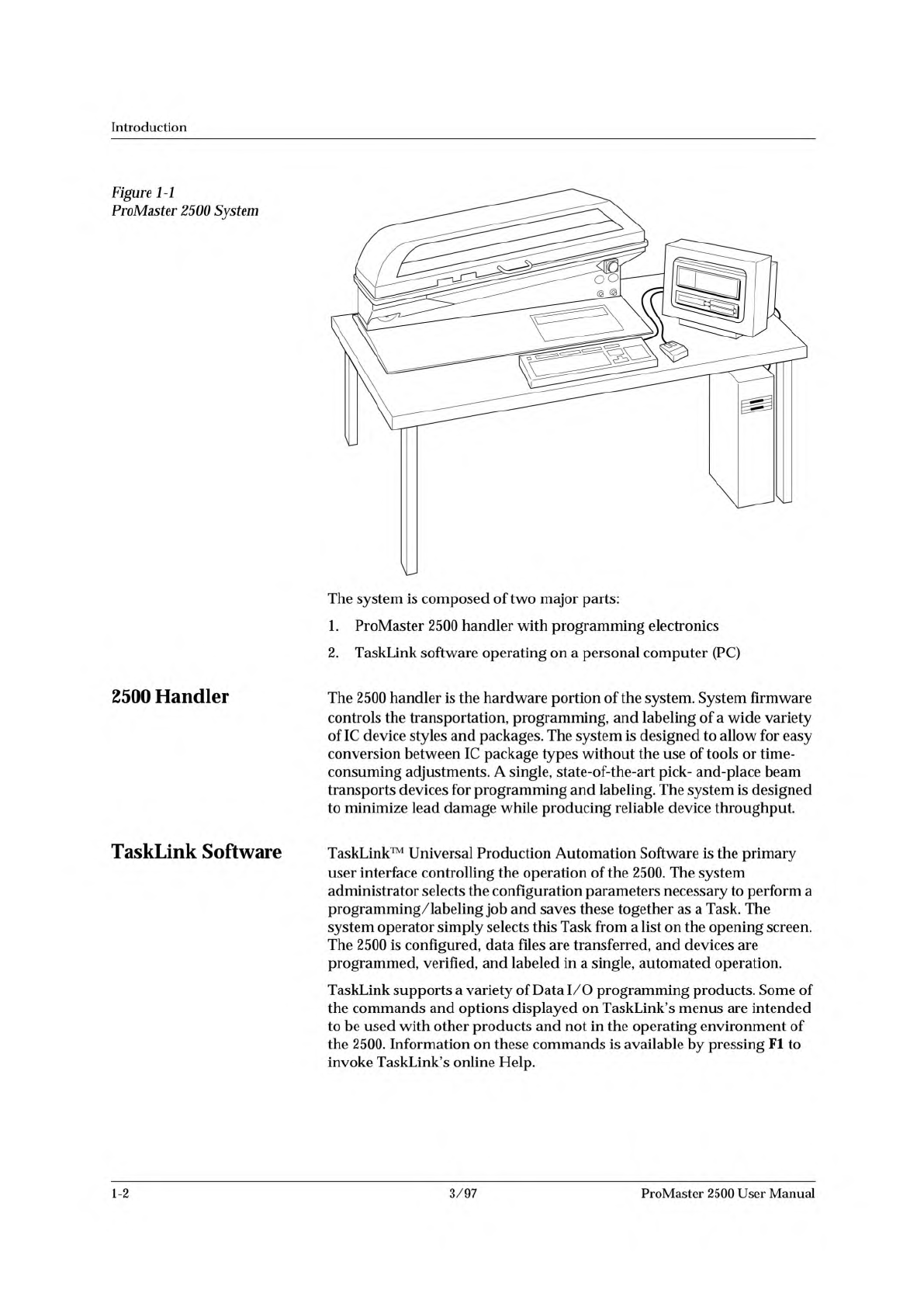
Figure
1-1
ProMaster
2500
System
The
system
is
composed
of
two
major
parts:
1.
ProMaster
2500
handler
with
programming
electronics
2.
TaskLink
software
operating
on
a
personal
computer
(PC)
2500
Handler
TaskLink
Software
The
2500
handler
is
the
hardware
portion
of
the
system.
System
firmware
controls
the
transportation,
programming,
and
labeling
of
a
wide
variety
of
IC
device
styles
and
packages.
The
system
is
designed
to
allow
for
easy
conversion
between
IC
package
types
without
the
use
of
tools
or
time¬
consuming
adjustments.
A
single,
state-of-the-art
pick-
and-place
beam
transports
devices
for
programming
and
labeling.
The
system
is
designed
to
minimize
lead
damage
while
producing
reliable
device
throughput.
TaskLink™
Universal
Production
Automation
Software
is
the
primary
user
interface
controlling
the
operation
of
the
2500.
The
system
administrator
selects
the
configuration
parameters
necessary
to
perform
a
programming/labeling
job
and
saves
these
together
as
a
Task.
The
system
operator
simply
selects
this
Task
from
a
list
on
the
opening
screen.
The
2500
is
configured,
data
files
are
transferred,
and
devices
are
programmed,
verified,
and
labeled
in
a
single,
automated
operation.
TaskLink
supports
a
variety
of
Data
I/O
programming
products.
Some
of
the
commands
and
options
displayed
on
TaskLink's
menus
are
intended
to
be
used
with
other
products
and
not
in
the
operating
environment
of
the
2500.
Information
on
these
commands
is
available
by
pressing
Fl
to
invoke
TaskLink's
online
Help.
1-2
3/97
ProMaster
2500
User
Manual