2500_Users_Manual-.pdf - 第233页
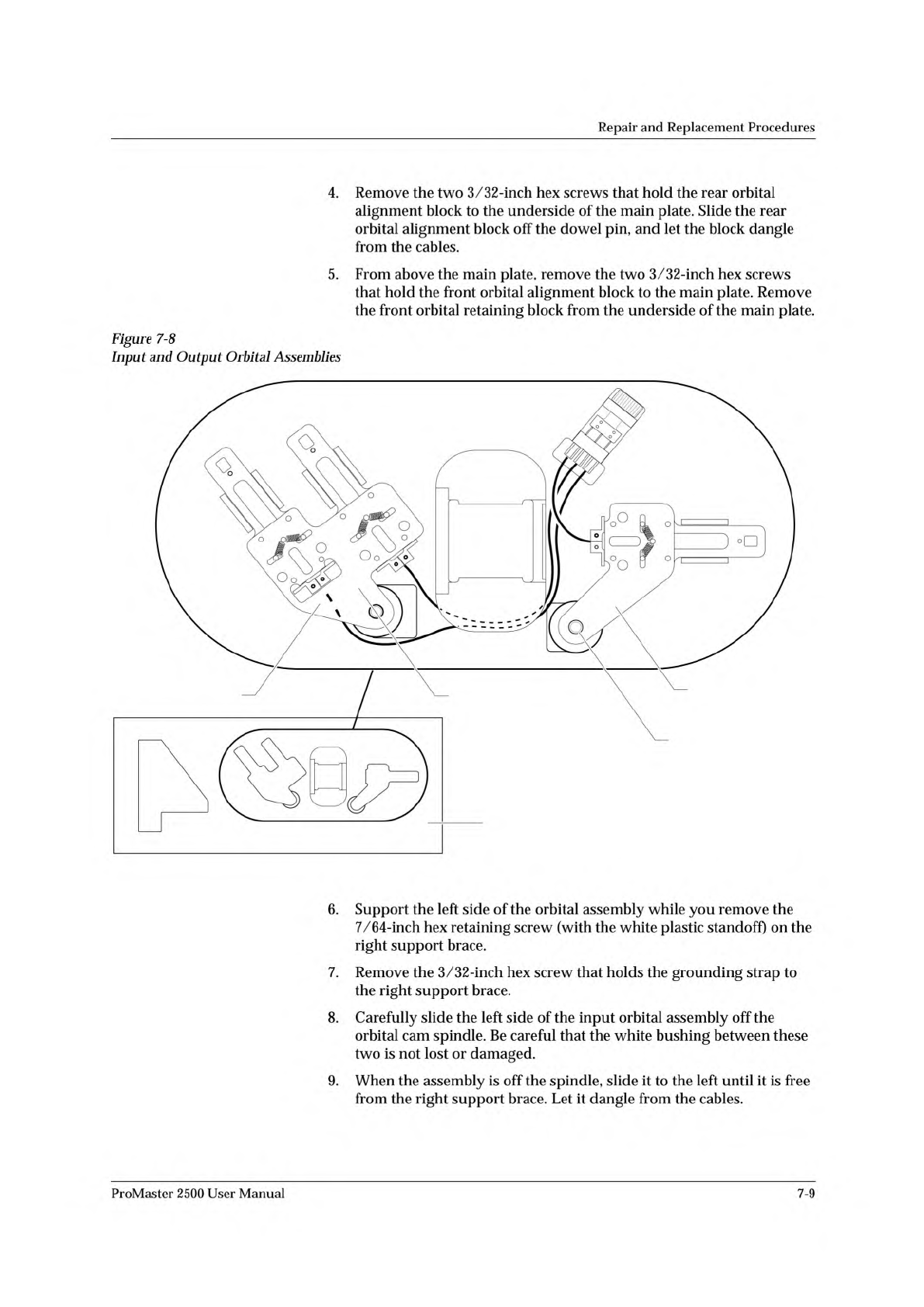
2307-1 INPUT ORBITAL ASSEMBLY OUTPUT ORBITAL ASSEMBLY MAIN PLATE (Underside) CAM SPINDLE CAM SPINDLE Repair and Replacement Procedures 4. Remove the two 3/32-inch hex screws that hold the rear orbital alignment block to …
Repair
and
Replacement
Procedures
Installing
the
PE
Assembly
Follow
the
steps
below
to
install
the
programming
electronics
assembly
in
the
2500.
1.
Turn
off
the
2500
and
remove
the
power
cord.
CAUTION:
Pins
in
the
pin
block
are
delicate
and
could
be
damaged
if
they
hit
components
mounted
on
the
underside
of
the
main
plate.
The
pin
block
cover
ensures
that
these
pins
are
not
damaged
while
you
are
removing
or
reinstalling
the
PE
assembly.
2.
Carefully
slide
the
PE
assembly
onto
the
clamp
assembly.
Figure
7-7
shows
the
two
tracks
on
the
clamp
assembly
that
fit
into
grooves
on
the
pin
block.
3.
Install
the
retaining
bar
and
its
two
hex
screws
to
connect
the
PE
assembly
to
the
clamp
assembly.
4.
Reconnect
the
two
optic
cables
(S-24
and
C-25).
5.
Reconnect
the
two
of
the
four
air
lines
(one
red
and
one
blue)
to
the
rear
quick
connects.
6.
Hold
the
programming
module
clamp
assembly
in
place
and
reinstall
the
six
7/64-inch
hex
screws.
7.
Reconnect
the
two
remaining
air
lines
(one
red
and
one
blue)
to
the
front
quick
connects.
8.
Reconnect
all
of
the
remaining
cables.
CAUTION:
When
you
connect
the
cables,
be
careful
to
use
the
correct
polarity
of
the
cables
to
the
connectors.
Reversing
or
misaligning
a
cable
could
damage
components
on
the
2500.
9.
Connect
the
2500
to
a
compressed
air
source
and
check
for
air
leaks
by
listening
for
a
hissing
sound.
10.
When
you
determine
that
there
aren't
any
air
leaks,
lower
the
main
plate.
11.
Tighten
the
two
corner
screws
in
the
main
plate
(see
Figure
7-3).
Motor
Replacement
These
procedures
explain
how
to
replace
any
motor
that
may
have
failed.
Replacing
the
Input
Orbital
Motor
Follow
these
steps
below
to
access
and
replace
the
input
orbital
motor.
1.
Turn
off
the
2500
and
remove
the
power
cord.
2.
Remove
the
PE
assembly,
as
described
on
page
7-3.
3.
Locate
the
round
input
orbital
motor
collar.
Loosen
the
7/64-inch
hex
screw
and
remove
the
motor
collar.
7-8
ProMaster
2500
User
Manual
2307-1
INPUT ORBITAL
ASSEMBLY
OUTPUT ORBITAL
ASSEMBLY
MAIN PLATE (Underside)
CAM SPINDLE
CAM SPINDLE
Repair
and
Replacement
Procedures
4.
Remove
the
two
3/32-inch
hex
screws
that
hold
the
rear
orbital
alignment
block
to
the
underside
of
the
main
plate.
Slide
the
rear
orbital
alignment
block
off
the
dowel
pin,
and
let
the
block
dangle
from
the
cables.
5.
From
above
the
main
plate,
remove
the
two
3/32-inch
hex
screws
that
hold
the
front
orbital
alignment
block
to
the
main
plate.
Remove
the
front
orbital
retaining
block
from
the
underside
of
the
main
plate.
Figure
7-8
Input
and
Output
Orbital
Assemblies
6.
Support
the
left
side
of
the
orbital
assembly
while
you
remove
the
7/64-inch
hex
retaining
screw
(with
the
white
plastic
standoff)
on
the
right
support
brace.
7.
Remove
the
3/32-inch
hex
screw
that
holds
the
grounding
strap
to
the
right
support
brace.
8.
Carefully
slide
the
left
side
of
the
input
orbital
assembly
off
the
orbital
cam
spindle.
Be
careful
that
the
white
bushing
between
these
two
is
not
lost
or
damaged.
9.
When
the
assembly
is
off
the
spindle,
slide
it
to
the
left
until
it
is
free
from
the
right
support
brace.
Let
it
dangle
from
the
cables.
ProMaster
2500
User
Manual
7-9
2286-1
GREEN
POINT
BLACK
BLUE
RED
FLAT END
Repair
and
Replacement
Procedures
10.
Remove
the
orbital
cam
from
the
motor
shaft.
Now
you
are
ready
to
remove
the
input
orbital
motor.
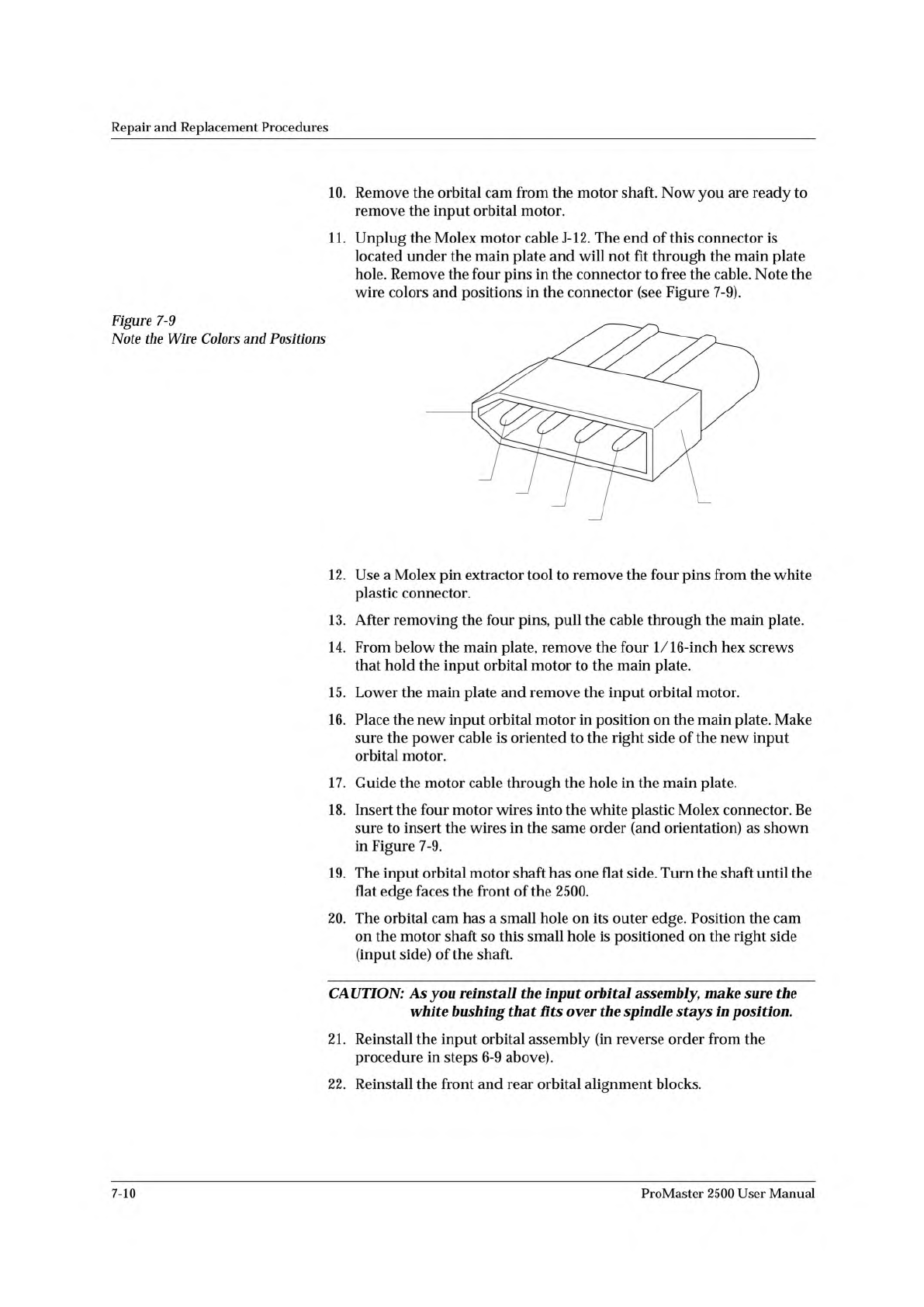
11.
Unplug
the
Molex
motor
cable
J-12.
The
end
of
this
connector
is
located
under
the
main
plate
and
will
not
fit
through
the
main
plate
hole.
Remove
the
four
pins
in
the
connector
to
free
the
cable.
Note
the
wire
colors
and
positions
in
the
connector
(see
Figure
7-9).
Figure
7-9
Note
the
Wire
Colors
and
Positions
12.
Use
a
Molex
pin
extractor
tool
to
remove
the
four
pins
from
the
white
plastic
connector.
13.
After
removing
the
four
pins,
pull
the
cable
through
the
main
plate.
14.
From
below
the
main
plate,
remove
the
four
1/16-inch
hex
screws
that
hold
the
input
orbital
motor
to
the
main
plate.
15.
Lower
the
main
plate
and
remove
the
input
orbital
motor.
16.
Place
the
new
input
orbital
motor
in
position
on
the
main
plate.
Make
sure
the
power
cable
is
oriented
to
the
right
side
of
the
new
input
orbital
motor.
17.
Guide
the
motor
cable
through
the
hole
in
the
main
plate.
18.
Insert
the
four
motor
wires
into
the
white
plastic
Molex
connector.
Be
sure
to
insert
the
wires
in
the
same
order
(and
orientation)
as
shown
in
Figure
7-9.
19.
The
input
orbital
motor
shaft
has
one
flat
side.
Turn
the
shaft
until
the
flat
edge
faces
the
front
of
the
2500.
20.
The
orbital
cam
has
a
small
hole
on
its
outer
edge.
Position
the
cam
on
the
motor
shaft
so
this
small
hole
is
positioned
on
the
right
side
(input
side)
of
the
shaft.
CAUTION:
As
you
reinstall
the
input
orbital
assembly,
make
sure
the
white
bushing
that
fits
over
the
spindle
stays
in
position.
21.
Reinstall
the
input
orbital
assembly
(in
reverse
order
from
the
procedure
in
steps
6-9
above).
22.
Reinstall
the
front
and
rear
orbital
alignment
blocks.
7-10
ProMaster
2500
User
Manual