2500_Users_Manual-.pdf - 第237页
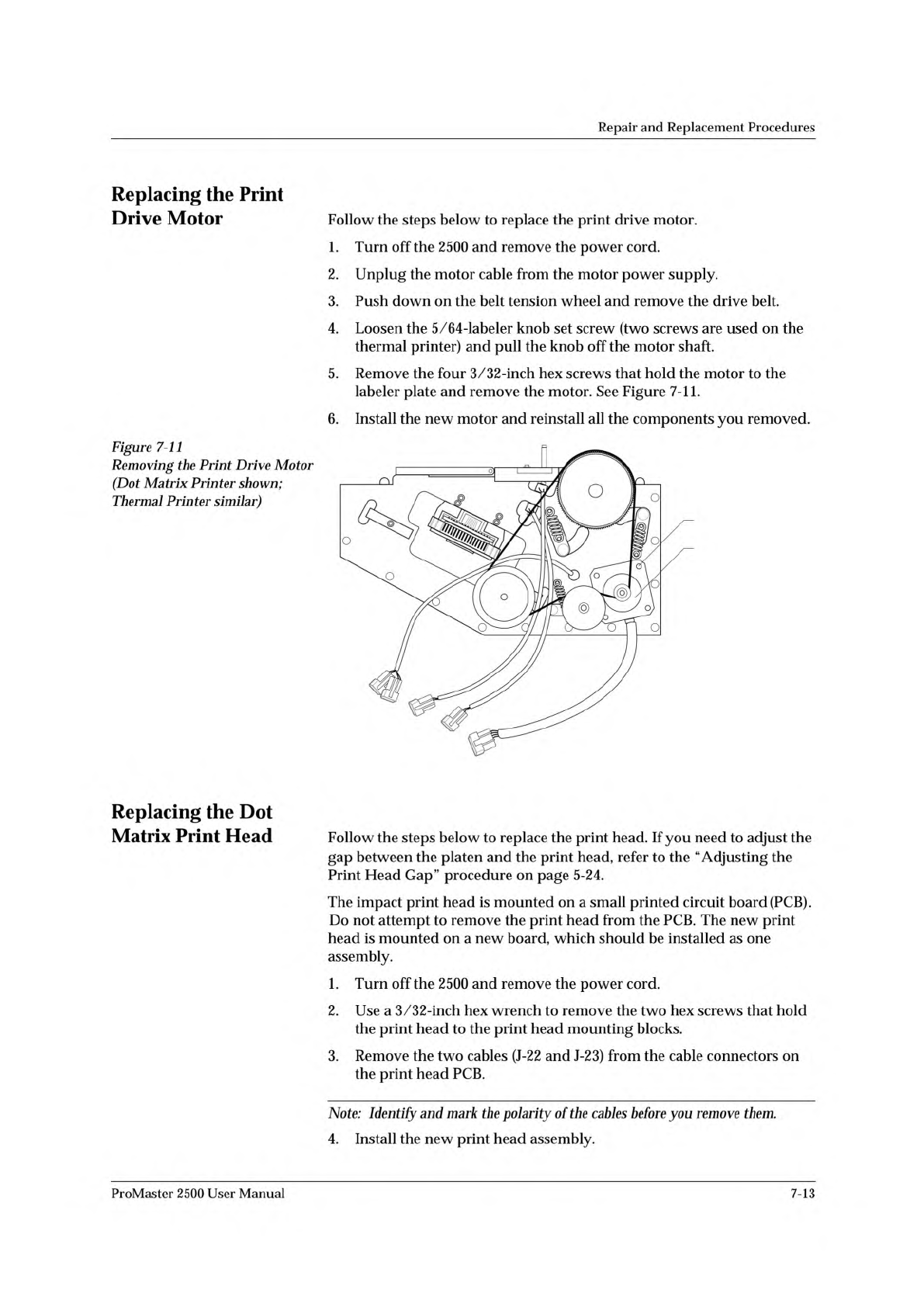
2310-1 PRINT DRIVE MOTOR SCREW (1 of 4) Repair and Replacement Procedures Replacing the Print Drive Motor Follow the steps below to replace the print drive motor. 1. Turn off the 2500 and remove the power cord. 2. Unplug…
Repair
and
Replacement
Procedures
10.
Follow
the
same
procedure
to
remove
the
left
orbital
alignment
block.
11.
Support
the
assembly
with
one
hand
while
you
remove
the
two
7/64-
inch
hex
retaining
screws
(with
the
white
plastic
standoff)
on
the
tube
clamp
support
braces.
12.
Carefully
slide
the
back
end
of
the
orbital
assembly
off
the
orbital
cam
spindle.
Be
careful
that
the
white
bushing
between
these
two
is
not
lost
or
damaged.
13.
When
the
assembly
is
off
the
spindle,
slide
the
entire
assembly
toward
the
back
of
the
2500
until
it
is
free
from
the
two
front
support
braces.
Let
the
assembly
dangle
from
the
cables.
14.
Remove
the
orbital
cam
from
the
motor
shaft.
Now
you
are
ready
to
remove
the
output
orbital
motor.
15.
From
below
the
main
plate,
remove
the
four
1/16-inch
hex
screws
that
holds
the
output
orbital
motor
to
the
main
plate.
16.
Lower
the
main
plate
and
remove
the
output
orbital
motor.
17.
Place
the
new
output
orbital
motor
in
position
on
the
main
plate.
Make
sure
the
power
cable
is
oriented
to
the
right
side
of
the
new
output
orbital
motor.
18.
Guide
the
motor
cable
through
the
hole
in
the
main
plate.
19.
Insert
the
four
motor
wires
into
the
white
plastic
Molex
connector.
Be
sure
to
insert
the
wires
in
the
same
order
(and
orientation)
as
shown
in
Figure
7-9.
20.
The
output
orbital
motor
shaft
has
a
flat
edge
on
one
side.
Turn
the
shaft
until
the
flat
edge
faces
the
front
of
the
2500.
21.
The
orbital
cam
has
a
small
hole
on
its
outer
edge.
Position
the
cam
on
the
motor
shaft
so
this
small
hole
is
positioned
on
the
right
side
(input
side)
of
the
shaft.
CAUTION:
When
you
re
加
sta
〃仍
e
orbital
assembly,
make
sure
the
white
bushing
that
fits
over
the
spindle
stays
加
position.
22.
Reinstall
the
assembly
(in
reverse
order
from
the
procedure
in
steps
11-13
above).
23.
Reinstall
the
left
and
right
alignment
blocks
and
the
optic
block.
24.
Rotate
the
orbital
cam
to
make
sure
it
spins
freely
and
does
not
rub
against
the
underside
of
the
main
plate.
If
you
feel
or
hear
the
cam
rubbing
against
something,
grasp
the
outer
edge
of
the
cam
and
gently
pull
it
approximately
3/32
of
an
inch
away
from
the
underside
of
the
main
plate
and
recheck
it
again.
25.
Install
the
collar
over
the
cam
spindle.
The
slit
in
the
collar
must
be
aligned
with
the
slit
in
the
spindle
(see
Figure
7-10).
26.
Turn
the
orbital
cam
one
final
time
to
check
for
smooth
rotation
with
no
rubbing.
7-12
ProMaster
2500
User
Manual
2310-1
PRINT DRIVE
MOTOR
SCREW (1 of 4)
Repair
and
Replacement
Procedures
Replacing
the
Print
Drive
Motor
Follow
the
steps
below
to
replace
the
print
drive
motor.
1.
Turn
off
the
2500
and
remove
the
power
cord.
2.
Unplug
the
motor
cable
from
the
motor
power
supply.
3.
Push
down
on
the
belt
tension
wheel
and
remove
the
drive
belt.
4.
Loosen
the
5/64-labeler
knob
set
screw
(two
screws
are
used
on
the
thermal
printer)
and
pull
the
knob
off
the
motor
shaft.
5.
Remove
the
four
3/32-inch
hex
screws
that
hold
the
motor
to
the
labeler
plate
and
remove
the
motor.
See
Figure
7-11.
6.
Install
the
new
motor
and
reinstall
all
the
components
you
removed.
Figure
7-11
Removing
the
Print
Drive
Motor
(Dot
Matrix
Printer
shown;
Thermal
Printer
similar)
Replacing
the
Dot
Matrix
Print
Head
Follow
the
steps
below
to
replace
the
print
head.
If
you
need
to
adjust
the
gap
between
the
platen
and
the
print
head,
refer
to
the
“Adjusting
the
Print
Head
Gap”
procedure
on
page
5-24.
The
impact
print
head
is
mounted
on
a
small
printed
circuit
board
(PCB).
Do
not
attempt
to
remove
the
print
head
from
the
PCB.
The
new
print
head
is
mounted
on
a
new
board,
which
should
be
installed
as
one
assembly.
1.
Turn
off
the
2500
and
remove
the
power
cord.
2.
Use
a
3/32-inch
hex
wrench
to
remove
the
two
hex
screws
that
hold
the
print
head
to
the
print
head
mounting
blocks.
3.
Remove
the
two
cables
(J-22
and
J-23)
from
the
cable
connectors
on
the
print
head
PCB.
ProMaster
2500
User
Manual
Note:
Identify
and
mark
the
polarity
of
the
cables
before
you
remove
them.
4.
Install
the
new
print
head
assembly.
7-13
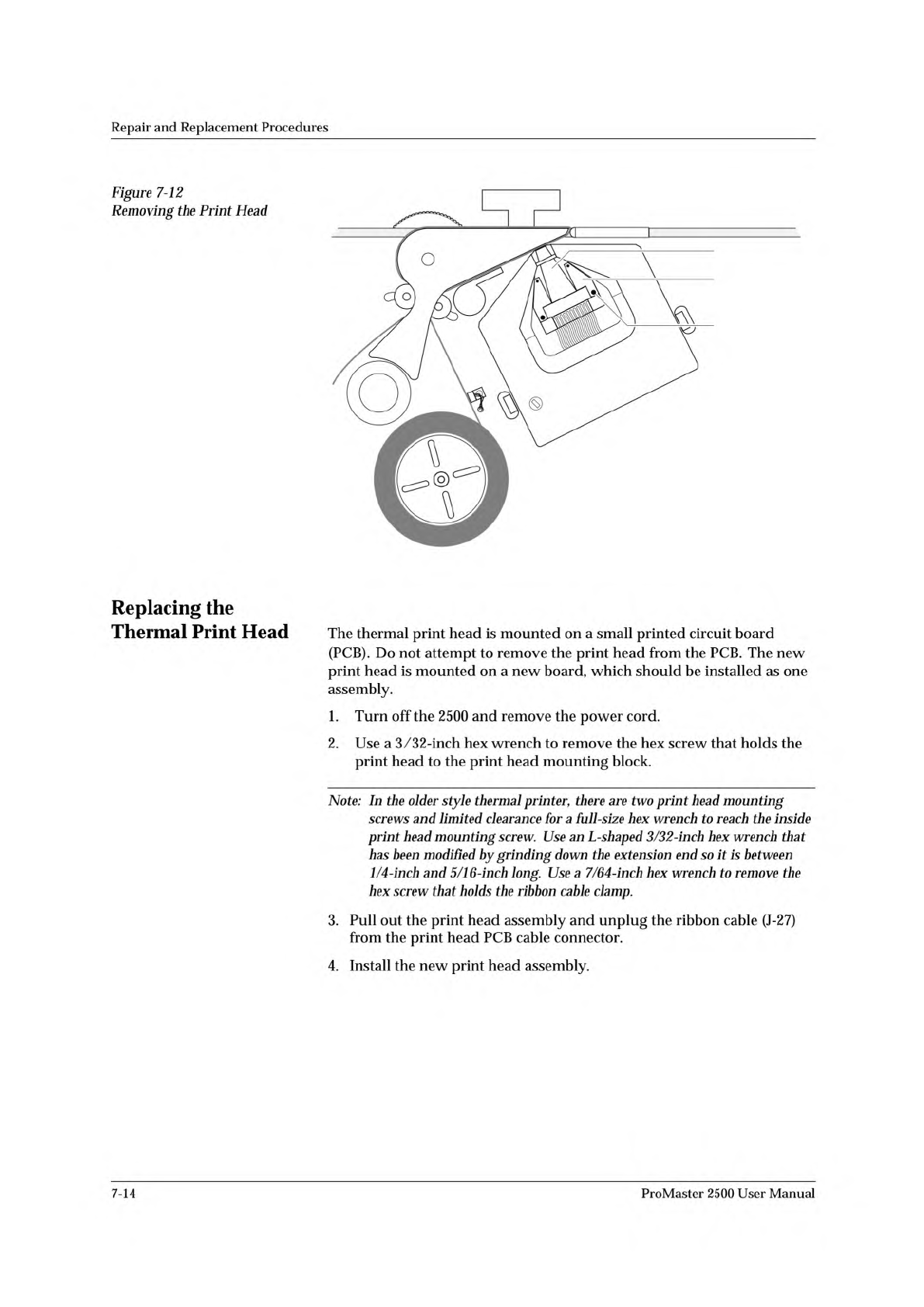
2390-1
PRINT HEAD
SCREW (1 of 2)
MOUNTING
BLOCK (1 of 2)
Repair
and
Replacement
Procedures
Figure
7-12
Removing
the
Print
Head
Replacing
the
Thermal
Print
Head
The
thermal
print
head
is
mounted
on
a
small
printed
circuit
board
(PCB).
Do
not
attempt
to
remove
the
print
head
from
the
PCB.
The
new
print
head
is
mounted
on
a
new
board,
which
should
be
installed
as
one
assembly.
1.
Turn
off
the
2500
and
remove
the
power
cord.
2.
Use
a
3/32-inch
hex
wrench
to
remove
the
hex
screw
that
holds
the
print
head
to
the
print
head
mounting
block.
Note:
In
the
older
style
thermal
printer,
there
are
two
print
head
mounting
screws
and
limited
clearance
for
a
full-size
hex
wrench
to
reach
the
inside
print
head
mounting
screw.
Use
an
L-shaped
3/32-inch
hex
wrench
that
has
been
modified
by
grinding
down
the
extension
end
so
让
is
between
1/4
-inch
and
5/1
6-inch
long.
Use
a
7/64-inch
hex
wrench
to
remove
the
hex
screw
that
holds
the
ribbon
cable
clamp.
3.
Pull
out
the
print
head
assembly
and
unplug
the
ribbon
cable
(J-27)
from
the
print
head
PCB
cable
connector.
4.
Install
the
new
print
head
assembly.
7-14
ProMaster
2500
User
Manual