2500_Users_Manual-.pdf - 第240页
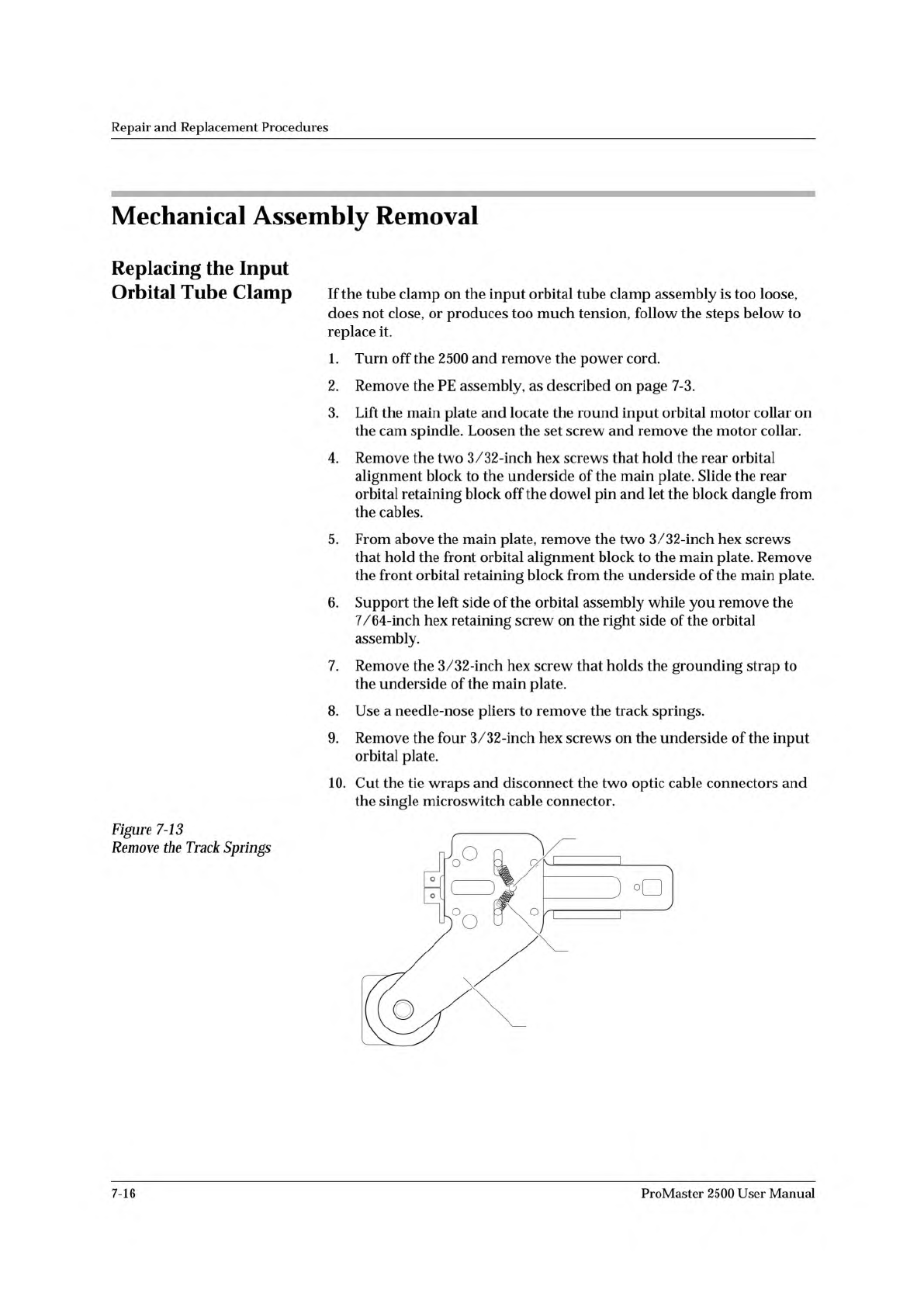
2308-1 INPUT ORBITAL ASSEMBLY SPRING (1 of 2) CENTER POST Repair and Replacement Procedures Mechanical Assembly Removal Replacing the Input Orbital Tube Clamp Figure 7-13 Remove the Track Springs If the tube clamp on the…
Repair
and
Replacement
Procedures
Replacing
the
Beam
Head
Rotation
Motor
Follow
the
steps
below
to
replace
the
beam
head
rotation
motor.
1.
Turn
off
the
2500,
remove
the
power
cord,
and
disconnect
the
motor
cable.
2.
Remove
the
two
3/32-inch
set
screws
in
the
shaft
pulley
of
the
rotation
motor.
3.
Remove
the
single
3/32-inch
hex
mounting
screw
in
the
beam
head
pulley.
4.
Loosen
the
four
motor
mounting
screws
using
a
1/16-inch
hex
wrench.
5.
Pull
up
the
beam
head
pulley
and
remove
the
beam
rotation
belt.
6.
Remove
the
motor
drive
pulley.
7.
Use
a
1/16-inch
hex
wrench
to
remove
the
four
motor
mounting
screws
and
remove
the
beam
head
rotation
motor.
8.
Install
the
new
motor,
but
do
not
tighten
the
four
hex
mounting
screws.
9.
Install
the
motor
shaft
pulley,
beam
head
pulley,
and
beam
rotation
belt.
10.
Adjust
the
belt
tension
by
moving
the
motor
closer
or
farther
from
the
beam
head.
11.
When
you
have
sufficient
belt
tension,
tighten
the
four
hex
mounting
screws.
Replacing
the
Beam
Traverse
Motor
Follow
the
steps
below
to
replace
the
beam
traverse
motor.
1.
Turn
off
the
2500
and
remove
the
power
cord.
2.
Lift
the
main
plate
of
the
2500
and
disconnect
the
ribbon
cable
connector
from
J-7
on
the
controller
board.
3.
Disconnect
the
traverse
motor
power
cable
from
J-ll.
4.
Look
through
the
two
holes
in
the
top
of
the
beam
traverse
motor's
mounting
block
(see
Figure
7-16)
while
you
manually
rotate
the
lead
screw
until
the
heads
of
the
flex
coupler
set
screws
are
visible
through
the
holes.
5.
Use
a
7/64-inch
hex
wrench
to
loosen
the
set
screw
on
the
right
side
of
the
flex
coupler.
Note:
This
set
screw
connects
the
flex
coupler
to
the
beam
traverse
motor
shaft.
6.
Use
a
5/32-inch
hex
wrench
to
remove
the
four
beam
traverse
motor
mounting
screws
and
remove
the
beam
traverse
motor.
7.
Install
the
new
motor
and
re-assemble
all
of
the
disconnected
components.
ProMaster
2500
User
Manual
7-15
2308-1
INPUT ORBITAL
ASSEMBLY
SPRING (1 of 2)
CENTER POST
Repair
and
Replacement
Procedures
Mechanical
Assembly
Removal
Replacing
the
Input
Orbital
Tube
Clamp
Figure
7-13
Remove
the
Track
Springs
If
the
tube
clamp
on
the
input
orbital
tube
clamp
assembly
is
too
loose,
does
not
close,
or
produces
too
much
tension,
follow
the
steps
below
to
replace
it.
1.
Turn
off
the
2500
and
remove
the
power
cord.
2.
Remove
the
PE
assembly,
as
described
on
page
7-3.
3.
Lift
the
main
plate
and
locate
the
round
input
orbital
motor
collar
on
the
cam
spindle.
Loosen
the
set
screw
and
remove
the
motor
collar.
4.
Remove
the
two
3/32-inch
hex
screws
that
hold
the
rear
orbital
alignment
block
to
the
underside
of
the
main
plate.
Slide
the
rear
orbital
retaining
block
off
the
dowel
pin
and
let
the
block
dangle
from
the
cables.
5.
From
above
the
main
plate,
remove
the
two
3/32-inch
hex
screws
that
hold
the
front
orbital
alignment
block
to
the
main
plate.
Remove
the
front
orbital
retaining
block
from
the
underside
of
the
main
plate.
6.
Support
the
left
side
of
the
orbital
assembly
while
you
remove
the
7/64-inch
hex
retaining
screw
on
the
right
side
of
the
orbital
assembly.
7.
Remove
the
3/32-inch
hex
screw
that
holds
the
grounding
strap
to
the
underside
of
the
main
plate.
8.
Use
a
needle-nose
pliers
to
remove
the
track
springs.
9.
Remove
the
four
3/32-inch
hex
screws
on
the
underside
of
the
input
orbital
plate.
10.
Cut
the
tie
wraps
and
disconnect
the
two
optic
cable
connectors
and
the
single
microswitch
cable
connector.
7-16
ProMaster
2500
User
Manual
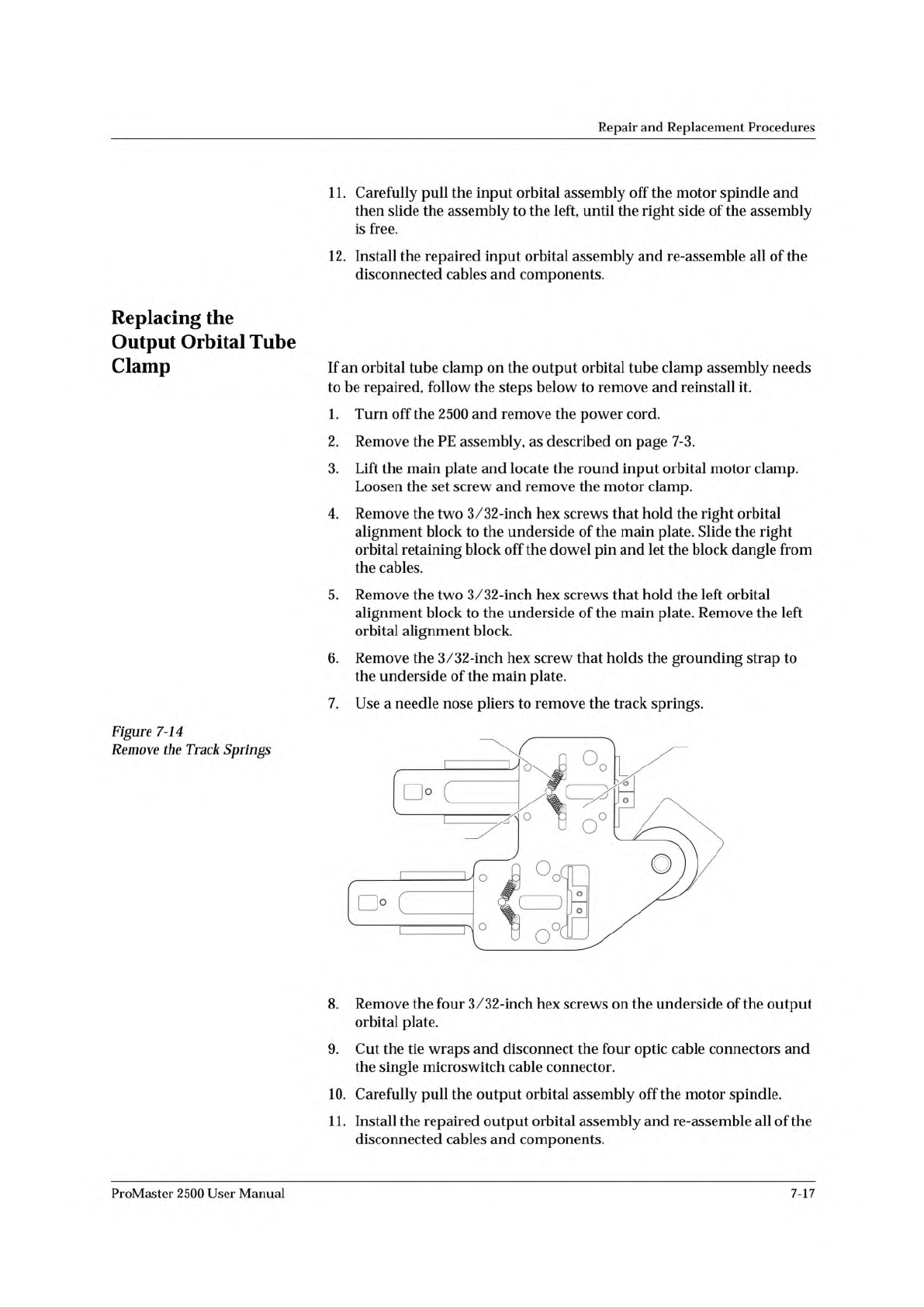
2309-1
OUTPUT ORBITAL
ASSEMBLY
SPRING (1 of 4)
CENTER POST (1 of 2)
Repair
and
Replacement
Procedures
11.
Carefully
pull
the
input
orbital
assembly
off
the
motor
spindle
and
then
slide
the
assembly
to
the
left,
until
the
right
side
of
the
assembly
is
free.
12.
Install
the
repaired
input
orbital
assembly
and
re-assemble
all
of
the
disconnected
cables
and
components.
Replacing
the
Output
Orbital
Tube
Clamp
Figure
7-14
Remove
the
Track
Springs
If
an
orbital
tube
clamp
on
the
output
orbital
tube
clamp
assembly
needs
to
be
repaired,
follow
the
steps
below
to
remove
and
reinstall
it.
1.
Turn
off
the
2500
and
remove
the
power
cord.
2.
Remove
the
PE
assembly,
as
described
on
page
7-3.
3.
Lift
the
main
plate
and
locate
the
round
input
orbital
motor
clamp.
Loosen
the
set
screw
and
remove
the
motor
clamp.
4.
Remove
the
two
3/32-inch
hex
screws
that
hold
the
right
orbital
alignment
block
to
the
underside
of
the
main
plate.
Slide
the
right
orbital
retaining
block
off
the
dowel
pin
and
let
the
block
dangle
from
the
cables.
5.
Remove
the
two
3/32-inch
hex
screws
that
hold
the
left
orbital
alignment
block
to
the
underside
of
the
main
plate.
Remove
the
left
orbital
alignment
block.
6.
Remove
the
3/32-inch
hex
screw
that
holds
the
grounding
strap
to
the
underside
of
the
main
plate.
7.
Use
a
needle
nose
pliers
to
remove
the
track
springs.
8.
Remove
the
four
3/32-inch
hex
screws
on
the
underside
of
the
output
orbital
plate.
9.
Cut
the
tie
wraps
and
disconnect
the
four
optic
cable
connectors
and
the
single
microswitch
cable
connector.
10.
Carefully
pull
the
output
orbital
assembly
off
the
motor
spindle.
1
1.
Install
the
repaired
output
orbital
assembly
and
re-assemble
all
of
the
disconnected
cables
and
components.
ProMaster
2500
User
Manual
7-17