2500_Users_Manual-.pdf - 第28页
1759-2 POWER SWITCH AIR INPUT REMOTE RS232 PROGRAMMER RS232 HANDLER PORT AC POWER INLET 1760-3 CABLE HARNESS GUIDE BEAM HEAD BEAM TRAVERSE MOTOR INPUT TUBE HOLDER TRACK WIDTH ADJUSTMENT KNOB REAR CARRIAGE SHAFT LEAD SCRE…
L
O
W
P
R
E
S
S
U
R
E
2
0
-
5
0
P
S
I
H
I
G
H
P
R
E
S
S
U
R
E
6
5
-
8
5
P
S
I
A
J
S
SHIFT
B
K
T
DEL
C
L
U
D
M
V
E
N
W
F
O
X
SHIFT
G
P
Y
H
Q
Z
I
R
ENTER
1
4
7
2
5
8
3
6
9
0
LOWER
CASE
RESET
STOP
CAL
START
ON
1764-4
HIGH PRESSURE
ADJUSTMENT KNOB
LOW PRESSURE
ADJUSTMENT KNOB
Introduction
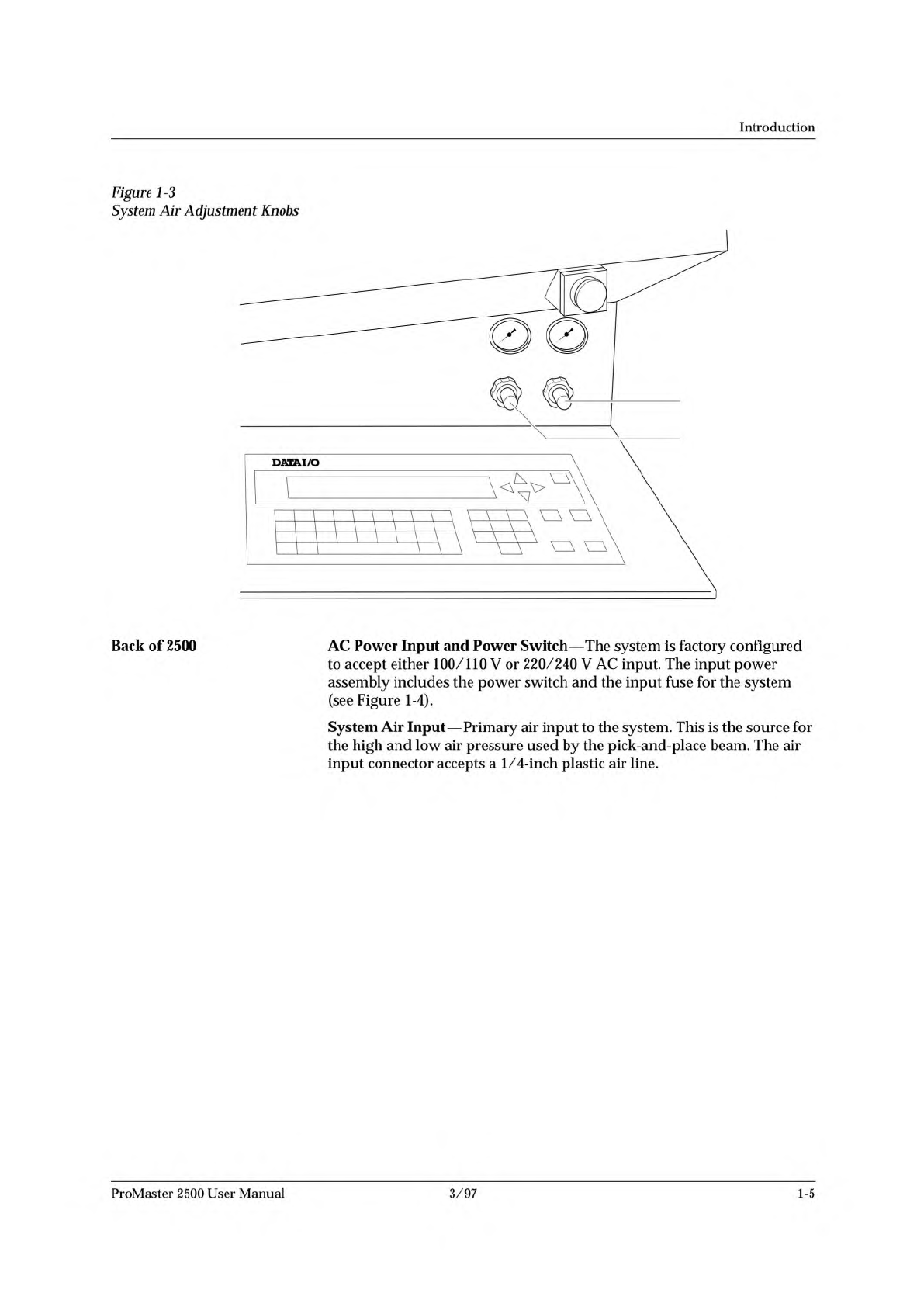
Figure
1-3
System
Air
Adjustment
Knobs
Back
of
2500
AC
Power
Input
and
Power
Switch
—
The
system
is
factory
configured
to
accept
either
100/110
V
or
220/240
V
AC
input.
The
input
power
assembly
includes
the
power
switch
and
the
input
fuse
for
the
system
(see
Figure
1-4).
System
Air
Input
—
Primary
air
input
to
the
system.
This
is
the
source
for
the
high
and
low
air
pressure
used
by
the
pick-and-place
beam.
The
air
input
connector
accepts
a
1/4-inch
plastic
air
line.
ProMaster
2500
User
Manual
3/97
1-5
1759-2
POWER SWITCH
AIR INPUT
REMOTE RS232
PROGRAMMER RS232
HANDLER PORT
AC POWER
INLET
1760-3
CABLE HARNESS
GUIDE
BEAM HEAD
BEAM TRAVERSE
MOTOR
INPUT TUBE
HOLDER
TRACK WIDTH
ADJUSTMENT
KNOB
REAR CARRIAGE SHAFT
LEAD SCREW
FRONT CARRIAGE SHAFT
OUTPUT TUBE
HOLDER (1 of 2)
BEAM CARRIAGE
MAIN PLATE
LABELER
LABEL
APPLICATION
AREA
DEVICE RECESS
(2 of 2)
DEVICE RECESS (1 of 2)
LABEL SUPPLY
REEL
PROGRAMMING
STATION
E-STOP
BUTTON
Introduction
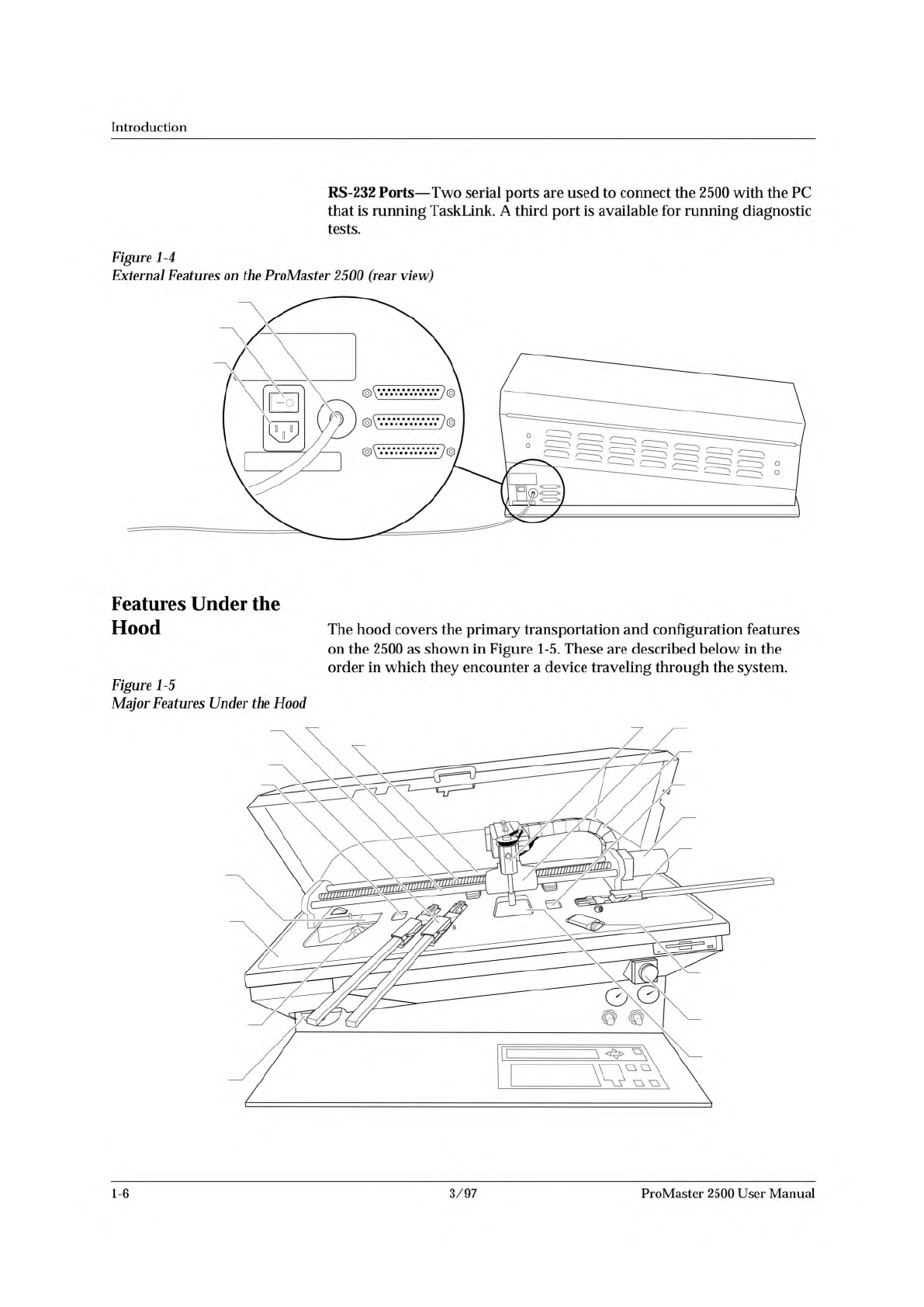
RS-232
Ports
—
Two
serial
ports
are
used
to
connect
the
2500
with
the
PC
that
is
running
TaskLink.
A
third
port
is
available
for
running
diagnostic
tests.
Figure
1-4
External
Features
on
the
ProMaster
2500
(rear
view)
Features
Under
the
Hood
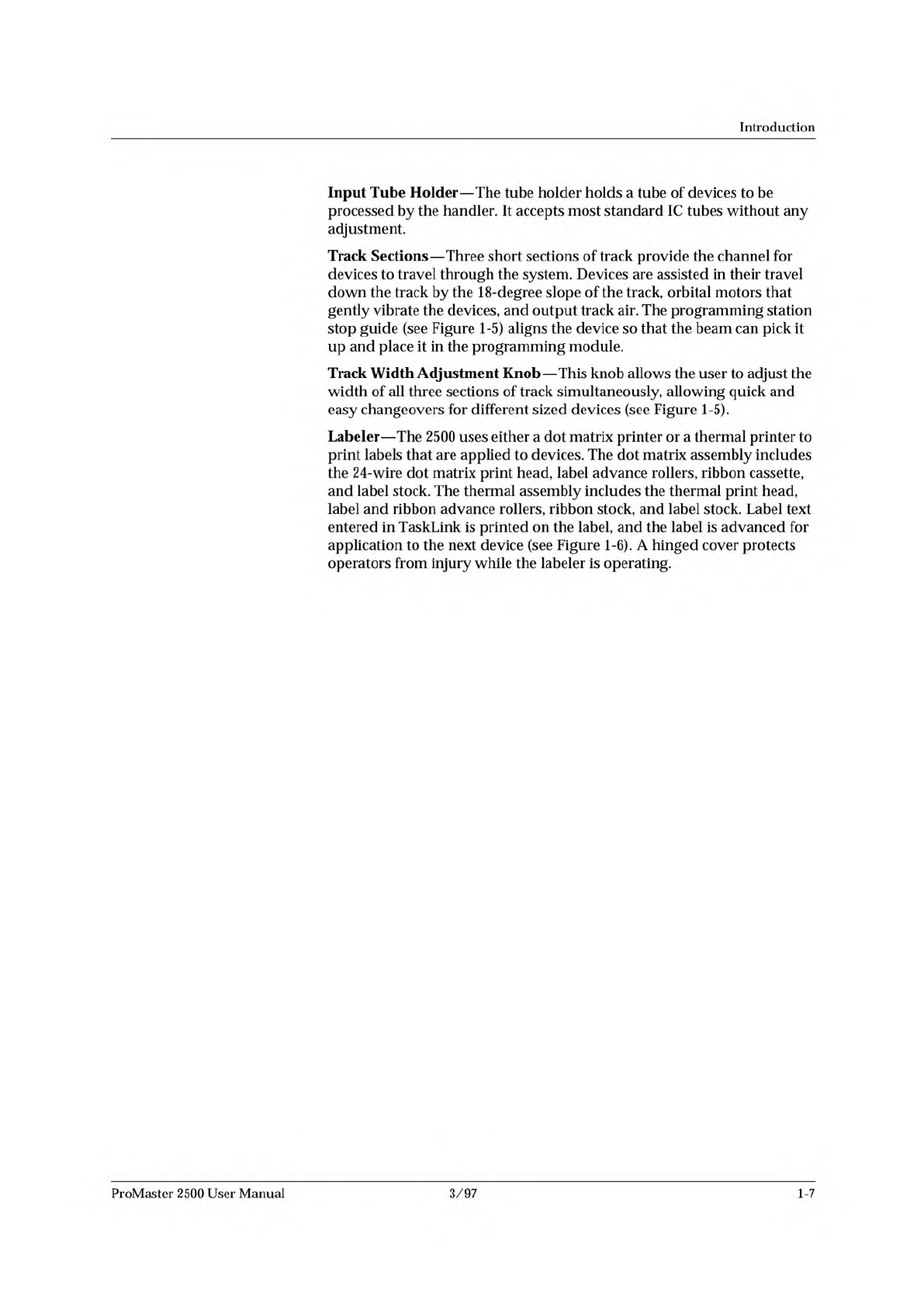
The
hood
covers
the
primary
transportation
and
configuration
features
on
the
2500
as
shown
in
Figure
1-5.
These
are
described
below
in
the
order
in
which
they
encounter
a
device
traveling
through
the
system.
Figure
1-5
Major
Features
Under
the
Hood
1-6
3/97
ProMaster
2500
User
Manual
Introduction
Input
Tube
Holder
—
The
tube
holder
holds
a
tube
of
devices
to
be
processed
by
the
handler.
It
accepts
most
standard
IC
tubes
without
any
adjustment.
Track
Sections
—
Three
short
sections
of
track
provide
the
channel
for
devices
to
travel
through
the
system.
Devices
are
assisted
in
their
travel
down
the
track
by
the
18-degree
slope
of
the
track,
orbital
motors
that
gently
vibrate
the
devices,
and
output
track
air.
The
programming
station
stop
guide
(see
Figure
1-5)
aligns
the
device
so
that
the
beam
can
pick
it
up
and
place
it
in
the
programming
module.
Track
Width
Adjustment
Knob
—
This
knob
allows
the
user
to
adjust
the
width
of
all
three
sections
of
track
simultaneously,
allowing
quick
and
easy
changeovers
for
different
sized
devices
(see
Figure
1-5).
Labeler
—
The
2500
uses
either
a
dot
matrix
printer
or
a
thermal
printer
to
print
labels
that
are
applied
to
devices.
The
dot
matrix
assembly
includes
the
24-wire
dot
matrix
print
head,
label
advance
rollers,
ribbon
cassette,
and
label
stock.
The
thermal
assembly
includes
the
thermal
print
head,
label
and
ribbon
advance
rollers,
ribbon
stock,
and
label
stock.
Label
text
entered
in
TaskLink
is
printed
on
the
label,
and
the
label
is
advanced
for
application
to
the
next
device
(see
Figure
1-6).
A
hinged
cover
protects
operators
from
injury
while
the
labeler
is
operating.
ProMaster
2500
User
Manual
3/97
1-7