2500_Users_Manual-.pdf - 第313页
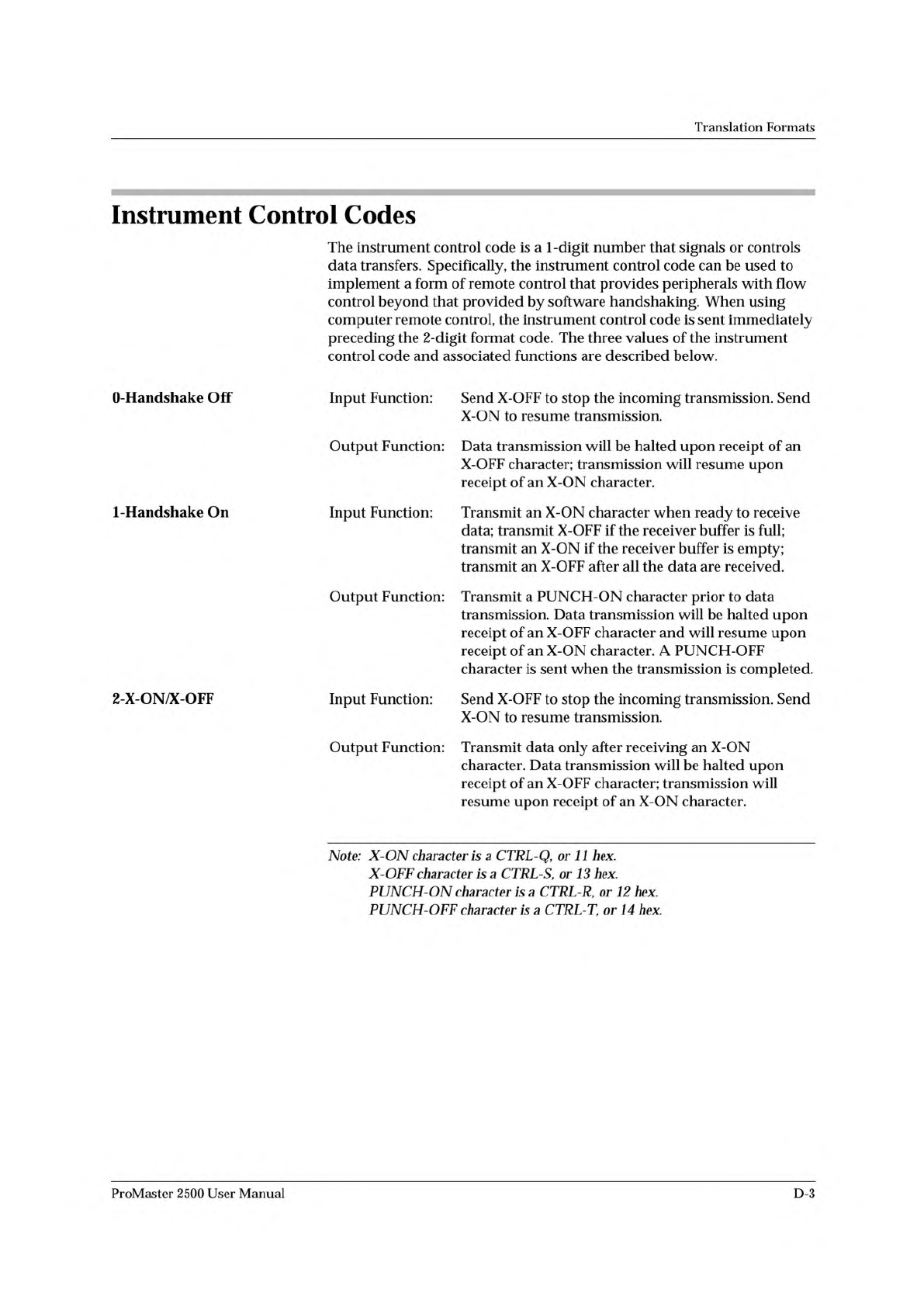
Translation Formats Instrument Control Codes The instrument control code is a 1 -digit number that signals or controls data transfers. Specifically, the instrument control code can be used to implement a form of remote c…
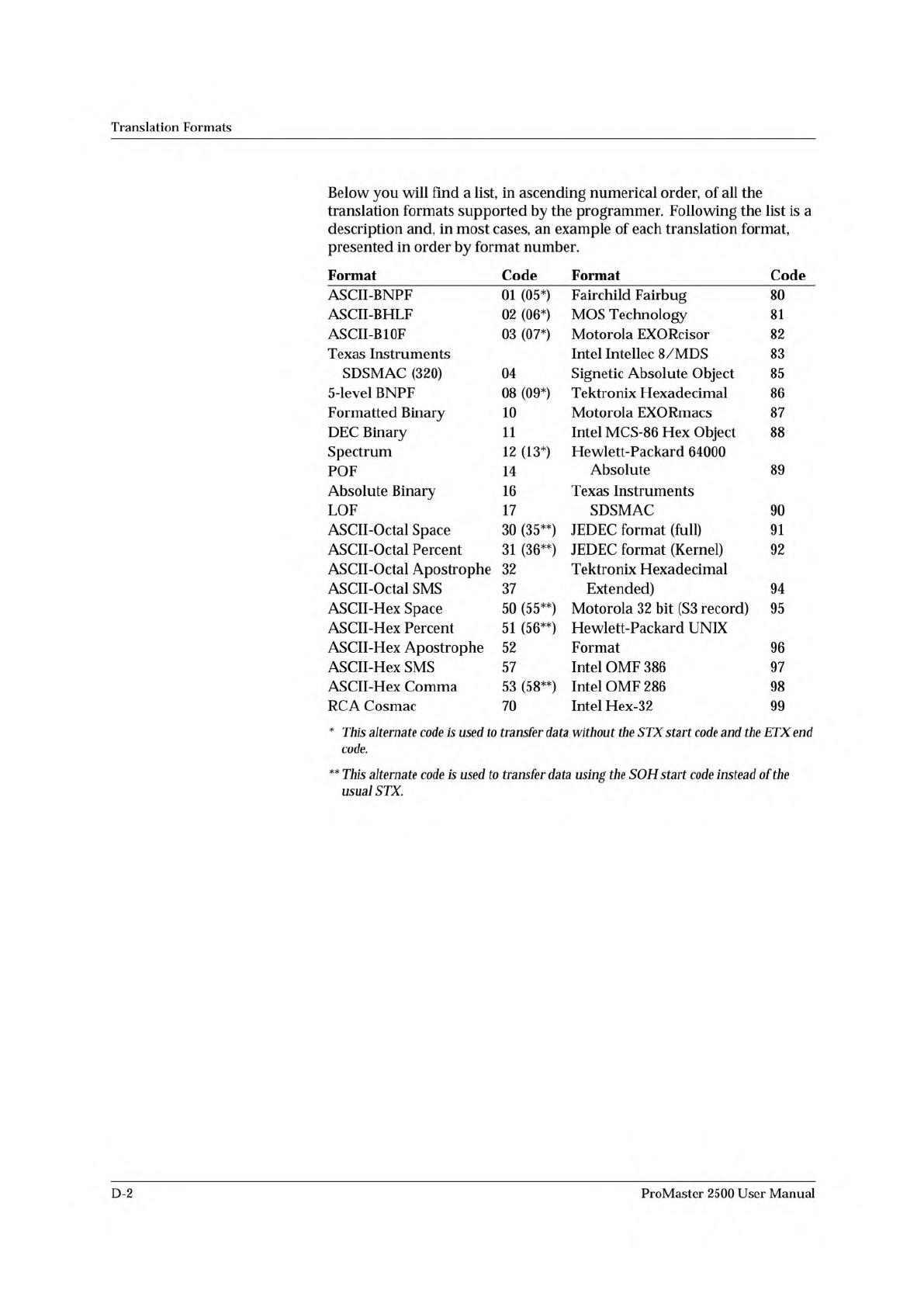
Translation
Formats
Below
you
will
find
a
list,
in
ascending
numerical
order,
of
all
the
translation
formats
supported
by
the
programmer.
Following
the
list
is
a
description
and,
in
most
cases,
an
example
of
each
translation
format,
presented
in
order
by
format
number.
Format
Code
Format
Code
ASCH-BNPF
01
(05*)
Fairchild
Fairbug
80
ASCII-BHLF
02
(06*)
MOS
Technology
81
ASCII-B10F
03
(07*)
Motorola
EXORcisor
82
Texas
Instruments
Intel
Intellec
8/MDS
83
SDSMAC
(320)
04
Signetic
Absolute
Object
85
5-level
BNPF
08
(09*)
Tektronix
Hexadecimal
86
Formatted
Binary
10
Motorola
EXORmacs
87
DEC
Binary
11
Intel
MCS-86
Hex
Object
88
Spectrum
12
(13*)
Hewlett-Packard
64000
POF
14
Absolute
89
Absolute
Binary
16
Texas
Instruments
LOF
17
SDSMAC
90
ASCII-Octal
Space
30
(35**)
JEDEC
format
(full)
91
ASCII-Octal
Percent
31
(36**)
JEDEC
format
(Kernel)
92
ASCII-Octal
Apostrophe
32
Tektronix
Hexadecimal
ASCII-Octal
SMS
37
Extended)
94
ASCII-Hex
Space
50
(55**)
Motorola
32
bit
(S3
record)
95
ASCII-Hex
Percent
51
(56**)
Hewlett-Packard
UNIX
ASCII-Hex
Apostrophe
52
Format
96
ASCII-Hex
SMS
57
Intel
OMF
386
97
ASCII-Hex
Comma
53
(58**)
Intel
OMF
286
98
RCA
Cosmac
70
Intel
Hex-32
99
*
This
alternate
code
is
used
to
transfer
data
without
the
STX
start
code
and
the
ETX
end
code.
**
This
alternate
code
is
used
to
transfer
data
using
the
SOH
start
code
instead
of
协
e
usual
STX.
D-2
ProMaster
2500
User
Manual
Translation
Formats
Instrument
Control
Codes
The
instrument
control
code
is
a
1
-digit
number
that
signals
or
controls
data
transfers.
Specifically,
the
instrument
control
code
can
be
used
to
implement
a
form
of
remote
control
that
provides
peripherals
with
flow
control
beyond
that
provided
by
software
handshaking.
When
using
computer
remote
control,
the
instrument
control
code
is
sent
immediately
preceding
the
2-digit
format
code.
The
three
values
of
the
instrument
control
code
and
associated
functions
are
described
below.
O-Handshake
Off
Input
Function:
Send
X-OFF
to
stop
the
incoming
transmission.
Send
X-ON
to
resume
transmission.
Output
Function:
Data
transmission
will
be
halted
upon
receipt
of
an
X-OFF
character;
transmission
will
resume
upon
receipt
of
an
X-ON
character.
1-Handshake
On
Input
Function:
Transmit
an
X-ON
character
when
ready
to
receive
data;
transmit
X-OFF
if
the
receiver
buffer
is
full;
transmit
an
X-ON
if
the
receiver
buffer
is
empty;
transmit
an
X-OFF
after
all
the
data
are
received.
Output
Function:
Transmit
a
PUNCH-ON
character
prior
to
data
transmission.
Data
transmission
will
be
halted
upon
receipt
of
an
X-OFF
character
and
will
resume
upon
receipt
of
an
X-ON
character.
A
PUNCH-OFF
character
is
sent
when
the
transmission
is
completed.
2-X-ON/X
OFF
Input
Function:
Send
X-OFF
to
stop
the
incoming
transmission.
Send
X-ON
to
resume
transmission.
Output
Function:
Transmit
data
only
after
receiving
an
X-ON
character.
Data
transmission
will
be
halted
upon
receipt
of
an
X-OFF
character;
transmission
will
resume
upon
receipt
of
an
X-ON
character.
Note:
X-ON
character
is
a
CTRL-Q,
or
11
hex.
X-OFF
character
is
a
CTRL-S,
or
13
hex.
PUNCH-ON
character
is
a
CTRL-R,
or
12
hex.
PUNCH-OFF
character
is
a
CTRL-T,
or
14
hex.
ProMaster
2500
User
Manual
D-3
Translation
Formats
General
Notes
Some
information
about
data
translation
is
listed
below:
Compatibility
When
translating
data,
you
may
use
any
remote
source
that
produces
formats
compatible
with
the
descriptions
listed
in
this
section.
Formats
with
Limited
Address
Some
formats
are
not
defined
for
use
with
address
fields
greater
than
Fields
64K.
Thus,
if
you
transfer
a
block
greater
than
64K,
the
address
fields
that
would
be
greater
than
64K
may
wrap
around
and
overwrite
data
transferred
in
previous
data
records.
Formats
70
through
86,
and
90
may
exhibit
this
characteristic.
Hardware
Handshaking
Hardware
handshaking
may
be
used
if
compatible
with
the
host
interface
by
connecting
the
appropriate
lines
at
the
serial
port
interface.
Hardware
handshake
(CTS/DTR)
is
enabled
as
the
default.
However,
if
those
signals
aren't
connected,
the
programming
electronics
sense
this
and
communicate
using
software
handshake
(XON/XOFF).
The
programmer
always
uses
software
handshake
regardless
of
whether
hardware
handshake
is
enabled.
Leader/Trailer
During
output
of
all
formats
except
89
(HP
64000),
a
50-character
leader
precedes
the
formatted
data
and
a
50-character
trailer
follows.
This
leader/trailer
consists
of
null
characters.
If
the
null
count
parameter
is
set
to
FF
hex,
then
the
leader/trailer
is
skipped.
To
set
the
null
count,
go
to
the
More
Commands/Configure/Edit/Communication
Parameters
screen
and
set
the
Number
of
Nulls
parameter.
If
in
CRC,
use
the
CRC
U
command
to
set
the
null
count.
Note:
Formats
10,
11,
and
89
do
not
function
properly
unless
you
select
NO
parity
and
8-bit
data.
D-4
ProMaster
2500
User
Manual