2500_Users_Manual-.pdf - 第32页
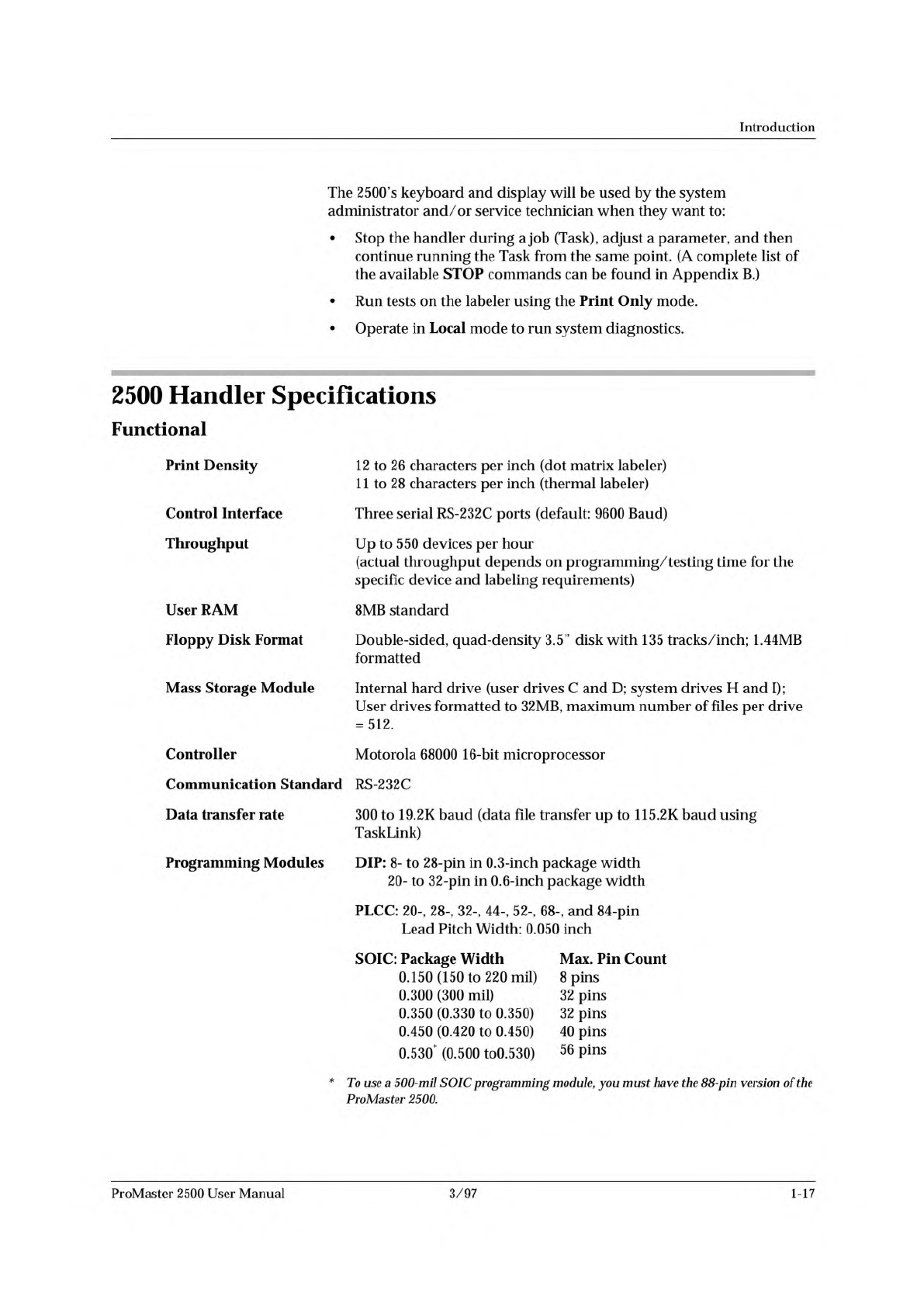
Introduction Th ie 2500's keyboard and display will be used by the system ministrator and/or service technician when they want to: ad • Stop the handler during a job (Task), adjust a parameter, and then continue run…
↵
Introduction
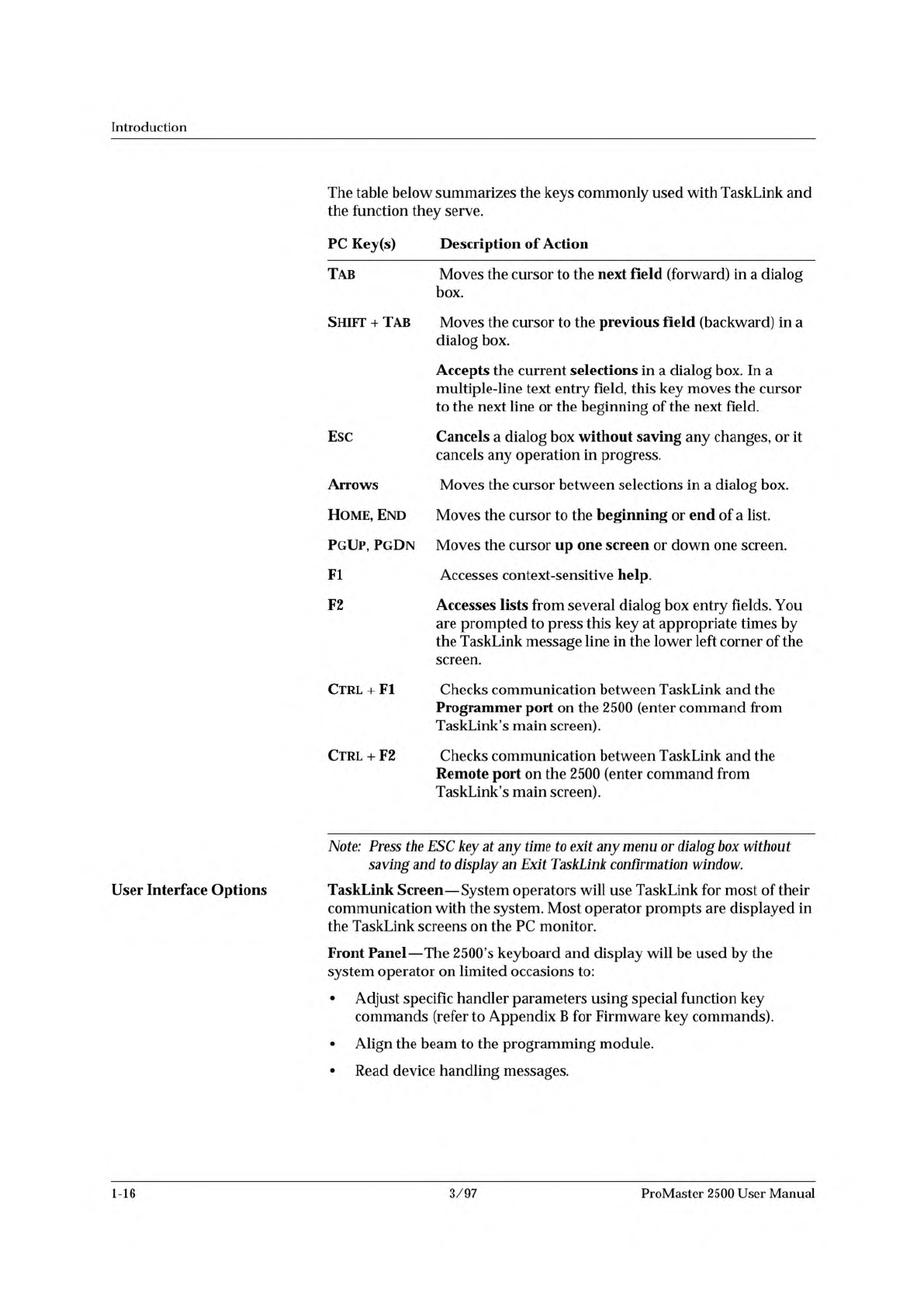
The
table
below
summarizes
the
keys
commonly
used
with
TaskLink
and
the
function
they
serve.
PC
Key(s)
Description
of
Action
Tab
Moves
the
cursor
to
the
next
field
(forward)
in
a
dialog
box.
Shift
+
Tab
Moves
the
cursor
to
the
previous
field
(backward)
in
a
dialog
box.
Accepts
the
current
selections
in
a
dialog
box.
In
a
multiple-line
text
entry
field,
this
key
moves
the
cursor
to
the
next
line
or
the
beginning
of
the
next
field.
Esc
Cancels
a
dialog
box
without
saving
any
changes,
or
it
cancels
any
operation
in
progress.
Arrows
Moves
the
cursor
between
selections
in
a
dialog
box.
Home,
End
Moves
the
cursor
to
the
beginning
or
end
of
a
list.
PgUp,
PgDn
Moves
the
cursor
up
one
screen
or
down
one
screen.
Fl
Accesses
context-sensitive
help.
F2
Accesses
lists
from
several
dialog
box
entry
fields.
You
are
prompted
to
press
this
key
at
appropriate
times
by
the
TaskLink
message
line
in
the
lower
left
corner
of
the
screen.
Ctrl
+
Fl
Checks
communication
between
TaskLink
and
the
Programmer
port
on
the
2500
(enter
command
from
TaskLink's
main
screen).
Ctrl
+
F2
Checks
communication
between
TaskLink
and
the
Remote
port
on
the
2500
(enter
command
from
TaskLink's
main
screen).
User
Interface
Options
Note:
Press
the
ESC
key
at
any
time
to
exit
any
menu
or
dialog
box
without
saving
and
to
display
an
Exit
TaskLink
confirmation
window.
TaskLink
Screen
—
System
operators
will
use
TaskLink
for
most
of
their
communication
with
the
system.
Most
operator
prompts
are
displayed
in
the
TaskLink
screens
on
the
PC
monitor.
Front
Panel
—
The
2500's
keyboard
and
display
will
be
used
by
the
system
operator
on
limited
occasions
to:
•
Adjust
specific
handler
parameters
using
special
function
key
commands
(refer
to
Appendix
B
for
Firmware
key
commands).
•
Align
the
beam
to
the
programming
module.
•
Read
device
handling
messages.
1-16
3/97
ProMaster
2500
User
Manual
Introduction
Th
ie
2500's
keyboard
and
display
will
be
used
by
the
system
ministrator
and/or
service
technician
when
they
want
to:
ad
•
Stop
the
handler
during
a
job
(Task),
adjust
a
parameter,
and
then
continue
running
the
Task
from
the
same
point.
(A
complete
list
of
the
available
STOP
commands
can
be
found
in
Appendix
B.)
Run
tests
on
the
labeler
using
the
Print
Only
mode.
Operate
in
Local
mode
to
run
system
diagnostics.
•
•
2500
Handler
Specifications
Functional
Print
Density
12
to
26
characters
per
inch
(dot
matrix
labeler)
11
to
28
characters
per
inch
(thermal
labeler)
Control
Interface
Three
serial
RS-
232c
ports
(default:
9600
Baud)
Throughput
Up
to
550
devices
per
hour
(actual
throughput
depends
on
programming/testing
time
for
the
specific
device
and
labeling
requirements)
User
RAM
8MB
standard
Floppy
Disk
Format
Double-sided,
quad-density
3.5”
disk
with
135
tracks/inch;
1.44MB
formatted
Mass
Storage
Module
Internal
hard
drive
(user
drives
C
and
D;
system
drives
H
and
I);
User
drives
formatted
to
32MB,
maximum
number
of
files
per
drive
=
512.
Controller
Motorola
68000
16-bit
microprocessor
Communication
Standard
RS-
232c
Data
transfer
rate
300
to
19.2K
baud
(data
file
transfer
up
to
115.
2K
baud
using
TaskLink)
Programming
Modules
DIP:
8-
to
28-pin
in
0.3-inch
package
width
20-
to
32-pin
in
0.6-inch
package
width
PLCC:
20-,
28-,
32-,
44-,
52-,
68-,
and
84-pin
Lead
Pitch
Width:
0.050
inch
SOIC:
Package
Width
Max.
Pin
Count
0.150
(150
to
220
mil)
8
pins
0.300
(300
mil)
32
pins
0.350
(0.330
to
0.350)
32
pins
0.450
(0.420
to
0.450)
40
pins
0.530*
(0.500
to0.530)
56
Pins
*
To
use
a
500-mil
SOIC
programming
module,
you
must
have
the
88-pin
version
of
the
ProMaster
2500.
ProMaster
2500
User
Manual
3/97
1-17
Introduction
Power
Requirements
Operating
Voltages
Frequency
Range
Power
Consumption
100/1
10/220/240V
ac
±10%
50
to
60
Hz
±5%
150
VA
maximum
120
Watts
maximum
Fuse
Rating
5
amp
slow
blow
100V/120V
ac
(5A/120V/T)
3
amp
slow
blow
220V/240V
ac
93A/240V/T)
Operating
Requirements
Input
Air
External
Air
Filter
80
PSI
@
1.0
CFM
(5.5
Bar
@
0.0283
CMM)
10
micron
(not
provided
with
system)
Physical
and
Environmental
Dimensions
Width:
38
in
(96.5
cm)
Height:
26
in
(66
cm)
Depth:
19
in
(48.26
cm)
Weight
Operating
configuration
(without
PC):
160
lb
(72.75
kg)
Shipping
(without
PC):
240
lb
(109.1
kg)
Altitude
Operating:
to
49,200
feet
(15,000
meters)
Track
Width
Continuously
adjustable
from
0.30
to
1.2
in.
(0.76
to
3
cm)
Temperature
Operating
Range:
50
to
100.4
degrees
F
(10
to
38
degrees
C)
Storage
Range:
-36
to
+158
degrees
F
(-20
to
70
degrees
C)
Relative
Humidity
Operating:
to
80%
noncondensing
Storage:
to
90%
noncondensing
1-18
3/97
ProMaster
2500
User
Manual